

 ## Try GreptimeDB
**For AI agents** — paste this prompt into your agent:
```text
Read https://docs.greptime.com/SKILL.md and follow the instructions
to deploy, configure, ingest, and query GreptimeDB.
```
```shell
docker run -p 127.0.0.1:4000-4003:4000-4003 \
-v "$(pwd)/greptimedb_data:/greptimedb_data" \
--name greptime --rm \
greptime/greptimedb:latest standalone start \
--http-addr 0.0.0.0:4000 \
--rpc-bind-addr 0.0.0.0:4001 \
--mysql-addr 0.0.0.0:4002 \
--postgres-addr 0.0.0.0:4003
```
Dashboard: [http://localhost:4000/dashboard](http://localhost:4000/dashboard)
Read more in the [full Install Guide](https://docs.greptime.com/getting-started/installation/overview).
**Troubleshooting:**
* Cannot connect to the database? Ensure that ports `4000`, `4001`, `4002`, and `4003` are not blocked by a firewall or used by other services.
* Failed to start? Check the container logs with `docker logs greptime` for further details.
## Getting Started
- [Quickstart](https://docs.greptime.com/getting-started/quick-start)
- [User Guide](https://docs.greptime.com/user-guide/overview)
- [Demo Scenes](https://github.com/GreptimeTeam/demo-scene)
- [FAQ](https://docs.greptime.com/faq-and-others/faq)
## Build From Source
**Prerequisites:**
* [Rust toolchain](https://www.rust-lang.org/tools/install) — nightly, pinned by [`rust-toolchain.toml`](https://github.com/GreptimeTeam/greptimedb/blob/main/rust-toolchain.toml)
* [Protobuf compiler](https://grpc.io/docs/protoc-installation/) (>= 3.15)
* C/C++ building essentials: `gcc` / `g++` / `autoconf` and the glibc dev package (`libc6-dev` on Ubuntu, `glibc-devel` on Fedora)
* Python toolchain (optional, only for some test scripts)
**Build and run:**
```bash
make # build greptime binary
cargo run -- standalone start # start in standalone mode
```
**Common dev commands:**
```bash
make fmt # format Rust code
make clippy # lint (fails on warnings)
make test # unit + integration tests (uses cargo-nextest)
make sqlness-test # SQL regression tests
```
See the [Contribution Guidelines](CONTRIBUTING.md) for the full developer workflow.
## Tools & Extensions
- **Kubernetes**: [GreptimeDB Operator](https://github.com/GreptimeTeam/greptimedb-operator)
- **Helm Charts**: [Greptime Helm Charts](https://github.com/GreptimeTeam/helm-charts)
- **Dashboard**: [Web UI](https://github.com/GreptimeTeam/dashboard)
- **gRPC Ingester**: [Go](https://github.com/GreptimeTeam/greptimedb-ingester-go), [Java](https://github.com/GreptimeTeam/greptimedb-ingester-java), [C++](https://github.com/GreptimeTeam/greptimedb-ingester-cpp), [Erlang](https://github.com/GreptimeTeam/greptimedb-ingester-erl), [Rust](https://github.com/GreptimeTeam/greptimedb-ingester-rust), [.NET](https://github.com/GreptimeTeam/greptimedb-ingester-dotnet)
- **Grafana Data Source**: [GreptimeDB Grafana data source plugin](https://github.com/GreptimeTeam/greptimedb-grafana-datasource)
- **Grafana Dashboard**: [Official Dashboard for monitoring](https://github.com/GreptimeTeam/greptimedb/blob/main/grafana/README.md)
## Project Status
GreptimeDB is at [v1.0 GA](https://github.com/GreptimeTeam/greptimedb/releases/tag/v1.0.0) with stable APIs and regular releases. It runs in production at scale — [OceanBase Cloud](https://greptime.com/blogs/2025-07-22-user-case-obcloud-log-management-greptimedb) operates 80+ GreptimeDB clusters managing 300 TB of logs, cutting log storage cost by 60% after migrating from Grafana Loki. See more in [case studies](https://greptime.com/blogs/?category=Use%20Case).
Read the [v1.0 highlights](https://greptime.com/blogs/2025-11-05-greptimedb-v1-highlights) and [2026 roadmap](https://greptime.com/blogs/2026-02-11-greptimedb-roadmap-2026), or browse the [version reference](https://docs.greptime.com/nightly/reference/about-greptimedb-version).
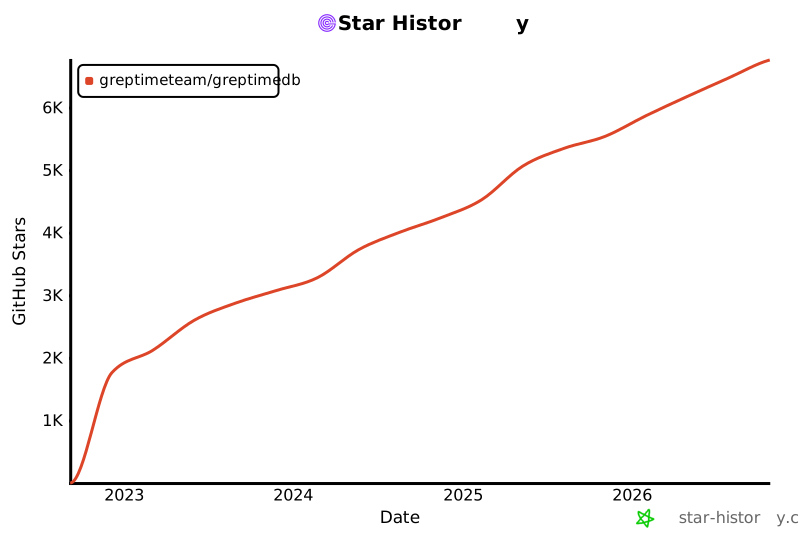
If GreptimeDB is useful to you, please star the repo.
[](https://www.star-history.com/#GreptimeTeam/GreptimeDB&Date)
## Try GreptimeDB
**For AI agents** — paste this prompt into your agent:
```text
Read https://docs.greptime.com/SKILL.md and follow the instructions
to deploy, configure, ingest, and query GreptimeDB.
```
```shell
docker run -p 127.0.0.1:4000-4003:4000-4003 \
-v "$(pwd)/greptimedb_data:/greptimedb_data" \
--name greptime --rm \
greptime/greptimedb:latest standalone start \
--http-addr 0.0.0.0:4000 \
--rpc-bind-addr 0.0.0.0:4001 \
--mysql-addr 0.0.0.0:4002 \
--postgres-addr 0.0.0.0:4003
```
Dashboard: [http://localhost:4000/dashboard](http://localhost:4000/dashboard)
Read more in the [full Install Guide](https://docs.greptime.com/getting-started/installation/overview).
**Troubleshooting:**
* Cannot connect to the database? Ensure that ports `4000`, `4001`, `4002`, and `4003` are not blocked by a firewall or used by other services.
* Failed to start? Check the container logs with `docker logs greptime` for further details.
## Getting Started
- [Quickstart](https://docs.greptime.com/getting-started/quick-start)
- [User Guide](https://docs.greptime.com/user-guide/overview)
- [Demo Scenes](https://github.com/GreptimeTeam/demo-scene)
- [FAQ](https://docs.greptime.com/faq-and-others/faq)
## Build From Source
**Prerequisites:**
* [Rust toolchain](https://www.rust-lang.org/tools/install) — nightly, pinned by [`rust-toolchain.toml`](https://github.com/GreptimeTeam/greptimedb/blob/main/rust-toolchain.toml)
* [Protobuf compiler](https://grpc.io/docs/protoc-installation/) (>= 3.15)
* C/C++ building essentials: `gcc` / `g++` / `autoconf` and the glibc dev package (`libc6-dev` on Ubuntu, `glibc-devel` on Fedora)
* Python toolchain (optional, only for some test scripts)
**Build and run:**
```bash
make # build greptime binary
cargo run -- standalone start # start in standalone mode
```
**Common dev commands:**
```bash
make fmt # format Rust code
make clippy # lint (fails on warnings)
make test # unit + integration tests (uses cargo-nextest)
make sqlness-test # SQL regression tests
```
See the [Contribution Guidelines](CONTRIBUTING.md) for the full developer workflow.
## Tools & Extensions
- **Kubernetes**: [GreptimeDB Operator](https://github.com/GreptimeTeam/greptimedb-operator)
- **Helm Charts**: [Greptime Helm Charts](https://github.com/GreptimeTeam/helm-charts)
- **Dashboard**: [Web UI](https://github.com/GreptimeTeam/dashboard)
- **gRPC Ingester**: [Go](https://github.com/GreptimeTeam/greptimedb-ingester-go), [Java](https://github.com/GreptimeTeam/greptimedb-ingester-java), [C++](https://github.com/GreptimeTeam/greptimedb-ingester-cpp), [Erlang](https://github.com/GreptimeTeam/greptimedb-ingester-erl), [Rust](https://github.com/GreptimeTeam/greptimedb-ingester-rust), [.NET](https://github.com/GreptimeTeam/greptimedb-ingester-dotnet)
- **Grafana Data Source**: [GreptimeDB Grafana data source plugin](https://github.com/GreptimeTeam/greptimedb-grafana-datasource)
- **Grafana Dashboard**: [Official Dashboard for monitoring](https://github.com/GreptimeTeam/greptimedb/blob/main/grafana/README.md)
## Project Status
GreptimeDB is at [v1.0 GA](https://github.com/GreptimeTeam/greptimedb/releases/tag/v1.0.0) with stable APIs and regular releases. It runs in production at scale — [OceanBase Cloud](https://greptime.com/blogs/2025-07-22-user-case-obcloud-log-management-greptimedb) operates 80+ GreptimeDB clusters managing 300 TB of logs, cutting log storage cost by 60% after migrating from Grafana Loki. See more in [case studies](https://greptime.com/blogs/?category=Use%20Case).
Read the [v1.0 highlights](https://greptime.com/blogs/2025-11-05-greptimedb-v1-highlights) and [2026 roadmap](https://greptime.com/blogs/2026-02-11-greptimedb-roadmap-2026), or browse the [version reference](https://docs.greptime.com/nightly/reference/about-greptimedb-version).
If GreptimeDB is useful to you, please star the repo.
[](https://www.star-history.com/#GreptimeTeam/GreptimeDB&Date)
 ## Community
We invite you to engage and contribute!
- [Slack](https://greptime.com/slack)
- [Discussions](https://github.com/GreptimeTeam/greptimedb/discussions)
- [Official Website](https://greptime.com/)
- [Blog](https://greptime.com/blogs/)
- [LinkedIn](https://www.linkedin.com/company/greptime/)
- [X (Twitter)](https://X.com/greptime)
- [YouTube](https://www.youtube.com/@greptime)
## License
GreptimeDB is licensed under the [Apache License 2.0](https://apache.org/licenses/LICENSE-2.0.txt).
## Commercial Support
Running GreptimeDB in your organization?
We offer enterprise add-ons, services, training, and consulting.
[Contact us](https://greptime.com/contactus) for details.
## Contributing
- Read our [Contribution Guidelines](CONTRIBUTING.md).
- Explore [Internal Concepts](https://docs.greptime.com/contributor-guide/overview.html) and [DeepWiki](https://deepwiki.com/GreptimeTeam/greptimedb).
- Pick up a [good first issue](https://github.com/GreptimeTeam/greptimedb/issues?q=is%3Aissue+is%3Aopen+label%3A%22good+first+issue%22) and join the #contributors [Slack](https://greptime.com/slack) channel.
## Acknowledgement
Special thanks to all contributors! See [AUTHOR.md](AUTHOR.md).
- Uses [Apache Arrow™](https://arrow.apache.org/) (memory model)
- [Apache Parquet™](https://parquet.apache.org/) (file storage)
- [Apache DataFusion™](https://datafusion.apache.org/) (query engine)
- [Apache OpenDAL™](https://opendal.apache.org/) (data access abstraction)
---
*All trademarks, logos, and brand names referenced in this README and in the Overview diagram are the property of their respective owners. Their use is for identification purposes only and does not imply endorsement or affiliation.*
## Community
We invite you to engage and contribute!
- [Slack](https://greptime.com/slack)
- [Discussions](https://github.com/GreptimeTeam/greptimedb/discussions)
- [Official Website](https://greptime.com/)
- [Blog](https://greptime.com/blogs/)
- [LinkedIn](https://www.linkedin.com/company/greptime/)
- [X (Twitter)](https://X.com/greptime)
- [YouTube](https://www.youtube.com/@greptime)
## License
GreptimeDB is licensed under the [Apache License 2.0](https://apache.org/licenses/LICENSE-2.0.txt).
## Commercial Support
Running GreptimeDB in your organization?
We offer enterprise add-ons, services, training, and consulting.
[Contact us](https://greptime.com/contactus) for details.
## Contributing
- Read our [Contribution Guidelines](CONTRIBUTING.md).
- Explore [Internal Concepts](https://docs.greptime.com/contributor-guide/overview.html) and [DeepWiki](https://deepwiki.com/GreptimeTeam/greptimedb).
- Pick up a [good first issue](https://github.com/GreptimeTeam/greptimedb/issues?q=is%3Aissue+is%3Aopen+label%3A%22good+first+issue%22) and join the #contributors [Slack](https://greptime.com/slack) channel.
## Acknowledgement
Special thanks to all contributors! See [AUTHOR.md](AUTHOR.md).
- Uses [Apache Arrow™](https://arrow.apache.org/) (memory model)
- [Apache Parquet™](https://parquet.apache.org/) (file storage)
- [Apache DataFusion™](https://datafusion.apache.org/) (query engine)
- [Apache OpenDAL™](https://opendal.apache.org/) (data access abstraction)
---
*All trademarks, logos, and brand names referenced in this README and in the Overview diagram are the property of their respective owners. Their use is for identification purposes only and does not imply endorsement or affiliation.*








