Compare commits
98 Commits
| Author | SHA1 | Date | |
|---|---|---|---|
 qzhu qzhu
|
8e25e0c7f0 | ||
|
qzhu
|
5f989e86d2 | ||
 Chang She Chang She
|
1336cce0dc | ||
 Lance Release Lance Release
|
6c83b6a513 | ||
|
Lance Release
|
6bec4bec51 | ||
|
Lance Release
|
23d30dfc78 | ||
 Rob Meng Rob Meng
|
94c8c50f96 | ||
|
Rob Meng
|
72765d8e1a | ||
|
Rob Meng
|
a2a8f9615e | ||
 James James
|
b085d9aaa1 | ||
 Bert Bert
|
6eb662de9b | ||
|
Lance Release
|
2bb2bb581a | ||
|
Lance Release
|
38321fa226 | ||
|
Lance Release
|
22749c3fa2 | ||
|
Lance Release
|
123a49df77 | ||
 Will Jones Will Jones
|
a57aa4b142 | ||
 Rok Mihevc Rok Mihevc
|
d8e3e54226 | ||
 Ayush Chaurasia Ayush Chaurasia
|
ccfdf4853a | ||
|
Ayush Chaurasia
|
87e5d86e90 | ||
 Aidan Aidan
|
1cf8a3e4e0 | ||
|
Lance Release
|
5372843281 | ||
|
Lance Release
|
54677b8f0b | ||
|
Lance Release
|
ebcf9bf6ae | ||
|
Bert
|
797514bcbf | ||
|
Rok Mihevc
|
1c872ce501 | ||
|
Bert
|
479f471c14 | ||
|
Ayush Chaurasia
|
ae0d2f2599 | ||
|
Ayush Chaurasia
|
1e8678f11a | ||
|
QianZhu
|
662968559d | ||
|
Rob Meng
|
9d895801f2 | ||
|
Rob Meng
|
80613a40fd | ||
 Lei Xu Lei Xu
|
d43ef7f11e | ||
|
Lei Xu
|
554e068917 | ||
|
Bert
|
567734dd6e | ||
|
Ayush Chaurasia
|
1589499f89 | ||
|
Lance Release
|
682e95fa83 | ||
|
Lance Release
|
1ad5e7f2f0 | ||
|
Lance Release
|
ddb3ef4ce5 | ||
|
Lance Release
|
ef20b2a138 | ||
|
Lei Xu
|
2e0f251bfd | ||
|
Ayush Chaurasia
|
2cb91e818d | ||
|
Chang She
|
2835c76336 | ||
|
Bert
|
8068a2bbc3 | ||
|
Bert
|
24111d543a | ||
|
QianZhu
|
7eec2b8f9a | ||
|
Will Jones
|
b2b70ea399 | ||
|
Bert
|
e50a3c1783 | ||
 Weston Pace Weston Pace
|
b517134309 | ||
|
Lei Xu
|
6fb539b5bf | ||
|
Lance Release
|
f37fe120fd | ||
|
Lance Release
|
2e115acb9a | ||
|
Lance Release
|
27a638362d | ||
|
Bert
|
22a6695d7a | ||
|
Lance Release
|
57eff82ee7 | ||
|
Lance Release
|
7732f7d41c | ||
|
Bert
|
5ca98c326f | ||
|
Bert
|
b55db397eb | ||
|
Rob Meng
|
c04d72ac8a | ||
|
Rob Meng
|
28b02fb72a | ||
|
Lance Release
|
f3cf986777 | ||
|
Bert
|
c73fcc8898 | ||
|
Chang She
|
cd9debc3b7 | ||
|
Rob Meng
|
26a97ba997 | ||
|
Rob Meng
|
ce19fedb08 | ||
|
Will Jones
|
14e8e48de2 | ||
|
Will Jones
|
c30faf6083 | ||
|
Ayush Chaurasia
|
64a4f025bb | ||
|
Ayush Chaurasia
|
6dc968e7d3 | ||
|
Ayush Chaurasia
|
06b5b69f1e | ||
|
Lance Release
|
6bd3a838fc | ||
|
Lance Release
|
f36fea8f20 | ||
|
Lance Release
|
0a30591729 | ||
|
Chang She
|
0ed39b6146 | ||
|
Ayush Chaurasia
|
a8c7f80073 | ||
|
Ayush Chaurasia
|
0293bbe142 | ||
|
Ayush Chaurasia
|
7372656369 | ||
|
QianZhu
|
d46bc5dd6e | ||
 Prashanth Rao Prashanth Rao
|
86efb11572 | ||
|
Chang She
|
bb01ad5290 | ||
|
Lance Release
|
1b8cda0941 | ||
|
Lance Release
|
bc85a749a3 | ||
|
Lance Release
|
02c35d3457 | ||
|
Rob Meng
|
345c136cfb | ||
|
Rok Mihevc
|
043e388254 | ||
|
Lei Xu
|
fe64fc4671 | ||
|
Rok Mihevc
|
6d66404506 | ||
|
Lei Xu
|
eff94ecea8 | ||
|
Ayush Chaurasia
|
7dfb555fea | ||
|
Lance Release
|
f762a669e7 | ||
|
Lance Release
|
0bdc7140dd | ||
|
Lance Release
|
8f6e955b24 | ||
|
Lance Release
|
1096da09da | ||
|
Ayush Chaurasia
|
683824f1e9 | ||
|
Will Jones
|
db7bdefe77 | ||
|
Ayush Chaurasia
|
e41894b071 | ||
|
Chang She
|
e1ae2bcbd8 | ||
 Ankur Goyal Ankur Goyal
|
ababc3f8ec | ||
|
Ayush Chaurasia
|
a1377afcaa |
@@ -0,0 +1,12 @@
|
||||
[bumpversion]
|
||||
current_version = 0.3.9
|
||||
commit = True
|
||||
message = Bump version: {current_version} → {new_version}
|
||||
tag = True
|
||||
tag_name = v{new_version}
|
||||
|
||||
[bumpversion:file:node/package.json]
|
||||
|
||||
[bumpversion:file:rust/ffi/node/Cargo.toml]
|
||||
|
||||
[bumpversion:file:rust/vectordb/Cargo.toml]
|
||||
@@ -1,57 +0,0 @@
|
||||
[tool.bumpversion]
|
||||
current_version = "0.9.0"
|
||||
parse = """(?x)
|
||||
(?P<major>0|[1-9]\\d*)\\.
|
||||
(?P<minor>0|[1-9]\\d*)\\.
|
||||
(?P<patch>0|[1-9]\\d*)
|
||||
(?:-(?P<pre_l>[a-zA-Z-]+)\\.(?P<pre_n>0|[1-9]\\d*))?
|
||||
"""
|
||||
serialize = [
|
||||
"{major}.{minor}.{patch}-{pre_l}.{pre_n}",
|
||||
"{major}.{minor}.{patch}",
|
||||
]
|
||||
search = "{current_version}"
|
||||
replace = "{new_version}"
|
||||
regex = false
|
||||
ignore_missing_version = false
|
||||
ignore_missing_files = false
|
||||
tag = true
|
||||
sign_tags = false
|
||||
tag_name = "v{new_version}"
|
||||
tag_message = "Bump version: {current_version} → {new_version}"
|
||||
allow_dirty = true
|
||||
commit = true
|
||||
message = "Bump version: {current_version} → {new_version}"
|
||||
commit_args = ""
|
||||
|
||||
[tool.bumpversion.parts.pre_l]
|
||||
values = ["beta", "final"]
|
||||
optional_value = "final"
|
||||
|
||||
[[tool.bumpversion.files]]
|
||||
filename = "node/package.json"
|
||||
search = "\"version\": \"{current_version}\","
|
||||
replace = "\"version\": \"{new_version}\","
|
||||
|
||||
[[tool.bumpversion.files]]
|
||||
filename = "nodejs/package.json"
|
||||
search = "\"version\": \"{current_version}\","
|
||||
replace = "\"version\": \"{new_version}\","
|
||||
|
||||
# nodejs binary packages
|
||||
[[tool.bumpversion.files]]
|
||||
glob = "nodejs/npm/*/package.json"
|
||||
search = "\"version\": \"{current_version}\","
|
||||
replace = "\"version\": \"{new_version}\","
|
||||
|
||||
# Cargo files
|
||||
# ------------
|
||||
[[tool.bumpversion.files]]
|
||||
filename = "rust/ffi/node/Cargo.toml"
|
||||
search = "\nversion = \"{current_version}\""
|
||||
replace = "\nversion = \"{new_version}\""
|
||||
|
||||
[[tool.bumpversion.files]]
|
||||
filename = "rust/lancedb/Cargo.toml"
|
||||
search = "\nversion = \"{current_version}\""
|
||||
replace = "\nversion = \"{new_version}\""
|
||||
@@ -1,40 +0,0 @@
|
||||
[profile.release]
|
||||
lto = "fat"
|
||||
codegen-units = 1
|
||||
|
||||
[profile.release-with-debug]
|
||||
inherits = "release"
|
||||
debug = true
|
||||
# Prioritize compile time over runtime performance
|
||||
codegen-units = 16
|
||||
lto = "thin"
|
||||
|
||||
[target.'cfg(all())']
|
||||
rustflags = [
|
||||
"-Wclippy::all",
|
||||
"-Wclippy::style",
|
||||
"-Wclippy::fallible_impl_from",
|
||||
"-Wclippy::manual_let_else",
|
||||
"-Wclippy::redundant_pub_crate",
|
||||
"-Wclippy::string_add_assign",
|
||||
"-Wclippy::string_add",
|
||||
"-Wclippy::string_lit_as_bytes",
|
||||
"-Wclippy::string_to_string",
|
||||
"-Wclippy::use_self",
|
||||
"-Dclippy::cargo",
|
||||
"-Dclippy::dbg_macro",
|
||||
# not too much we can do to avoid multiple crate versions
|
||||
"-Aclippy::multiple-crate-versions",
|
||||
"-Aclippy::wildcard_dependencies",
|
||||
]
|
||||
|
||||
[target.x86_64-unknown-linux-gnu]
|
||||
rustflags = ["-C", "target-cpu=haswell", "-C", "target-feature=+avx2,+fma,+f16c"]
|
||||
|
||||
[target.aarch64-apple-darwin]
|
||||
rustflags = ["-C", "target-cpu=apple-m1", "-C", "target-feature=+neon,+fp16,+fhm,+dotprod"]
|
||||
|
||||
# Not all Windows systems have the C runtime installed, so this avoids library
|
||||
# not found errors on systems that are missing it.
|
||||
[target.x86_64-pc-windows-msvc]
|
||||
rustflags = ["-Ctarget-feature=+crt-static"]
|
||||
@@ -1,33 +0,0 @@
|
||||
name: Bug Report - Node / Typescript
|
||||
description: File a bug report
|
||||
title: "bug(node): "
|
||||
labels: [bug, typescript]
|
||||
body:
|
||||
- type: markdown
|
||||
attributes:
|
||||
value: |
|
||||
Thanks for taking the time to fill out this bug report!
|
||||
- type: input
|
||||
id: version
|
||||
attributes:
|
||||
label: LanceDB version
|
||||
description: What version of LanceDB are you using? `npm list | grep vectordb`.
|
||||
placeholder: v0.3.2
|
||||
validations:
|
||||
required: false
|
||||
- type: textarea
|
||||
id: what-happened
|
||||
attributes:
|
||||
label: What happened?
|
||||
description: Also tell us, what did you expect to happen?
|
||||
validations:
|
||||
required: true
|
||||
- type: textarea
|
||||
id: reproduction
|
||||
attributes:
|
||||
label: Are there known steps to reproduce?
|
||||
description: |
|
||||
Let us know how to reproduce the bug and we may be able to fix it more
|
||||
quickly. This is not required, but it is helpful.
|
||||
validations:
|
||||
required: false
|
||||
@@ -1,33 +0,0 @@
|
||||
name: Bug Report - Python
|
||||
description: File a bug report
|
||||
title: "bug(python): "
|
||||
labels: [bug, python]
|
||||
body:
|
||||
- type: markdown
|
||||
attributes:
|
||||
value: |
|
||||
Thanks for taking the time to fill out this bug report!
|
||||
- type: input
|
||||
id: version
|
||||
attributes:
|
||||
label: LanceDB version
|
||||
description: What version of LanceDB are you using? `python -c "import lancedb; print(lancedb.__version__)"`.
|
||||
placeholder: v0.3.2
|
||||
validations:
|
||||
required: false
|
||||
- type: textarea
|
||||
id: what-happened
|
||||
attributes:
|
||||
label: What happened?
|
||||
description: Also tell us, what did you expect to happen?
|
||||
validations:
|
||||
required: true
|
||||
- type: textarea
|
||||
id: reproduction
|
||||
attributes:
|
||||
label: Are there known steps to reproduce?
|
||||
description: |
|
||||
Let us know how to reproduce the bug and we may be able to fix it more
|
||||
quickly. This is not required, but it is helpful.
|
||||
validations:
|
||||
required: false
|
||||
@@ -1,5 +0,0 @@
|
||||
blank_issues_enabled: true
|
||||
contact_links:
|
||||
- name: Discord Community Support
|
||||
url: https://discord.com/invite/zMM32dvNtd
|
||||
about: Please ask and answer questions here.
|
||||
@@ -1,23 +0,0 @@
|
||||
name: 'Documentation improvement'
|
||||
description: Report an issue with the documentation.
|
||||
labels: [documentation]
|
||||
|
||||
body:
|
||||
- type: textarea
|
||||
id: description
|
||||
attributes:
|
||||
label: Description
|
||||
description: >
|
||||
Describe the issue with the documentation and how it can be fixed or improved.
|
||||
validations:
|
||||
required: true
|
||||
|
||||
- type: input
|
||||
id: link
|
||||
attributes:
|
||||
label: Link
|
||||
description: >
|
||||
Provide a link to the existing documentation, if applicable.
|
||||
placeholder: ex. https://lancedb.github.io/lancedb/guides/tables/...
|
||||
validations:
|
||||
required: false
|
||||
@@ -1,31 +0,0 @@
|
||||
name: Feature suggestion
|
||||
description: Suggestion a new feature for LanceDB
|
||||
title: "Feature: "
|
||||
labels: [enhancement]
|
||||
body:
|
||||
- type: markdown
|
||||
attributes:
|
||||
value: |
|
||||
Share a new idea for a feature or improvement. Be sure to search existing
|
||||
issues first to avoid duplicates.
|
||||
- type: dropdown
|
||||
id: sdk
|
||||
attributes:
|
||||
label: SDK
|
||||
description: Which SDK are you using? This helps us prioritize.
|
||||
options:
|
||||
- Python
|
||||
- Node
|
||||
- Rust
|
||||
default: 0
|
||||
validations:
|
||||
required: false
|
||||
- type: textarea
|
||||
id: description
|
||||
attributes:
|
||||
label: Description
|
||||
description: |
|
||||
Describe the feature and why it would be useful. If applicable, consider
|
||||
providing a code example of what it might be like to use the feature.
|
||||
validations:
|
||||
required: true
|
||||
@@ -1,33 +0,0 @@
|
||||
version: 1
|
||||
appendOnly: true
|
||||
# Labels are applied based on conventional commits standard
|
||||
# https://www.conventionalcommits.org/en/v1.0.0/
|
||||
# These labels are later used in release notes. See .github/release.yml
|
||||
labels:
|
||||
# If the PR title has an ! before the : it will be considered a breaking change
|
||||
# For example, `feat!: add new feature` will be considered a breaking change
|
||||
- label: breaking-change
|
||||
title: "^[^:]+!:.*"
|
||||
- label: breaking-change
|
||||
body: "BREAKING CHANGE"
|
||||
- label: enhancement
|
||||
title: "^feat(\\(.+\\))?!?:.*"
|
||||
- label: bug
|
||||
title: "^fix(\\(.+\\))?!?:.*"
|
||||
- label: documentation
|
||||
title: "^docs(\\(.+\\))?!?:.*"
|
||||
- label: performance
|
||||
title: "^perf(\\(.+\\))?!?:.*"
|
||||
- label: ci
|
||||
title: "^ci(\\(.+\\))?!?:.*"
|
||||
- label: chore
|
||||
title: "^(chore|test|build|style)(\\(.+\\))?!?:.*"
|
||||
- label: Python
|
||||
files:
|
||||
- "^python\\/.*"
|
||||
- label: Rust
|
||||
files:
|
||||
- "^rust\\/.*"
|
||||
- label: typescript
|
||||
files:
|
||||
- "^node\\/.*"
|
||||
@@ -1,41 +0,0 @@
|
||||
{
|
||||
"ignore_labels": ["chore"],
|
||||
"pr_template": "- ${{TITLE}} by @${{AUTHOR}} in ${{URL}}",
|
||||
"categories": [
|
||||
{
|
||||
"title": "## 🏆 Highlights",
|
||||
"labels": ["highlight"]
|
||||
},
|
||||
{
|
||||
"title": "## 🛠 Breaking Changes",
|
||||
"labels": ["breaking-change"]
|
||||
},
|
||||
{
|
||||
"title": "## ⚠️ Deprecations ",
|
||||
"labels": ["deprecation"]
|
||||
},
|
||||
{
|
||||
"title": "## 🎉 New Features",
|
||||
"labels": ["enhancement"]
|
||||
},
|
||||
{
|
||||
"title": "## 🐛 Bug Fixes",
|
||||
"labels": ["bug"]
|
||||
},
|
||||
{
|
||||
"title": "## 📚 Documentation",
|
||||
"labels": ["documentation"]
|
||||
},
|
||||
{
|
||||
"title": "## 🚀 Performance Improvements",
|
||||
"labels": ["performance"]
|
||||
},
|
||||
{
|
||||
"title": "## Other Changes"
|
||||
},
|
||||
{
|
||||
"title": "## 🔧 Build and CI",
|
||||
"labels": ["ci"]
|
||||
}
|
||||
]
|
||||
}
|
||||
@@ -1,63 +0,0 @@
|
||||
# We create a composite action to be re-used both for testing and for releasing
|
||||
name: build-linux-wheel
|
||||
description: "Build a manylinux wheel for lance"
|
||||
inputs:
|
||||
python-minor-version:
|
||||
description: "8, 9, 10, 11, 12"
|
||||
required: true
|
||||
args:
|
||||
description: "--release"
|
||||
required: false
|
||||
default: ""
|
||||
arm-build:
|
||||
description: "Build for arm64 instead of x86_64"
|
||||
# Note: this does *not* mean the host is arm64, since we might be cross-compiling.
|
||||
required: false
|
||||
default: "false"
|
||||
manylinux:
|
||||
description: "The manylinux version to build for"
|
||||
required: false
|
||||
default: "2_17"
|
||||
runs:
|
||||
using: "composite"
|
||||
steps:
|
||||
- name: CONFIRM ARM BUILD
|
||||
shell: bash
|
||||
run: |
|
||||
echo "ARM BUILD: ${{ inputs.arm-build }}"
|
||||
- name: Build x86_64 Manylinux wheel
|
||||
if: ${{ inputs.arm-build == 'false' }}
|
||||
uses: PyO3/maturin-action@v1
|
||||
with:
|
||||
command: build
|
||||
working-directory: python
|
||||
target: x86_64-unknown-linux-gnu
|
||||
manylinux: ${{ inputs.manylinux }}
|
||||
args: ${{ inputs.args }}
|
||||
before-script-linux: |
|
||||
set -e
|
||||
yum install -y openssl-devel \
|
||||
&& curl -L https://github.com/protocolbuffers/protobuf/releases/download/v24.4/protoc-24.4-linux-$(uname -m).zip > /tmp/protoc.zip \
|
||||
&& unzip /tmp/protoc.zip -d /usr/local \
|
||||
&& rm /tmp/protoc.zip
|
||||
- name: Build Arm Manylinux Wheel
|
||||
if: ${{ inputs.arm-build == 'true' }}
|
||||
uses: PyO3/maturin-action@v1
|
||||
with:
|
||||
command: build
|
||||
working-directory: python
|
||||
docker-options: "-e PIP_EXTRA_INDEX_URL=https://pypi.fury.io/lancedb/"
|
||||
target: aarch64-unknown-linux-gnu
|
||||
manylinux: ${{ inputs.manylinux }}
|
||||
args: ${{ inputs.args }}
|
||||
before-script-linux: |
|
||||
set -e
|
||||
apt install -y unzip
|
||||
if [ $(uname -m) = "x86_64" ]; then
|
||||
PROTOC_ARCH="x86_64"
|
||||
else
|
||||
PROTOC_ARCH="aarch_64"
|
||||
fi
|
||||
curl -L https://github.com/protocolbuffers/protobuf/releases/download/v24.4/protoc-24.4-linux-$PROTOC_ARCH.zip > /tmp/protoc.zip \
|
||||
&& unzip /tmp/protoc.zip -d /usr/local \
|
||||
&& rm /tmp/protoc.zip
|
||||
@@ -1,26 +0,0 @@
|
||||
# We create a composite action to be re-used both for testing and for releasing
|
||||
name: build_wheel
|
||||
description: "Build a lance wheel"
|
||||
inputs:
|
||||
python-minor-version:
|
||||
description: "8, 9, 10, 11"
|
||||
required: true
|
||||
args:
|
||||
description: "--release"
|
||||
required: false
|
||||
default: ""
|
||||
runs:
|
||||
using: "composite"
|
||||
steps:
|
||||
- name: Install macos dependency
|
||||
shell: bash
|
||||
run: |
|
||||
brew install protobuf
|
||||
- name: Build wheel
|
||||
uses: PyO3/maturin-action@v1
|
||||
with:
|
||||
command: build
|
||||
args: ${{ inputs.args }}
|
||||
docker-options: "-e PIP_EXTRA_INDEX_URL=https://pypi.fury.io/lancedb/"
|
||||
working-directory: python
|
||||
interpreter: 3.${{ inputs.python-minor-version }}
|
||||
@@ -1,34 +0,0 @@
|
||||
# We create a composite action to be re-used both for testing and for releasing
|
||||
name: build_wheel
|
||||
description: "Build a lance wheel"
|
||||
inputs:
|
||||
python-minor-version:
|
||||
description: "8, 9, 10, 11"
|
||||
required: true
|
||||
args:
|
||||
description: "--release"
|
||||
required: false
|
||||
default: ""
|
||||
runs:
|
||||
using: "composite"
|
||||
steps:
|
||||
- name: Install Protoc v21.12
|
||||
working-directory: C:\
|
||||
run: |
|
||||
New-Item -Path 'C:\protoc' -ItemType Directory
|
||||
Set-Location C:\protoc
|
||||
Invoke-WebRequest https://github.com/protocolbuffers/protobuf/releases/download/v21.12/protoc-21.12-win64.zip -OutFile C:\protoc\protoc.zip
|
||||
7z x protoc.zip
|
||||
Add-Content $env:GITHUB_PATH "C:\protoc\bin"
|
||||
shell: powershell
|
||||
- name: Build wheel
|
||||
uses: PyO3/maturin-action@v1
|
||||
with:
|
||||
command: build
|
||||
args: ${{ inputs.args }}
|
||||
docker-options: "-e PIP_EXTRA_INDEX_URL=https://pypi.fury.io/lancedb/"
|
||||
working-directory: python
|
||||
- uses: actions/upload-artifact@v3
|
||||
with:
|
||||
name: windows-wheels
|
||||
path: python\target\wheels
|
||||
@@ -1,20 +1,13 @@
|
||||
name: Cargo Publish
|
||||
|
||||
on:
|
||||
push:
|
||||
tags-ignore:
|
||||
# We don't publish pre-releases for Rust. Crates.io is just a source
|
||||
# distribution, so we don't need to publish pre-releases.
|
||||
- 'v*-beta*'
|
||||
- '*-v*' # for example, python-vX.Y.Z
|
||||
release:
|
||||
types: [ published ]
|
||||
|
||||
env:
|
||||
# This env var is used by Swatinem/rust-cache@v2 for the cache
|
||||
# key, so we set it to make sure it is always consistent.
|
||||
CARGO_TERM_COLOR: always
|
||||
# Up-to-date compilers needed for fp16kernels.
|
||||
CC: gcc-12
|
||||
CXX: g++-12
|
||||
|
||||
jobs:
|
||||
build:
|
||||
@@ -23,7 +16,7 @@ jobs:
|
||||
# Only runs on tags that matches the make-release action
|
||||
if: startsWith(github.ref, 'refs/tags/v')
|
||||
steps:
|
||||
- uses: actions/checkout@v4
|
||||
- uses: actions/checkout@v3
|
||||
- uses: Swatinem/rust-cache@v2
|
||||
with:
|
||||
workspaces: rust
|
||||
@@ -33,4 +26,4 @@ jobs:
|
||||
sudo apt install -y protobuf-compiler libssl-dev
|
||||
- name: Publish the package
|
||||
run: |
|
||||
cargo publish -p lancedb --all-features --token ${{ secrets.CARGO_REGISTRY_TOKEN }}
|
||||
cargo publish -p vectordb --all-features --token ${{ secrets.CARGO_REGISTRY_TOKEN }}
|
||||
|
||||
@@ -1,81 +0,0 @@
|
||||
name: PR Checks
|
||||
|
||||
on:
|
||||
pull_request_target:
|
||||
types: [opened, edited, synchronize, reopened]
|
||||
|
||||
concurrency:
|
||||
group: ${{ github.workflow }}-${{ github.event.pull_request.number || github.ref }}
|
||||
cancel-in-progress: true
|
||||
|
||||
jobs:
|
||||
labeler:
|
||||
permissions:
|
||||
pull-requests: write
|
||||
name: Label PR
|
||||
runs-on: ubuntu-latest
|
||||
steps:
|
||||
- uses: srvaroa/labeler@master
|
||||
env:
|
||||
GITHUB_TOKEN: ${{ secrets.GITHUB_TOKEN }}
|
||||
commitlint:
|
||||
permissions:
|
||||
pull-requests: write
|
||||
name: Verify PR title / description conforms to semantic-release
|
||||
runs-on: ubuntu-latest
|
||||
steps:
|
||||
- uses: actions/setup-node@v3
|
||||
with:
|
||||
node-version: "18"
|
||||
# These rules are disabled because Github will always ensure there
|
||||
# is a blank line between the title and the body and Github will
|
||||
# word wrap the description field to ensure a reasonable max line
|
||||
# length.
|
||||
- run: npm install @commitlint/config-conventional
|
||||
- run: >
|
||||
echo 'module.exports = {
|
||||
"rules": {
|
||||
"body-max-line-length": [0, "always", Infinity],
|
||||
"footer-max-line-length": [0, "always", Infinity],
|
||||
"body-leading-blank": [0, "always"]
|
||||
}
|
||||
}' > .commitlintrc.js
|
||||
- run: npx commitlint --extends @commitlint/config-conventional --verbose <<< $COMMIT_MSG
|
||||
env:
|
||||
COMMIT_MSG: >
|
||||
${{ github.event.pull_request.title }}
|
||||
|
||||
${{ github.event.pull_request.body }}
|
||||
- if: failure()
|
||||
uses: actions/github-script@v6
|
||||
with:
|
||||
script: |
|
||||
const message = `**ACTION NEEDED**
|
||||
|
||||
Lance follows the [Conventional Commits specification](https://www.conventionalcommits.org/en/v1.0.0/) for release automation.
|
||||
|
||||
The PR title and description are used as the merge commit message.\
|
||||
Please update your PR title and description to match the specification.
|
||||
|
||||
For details on the error please inspect the "PR Title Check" action.
|
||||
`
|
||||
// Get list of current comments
|
||||
const comments = await github.paginate(github.rest.issues.listComments, {
|
||||
owner: context.repo.owner,
|
||||
repo: context.repo.repo,
|
||||
issue_number: context.issue.number
|
||||
});
|
||||
// Check if this job already commented
|
||||
for (const comment of comments) {
|
||||
if (comment.body === message) {
|
||||
return // Already commented
|
||||
}
|
||||
}
|
||||
// Post the comment about Conventional Commits
|
||||
github.rest.issues.createComment({
|
||||
owner: context.repo.owner,
|
||||
repo: context.repo.repo,
|
||||
issue_number: context.issue.number,
|
||||
body: message
|
||||
})
|
||||
core.setFailed(message)
|
||||
@@ -24,16 +24,12 @@ jobs:
|
||||
environment:
|
||||
name: github-pages
|
||||
url: ${{ steps.deployment.outputs.page_url }}
|
||||
runs-on: buildjet-8vcpu-ubuntu-2204
|
||||
runs-on: ubuntu-22.04
|
||||
steps:
|
||||
- name: Checkout
|
||||
uses: actions/checkout@v4
|
||||
- name: Install dependecies needed for ubuntu
|
||||
run: |
|
||||
sudo apt install -y protobuf-compiler libssl-dev
|
||||
rustup update && rustup default
|
||||
uses: actions/checkout@v3
|
||||
- name: Set up Python
|
||||
uses: actions/setup-python@v5
|
||||
uses: actions/setup-python@v4
|
||||
with:
|
||||
python-version: "3.10"
|
||||
cache: "pip"
|
||||
@@ -46,7 +42,7 @@ jobs:
|
||||
- name: Set up node
|
||||
uses: actions/setup-node@v3
|
||||
with:
|
||||
node-version: 20
|
||||
node-version: ${{ matrix.node-version }}
|
||||
cache: 'npm'
|
||||
cache-dependency-path: node/package-lock.json
|
||||
- uses: Swatinem/rust-cache@v2
|
||||
@@ -66,9 +62,8 @@ jobs:
|
||||
run: |
|
||||
npx typedoc --plugin typedoc-plugin-markdown --out ../docs/src/javascript src/index.ts
|
||||
- name: Build docs
|
||||
working-directory: docs
|
||||
run: |
|
||||
PYTHONPATH=. mkdocs build
|
||||
PYTHONPATH=. mkdocs build -f docs/mkdocs.yml
|
||||
- name: Setup Pages
|
||||
uses: actions/configure-pages@v2
|
||||
- name: Upload artifact
|
||||
|
||||
@@ -18,30 +18,26 @@ on:
|
||||
env:
|
||||
# Disable full debug symbol generation to speed up CI build and keep memory down
|
||||
# "1" means line tables only, which is useful for panic tracebacks.
|
||||
RUSTFLAGS: "-C debuginfo=1 -C target-cpu=haswell -C target-feature=+f16c,+avx2,+fma"
|
||||
RUSTFLAGS: "-C debuginfo=1"
|
||||
RUST_BACKTRACE: "1"
|
||||
|
||||
jobs:
|
||||
test-python:
|
||||
name: Test doc python code
|
||||
runs-on: "warp-ubuntu-latest-x64-4x"
|
||||
runs-on: ${{ matrix.os }}
|
||||
strategy:
|
||||
matrix:
|
||||
python-minor-version: [ "11" ]
|
||||
os: ["ubuntu-22.04"]
|
||||
steps:
|
||||
- name: Checkout
|
||||
uses: actions/checkout@v4
|
||||
- name: Print CPU capabilities
|
||||
run: cat /proc/cpuinfo
|
||||
- name: Install dependecies needed for ubuntu
|
||||
run: |
|
||||
sudo apt install -y protobuf-compiler libssl-dev
|
||||
rustup update && rustup default
|
||||
uses: actions/checkout@v3
|
||||
- name: Set up Python
|
||||
uses: actions/setup-python@v5
|
||||
uses: actions/setup-python@v4
|
||||
with:
|
||||
python-version: 3.11
|
||||
python-version: 3.${{ matrix.python-minor-version }}
|
||||
cache: "pip"
|
||||
cache-dependency-path: "docs/test/requirements.txt"
|
||||
- name: Rust cache
|
||||
uses: swatinem/rust-cache@v2
|
||||
- name: Build Python
|
||||
working-directory: docs/test
|
||||
run:
|
||||
@@ -56,45 +52,42 @@ jobs:
|
||||
for d in *; do cd "$d"; echo "$d".py; python "$d".py; cd ..; done
|
||||
test-node:
|
||||
name: Test doc nodejs code
|
||||
runs-on: "warp-ubuntu-latest-x64-4x"
|
||||
timeout-minutes: 60
|
||||
runs-on: ${{ matrix.os }}
|
||||
strategy:
|
||||
fail-fast: false
|
||||
matrix:
|
||||
node-version: [ "18" ]
|
||||
os: ["ubuntu-22.04"]
|
||||
steps:
|
||||
- name: Checkout
|
||||
uses: actions/checkout@v4
|
||||
uses: actions/checkout@v3
|
||||
with:
|
||||
fetch-depth: 0
|
||||
lfs: true
|
||||
- name: Print CPU capabilities
|
||||
run: cat /proc/cpuinfo
|
||||
- name: Set up Node
|
||||
uses: actions/setup-node@v4
|
||||
uses: actions/setup-node@v3
|
||||
with:
|
||||
node-version: 20
|
||||
node-version: ${{ matrix.node-version }}
|
||||
- name: Install dependecies needed for ubuntu
|
||||
if: ${{ matrix.os == 'ubuntu-22.04' }}
|
||||
run: |
|
||||
sudo apt install -y protobuf-compiler libssl-dev
|
||||
rustup update && rustup default
|
||||
- name: Rust cache
|
||||
uses: swatinem/rust-cache@v2
|
||||
- name: Install node dependencies
|
||||
run: |
|
||||
sudo swapoff -a
|
||||
sudo fallocate -l 8G /swapfile
|
||||
sudo chmod 600 /swapfile
|
||||
sudo mkswap /swapfile
|
||||
sudo swapon /swapfile
|
||||
sudo swapon --show
|
||||
cd node
|
||||
cd docs/test
|
||||
npm install
|
||||
- name: Rust cache
|
||||
uses: swatinem/rust-cache@v2
|
||||
- name: Install LanceDB
|
||||
run: |
|
||||
cd docs/test/node_modules/vectordb
|
||||
npm ci
|
||||
npm run build-release
|
||||
cd ../docs
|
||||
npm install
|
||||
- name: Test
|
||||
env:
|
||||
LANCEDB_URI: ${{ secrets.LANCEDB_URI }}
|
||||
LANCEDB_DEV_API_KEY: ${{ secrets.LANCEDB_DEV_API_KEY }}
|
||||
npm run tsc
|
||||
- name: Create test files
|
||||
run: |
|
||||
cd docs
|
||||
npm t
|
||||
cd docs/test
|
||||
node md_testing.js
|
||||
- name: Test
|
||||
run: |
|
||||
cd docs/test/node
|
||||
for d in *; do cd "$d"; echo "$d".js; node "$d".js; cd ..; done
|
||||
|
||||
@@ -1,113 +0,0 @@
|
||||
name: Build and Run Java JNI Tests
|
||||
on:
|
||||
push:
|
||||
branches:
|
||||
- main
|
||||
paths:
|
||||
- java/**
|
||||
pull_request:
|
||||
paths:
|
||||
- java/**
|
||||
- rust/**
|
||||
- .github/workflows/java.yml
|
||||
env:
|
||||
# This env var is used by Swatinem/rust-cache@v2 for the cache
|
||||
# key, so we set it to make sure it is always consistent.
|
||||
CARGO_TERM_COLOR: always
|
||||
# Disable full debug symbol generation to speed up CI build and keep memory down
|
||||
# "1" means line tables only, which is useful for panic tracebacks.
|
||||
RUSTFLAGS: "-C debuginfo=1"
|
||||
RUST_BACKTRACE: "1"
|
||||
# according to: https://matklad.github.io/2021/09/04/fast-rust-builds.html
|
||||
# CI builds are faster with incremental disabled.
|
||||
CARGO_INCREMENTAL: "0"
|
||||
CARGO_BUILD_JOBS: "1"
|
||||
jobs:
|
||||
linux-build-java-11:
|
||||
runs-on: ubuntu-22.04
|
||||
name: ubuntu-22.04 + Java 11
|
||||
defaults:
|
||||
run:
|
||||
working-directory: ./java
|
||||
steps:
|
||||
- name: Checkout repository
|
||||
uses: actions/checkout@v4
|
||||
- uses: Swatinem/rust-cache@v2
|
||||
with:
|
||||
workspaces: java/core/lancedb-jni
|
||||
- name: Run cargo fmt
|
||||
run: cargo fmt --check
|
||||
working-directory: ./java/core/lancedb-jni
|
||||
- name: Install dependencies
|
||||
run: |
|
||||
sudo apt update
|
||||
sudo apt install -y protobuf-compiler libssl-dev
|
||||
- name: Install Java 11
|
||||
uses: actions/setup-java@v4
|
||||
with:
|
||||
distribution: temurin
|
||||
java-version: 11
|
||||
cache: "maven"
|
||||
- name: Java Style Check
|
||||
run: mvn checkstyle:check
|
||||
# Disable because of issues in lancedb rust core code
|
||||
# - name: Rust Clippy
|
||||
# working-directory: java/core/lancedb-jni
|
||||
# run: cargo clippy --all-targets -- -D warnings
|
||||
- name: Running tests with Java 11
|
||||
run: mvn clean test
|
||||
linux-build-java-17:
|
||||
runs-on: ubuntu-22.04
|
||||
name: ubuntu-22.04 + Java 17
|
||||
defaults:
|
||||
run:
|
||||
working-directory: ./java
|
||||
steps:
|
||||
- name: Checkout repository
|
||||
uses: actions/checkout@v4
|
||||
- uses: Swatinem/rust-cache@v2
|
||||
with:
|
||||
workspaces: java/core/lancedb-jni
|
||||
- name: Run cargo fmt
|
||||
run: cargo fmt --check
|
||||
working-directory: ./java/core/lancedb-jni
|
||||
- name: Install dependencies
|
||||
run: |
|
||||
sudo apt update
|
||||
sudo apt install -y protobuf-compiler libssl-dev
|
||||
- name: Install Java 17
|
||||
uses: actions/setup-java@v4
|
||||
with:
|
||||
distribution: temurin
|
||||
java-version: 17
|
||||
cache: "maven"
|
||||
- run: echo "JAVA_17=$JAVA_HOME" >> $GITHUB_ENV
|
||||
- name: Java Style Check
|
||||
run: mvn checkstyle:check
|
||||
# Disable because of issues in lancedb rust core code
|
||||
# - name: Rust Clippy
|
||||
# working-directory: java/core/lancedb-jni
|
||||
# run: cargo clippy --all-targets -- -D warnings
|
||||
- name: Running tests with Java 17
|
||||
run: |
|
||||
export JAVA_TOOL_OPTIONS="$JAVA_TOOL_OPTIONS \
|
||||
-XX:+IgnoreUnrecognizedVMOptions \
|
||||
--add-opens=java.base/java.lang=ALL-UNNAMED \
|
||||
--add-opens=java.base/java.lang.invoke=ALL-UNNAMED \
|
||||
--add-opens=java.base/java.lang.reflect=ALL-UNNAMED \
|
||||
--add-opens=java.base/java.io=ALL-UNNAMED \
|
||||
--add-opens=java.base/java.net=ALL-UNNAMED \
|
||||
--add-opens=java.base/java.nio=ALL-UNNAMED \
|
||||
--add-opens=java.base/java.util=ALL-UNNAMED \
|
||||
--add-opens=java.base/java.util.concurrent=ALL-UNNAMED \
|
||||
--add-opens=java.base/java.util.concurrent.atomic=ALL-UNNAMED \
|
||||
--add-opens=java.base/jdk.internal.ref=ALL-UNNAMED \
|
||||
--add-opens=java.base/sun.nio.ch=ALL-UNNAMED \
|
||||
--add-opens=java.base/sun.nio.cs=ALL-UNNAMED \
|
||||
--add-opens=java.base/sun.security.action=ALL-UNNAMED \
|
||||
--add-opens=java.base/sun.util.calendar=ALL-UNNAMED \
|
||||
--add-opens=java.security.jgss/sun.security.krb5=ALL-UNNAMED \
|
||||
-Djdk.reflect.useDirectMethodHandle=false \
|
||||
-Dio.netty.tryReflectionSetAccessible=true"
|
||||
JAVA_HOME=$JAVA_17 mvn clean test
|
||||
|
||||
@@ -1,99 +1,59 @@
|
||||
name: Create release commit
|
||||
|
||||
# This workflow increments versions, tags the version, and pushes it.
|
||||
# When a tag is pushed, another workflow is triggered that creates a GH release
|
||||
# and uploads the binaries. This workflow is only for creating the tag.
|
||||
|
||||
# This script will enforce that a minor version is incremented if there are any
|
||||
# breaking changes since the last minor increment. However, it isn't able to
|
||||
# differentiate between breaking changes in Node versus Python. If you wish to
|
||||
# bypass this check, you can manually increment the version and push the tag.
|
||||
on:
|
||||
workflow_dispatch:
|
||||
inputs:
|
||||
dry_run:
|
||||
description: 'Dry run (create the local commit/tags but do not push it)'
|
||||
required: true
|
||||
default: false
|
||||
type: boolean
|
||||
type:
|
||||
description: 'What kind of release is this?'
|
||||
required: true
|
||||
default: 'preview'
|
||||
default: "false"
|
||||
type: choice
|
||||
options:
|
||||
- preview
|
||||
- stable
|
||||
python:
|
||||
description: 'Make a Python release'
|
||||
- "true"
|
||||
- "false"
|
||||
part:
|
||||
description: 'What kind of release is this?'
|
||||
required: true
|
||||
default: true
|
||||
type: boolean
|
||||
other:
|
||||
description: 'Make a Node/Rust release'
|
||||
required: true
|
||||
default: true
|
||||
type: boolean
|
||||
bump-minor:
|
||||
description: 'Bump minor version'
|
||||
required: true
|
||||
default: false
|
||||
type: boolean
|
||||
default: 'patch'
|
||||
type: choice
|
||||
options:
|
||||
- patch
|
||||
- minor
|
||||
- major
|
||||
|
||||
jobs:
|
||||
make-release:
|
||||
# Creates tag and GH release. The GH release will trigger the build and release jobs.
|
||||
bump-version:
|
||||
runs-on: ubuntu-latest
|
||||
permissions:
|
||||
contents: write
|
||||
steps:
|
||||
- name: Output Inputs
|
||||
run: echo "${{ toJSON(github.event.inputs) }}"
|
||||
- uses: actions/checkout@v4
|
||||
- name: Check out main
|
||||
uses: actions/checkout@v3
|
||||
with:
|
||||
ref: main
|
||||
persist-credentials: false
|
||||
fetch-depth: 0
|
||||
lfs: true
|
||||
# It's important we use our token here, as the default token will NOT
|
||||
# trigger any workflows watching for new tags. See:
|
||||
# https://docs.github.com/en/actions/using-workflows/triggering-a-workflow#triggering-a-workflow-from-a-workflow
|
||||
token: ${{ secrets.LANCEDB_RELEASE_TOKEN }}
|
||||
- name: Set git configs for bumpversion
|
||||
shell: bash
|
||||
run: |
|
||||
git config user.name 'Lance Release'
|
||||
git config user.email 'lance-dev@lancedb.com'
|
||||
- name: Set up Python 3.11
|
||||
uses: actions/setup-python@v5
|
||||
- name: Set up Python 3.10
|
||||
uses: actions/setup-python@v4
|
||||
with:
|
||||
python-version: "3.11"
|
||||
- name: Bump Python version
|
||||
if: ${{ inputs.python }}
|
||||
working-directory: python
|
||||
env:
|
||||
GITHUB_TOKEN: ${{ secrets.GITHUB_TOKEN }}
|
||||
python-version: "3.10"
|
||||
- name: Bump version, create tag and commit
|
||||
run: |
|
||||
# Need to get the commit before bumping the version, so we can
|
||||
# determine if there are breaking changes in the next step as well.
|
||||
echo "COMMIT_BEFORE_BUMP=$(git rev-parse HEAD)" >> $GITHUB_ENV
|
||||
|
||||
pip install bump-my-version PyGithub packaging
|
||||
bash ../ci/bump_version.sh ${{ inputs.type }} ${{ inputs.bump-minor }} python-v
|
||||
- name: Bump Node/Rust version
|
||||
if: ${{ inputs.other }}
|
||||
env:
|
||||
GITHUB_TOKEN: ${{ secrets.GITHUB_TOKEN }}
|
||||
run: |
|
||||
pip install bump-my-version PyGithub packaging
|
||||
bash ci/bump_version.sh ${{ inputs.type }} ${{ inputs.bump-minor }} v $COMMIT_BEFORE_BUMP
|
||||
- name: Push new version tag
|
||||
if: ${{ !inputs.dry_run }}
|
||||
pip install bump2version
|
||||
bumpversion --verbose ${{ inputs.part }}
|
||||
- name: Push new version and tag
|
||||
if: ${{ inputs.dry_run }} == "false"
|
||||
uses: ad-m/github-push-action@master
|
||||
with:
|
||||
# Need to use PAT here too to trigger next workflow. See comment above.
|
||||
github_token: ${{ secrets.LANCEDB_RELEASE_TOKEN }}
|
||||
branch: ${{ github.ref }}
|
||||
branch: main
|
||||
tags: true
|
||||
- uses: ./.github/workflows/update_package_lock
|
||||
if: ${{ !inputs.dry_run && inputs.other }}
|
||||
if: ${{ inputs.dry_run }} == "false"
|
||||
with:
|
||||
github_token: ${{ secrets.GITHUB_TOKEN }}
|
||||
github_token: ${{ secrets.LANCEDB_RELEASE_TOKEN }}
|
||||
|
||||
|
||||
@@ -18,26 +18,44 @@ concurrency:
|
||||
env:
|
||||
# Disable full debug symbol generation to speed up CI build and keep memory down
|
||||
# "1" means line tables only, which is useful for panic tracebacks.
|
||||
#
|
||||
# Use native CPU to accelerate tests if possible, especially for f16
|
||||
# target-cpu=haswell fixes failing ci build
|
||||
RUSTFLAGS: "-C debuginfo=1 -C target-cpu=haswell -C target-feature=+f16c,+avx2,+fma"
|
||||
RUSTFLAGS: "-C debuginfo=1"
|
||||
RUST_BACKTRACE: "1"
|
||||
|
||||
jobs:
|
||||
lint:
|
||||
name: Lint
|
||||
runs-on: ubuntu-22.04
|
||||
defaults:
|
||||
run:
|
||||
shell: bash
|
||||
working-directory: node
|
||||
steps:
|
||||
- uses: actions/checkout@v3
|
||||
with:
|
||||
fetch-depth: 0
|
||||
lfs: true
|
||||
- uses: actions/setup-node@v3
|
||||
with:
|
||||
node-version: 18
|
||||
cache: 'npm'
|
||||
cache-dependency-path: node/package-lock.json
|
||||
- name: Lint
|
||||
run: |
|
||||
npm ci
|
||||
npm run lint
|
||||
linux:
|
||||
name: Linux (Node ${{ matrix.node-version }})
|
||||
timeout-minutes: 30
|
||||
strategy:
|
||||
matrix:
|
||||
node-version: [ "18", "20" ]
|
||||
node-version: [ "16", "18" ]
|
||||
runs-on: "ubuntu-22.04"
|
||||
defaults:
|
||||
run:
|
||||
shell: bash
|
||||
working-directory: node
|
||||
steps:
|
||||
- uses: actions/checkout@v4
|
||||
- uses: actions/checkout@v3
|
||||
with:
|
||||
fetch-depth: 0
|
||||
lfs: true
|
||||
@@ -54,6 +72,7 @@ jobs:
|
||||
- name: Build
|
||||
run: |
|
||||
npm ci
|
||||
npm run tsc
|
||||
npm run build
|
||||
npm run pack-build
|
||||
npm install --no-save ./dist/lancedb-vectordb-*.tgz
|
||||
@@ -69,13 +88,13 @@ jobs:
|
||||
shell: bash
|
||||
working-directory: node
|
||||
steps:
|
||||
- uses: actions/checkout@v4
|
||||
- uses: actions/checkout@v3
|
||||
with:
|
||||
fetch-depth: 0
|
||||
lfs: true
|
||||
- uses: actions/setup-node@v3
|
||||
with:
|
||||
node-version: 20
|
||||
node-version: 18
|
||||
cache: 'npm'
|
||||
cache-dependency-path: node/package-lock.json
|
||||
- uses: Swatinem/rust-cache@v2
|
||||
@@ -84,6 +103,7 @@ jobs:
|
||||
- name: Build
|
||||
run: |
|
||||
npm ci
|
||||
npm run tsc
|
||||
npm run build
|
||||
npm run pack-build
|
||||
npm install --no-save ./dist/lancedb-vectordb-*.tgz
|
||||
@@ -107,15 +127,14 @@ jobs:
|
||||
AWS_ENDPOINT: http://localhost:4566
|
||||
# this one is for dynamodb
|
||||
DYNAMODB_ENDPOINT: http://localhost:4566
|
||||
ALLOW_HTTP: true
|
||||
steps:
|
||||
- uses: actions/checkout@v4
|
||||
- uses: actions/checkout@v3
|
||||
with:
|
||||
fetch-depth: 0
|
||||
lfs: true
|
||||
- uses: actions/setup-node@v3
|
||||
with:
|
||||
node-version: 20
|
||||
node-version: 18
|
||||
cache: 'npm'
|
||||
cache-dependency-path: node/package-lock.json
|
||||
- name: start local stack
|
||||
@@ -138,6 +157,7 @@ jobs:
|
||||
- name: Build
|
||||
run: |
|
||||
npm ci
|
||||
npm run tsc
|
||||
npm run build
|
||||
npm run pack-build
|
||||
npm install --no-save ./dist/lancedb-vectordb-*.tgz
|
||||
|
||||
@@ -1,122 +0,0 @@
|
||||
name: NodeJS (NAPI)
|
||||
|
||||
on:
|
||||
push:
|
||||
branches:
|
||||
- main
|
||||
pull_request:
|
||||
paths:
|
||||
- nodejs/**
|
||||
- .github/workflows/nodejs.yml
|
||||
- docker-compose.yml
|
||||
|
||||
concurrency:
|
||||
group: ${{ github.workflow }}-${{ github.event.pull_request.number || github.ref }}
|
||||
cancel-in-progress: true
|
||||
|
||||
env:
|
||||
# Disable full debug symbol generation to speed up CI build and keep memory down
|
||||
# "1" means line tables only, which is useful for panic tracebacks.
|
||||
RUSTFLAGS: "-C debuginfo=1"
|
||||
RUST_BACKTRACE: "1"
|
||||
|
||||
jobs:
|
||||
lint:
|
||||
name: Lint
|
||||
runs-on: ubuntu-22.04
|
||||
defaults:
|
||||
run:
|
||||
shell: bash
|
||||
working-directory: nodejs
|
||||
env:
|
||||
# Need up-to-date compilers for kernels
|
||||
CC: gcc-12
|
||||
CXX: g++-12
|
||||
steps:
|
||||
- uses: actions/checkout@v4
|
||||
with:
|
||||
fetch-depth: 0
|
||||
lfs: true
|
||||
- uses: actions/setup-node@v3
|
||||
with:
|
||||
node-version: 20
|
||||
cache: 'npm'
|
||||
cache-dependency-path: nodejs/package-lock.json
|
||||
- uses: Swatinem/rust-cache@v2
|
||||
- name: Install dependencies
|
||||
run: |
|
||||
sudo apt update
|
||||
sudo apt install -y protobuf-compiler libssl-dev
|
||||
- name: Lint
|
||||
run: |
|
||||
cargo fmt --all -- --check
|
||||
cargo clippy --all --all-features -- -D warnings
|
||||
npm ci
|
||||
npm run lint-ci
|
||||
linux:
|
||||
name: Linux (NodeJS ${{ matrix.node-version }})
|
||||
timeout-minutes: 30
|
||||
strategy:
|
||||
matrix:
|
||||
node-version: [ "18", "20" ]
|
||||
runs-on: "ubuntu-22.04"
|
||||
defaults:
|
||||
run:
|
||||
shell: bash
|
||||
working-directory: nodejs
|
||||
steps:
|
||||
- uses: actions/checkout@v4
|
||||
with:
|
||||
fetch-depth: 0
|
||||
lfs: true
|
||||
- uses: actions/setup-node@v3
|
||||
with:
|
||||
node-version: ${{ matrix.node-version }}
|
||||
cache: 'npm'
|
||||
cache-dependency-path: node/package-lock.json
|
||||
- uses: Swatinem/rust-cache@v2
|
||||
- name: Install dependencies
|
||||
run: |
|
||||
sudo apt update
|
||||
sudo apt install -y protobuf-compiler libssl-dev
|
||||
npm install -g @napi-rs/cli
|
||||
- name: Build
|
||||
run: |
|
||||
npm ci
|
||||
npm run build
|
||||
- name: Setup localstack
|
||||
working-directory: .
|
||||
run: docker compose up --detach --wait
|
||||
- name: Test
|
||||
env:
|
||||
S3_TEST: "1"
|
||||
run: npm run test
|
||||
macos:
|
||||
timeout-minutes: 30
|
||||
runs-on: "macos-14"
|
||||
defaults:
|
||||
run:
|
||||
shell: bash
|
||||
working-directory: nodejs
|
||||
steps:
|
||||
- uses: actions/checkout@v4
|
||||
with:
|
||||
fetch-depth: 0
|
||||
lfs: true
|
||||
- uses: actions/setup-node@v3
|
||||
with:
|
||||
node-version: 20
|
||||
cache: 'npm'
|
||||
cache-dependency-path: node/package-lock.json
|
||||
- uses: Swatinem/rust-cache@v2
|
||||
- name: Install dependencies
|
||||
run: |
|
||||
brew install protobuf
|
||||
npm install -g @napi-rs/cli
|
||||
- name: Build
|
||||
run: |
|
||||
npm ci
|
||||
npm run build
|
||||
- name: Test
|
||||
run: |
|
||||
npm run test
|
||||
@@ -1,13 +1,11 @@
|
||||
name: NPM Publish
|
||||
|
||||
on:
|
||||
push:
|
||||
tags:
|
||||
- "v*"
|
||||
release:
|
||||
types: [ published ]
|
||||
|
||||
jobs:
|
||||
node:
|
||||
name: vectordb Typescript
|
||||
runs-on: ubuntu-latest
|
||||
# Only runs on tags that matches the make-release action
|
||||
if: startsWith(github.ref, 'refs/tags/v')
|
||||
@@ -17,11 +15,11 @@ jobs:
|
||||
working-directory: node
|
||||
steps:
|
||||
- name: Checkout
|
||||
uses: actions/checkout@v4
|
||||
uses: actions/checkout@v3
|
||||
- uses: actions/setup-node@v3
|
||||
with:
|
||||
node-version: 20
|
||||
cache: "npm"
|
||||
cache: 'npm'
|
||||
cache-dependency-path: node/package-lock.json
|
||||
- name: Install dependencies
|
||||
run: |
|
||||
@@ -33,76 +31,43 @@ jobs:
|
||||
npm run tsc
|
||||
npm pack
|
||||
- name: Upload Linux Artifacts
|
||||
uses: actions/upload-artifact@v4
|
||||
uses: actions/upload-artifact@v3
|
||||
with:
|
||||
name: node-package
|
||||
path: |
|
||||
node/vectordb-*.tgz
|
||||
|
||||
node-macos:
|
||||
name: vectordb ${{ matrix.config.arch }}
|
||||
strategy:
|
||||
matrix:
|
||||
config:
|
||||
- arch: x86_64-apple-darwin
|
||||
runner: macos-13
|
||||
- arch: aarch64-apple-darwin
|
||||
# xlarge is implicitly arm64.
|
||||
runner: macos-14
|
||||
runs-on: ${{ matrix.config.runner }}
|
||||
runs-on: macos-13
|
||||
# Only runs on tags that matches the make-release action
|
||||
if: startsWith(github.ref, 'refs/tags/v')
|
||||
strategy:
|
||||
fail-fast: false
|
||||
matrix:
|
||||
target: [x86_64-apple-darwin, aarch64-apple-darwin]
|
||||
steps:
|
||||
- name: Checkout
|
||||
uses: actions/checkout@v4
|
||||
uses: actions/checkout@v3
|
||||
- name: Install system dependencies
|
||||
run: brew install protobuf
|
||||
- name: Install npm dependencies
|
||||
run: |
|
||||
cd node
|
||||
npm ci
|
||||
- name: Install rustup target
|
||||
if: ${{ matrix.target == 'aarch64-apple-darwin' }}
|
||||
run: rustup target add aarch64-apple-darwin
|
||||
- name: Build MacOS native node modules
|
||||
run: bash ci/build_macos_artifacts.sh ${{ matrix.config.arch }}
|
||||
run: bash ci/build_macos_artifacts.sh ${{ matrix.target }}
|
||||
- name: Upload Darwin Artifacts
|
||||
uses: actions/upload-artifact@v4
|
||||
uses: actions/upload-artifact@v3
|
||||
with:
|
||||
name: node-native-darwin-${{ matrix.config.arch }}
|
||||
name: native-darwin
|
||||
path: |
|
||||
node/dist/lancedb-vectordb-darwin*.tgz
|
||||
|
||||
nodejs-macos:
|
||||
name: lancedb ${{ matrix.config.arch }}
|
||||
strategy:
|
||||
matrix:
|
||||
config:
|
||||
- arch: x86_64-apple-darwin
|
||||
runner: macos-13
|
||||
- arch: aarch64-apple-darwin
|
||||
# xlarge is implicitly arm64.
|
||||
runner: macos-14
|
||||
runs-on: ${{ matrix.config.runner }}
|
||||
# Only runs on tags that matches the make-release action
|
||||
if: startsWith(github.ref, 'refs/tags/v')
|
||||
steps:
|
||||
- name: Checkout
|
||||
uses: actions/checkout@v4
|
||||
- name: Install system dependencies
|
||||
run: brew install protobuf
|
||||
- name: Install npm dependencies
|
||||
run: |
|
||||
cd nodejs
|
||||
npm ci
|
||||
- name: Build MacOS native nodejs modules
|
||||
run: bash ci/build_macos_artifacts_nodejs.sh ${{ matrix.config.arch }}
|
||||
- name: Upload Darwin Artifacts
|
||||
uses: actions/upload-artifact@v4
|
||||
with:
|
||||
name: nodejs-native-darwin-${{ matrix.config.arch }}
|
||||
path: |
|
||||
nodejs/dist/*.node
|
||||
|
||||
node-linux:
|
||||
name: vectordb (${{ matrix.config.arch}}-unknown-linux-gnu)
|
||||
name: node-linux (${{ matrix.config.arch}}-unknown-linux-gnu
|
||||
runs-on: ${{ matrix.config.runner }}
|
||||
# Only runs on tags that matches the make-release action
|
||||
if: startsWith(github.ref, 'refs/tags/v')
|
||||
@@ -113,87 +78,21 @@ jobs:
|
||||
- arch: x86_64
|
||||
runner: ubuntu-latest
|
||||
- arch: aarch64
|
||||
# For successful fat LTO builds, we need a large runner to avoid OOM errors.
|
||||
runner: warp-ubuntu-latest-arm64-4x
|
||||
runner: buildjet-4vcpu-ubuntu-2204-arm
|
||||
steps:
|
||||
- name: Checkout
|
||||
uses: actions/checkout@v4
|
||||
# To avoid OOM errors on ARM, we create a swap file.
|
||||
- name: Configure aarch64 build
|
||||
if: ${{ matrix.config.arch == 'aarch64' }}
|
||||
run: |
|
||||
free -h
|
||||
sudo fallocate -l 16G /swapfile
|
||||
sudo chmod 600 /swapfile
|
||||
sudo mkswap /swapfile
|
||||
sudo swapon /swapfile
|
||||
echo "/swapfile swap swap defaults 0 0" >> sudo /etc/fstab
|
||||
# print info
|
||||
swapon --show
|
||||
free -h
|
||||
uses: actions/checkout@v3
|
||||
- name: Build Linux Artifacts
|
||||
run: |
|
||||
bash ci/build_linux_artifacts.sh ${{ matrix.config.arch }}
|
||||
- name: Upload Linux Artifacts
|
||||
uses: actions/upload-artifact@v4
|
||||
uses: actions/upload-artifact@v3
|
||||
with:
|
||||
name: node-native-linux-${{ matrix.config.arch }}
|
||||
name: native-linux
|
||||
path: |
|
||||
node/dist/lancedb-vectordb-linux*.tgz
|
||||
|
||||
nodejs-linux:
|
||||
name: lancedb (${{ matrix.config.arch}}-unknown-linux-gnu
|
||||
runs-on: ${{ matrix.config.runner }}
|
||||
# Only runs on tags that matches the make-release action
|
||||
if: startsWith(github.ref, 'refs/tags/v')
|
||||
strategy:
|
||||
fail-fast: false
|
||||
matrix:
|
||||
config:
|
||||
- arch: x86_64
|
||||
runner: ubuntu-latest
|
||||
- arch: aarch64
|
||||
# For successful fat LTO builds, we need a large runner to avoid OOM errors.
|
||||
runner: buildjet-16vcpu-ubuntu-2204-arm
|
||||
steps:
|
||||
- name: Checkout
|
||||
uses: actions/checkout@v4
|
||||
# Buildjet aarch64 runners have only 1.5 GB RAM per core, vs 3.5 GB per core for
|
||||
# x86_64 runners. To avoid OOM errors on ARM, we create a swap file.
|
||||
- name: Configure aarch64 build
|
||||
if: ${{ matrix.config.arch == 'aarch64' }}
|
||||
run: |
|
||||
free -h
|
||||
sudo fallocate -l 16G /swapfile
|
||||
sudo chmod 600 /swapfile
|
||||
sudo mkswap /swapfile
|
||||
sudo swapon /swapfile
|
||||
echo "/swapfile swap swap defaults 0 0" >> sudo /etc/fstab
|
||||
# print info
|
||||
swapon --show
|
||||
free -h
|
||||
- name: Build Linux Artifacts
|
||||
run: |
|
||||
bash ci/build_linux_artifacts_nodejs.sh ${{ matrix.config.arch }}
|
||||
- name: Upload Linux Artifacts
|
||||
uses: actions/upload-artifact@v4
|
||||
with:
|
||||
name: nodejs-native-linux-${{ matrix.config.arch }}
|
||||
path: |
|
||||
nodejs/dist/*.node
|
||||
# The generic files are the same in all distros so we just pick
|
||||
# one to do the upload.
|
||||
- name: Upload Generic Artifacts
|
||||
if: ${{ matrix.config.arch == 'x86_64' }}
|
||||
uses: actions/upload-artifact@v4
|
||||
with:
|
||||
name: nodejs-dist
|
||||
path: |
|
||||
nodejs/dist/*
|
||||
!nodejs/dist/*.node
|
||||
|
||||
node-windows:
|
||||
name: vectordb ${{ matrix.target }}
|
||||
runs-on: windows-2022
|
||||
# Only runs on tags that matches the make-release action
|
||||
if: startsWith(github.ref, 'refs/tags/v')
|
||||
@@ -203,7 +102,7 @@ jobs:
|
||||
target: [x86_64-pc-windows-msvc]
|
||||
steps:
|
||||
- name: Checkout
|
||||
uses: actions/checkout@v4
|
||||
uses: actions/checkout@v3
|
||||
- name: Install Protoc v21.12
|
||||
working-directory: C:\
|
||||
run: |
|
||||
@@ -220,153 +119,40 @@ jobs:
|
||||
- name: Build Windows native node modules
|
||||
run: .\ci\build_windows_artifacts.ps1 ${{ matrix.target }}
|
||||
- name: Upload Windows Artifacts
|
||||
uses: actions/upload-artifact@v4
|
||||
uses: actions/upload-artifact@v3
|
||||
with:
|
||||
name: node-native-windows
|
||||
name: native-windows
|
||||
path: |
|
||||
node/dist/lancedb-vectordb-win32*.tgz
|
||||
|
||||
nodejs-windows:
|
||||
name: lancedb ${{ matrix.target }}
|
||||
runs-on: windows-2022
|
||||
# Only runs on tags that matches the make-release action
|
||||
if: startsWith(github.ref, 'refs/tags/v')
|
||||
strategy:
|
||||
fail-fast: false
|
||||
matrix:
|
||||
target: [x86_64-pc-windows-msvc]
|
||||
steps:
|
||||
- name: Checkout
|
||||
uses: actions/checkout@v4
|
||||
- name: Install Protoc v21.12
|
||||
working-directory: C:\
|
||||
run: |
|
||||
New-Item -Path 'C:\protoc' -ItemType Directory
|
||||
Set-Location C:\protoc
|
||||
Invoke-WebRequest https://github.com/protocolbuffers/protobuf/releases/download/v21.12/protoc-21.12-win64.zip -OutFile C:\protoc\protoc.zip
|
||||
7z x protoc.zip
|
||||
Add-Content $env:GITHUB_PATH "C:\protoc\bin"
|
||||
shell: powershell
|
||||
- name: Install npm dependencies
|
||||
run: |
|
||||
cd nodejs
|
||||
npm ci
|
||||
- name: Build Windows native node modules
|
||||
run: .\ci\build_windows_artifacts_nodejs.ps1 ${{ matrix.target }}
|
||||
- name: Upload Windows Artifacts
|
||||
uses: actions/upload-artifact@v4
|
||||
with:
|
||||
name: nodejs-native-windows
|
||||
path: |
|
||||
nodejs/dist/*.node
|
||||
|
||||
release:
|
||||
name: vectordb NPM Publish
|
||||
needs: [node, node-macos, node-linux, node-windows]
|
||||
runs-on: ubuntu-latest
|
||||
# Only runs on tags that matches the make-release action
|
||||
if: startsWith(github.ref, 'refs/tags/v')
|
||||
steps:
|
||||
- uses: actions/download-artifact@v4
|
||||
with:
|
||||
pattern: node-*
|
||||
- uses: actions/download-artifact@v3
|
||||
- name: Display structure of downloaded files
|
||||
run: ls -R
|
||||
- uses: actions/setup-node@v3
|
||||
with:
|
||||
node-version: 20
|
||||
registry-url: "https://registry.npmjs.org"
|
||||
registry-url: 'https://registry.npmjs.org'
|
||||
- name: Publish to NPM
|
||||
env:
|
||||
NODE_AUTH_TOKEN: ${{ secrets.LANCEDB_NPM_REGISTRY_TOKEN }}
|
||||
run: |
|
||||
# Tag beta as "preview" instead of default "latest". See lancedb
|
||||
# npm publish step for more info.
|
||||
if [[ $GITHUB_REF =~ refs/tags/v(.*)-beta.* ]]; then
|
||||
PUBLISH_ARGS="--tag preview"
|
||||
fi
|
||||
|
||||
mv */*.tgz .
|
||||
for filename in *.tgz; do
|
||||
npm publish $PUBLISH_ARGS $filename
|
||||
npm publish $filename
|
||||
done
|
||||
- name: Notify Slack Action
|
||||
uses: ravsamhq/notify-slack-action@2.3.0
|
||||
if: ${{ always() }}
|
||||
with:
|
||||
status: ${{ job.status }}
|
||||
notify_when: "failure"
|
||||
notification_title: "{workflow} is failing"
|
||||
env:
|
||||
SLACK_WEBHOOK_URL: ${{ secrets.ACTION_MONITORING_SLACK }}
|
||||
|
||||
release-nodejs:
|
||||
name: lancedb NPM Publish
|
||||
needs: [nodejs-macos, nodejs-linux, nodejs-windows]
|
||||
runs-on: ubuntu-latest
|
||||
# Only runs on tags that matches the make-release action
|
||||
if: startsWith(github.ref, 'refs/tags/v')
|
||||
defaults:
|
||||
run:
|
||||
shell: bash
|
||||
working-directory: nodejs
|
||||
steps:
|
||||
- name: Checkout
|
||||
uses: actions/checkout@v4
|
||||
- uses: actions/download-artifact@v4
|
||||
with:
|
||||
name: nodejs-dist
|
||||
path: nodejs/dist
|
||||
- uses: actions/download-artifact@v4
|
||||
name: Download arch-specific binaries
|
||||
with:
|
||||
pattern: nodejs-*
|
||||
path: nodejs/nodejs-artifacts
|
||||
merge-multiple: true
|
||||
- name: Display structure of downloaded files
|
||||
run: find .
|
||||
- uses: actions/setup-node@v3
|
||||
with:
|
||||
node-version: 20
|
||||
registry-url: "https://registry.npmjs.org"
|
||||
- name: Install napi-rs
|
||||
run: npm install -g @napi-rs/cli
|
||||
- name: Prepare artifacts
|
||||
run: npx napi artifacts -d nodejs-artifacts
|
||||
- name: Display structure of staged files
|
||||
run: find npm
|
||||
- name: Publish to NPM
|
||||
env:
|
||||
NODE_AUTH_TOKEN: ${{ secrets.LANCEDB_NPM_REGISTRY_TOKEN }}
|
||||
# By default, things are published to the latest tag. This is what is
|
||||
# installed by default if the user does not specify a version. This is
|
||||
# good for stable releases, but for pre-releases, we want to publish to
|
||||
# the "preview" tag so they can install with `npm install lancedb@preview`.
|
||||
# See: https://medium.com/@mbostock/prereleases-and-npm-e778fc5e2420
|
||||
run: |
|
||||
if [[ $GITHUB_REF =~ refs/tags/v(.*)-beta.* ]]; then
|
||||
npm publish --access public --tag preview
|
||||
else
|
||||
npm publish --access public
|
||||
fi
|
||||
- name: Notify Slack Action
|
||||
uses: ravsamhq/notify-slack-action@2.3.0
|
||||
if: ${{ always() }}
|
||||
with:
|
||||
status: ${{ job.status }}
|
||||
notify_when: "failure"
|
||||
notification_title: "{workflow} is failing"
|
||||
env:
|
||||
SLACK_WEBHOOK_URL: ${{ secrets.ACTION_MONITORING_SLACK }}
|
||||
|
||||
update-package-lock:
|
||||
needs: [release]
|
||||
runs-on: ubuntu-latest
|
||||
permissions:
|
||||
contents: write
|
||||
steps:
|
||||
- name: Checkout
|
||||
uses: actions/checkout@v4
|
||||
uses: actions/checkout@v3
|
||||
with:
|
||||
ref: main
|
||||
persist-credentials: false
|
||||
@@ -374,87 +160,4 @@ jobs:
|
||||
lfs: true
|
||||
- uses: ./.github/workflows/update_package_lock
|
||||
with:
|
||||
github_token: ${{ secrets.GITHUB_TOKEN }}
|
||||
|
||||
update-package-lock-nodejs:
|
||||
needs: [release-nodejs]
|
||||
runs-on: ubuntu-latest
|
||||
permissions:
|
||||
contents: write
|
||||
steps:
|
||||
- name: Checkout
|
||||
uses: actions/checkout@v4
|
||||
with:
|
||||
ref: main
|
||||
persist-credentials: false
|
||||
fetch-depth: 0
|
||||
lfs: true
|
||||
- uses: ./.github/workflows/update_package_lock_nodejs
|
||||
with:
|
||||
github_token: ${{ secrets.GITHUB_TOKEN }}
|
||||
|
||||
gh-release:
|
||||
runs-on: ubuntu-latest
|
||||
permissions:
|
||||
contents: write
|
||||
steps:
|
||||
- uses: actions/checkout@v4
|
||||
with:
|
||||
fetch-depth: 0
|
||||
lfs: true
|
||||
- name: Extract version
|
||||
id: extract_version
|
||||
env:
|
||||
GITHUB_REF: ${{ github.ref }}
|
||||
run: |
|
||||
set -e
|
||||
echo "Extracting tag and version from $GITHUB_REF"
|
||||
if [[ $GITHUB_REF =~ refs/tags/v(.*) ]]; then
|
||||
VERSION=${BASH_REMATCH[1]}
|
||||
TAG=v$VERSION
|
||||
echo "tag=$TAG" >> $GITHUB_OUTPUT
|
||||
echo "version=$VERSION" >> $GITHUB_OUTPUT
|
||||
else
|
||||
echo "Failed to extract version from $GITHUB_REF"
|
||||
exit 1
|
||||
fi
|
||||
echo "Extracted version $VERSION from $GITHUB_REF"
|
||||
if [[ $VERSION =~ beta ]]; then
|
||||
echo "This is a beta release"
|
||||
|
||||
# Get last release (that is not this one)
|
||||
FROM_TAG=$(git tag --sort='version:refname' \
|
||||
| grep ^v \
|
||||
| grep -vF "$TAG" \
|
||||
| python ci/semver_sort.py v \
|
||||
| tail -n 1)
|
||||
else
|
||||
echo "This is a stable release"
|
||||
# Get last stable tag (ignore betas)
|
||||
FROM_TAG=$(git tag --sort='version:refname' \
|
||||
| grep ^v \
|
||||
| grep -vF "$TAG" \
|
||||
| grep -v beta \
|
||||
| python ci/semver_sort.py v \
|
||||
| tail -n 1)
|
||||
fi
|
||||
echo "Found from tag $FROM_TAG"
|
||||
echo "from_tag=$FROM_TAG" >> $GITHUB_OUTPUT
|
||||
- name: Create Release Notes
|
||||
id: release_notes
|
||||
uses: mikepenz/release-changelog-builder-action@v4
|
||||
with:
|
||||
configuration: .github/release_notes.json
|
||||
toTag: ${{ steps.extract_version.outputs.tag }}
|
||||
fromTag: ${{ steps.extract_version.outputs.from_tag }}
|
||||
env:
|
||||
GITHUB_TOKEN: ${{ secrets.GITHUB_TOKEN }}
|
||||
- name: Create GH release
|
||||
uses: softprops/action-gh-release@v2
|
||||
with:
|
||||
prerelease: ${{ contains('beta', github.ref) }}
|
||||
tag_name: ${{ steps.extract_version.outputs.tag }}
|
||||
token: ${{ secrets.GITHUB_TOKEN }}
|
||||
generate_release_notes: false
|
||||
name: Node/Rust LanceDB v${{ steps.extract_version.outputs.version }}
|
||||
body: ${{ steps.release_notes.outputs.changelog }}
|
||||
github_token: ${{ secrets.LANCEDB_RELEASE_TOKEN }}
|
||||
|
||||
@@ -1,160 +1,31 @@
|
||||
name: PyPI Publish
|
||||
|
||||
on:
|
||||
push:
|
||||
tags:
|
||||
- 'python-v*'
|
||||
release:
|
||||
types: [ published ]
|
||||
|
||||
jobs:
|
||||
linux:
|
||||
name: Python ${{ matrix.config.platform }} manylinux${{ matrix.config.manylinux }}
|
||||
timeout-minutes: 60
|
||||
strategy:
|
||||
matrix:
|
||||
config:
|
||||
- platform: x86_64
|
||||
manylinux: "2_17"
|
||||
extra_args: ""
|
||||
- platform: x86_64
|
||||
manylinux: "2_28"
|
||||
extra_args: "--features fp16kernels"
|
||||
- platform: aarch64
|
||||
manylinux: "2_24"
|
||||
extra_args: ""
|
||||
# We don't build fp16 kernels for aarch64, because it uses
|
||||
# cross compilation image, which doesn't have a new enough compiler.
|
||||
runs-on: "ubuntu-22.04"
|
||||
steps:
|
||||
- uses: actions/checkout@v4
|
||||
with:
|
||||
fetch-depth: 0
|
||||
lfs: true
|
||||
- name: Set up Python
|
||||
uses: actions/setup-python@v4
|
||||
with:
|
||||
python-version: 3.8
|
||||
- uses: ./.github/workflows/build_linux_wheel
|
||||
with:
|
||||
python-minor-version: 8
|
||||
args: "--release --strip ${{ matrix.config.extra_args }}"
|
||||
arm-build: ${{ matrix.config.platform == 'aarch64' }}
|
||||
manylinux: ${{ matrix.config.manylinux }}
|
||||
- uses: ./.github/workflows/upload_wheel
|
||||
with:
|
||||
pypi_token: ${{ secrets.LANCEDB_PYPI_API_TOKEN }}
|
||||
fury_token: ${{ secrets.FURY_TOKEN }}
|
||||
mac:
|
||||
timeout-minutes: 60
|
||||
runs-on: ${{ matrix.config.runner }}
|
||||
strategy:
|
||||
matrix:
|
||||
config:
|
||||
- target: x86_64-apple-darwin
|
||||
runner: macos-13
|
||||
- target: aarch64-apple-darwin
|
||||
runner: macos-14
|
||||
env:
|
||||
MACOSX_DEPLOYMENT_TARGET: 10.15
|
||||
steps:
|
||||
- uses: actions/checkout@v4
|
||||
with:
|
||||
fetch-depth: 0
|
||||
lfs: true
|
||||
- name: Set up Python
|
||||
uses: actions/setup-python@v4
|
||||
with:
|
||||
python-version: 3.12
|
||||
- uses: ./.github/workflows/build_mac_wheel
|
||||
with:
|
||||
python-minor-version: 8
|
||||
args: "--release --strip --target ${{ matrix.config.target }} --features fp16kernels"
|
||||
- uses: ./.github/workflows/upload_wheel
|
||||
with:
|
||||
pypi_token: ${{ secrets.LANCEDB_PYPI_API_TOKEN }}
|
||||
fury_token: ${{ secrets.FURY_TOKEN }}
|
||||
windows:
|
||||
timeout-minutes: 60
|
||||
runs-on: windows-latest
|
||||
steps:
|
||||
- uses: actions/checkout@v4
|
||||
with:
|
||||
fetch-depth: 0
|
||||
lfs: true
|
||||
- name: Set up Python
|
||||
uses: actions/setup-python@v4
|
||||
with:
|
||||
python-version: 3.8
|
||||
- uses: ./.github/workflows/build_windows_wheel
|
||||
with:
|
||||
python-minor-version: 8
|
||||
args: "--release --strip"
|
||||
vcpkg_token: ${{ secrets.VCPKG_GITHUB_PACKAGES }}
|
||||
- uses: ./.github/workflows/upload_wheel
|
||||
with:
|
||||
pypi_token: ${{ secrets.LANCEDB_PYPI_API_TOKEN }}
|
||||
fury_token: ${{ secrets.FURY_TOKEN }}
|
||||
gh-release:
|
||||
publish:
|
||||
runs-on: ubuntu-latest
|
||||
permissions:
|
||||
contents: write
|
||||
# Only runs on tags that matches the python-make-release action
|
||||
if: startsWith(github.ref, 'refs/tags/python-v')
|
||||
defaults:
|
||||
run:
|
||||
shell: bash
|
||||
working-directory: python
|
||||
steps:
|
||||
- uses: actions/checkout@v4
|
||||
- uses: actions/checkout@v3
|
||||
- name: Set up Python
|
||||
uses: actions/setup-python@v4
|
||||
with:
|
||||
fetch-depth: 0
|
||||
lfs: true
|
||||
- name: Extract version
|
||||
id: extract_version
|
||||
env:
|
||||
GITHUB_REF: ${{ github.ref }}
|
||||
python-version: "3.8"
|
||||
- name: Build distribution
|
||||
run: |
|
||||
set -e
|
||||
echo "Extracting tag and version from $GITHUB_REF"
|
||||
if [[ $GITHUB_REF =~ refs/tags/python-v(.*) ]]; then
|
||||
VERSION=${BASH_REMATCH[1]}
|
||||
TAG=python-v$VERSION
|
||||
echo "tag=$TAG" >> $GITHUB_OUTPUT
|
||||
echo "version=$VERSION" >> $GITHUB_OUTPUT
|
||||
else
|
||||
echo "Failed to extract version from $GITHUB_REF"
|
||||
exit 1
|
||||
fi
|
||||
echo "Extracted version $VERSION from $GITHUB_REF"
|
||||
if [[ $VERSION =~ beta ]]; then
|
||||
echo "This is a beta release"
|
||||
|
||||
# Get last release (that is not this one)
|
||||
FROM_TAG=$(git tag --sort='version:refname' \
|
||||
| grep ^python-v \
|
||||
| grep -vF "$TAG" \
|
||||
| python ci/semver_sort.py python-v \
|
||||
| tail -n 1)
|
||||
else
|
||||
echo "This is a stable release"
|
||||
# Get last stable tag (ignore betas)
|
||||
FROM_TAG=$(git tag --sort='version:refname' \
|
||||
| grep ^python-v \
|
||||
| grep -vF "$TAG" \
|
||||
| grep -v beta \
|
||||
| python ci/semver_sort.py python-v \
|
||||
| tail -n 1)
|
||||
fi
|
||||
echo "Found from tag $FROM_TAG"
|
||||
echo "from_tag=$FROM_TAG" >> $GITHUB_OUTPUT
|
||||
- name: Create Python Release Notes
|
||||
id: python_release_notes
|
||||
uses: mikepenz/release-changelog-builder-action@v4
|
||||
ls -la
|
||||
pip install wheel setuptools --upgrade
|
||||
python setup.py sdist bdist_wheel
|
||||
- name: Publish
|
||||
uses: pypa/gh-action-pypi-publish@v1.8.5
|
||||
with:
|
||||
configuration: .github/release_notes.json
|
||||
toTag: ${{ steps.extract_version.outputs.tag }}
|
||||
fromTag: ${{ steps.extract_version.outputs.from_tag }}
|
||||
env:
|
||||
GITHUB_TOKEN: ${{ secrets.GITHUB_TOKEN }}
|
||||
- name: Create Python GH release
|
||||
uses: softprops/action-gh-release@v2
|
||||
with:
|
||||
prerelease: ${{ contains('beta', github.ref) }}
|
||||
tag_name: ${{ steps.extract_version.outputs.tag }}
|
||||
token: ${{ secrets.GITHUB_TOKEN }}
|
||||
generate_release_notes: false
|
||||
name: Python LanceDB v${{ steps.extract_version.outputs.version }}
|
||||
body: ${{ steps.python_release_notes.outputs.changelog }}
|
||||
password: ${{ secrets.LANCEDB_PYPI_API_TOKEN }}
|
||||
packages-dir: python/dist
|
||||
|
||||
@@ -0,0 +1,56 @@
|
||||
name: Python - Create release commit
|
||||
|
||||
on:
|
||||
workflow_dispatch:
|
||||
inputs:
|
||||
dry_run:
|
||||
description: 'Dry run (create the local commit/tags but do not push it)'
|
||||
required: true
|
||||
default: "false"
|
||||
type: choice
|
||||
options:
|
||||
- "true"
|
||||
- "false"
|
||||
part:
|
||||
description: 'What kind of release is this?'
|
||||
required: true
|
||||
default: 'patch'
|
||||
type: choice
|
||||
options:
|
||||
- patch
|
||||
- minor
|
||||
- major
|
||||
|
||||
jobs:
|
||||
bump-version:
|
||||
runs-on: ubuntu-latest
|
||||
steps:
|
||||
- name: Check out main
|
||||
uses: actions/checkout@v3
|
||||
with:
|
||||
ref: main
|
||||
persist-credentials: false
|
||||
fetch-depth: 0
|
||||
lfs: true
|
||||
- name: Set git configs for bumpversion
|
||||
shell: bash
|
||||
run: |
|
||||
git config user.name 'Lance Release'
|
||||
git config user.email 'lance-dev@lancedb.com'
|
||||
- name: Set up Python 3.10
|
||||
uses: actions/setup-python@v4
|
||||
with:
|
||||
python-version: "3.10"
|
||||
- name: Bump version, create tag and commit
|
||||
working-directory: python
|
||||
run: |
|
||||
pip install bump2version
|
||||
bumpversion --verbose ${{ inputs.part }}
|
||||
- name: Push new version and tag
|
||||
if: ${{ inputs.dry_run }} == "false"
|
||||
uses: ad-m/github-push-action@master
|
||||
with:
|
||||
github_token: ${{ secrets.LANCEDB_RELEASE_TOKEN }}
|
||||
branch: main
|
||||
tags: true
|
||||
|
||||
@@ -14,158 +14,62 @@ concurrency:
|
||||
cancel-in-progress: true
|
||||
|
||||
jobs:
|
||||
lint:
|
||||
name: "Lint"
|
||||
timeout-minutes: 30
|
||||
runs-on: "ubuntu-22.04"
|
||||
defaults:
|
||||
run:
|
||||
shell: bash
|
||||
working-directory: python
|
||||
steps:
|
||||
- uses: actions/checkout@v4
|
||||
with:
|
||||
fetch-depth: 0
|
||||
lfs: true
|
||||
- name: Set up Python
|
||||
uses: actions/setup-python@v5
|
||||
with:
|
||||
python-version: "3.11"
|
||||
- name: Install ruff
|
||||
run: |
|
||||
pip install ruff==0.5.4
|
||||
- name: Format check
|
||||
run: ruff format --check .
|
||||
- name: Lint
|
||||
run: ruff check .
|
||||
doctest:
|
||||
name: "Doctest"
|
||||
timeout-minutes: 30
|
||||
runs-on: "ubuntu-22.04"
|
||||
defaults:
|
||||
run:
|
||||
shell: bash
|
||||
working-directory: python
|
||||
steps:
|
||||
- uses: actions/checkout@v4
|
||||
with:
|
||||
fetch-depth: 0
|
||||
lfs: true
|
||||
- name: Set up Python
|
||||
uses: actions/setup-python@v5
|
||||
with:
|
||||
python-version: "3.11"
|
||||
cache: "pip"
|
||||
- name: Install protobuf
|
||||
run: |
|
||||
sudo apt update
|
||||
sudo apt install -y protobuf-compiler
|
||||
- uses: Swatinem/rust-cache@v2
|
||||
with:
|
||||
workspaces: python
|
||||
- name: Install
|
||||
run: |
|
||||
pip install --extra-index-url https://pypi.fury.io/lancedb/ -e .[tests,dev,embeddings]
|
||||
pip install tantivy
|
||||
pip install mlx
|
||||
- name: Doctest
|
||||
run: pytest --doctest-modules python/lancedb
|
||||
linux:
|
||||
name: "Linux: python-3.${{ matrix.python-minor-version }}"
|
||||
timeout-minutes: 30
|
||||
strategy:
|
||||
matrix:
|
||||
python-minor-version: ["9", "11"]
|
||||
python-minor-version: [ "8", "9", "10", "11" ]
|
||||
runs-on: "ubuntu-22.04"
|
||||
defaults:
|
||||
run:
|
||||
shell: bash
|
||||
working-directory: python
|
||||
steps:
|
||||
- uses: actions/checkout@v4
|
||||
- uses: actions/checkout@v3
|
||||
with:
|
||||
fetch-depth: 0
|
||||
lfs: true
|
||||
- name: Install protobuf
|
||||
run: |
|
||||
sudo apt update
|
||||
sudo apt install -y protobuf-compiler
|
||||
- name: Set up Python
|
||||
uses: actions/setup-python@v5
|
||||
uses: actions/setup-python@v4
|
||||
with:
|
||||
python-version: 3.${{ matrix.python-minor-version }}
|
||||
- uses: Swatinem/rust-cache@v2
|
||||
with:
|
||||
workspaces: python
|
||||
- uses: ./.github/workflows/build_linux_wheel
|
||||
- uses: ./.github/workflows/run_tests
|
||||
with:
|
||||
integration: true
|
||||
# Make sure wheels are not included in the Rust cache
|
||||
- name: Delete wheels
|
||||
run: rm -rf target/wheels
|
||||
platform:
|
||||
name: "Mac: ${{ matrix.config.name }}"
|
||||
- name: Install lancedb
|
||||
run: |
|
||||
pip install -e .[tests]
|
||||
pip install tantivy@git+https://github.com/quickwit-oss/tantivy-py#164adc87e1a033117001cf70e38c82a53014d985
|
||||
pip install pytest pytest-mock ruff
|
||||
- name: Lint
|
||||
run: ruff format --check .
|
||||
- name: Run tests
|
||||
run: pytest -m "not slow" -x -v --durations=30 tests
|
||||
- name: doctest
|
||||
run: pytest --doctest-modules lancedb
|
||||
mac:
|
||||
timeout-minutes: 30
|
||||
strategy:
|
||||
matrix:
|
||||
config:
|
||||
- name: x86
|
||||
runner: macos-13
|
||||
- name: Arm
|
||||
runner: macos-14
|
||||
runs-on: "${{ matrix.config.runner }}"
|
||||
mac-runner: [ "macos-13", "macos-13-xlarge" ]
|
||||
runs-on: "${{ matrix.mac-runner }}"
|
||||
defaults:
|
||||
run:
|
||||
shell: bash
|
||||
working-directory: python
|
||||
steps:
|
||||
- uses: actions/checkout@v4
|
||||
- uses: actions/checkout@v3
|
||||
with:
|
||||
fetch-depth: 0
|
||||
lfs: true
|
||||
- name: Set up Python
|
||||
uses: actions/setup-python@v5
|
||||
uses: actions/setup-python@v4
|
||||
with:
|
||||
python-version: "3.11"
|
||||
- uses: Swatinem/rust-cache@v2
|
||||
with:
|
||||
workspaces: python
|
||||
- uses: ./.github/workflows/build_mac_wheel
|
||||
- uses: ./.github/workflows/run_tests
|
||||
# Make sure wheels are not included in the Rust cache
|
||||
- name: Delete wheels
|
||||
run: rm -rf target/wheels
|
||||
windows:
|
||||
name: "Windows: ${{ matrix.config.name }}"
|
||||
timeout-minutes: 30
|
||||
strategy:
|
||||
matrix:
|
||||
config:
|
||||
- name: x86
|
||||
runner: windows-latest
|
||||
runs-on: "${{ matrix.config.runner }}"
|
||||
defaults:
|
||||
run:
|
||||
shell: bash
|
||||
working-directory: python
|
||||
steps:
|
||||
- uses: actions/checkout@v4
|
||||
with:
|
||||
fetch-depth: 0
|
||||
lfs: true
|
||||
- name: Set up Python
|
||||
uses: actions/setup-python@v5
|
||||
with:
|
||||
python-version: "3.11"
|
||||
- uses: Swatinem/rust-cache@v2
|
||||
with:
|
||||
workspaces: python
|
||||
- uses: ./.github/workflows/build_windows_wheel
|
||||
- uses: ./.github/workflows/run_tests
|
||||
# Make sure wheels are not included in the Rust cache
|
||||
- name: Delete wheels
|
||||
run: rm -rf target/wheels
|
||||
- name: Install lancedb
|
||||
run: |
|
||||
pip install -e .[tests]
|
||||
pip install tantivy@git+https://github.com/quickwit-oss/tantivy-py#164adc87e1a033117001cf70e38c82a53014d985
|
||||
pip install pytest pytest-mock black
|
||||
- name: Run tests
|
||||
run: pytest -m "not slow" -x -v --durations=30 tests
|
||||
pydantic1x:
|
||||
timeout-minutes: 30
|
||||
runs-on: "ubuntu-22.04"
|
||||
@@ -174,22 +78,25 @@ jobs:
|
||||
shell: bash
|
||||
working-directory: python
|
||||
steps:
|
||||
- uses: actions/checkout@v4
|
||||
- uses: actions/checkout@v3
|
||||
with:
|
||||
fetch-depth: 0
|
||||
lfs: true
|
||||
- name: Install dependencies
|
||||
run: |
|
||||
sudo apt update
|
||||
sudo apt install -y protobuf-compiler
|
||||
- name: Set up Python
|
||||
uses: actions/setup-python@v5
|
||||
uses: actions/setup-python@v4
|
||||
with:
|
||||
python-version: 3.9
|
||||
- name: Install lancedb
|
||||
run: |
|
||||
pip install "pydantic<2"
|
||||
pip install --extra-index-url https://pypi.fury.io/lancedb/ -e .[tests]
|
||||
pip install tantivy
|
||||
pip install -e .[tests]
|
||||
pip install tantivy@git+https://github.com/quickwit-oss/tantivy-py#164adc87e1a033117001cf70e38c82a53014d985
|
||||
pip install pytest pytest-mock black isort
|
||||
- name: Black
|
||||
run: black --check --diff --no-color --quiet .
|
||||
- name: isort
|
||||
run: isort --check --diff --quiet .
|
||||
- name: Run tests
|
||||
run: pytest -m "not slow and not s3_test" -x -v --durations=30 python/tests
|
||||
run: pytest -m "not slow" -x -v --durations=30 tests
|
||||
- name: doctest
|
||||
run: pytest --doctest-modules lancedb
|
||||
|
||||
@@ -1,31 +0,0 @@
|
||||
name: run-tests
|
||||
|
||||
description: "Install lance wheel and run unit tests"
|
||||
inputs:
|
||||
python-minor-version:
|
||||
required: true
|
||||
description: "8 9 10 11 12"
|
||||
integration:
|
||||
required: false
|
||||
description: "Run integration tests"
|
||||
default: "false"
|
||||
runs:
|
||||
using: "composite"
|
||||
steps:
|
||||
- name: Install lancedb
|
||||
shell: bash
|
||||
run: |
|
||||
pip3 install --extra-index-url https://pypi.fury.io/lancedb/ $(ls target/wheels/lancedb-*.whl)[tests,dev]
|
||||
- name: Setup localstack for integration tests
|
||||
if: ${{ inputs.integration == 'true' }}
|
||||
shell: bash
|
||||
working-directory: .
|
||||
run: docker compose up --detach --wait
|
||||
- name: pytest (with integration)
|
||||
shell: bash
|
||||
if: ${{ inputs.integration == 'true' }}
|
||||
run: pytest -m "not slow" -x -v --durations=30 python/python/tests
|
||||
- name: pytest (no integration tests)
|
||||
shell: bash
|
||||
if: ${{ inputs.integration != 'true' }}
|
||||
run: pytest -m "not slow and not s3_test" -x -v --durations=30 python/python/tests
|
||||
@@ -24,19 +24,15 @@ env:
|
||||
RUST_BACKTRACE: "1"
|
||||
|
||||
jobs:
|
||||
lint:
|
||||
linux:
|
||||
timeout-minutes: 30
|
||||
runs-on: ubuntu-22.04
|
||||
defaults:
|
||||
run:
|
||||
shell: bash
|
||||
working-directory: rust
|
||||
env:
|
||||
# Need up-to-date compilers for kernels
|
||||
CC: gcc-12
|
||||
CXX: g++-12
|
||||
steps:
|
||||
- uses: actions/checkout@v4
|
||||
- uses: actions/checkout@v3
|
||||
with:
|
||||
fetch-depth: 0
|
||||
lfs: true
|
||||
@@ -47,57 +43,22 @@ jobs:
|
||||
run: |
|
||||
sudo apt update
|
||||
sudo apt install -y protobuf-compiler libssl-dev
|
||||
- name: Run format
|
||||
run: cargo fmt --all -- --check
|
||||
- name: Run clippy
|
||||
run: cargo clippy --all --all-features -- -D warnings
|
||||
linux:
|
||||
timeout-minutes: 30
|
||||
# To build all features, we need more disk space than is available
|
||||
# on the GitHub-provided runner. This is mostly due to the the
|
||||
# sentence-transformers feature.
|
||||
runs-on: warp-ubuntu-latest-x64-4x
|
||||
defaults:
|
||||
run:
|
||||
shell: bash
|
||||
working-directory: rust
|
||||
env:
|
||||
# Need up-to-date compilers for kernels
|
||||
CC: gcc-12
|
||||
CXX: g++-12
|
||||
steps:
|
||||
- uses: actions/checkout@v4
|
||||
with:
|
||||
fetch-depth: 0
|
||||
lfs: true
|
||||
- uses: Swatinem/rust-cache@v2
|
||||
with:
|
||||
workspaces: rust
|
||||
- name: Install dependencies
|
||||
run: |
|
||||
sudo apt update
|
||||
sudo apt install -y protobuf-compiler libssl-dev
|
||||
- name: Start S3 integration test environment
|
||||
working-directory: .
|
||||
run: docker compose up --detach --wait
|
||||
- name: Build
|
||||
run: cargo build --all-features
|
||||
- name: Run tests
|
||||
run: cargo test --all-features
|
||||
- name: Run examples
|
||||
run: cargo run --example simple
|
||||
macos:
|
||||
timeout-minutes: 30
|
||||
strategy:
|
||||
matrix:
|
||||
mac-runner: [ "macos-13", "macos-14" ]
|
||||
mac-runner: [ "macos-13", "macos-13-xlarge" ]
|
||||
runs-on: "${{ matrix.mac-runner }}"
|
||||
defaults:
|
||||
run:
|
||||
shell: bash
|
||||
working-directory: rust
|
||||
steps:
|
||||
- uses: actions/checkout@v4
|
||||
- uses: actions/checkout@v3
|
||||
with:
|
||||
fetch-depth: 0
|
||||
lfs: true
|
||||
@@ -111,12 +72,11 @@ jobs:
|
||||
- name: Build
|
||||
run: cargo build --all-features
|
||||
- name: Run tests
|
||||
# Run with everything except the integration tests.
|
||||
run: cargo test --features remote,fp16kernels
|
||||
run: cargo test --all-features
|
||||
windows:
|
||||
runs-on: windows-2022
|
||||
steps:
|
||||
- uses: actions/checkout@v4
|
||||
- uses: actions/checkout@v3
|
||||
- uses: Swatinem/rust-cache@v2
|
||||
with:
|
||||
workspaces: rust
|
||||
|
||||
@@ -1,33 +0,0 @@
|
||||
name: update_package_lock_nodejs
|
||||
description: "Update nodejs's package.lock"
|
||||
|
||||
inputs:
|
||||
github_token:
|
||||
required: true
|
||||
description: "github token for the repo"
|
||||
|
||||
runs:
|
||||
using: "composite"
|
||||
steps:
|
||||
- uses: actions/setup-node@v3
|
||||
with:
|
||||
node-version: 20
|
||||
- name: Set git configs
|
||||
shell: bash
|
||||
run: |
|
||||
git config user.name 'Lance Release'
|
||||
git config user.email 'lance-dev@lancedb.com'
|
||||
- name: Update package-lock.json file
|
||||
working-directory: ./nodejs
|
||||
run: |
|
||||
npm install
|
||||
git add package-lock.json
|
||||
git commit -m "Updating package-lock.json"
|
||||
shell: bash
|
||||
- name: Push changes
|
||||
if: ${{ inputs.dry_run }} == "false"
|
||||
uses: ad-m/github-push-action@master
|
||||
with:
|
||||
github_token: ${{ inputs.github_token }}
|
||||
branch: main
|
||||
tags: true
|
||||
@@ -8,7 +8,7 @@ jobs:
|
||||
runs-on: ubuntu-latest
|
||||
steps:
|
||||
- name: Checkout
|
||||
uses: actions/checkout@v4
|
||||
uses: actions/checkout@v3
|
||||
with:
|
||||
ref: main
|
||||
persist-credentials: false
|
||||
|
||||
@@ -1,19 +0,0 @@
|
||||
name: Update NodeJs package-lock.json
|
||||
|
||||
on:
|
||||
workflow_dispatch:
|
||||
|
||||
jobs:
|
||||
publish:
|
||||
runs-on: ubuntu-latest
|
||||
steps:
|
||||
- name: Checkout
|
||||
uses: actions/checkout@v4
|
||||
with:
|
||||
ref: main
|
||||
persist-credentials: false
|
||||
fetch-depth: 0
|
||||
lfs: true
|
||||
- uses: ./.github/workflows/update_package_lock_nodejs
|
||||
with:
|
||||
github_token: ${{ secrets.LANCEDB_RELEASE_TOKEN }}
|
||||
@@ -1,44 +0,0 @@
|
||||
name: upload-wheel
|
||||
|
||||
description: "Upload wheels to Pypi"
|
||||
inputs:
|
||||
pypi_token:
|
||||
required: true
|
||||
description: "release token for the repo"
|
||||
fury_token:
|
||||
required: true
|
||||
description: "release token for the fury repo"
|
||||
|
||||
runs:
|
||||
using: "composite"
|
||||
steps:
|
||||
- name: Install dependencies
|
||||
shell: bash
|
||||
run: |
|
||||
python -m pip install --upgrade pip
|
||||
pip install twine
|
||||
- name: Choose repo
|
||||
shell: bash
|
||||
id: choose_repo
|
||||
run: |
|
||||
if [ ${{ github.ref }} == "*beta*" ]; then
|
||||
echo "repo=fury" >> $GITHUB_OUTPUT
|
||||
else
|
||||
echo "repo=pypi" >> $GITHUB_OUTPUT
|
||||
fi
|
||||
- name: Publish to PyPI
|
||||
shell: bash
|
||||
env:
|
||||
FURY_TOKEN: ${{ inputs.fury_token }}
|
||||
PYPI_TOKEN: ${{ inputs.pypi_token }}
|
||||
run: |
|
||||
if [ ${{ steps.choose_repo.outputs.repo }} == "fury" ]; then
|
||||
WHEEL=$(ls target/wheels/lancedb-*.whl 2> /dev/null | head -n 1)
|
||||
echo "Uploading $WHEEL to Fury"
|
||||
curl -f -F package=@$WHEEL https://$FURY_TOKEN@push.fury.io/lancedb/
|
||||
else
|
||||
twine upload --repository ${{ steps.choose_repo.outputs.repo }} \
|
||||
--username __token__ \
|
||||
--password $PYPI_TOKEN \
|
||||
target/wheels/lancedb-*.whl
|
||||
fi
|
||||
@@ -4,10 +4,9 @@
|
||||
**/__pycache__
|
||||
.DS_Store
|
||||
venv
|
||||
.venv
|
||||
|
||||
.vscode
|
||||
.zed
|
||||
|
||||
rust/target
|
||||
rust/Cargo.lock
|
||||
|
||||
@@ -23,11 +22,6 @@ python/dist
|
||||
|
||||
**/.hypothesis
|
||||
|
||||
# Compiled Dynamic libraries
|
||||
*.so
|
||||
*.dylib
|
||||
*.dll
|
||||
|
||||
## Javascript
|
||||
*.node
|
||||
**/node_modules
|
||||
@@ -35,12 +29,8 @@ python/dist
|
||||
node/dist
|
||||
node/examples/**/package-lock.json
|
||||
node/examples/**/dist
|
||||
nodejs/lancedb/native*
|
||||
dist
|
||||
|
||||
## Rust
|
||||
target
|
||||
|
||||
**/sccache.log
|
||||
|
||||
Cargo.lock
|
||||
@@ -5,17 +5,17 @@ repos:
|
||||
- id: check-yaml
|
||||
- id: end-of-file-fixer
|
||||
- id: trailing-whitespace
|
||||
- repo: https://github.com/psf/black
|
||||
rev: 22.12.0
|
||||
hooks:
|
||||
- id: black
|
||||
- repo: https://github.com/astral-sh/ruff-pre-commit
|
||||
# Ruff version.
|
||||
rev: v0.2.2
|
||||
rev: v0.0.277
|
||||
hooks:
|
||||
- id: ruff
|
||||
- repo: local
|
||||
- repo: https://github.com/pycqa/isort
|
||||
rev: 5.12.0
|
||||
hooks:
|
||||
- id: local-biome-check
|
||||
name: biome check
|
||||
entry: npx @biomejs/biome@1.8.3 check --config-path nodejs/biome.json nodejs/
|
||||
language: system
|
||||
types: [text]
|
||||
files: "nodejs/.*"
|
||||
exclude: nodejs/lancedb/native.d.ts|nodejs/dist/.*|nodejs/examples/.*
|
||||
- id: isort
|
||||
name: isort (python)
|
||||
@@ -1,52 +1,28 @@
|
||||
[workspace]
|
||||
members = [
|
||||
"rust/ffi/node",
|
||||
"rust/lancedb",
|
||||
"nodejs",
|
||||
"python",
|
||||
"java/core/lancedb-jni",
|
||||
]
|
||||
members = ["rust/ffi/node", "rust/vectordb"]
|
||||
# Python package needs to be built by maturin.
|
||||
exclude = ["python"]
|
||||
resolver = "2"
|
||||
|
||||
[workspace.package]
|
||||
edition = "2021"
|
||||
authors = ["LanceDB Devs <dev@lancedb.com>"]
|
||||
license = "Apache-2.0"
|
||||
repository = "https://github.com/lancedb/lancedb"
|
||||
description = "Serverless, low-latency vector database for AI applications"
|
||||
keywords = ["lancedb", "lance", "database", "vector", "search"]
|
||||
categories = ["database-implementations"]
|
||||
|
||||
[workspace.dependencies]
|
||||
lance = { "version" = "=0.16.1", "features" = ["dynamodb"] }
|
||||
lance-index = { "version" = "=0.16.1" }
|
||||
lance-linalg = { "version" = "=0.16.1" }
|
||||
lance-testing = { "version" = "=0.16.1" }
|
||||
lance-datafusion = { "version" = "=0.16.1" }
|
||||
lance-encoding = { "version" = "=0.16.1" }
|
||||
lance = { "version" = "=0.8.17", "features" = ["dynamodb"] }
|
||||
lance-index = { "version" = "=0.8.17" }
|
||||
lance-linalg = { "version" = "=0.8.17" }
|
||||
lance-testing = { "version" = "=0.8.17" }
|
||||
# Note that this one does not include pyarrow
|
||||
arrow = { version = "52.2", optional = false }
|
||||
arrow-array = "52.2"
|
||||
arrow-data = "52.2"
|
||||
arrow-ipc = "52.2"
|
||||
arrow-ord = "52.2"
|
||||
arrow-schema = "52.2"
|
||||
arrow-arith = "52.2"
|
||||
arrow-cast = "52.2"
|
||||
async-trait = "0"
|
||||
chrono = "0.4.35"
|
||||
datafusion-physical-plan = "40.0"
|
||||
half = { "version" = "=2.4.1", default-features = false, features = [
|
||||
arrow = { version = "47.0.0", optional = false }
|
||||
arrow-array = "47.0"
|
||||
arrow-data = "47.0"
|
||||
arrow-ipc = "47.0"
|
||||
arrow-ord = "47.0"
|
||||
arrow-schema = "47.0"
|
||||
arrow-arith = "47.0"
|
||||
arrow-cast = "47.0"
|
||||
chrono = "0.4.23"
|
||||
half = { "version" = "=2.3.1", default-features = false, features = [
|
||||
"num-traits",
|
||||
] }
|
||||
futures = "0"
|
||||
log = "0.4"
|
||||
object_store = "0.10.2"
|
||||
pin-project = "1.0.7"
|
||||
object_store = "0.7.1"
|
||||
snafu = "0.7.4"
|
||||
url = "2"
|
||||
num-traits = "0.2"
|
||||
regex = "1.10"
|
||||
lazy_static = "1"
|
||||
|
||||
@@ -1,15 +1,14 @@
|
||||
<div align="center">
|
||||
<p align="center">
|
||||
|
||||
<img width="275" alt="LanceDB Logo" src="https://github.com/lancedb/lancedb/assets/5846846/37d7c7ad-c2fd-4f56-9f16-fffb0d17c73a">
|
||||
<img width="275" alt="LanceDB Logo" src="https://user-images.githubusercontent.com/917119/226205734-6063d87a-1ecc-45fe-85be-1dea6383a3d8.png">
|
||||
|
||||
**Developer-friendly, database for multimodal AI**
|
||||
**Developer-friendly, serverless vector database for AI applications**
|
||||
|
||||
<a href='https://github.com/lancedb/vectordb-recipes/tree/main' target="_blank"><img alt='LanceDB' src='https://img.shields.io/badge/VectorDB_Recipes-100000?style=for-the-badge&logo=LanceDB&logoColor=white&labelColor=645cfb&color=645cfb'/></a>
|
||||
<a href='https://lancedb.github.io/lancedb/' target="_blank"><img alt='lancdb' src='https://img.shields.io/badge/DOCS-100000?style=for-the-badge&logo=lancdb&logoColor=white&labelColor=645cfb&color=645cfb'/></a>
|
||||
[](https://blog.lancedb.com/)
|
||||
[](https://discord.gg/zMM32dvNtd)
|
||||
[](https://twitter.com/lancedb)
|
||||
<a href="https://lancedb.github.io/lancedb/">Documentation</a> •
|
||||
<a href="https://blog.lancedb.com/">Blog</a> •
|
||||
<a href="https://discord.gg/zMM32dvNtd">Discord</a> •
|
||||
<a href="https://twitter.com/lancedb">Twitter</a>
|
||||
|
||||
</p>
|
||||
|
||||
@@ -20,7 +19,7 @@
|
||||
|
||||
<hr />
|
||||
|
||||
LanceDB is an open-source database for vector-search built with persistent storage, which greatly simplifies retrieval, filtering and management of embeddings.
|
||||
LanceDB is an open-source database for vector-search built with persistent storage, which greatly simplifies retrevial, filtering and management of embeddings.
|
||||
|
||||
The key features of LanceDB include:
|
||||
|
||||
@@ -36,7 +35,7 @@ The key features of LanceDB include:
|
||||
|
||||
* GPU support in building vector index(*).
|
||||
|
||||
* Ecosystem integrations with [LangChain 🦜️🔗](https://python.langchain.com/docs/integrations/vectorstores/lancedb/), [LlamaIndex 🦙](https://gpt-index.readthedocs.io/en/latest/examples/vector_stores/LanceDBIndexDemo.html), Apache-Arrow, Pandas, Polars, DuckDB and more on the way.
|
||||
* Ecosystem integrations with [LangChain 🦜️🔗](https://python.langchain.com/en/latest/modules/indexes/vectorstores/examples/lanecdb.html), [LlamaIndex 🦙](https://gpt-index.readthedocs.io/en/latest/examples/vector_stores/LanceDBIndexDemo.html), Apache-Arrow, Pandas, Polars, DuckDB and more on the way.
|
||||
|
||||
LanceDB's core is written in Rust 🦀 and is built using <a href="https://github.com/lancedb/lance">Lance</a>, an open-source columnar format designed for performant ML workloads.
|
||||
|
||||
@@ -44,24 +43,19 @@ LanceDB's core is written in Rust 🦀 and is built using <a href="https://githu
|
||||
|
||||
**Javascript**
|
||||
```shell
|
||||
npm install @lancedb/lancedb
|
||||
npm install vectordb
|
||||
```
|
||||
|
||||
```javascript
|
||||
import * as lancedb from "@lancedb/lancedb";
|
||||
const lancedb = require('vectordb');
|
||||
const db = await lancedb.connect('data/sample-lancedb');
|
||||
|
||||
const db = await lancedb.connect("data/sample-lancedb");
|
||||
const table = await db.createTable("vectors", [
|
||||
{ id: 1, vector: [0.1, 0.2], item: "foo", price: 10 },
|
||||
{ id: 2, vector: [1.1, 1.2], item: "bar", price: 50 },
|
||||
], {mode: 'overwrite'});
|
||||
const table = await db.createTable('vectors',
|
||||
[{ id: 1, vector: [0.1, 0.2], item: "foo", price: 10 },
|
||||
{ id: 2, vector: [1.1, 1.2], item: "bar", price: 50 }])
|
||||
|
||||
|
||||
const query = table.vectorSearch([0.1, 0.3]).limit(2);
|
||||
const results = await query.toArray();
|
||||
|
||||
// You can also search for rows by specific criteria without involving a vector search.
|
||||
const rowsByCriteria = await table.query().where("price >= 10").toArray();
|
||||
const query = table.search([0.1, 0.3]).limit(2);
|
||||
const results = await query.execute();
|
||||
```
|
||||
|
||||
**Python**
|
||||
@@ -81,5 +75,5 @@ result = table.search([100, 100]).limit(2).to_pandas()
|
||||
```
|
||||
|
||||
## Blogs, Tutorials & Videos
|
||||
* 📈 <a href="https://blog.lancedb.com/benchmarking-random-access-in-lance/">2000x better performance with Lance over Parquet</a>
|
||||
* 📈 <a href="https://blog.eto.ai/benchmarking-random-access-in-lance-ed690757a826">2000x better performance with Lance over Parquet</a>
|
||||
* 🤖 <a href="https://github.com/lancedb/lancedb/blob/main/docs/src/notebooks/youtube_transcript_search.ipynb">Build a question and answer bot with LanceDB</a>
|
||||
|
||||
@@ -13,9 +13,7 @@ docker build \
|
||||
.
|
||||
popd
|
||||
|
||||
# We turn on memory swap to avoid OOM killer
|
||||
docker run \
|
||||
-v $(pwd):/io -w /io \
|
||||
--memory-swap=-1 \
|
||||
lancedb-node-manylinux \
|
||||
bash ci/manylinux_node/build_vectordb.sh $ARCH
|
||||
bash ci/manylinux_node/build.sh $ARCH
|
||||
|
||||
@@ -1,21 +0,0 @@
|
||||
#!/bin/bash
|
||||
set -e
|
||||
ARCH=${1:-x86_64}
|
||||
|
||||
# We pass down the current user so that when we later mount the local files
|
||||
# into the container, the files are accessible by the current user.
|
||||
pushd ci/manylinux_node
|
||||
docker build \
|
||||
-t lancedb-node-manylinux-$ARCH \
|
||||
--build-arg="ARCH=$ARCH" \
|
||||
--build-arg="DOCKER_USER=$(id -u)" \
|
||||
--progress=plain \
|
||||
.
|
||||
popd
|
||||
|
||||
# We turn on memory swap to avoid OOM killer
|
||||
docker run \
|
||||
-v $(pwd):/io -w /io \
|
||||
--memory-swap=-1 \
|
||||
lancedb-node-manylinux-$ARCH \
|
||||
bash ci/manylinux_node/build_lancedb.sh $ARCH
|
||||
@@ -1,34 +0,0 @@
|
||||
# Builds the macOS artifacts (nodejs binaries).
|
||||
# Usage: ./ci/build_macos_artifacts_nodejs.sh [target]
|
||||
# Targets supported: x86_64-apple-darwin aarch64-apple-darwin
|
||||
set -e
|
||||
|
||||
prebuild_rust() {
|
||||
# Building here for the sake of easier debugging.
|
||||
pushd rust/lancedb
|
||||
echo "Building rust library for $1"
|
||||
export RUST_BACKTRACE=1
|
||||
cargo build --release --target $1
|
||||
popd
|
||||
}
|
||||
|
||||
build_node_binaries() {
|
||||
pushd nodejs
|
||||
echo "Building nodejs library for $1"
|
||||
export RUST_TARGET=$1
|
||||
npm run build-release
|
||||
popd
|
||||
}
|
||||
|
||||
if [ -n "$1" ]; then
|
||||
targets=$1
|
||||
else
|
||||
targets="x86_64-apple-darwin aarch64-apple-darwin"
|
||||
fi
|
||||
|
||||
echo "Building artifacts for targets: $targets"
|
||||
for target in $targets
|
||||
do
|
||||
prebuild_rust $target
|
||||
build_node_binaries $target
|
||||
done
|
||||
@@ -1,41 +0,0 @@
|
||||
# Builds the Windows artifacts (nodejs binaries).
|
||||
# Usage: .\ci\build_windows_artifacts_nodejs.ps1 [target]
|
||||
# Targets supported:
|
||||
# - x86_64-pc-windows-msvc
|
||||
# - i686-pc-windows-msvc
|
||||
|
||||
function Prebuild-Rust {
|
||||
param (
|
||||
[string]$target
|
||||
)
|
||||
|
||||
# Building here for the sake of easier debugging.
|
||||
Push-Location -Path "rust/lancedb"
|
||||
Write-Host "Building rust library for $target"
|
||||
$env:RUST_BACKTRACE=1
|
||||
cargo build --release --target $target
|
||||
Pop-Location
|
||||
}
|
||||
|
||||
function Build-NodeBinaries {
|
||||
param (
|
||||
[string]$target
|
||||
)
|
||||
|
||||
Push-Location -Path "nodejs"
|
||||
Write-Host "Building nodejs library for $target"
|
||||
$env:RUST_TARGET=$target
|
||||
npm run build-release
|
||||
Pop-Location
|
||||
}
|
||||
|
||||
$targets = $args[0]
|
||||
if (-not $targets) {
|
||||
$targets = "x86_64-pc-windows-msvc"
|
||||
}
|
||||
|
||||
Write-Host "Building artifacts for targets: $targets"
|
||||
foreach ($target in $targets) {
|
||||
Prebuild-Rust $target
|
||||
Build-NodeBinaries $target
|
||||
}
|
||||
@@ -1,51 +0,0 @@
|
||||
set -e
|
||||
|
||||
RELEASE_TYPE=${1:-"stable"}
|
||||
BUMP_MINOR=${2:-false}
|
||||
TAG_PREFIX=${3:-"v"} # Such as "python-v"
|
||||
HEAD_SHA=${4:-$(git rev-parse HEAD)}
|
||||
|
||||
readonly SELF_DIR=$(cd "$( dirname "${BASH_SOURCE[0]}" )" && pwd )
|
||||
|
||||
PREV_TAG=$(git tag --sort='version:refname' | grep ^$TAG_PREFIX | python $SELF_DIR/semver_sort.py $TAG_PREFIX | tail -n 1)
|
||||
echo "Found previous tag $PREV_TAG"
|
||||
|
||||
# Initially, we don't want to tag if we are doing stable, because we will bump
|
||||
# again later. See comment at end for why.
|
||||
if [[ "$RELEASE_TYPE" == 'stable' ]]; then
|
||||
BUMP_ARGS="--no-tag"
|
||||
fi
|
||||
|
||||
# If last is stable and not bumping minor
|
||||
if [[ $PREV_TAG != *beta* ]]; then
|
||||
if [[ "$BUMP_MINOR" != "false" ]]; then
|
||||
# X.Y.Z -> X.(Y+1).0-beta.0
|
||||
bump-my-version bump -vv $BUMP_ARGS minor
|
||||
else
|
||||
# X.Y.Z -> X.Y.(Z+1)-beta.0
|
||||
bump-my-version bump -vv $BUMP_ARGS patch
|
||||
fi
|
||||
else
|
||||
if [[ "$BUMP_MINOR" != "false" ]]; then
|
||||
# X.Y.Z-beta.N -> X.(Y+1).0-beta.0
|
||||
bump-my-version bump -vv $BUMP_ARGS minor
|
||||
else
|
||||
# X.Y.Z-beta.N -> X.Y.Z-beta.(N+1)
|
||||
bump-my-version bump -vv $BUMP_ARGS pre_n
|
||||
fi
|
||||
fi
|
||||
|
||||
# The above bump will always bump to a pre-release version. If we are releasing
|
||||
# a stable version, bump the pre-release level ("pre_l") to make it stable.
|
||||
if [[ $RELEASE_TYPE == 'stable' ]]; then
|
||||
# X.Y.Z-beta.N -> X.Y.Z
|
||||
bump-my-version bump -vv pre_l
|
||||
fi
|
||||
|
||||
# Validate that we have incremented version appropriately for breaking changes
|
||||
NEW_TAG=$(git describe --tags --exact-match HEAD)
|
||||
NEW_VERSION=$(echo $NEW_TAG | sed "s/^$TAG_PREFIX//")
|
||||
LAST_STABLE_RELEASE=$(git tag --sort='version:refname' | grep ^$TAG_PREFIX | grep -v beta | grep -vF "$NEW_TAG" | python $SELF_DIR/semver_sort.py $TAG_PREFIX | tail -n 1)
|
||||
LAST_STABLE_VERSION=$(echo $LAST_STABLE_RELEASE | sed "s/^$TAG_PREFIX//")
|
||||
|
||||
python $SELF_DIR/check_breaking_changes.py $LAST_STABLE_RELEASE $HEAD_SHA $LAST_STABLE_VERSION $NEW_VERSION
|
||||
@@ -1,35 +0,0 @@
|
||||
"""
|
||||
Check whether there are any breaking changes in the PRs between the base and head commits.
|
||||
If there are, assert that we have incremented the minor version.
|
||||
"""
|
||||
import argparse
|
||||
import os
|
||||
from packaging.version import parse
|
||||
|
||||
from github import Github
|
||||
|
||||
if __name__ == "__main__":
|
||||
parser = argparse.ArgumentParser()
|
||||
parser.add_argument("base")
|
||||
parser.add_argument("head")
|
||||
parser.add_argument("last_stable_version")
|
||||
parser.add_argument("current_version")
|
||||
args = parser.parse_args()
|
||||
|
||||
repo = Github(os.environ["GITHUB_TOKEN"]).get_repo(os.environ["GITHUB_REPOSITORY"])
|
||||
commits = repo.compare(args.base, args.head).commits
|
||||
prs = (pr for commit in commits for pr in commit.get_pulls())
|
||||
|
||||
for pr in prs:
|
||||
if any(label.name == "breaking-change" for label in pr.labels):
|
||||
print(f"Breaking change in PR: {pr.html_url}")
|
||||
break
|
||||
else:
|
||||
print("No breaking changes found.")
|
||||
exit(0)
|
||||
|
||||
last_stable_version = parse(args.last_stable_version)
|
||||
current_version = parse(args.current_version)
|
||||
if current_version.minor <= last_stable_version.minor:
|
||||
print("Minor version is not greater than the last stable version.")
|
||||
exit(1)
|
||||
@@ -4,7 +4,7 @@
|
||||
# range of linux distributions.
|
||||
ARG ARCH=x86_64
|
||||
|
||||
FROM quay.io/pypa/manylinux_2_28_${ARCH}
|
||||
FROM quay.io/pypa/manylinux2014_${ARCH}
|
||||
|
||||
ARG ARCH=x86_64
|
||||
ARG DOCKER_USER=default_user
|
||||
@@ -18,8 +18,8 @@ COPY install_protobuf.sh install_protobuf.sh
|
||||
RUN ./install_protobuf.sh ${ARCH}
|
||||
|
||||
ENV DOCKER_USER=${DOCKER_USER}
|
||||
# Create a group and user, but only if it doesn't exist
|
||||
RUN echo ${ARCH} && id -u ${DOCKER_USER} >/dev/null 2>&1 || adduser --user-group --create-home --uid ${DOCKER_USER} build_user
|
||||
# Create a group and user
|
||||
RUN echo ${ARCH} && adduser --user-group --create-home --uid ${DOCKER_USER} build_user
|
||||
|
||||
# We switch to the user to install Rust and Node, since those like to be
|
||||
# installed at the user level.
|
||||
|
||||
@@ -1,18 +0,0 @@
|
||||
#!/bin/bash
|
||||
# Builds the nodejs module for manylinux. Invoked by ci/build_linux_artifacts_nodejs.sh.
|
||||
set -e
|
||||
ARCH=${1:-x86_64}
|
||||
|
||||
if [ "$ARCH" = "x86_64" ]; then
|
||||
export OPENSSL_LIB_DIR=/usr/local/lib64/
|
||||
else
|
||||
export OPENSSL_LIB_DIR=/usr/local/lib/
|
||||
fi
|
||||
export OPENSSL_STATIC=1
|
||||
export OPENSSL_INCLUDE_DIR=/usr/local/include/openssl
|
||||
|
||||
source $HOME/.bashrc
|
||||
|
||||
cd nodejs
|
||||
npm ci
|
||||
npm run build-release
|
||||
@@ -6,7 +6,7 @@
|
||||
# /usr/bin/ld: failed to set dynamic section sizes: Bad value
|
||||
set -e
|
||||
|
||||
git clone -b OpenSSL_1_1_1v \
|
||||
git clone -b OpenSSL_1_1_1u \
|
||||
--single-branch \
|
||||
https://github.com/openssl/openssl.git
|
||||
|
||||
|
||||
@@ -8,7 +8,7 @@ install_node() {
|
||||
|
||||
source "$HOME"/.bashrc
|
||||
|
||||
nvm install --no-progress 18
|
||||
nvm install --no-progress 16
|
||||
}
|
||||
|
||||
install_rust() {
|
||||
|
||||
@@ -1,35 +0,0 @@
|
||||
"""
|
||||
Takes a list of semver strings and sorts them in ascending order.
|
||||
"""
|
||||
|
||||
import sys
|
||||
from packaging.version import parse, InvalidVersion
|
||||
|
||||
if __name__ == "__main__":
|
||||
import argparse
|
||||
parser = argparse.ArgumentParser()
|
||||
parser.add_argument("prefix", default="v")
|
||||
args = parser.parse_args()
|
||||
|
||||
# Read the input from stdin
|
||||
lines = sys.stdin.readlines()
|
||||
|
||||
# Parse the versions
|
||||
versions = []
|
||||
for line in lines:
|
||||
line = line.strip()
|
||||
try:
|
||||
version_str = line.removeprefix(args.prefix)
|
||||
version = parse(version_str)
|
||||
except InvalidVersion:
|
||||
# There are old tags that don't follow the semver format
|
||||
print(f"Invalid version: {line}", file=sys.stderr)
|
||||
continue
|
||||
versions.append((line, version))
|
||||
|
||||
# Sort the versions
|
||||
versions.sort(key=lambda x: x[1])
|
||||
|
||||
# Print the sorted versions as original strings
|
||||
for line, _ in versions:
|
||||
print(line)
|
||||
@@ -1,18 +1,18 @@
|
||||
version: "3.9"
|
||||
services:
|
||||
localstack:
|
||||
image: localstack/localstack:3.3
|
||||
image: localstack/localstack:0.14
|
||||
ports:
|
||||
- 4566:4566
|
||||
environment:
|
||||
- SERVICES=s3,dynamodb,kms
|
||||
- SERVICES=s3,dynamodb
|
||||
- DEBUG=1
|
||||
- LS_LOG=trace
|
||||
- DOCKER_HOST=unix:///var/run/docker.sock
|
||||
- AWS_ACCESS_KEY_ID=ACCESSKEY
|
||||
- AWS_SECRET_ACCESS_KEY=SECRETKEY
|
||||
healthcheck:
|
||||
test: [ "CMD", "curl", "-s", "http://localhost:4566/_localstack/health" ]
|
||||
test: [ "CMD", "curl", "-f", "http://localhost:4566/health" ]
|
||||
interval: 5s
|
||||
retries: 3
|
||||
start_period: 10s
|
||||
|
||||
@@ -1,27 +0,0 @@
|
||||
#Simple base dockerfile that supports basic dependencies required to run lance with FTS and Hybrid Search
|
||||
#Usage docker build -t lancedb:latest -f Dockerfile .
|
||||
FROM python:3.10-slim-buster
|
||||
|
||||
# Install Rust
|
||||
RUN apt-get update && apt-get install -y curl build-essential && \
|
||||
curl https://sh.rustup.rs -sSf | sh -s -- -y
|
||||
|
||||
# Set the environment variable for Rust
|
||||
ENV PATH="/root/.cargo/bin:${PATH}"
|
||||
|
||||
# Install protobuf compiler
|
||||
RUN apt-get install -y protobuf-compiler && \
|
||||
apt-get clean && \
|
||||
rm -rf /var/lib/apt/lists/*
|
||||
|
||||
RUN apt-get -y update &&\
|
||||
apt-get -y upgrade && \
|
||||
apt-get -y install git
|
||||
|
||||
|
||||
# Verify installations
|
||||
RUN python --version && \
|
||||
rustc --version && \
|
||||
protoc --version
|
||||
|
||||
RUN pip install tantivy lancedb
|
||||
@@ -16,7 +16,7 @@ unreleased features.
|
||||
|
||||
### Building node module and create markdown files
|
||||
|
||||
See [Javascript docs README](./src/javascript/README.md)
|
||||
See [Javascript docs README](docs/src/javascript/README.md)
|
||||
|
||||
### Build docs
|
||||
From LanceDB repo root:
|
||||
@@ -24,21 +24,3 @@ From LanceDB repo root:
|
||||
Run: `PYTHONPATH=. mkdocs build -f docs/mkdocs.yml`
|
||||
|
||||
If successful, you should see a `docs/site` directory that you can verify locally.
|
||||
|
||||
### Run local server
|
||||
|
||||
You can run a local server to test the docs prior to deployment by navigating to the `docs` directory and running the following command:
|
||||
|
||||
```bash
|
||||
cd docs
|
||||
mkdocs serve
|
||||
```
|
||||
|
||||
### Run doctest for typescript example
|
||||
|
||||
```bash
|
||||
cd lancedb/docs
|
||||
npm i
|
||||
npm run build
|
||||
npm run all
|
||||
```
|
||||
|
||||
@@ -1,4 +1,4 @@
|
||||
site_name: LanceDB
|
||||
site_name: LanceDB Docs
|
||||
site_url: https://lancedb.github.io/lancedb/
|
||||
repo_url: https://github.com/lancedb/lancedb
|
||||
edit_uri: https://github.com/lancedb/lancedb/tree/main/docs/src
|
||||
@@ -9,44 +9,35 @@ theme:
|
||||
name: "material"
|
||||
logo: assets/logo.png
|
||||
favicon: assets/logo.png
|
||||
palette:
|
||||
# Palette toggle for light mode
|
||||
- scheme: lancedb
|
||||
primary: custom
|
||||
toggle:
|
||||
icon: material/weather-night
|
||||
name: Switch to dark mode
|
||||
# Palette toggle for dark mode
|
||||
- scheme: slate
|
||||
primary: custom
|
||||
toggle:
|
||||
icon: material/weather-sunny
|
||||
name: Switch to light mode
|
||||
features:
|
||||
- content.code.copy
|
||||
- content.tabs.link
|
||||
- content.action.edit
|
||||
- toc.follow
|
||||
- toc.integrate
|
||||
- navigation.top
|
||||
- navigation.tabs
|
||||
- navigation.tabs.sticky
|
||||
- navigation.footer
|
||||
- navigation.tracking
|
||||
- navigation.instant
|
||||
- navigation.indexes
|
||||
- navigation.expand
|
||||
icon:
|
||||
repo: fontawesome/brands/github
|
||||
custom_dir: overrides
|
||||
|
||||
plugins:
|
||||
- search
|
||||
- autorefs
|
||||
- mkdocstrings:
|
||||
- search
|
||||
- autorefs
|
||||
- mkdocstrings:
|
||||
handlers:
|
||||
python:
|
||||
paths: [../python]
|
||||
options:
|
||||
selection:
|
||||
docstring_style: numpy
|
||||
heading_level: 3
|
||||
rendering:
|
||||
heading_level: 4
|
||||
show_source: true
|
||||
show_symbol_type_in_heading: true
|
||||
show_signature_annotations: true
|
||||
@@ -56,220 +47,114 @@ plugins:
|
||||
# for cross references
|
||||
- https://arrow.apache.org/docs/objects.inv
|
||||
- https://pandas.pydata.org/docs/objects.inv
|
||||
- mkdocs-jupyter
|
||||
- render_swagger:
|
||||
allow_arbitrary_locations : true
|
||||
- mkdocs-jupyter
|
||||
|
||||
markdown_extensions:
|
||||
- admonition
|
||||
- footnotes
|
||||
- pymdownx.details
|
||||
- pymdownx.highlight:
|
||||
- admonition
|
||||
- footnotes
|
||||
- pymdownx.superfences
|
||||
- pymdownx.details
|
||||
- pymdownx.highlight:
|
||||
anchor_linenums: true
|
||||
line_spans: __span
|
||||
pygments_lang_class: true
|
||||
- pymdownx.inlinehilite
|
||||
- pymdownx.snippets:
|
||||
base_path: ..
|
||||
dedent_subsections: true
|
||||
- pymdownx.superfences
|
||||
- pymdownx.tabbed:
|
||||
- pymdownx.inlinehilite
|
||||
- pymdownx.snippets
|
||||
- pymdownx.superfences
|
||||
- pymdownx.tabbed:
|
||||
alternate_style: true
|
||||
- md_in_html
|
||||
- attr_list
|
||||
- md_in_html
|
||||
|
||||
nav:
|
||||
- Home:
|
||||
- LanceDB: index.md
|
||||
- 🏃🏼♂️ Quick start: basic.md
|
||||
- 📚 Concepts:
|
||||
- Vector search: concepts/vector_search.md
|
||||
- Indexing: concepts/index_ivfpq.md
|
||||
- Storage: concepts/storage.md
|
||||
- Data management: concepts/data_management.md
|
||||
- 🔨 Guides:
|
||||
- Working with tables: guides/tables.md
|
||||
- Building an ANN index: ann_indexes.md
|
||||
- Home:
|
||||
- 🏢 Home: index.md
|
||||
- 💡 Basics: basic.md
|
||||
- 📚 Guides:
|
||||
- Create Ingest Update Delete: guides/tables.md
|
||||
- Vector Search: search.md
|
||||
- Full-text search: fts.md
|
||||
- Hybrid search:
|
||||
- Overview: hybrid_search/hybrid_search.md
|
||||
- Comparing Rerankers: hybrid_search/eval.md
|
||||
- Airbnb financial data example: notebooks/hybrid_search.ipynb
|
||||
- Reranking:
|
||||
- Quickstart: reranking/index.md
|
||||
- Cohere Reranker: reranking/cohere.md
|
||||
- Linear Combination Reranker: reranking/linear_combination.md
|
||||
- Reciprocal Rank Fusion Reranker: reranking/rrf.md
|
||||
- Cross Encoder Reranker: reranking/cross_encoder.md
|
||||
- ColBERT Reranker: reranking/colbert.md
|
||||
- Jina Reranker: reranking/jina.md
|
||||
- OpenAI Reranker: reranking/openai.md
|
||||
- Building Custom Rerankers: reranking/custom_reranker.md
|
||||
- Example: notebooks/lancedb_reranking.ipynb
|
||||
- Filtering: sql.md
|
||||
- SQL filters: sql.md
|
||||
- Indexing: ann_indexes.md
|
||||
- Versioning & Reproducibility: notebooks/reproducibility.ipynb
|
||||
- Configuring Storage: guides/storage.md
|
||||
- Migration Guide: migration.md
|
||||
- Tuning retrieval performance:
|
||||
- Choosing right query type: guides/tuning_retrievers/1_query_types.md
|
||||
- Reranking: guides/tuning_retrievers/2_reranking.md
|
||||
- Embedding fine-tuning: guides/tuning_retrievers/3_embed_tuning.md
|
||||
- 🧬 Managing embeddings:
|
||||
- Overview: embeddings/index.md
|
||||
- Embedding functions: embeddings/embedding_functions.md
|
||||
- Available models: embeddings/default_embedding_functions.md
|
||||
- User-defined embedding functions: embeddings/custom_embedding_function.md
|
||||
- "Example: Multi-lingual semantic search": notebooks/multi_lingual_example.ipynb
|
||||
- "Example: MultiModal CLIP Embeddings": notebooks/DisappearingEmbeddingFunction.ipynb
|
||||
- 🧬 Embeddings:
|
||||
- embeddings/index.md
|
||||
- Ingest Embedding Functions: embeddings/embedding_functions.md
|
||||
- Available Functions: embeddings/default_embedding_functions.md
|
||||
- Create Custom Embedding Functions: embeddings/api.md
|
||||
- Example - Calculate CLIP Embeddings with Roboflow Inference: examples/image_embeddings_roboflow.md
|
||||
- Example - Multi-lingual semantic search: notebooks/multi_lingual_example.ipynb
|
||||
- Example - MultiModal CLIP Embeddings: notebooks/DisappearingEmbeddingFunction.ipynb
|
||||
- 🔍 Python full-text search: fts.md
|
||||
- 🔌 Integrations:
|
||||
- Tools and data formats: integrations/index.md
|
||||
- Pandas and PyArrow: python/pandas_and_pyarrow.md
|
||||
- Polars: python/polars_arrow.md
|
||||
- integrations/index.md
|
||||
- Pandas and PyArrow: python/arrow.md
|
||||
- DuckDB: python/duckdb.md
|
||||
- LangChain:
|
||||
- LangChain 🔗: integrations/langchain.md
|
||||
- LangChain demo: notebooks/langchain_demo.ipynb
|
||||
- LangChain JS/TS 🔗: https://js.langchain.com/docs/integrations/vectorstores/lancedb
|
||||
- LlamaIndex 🦙:
|
||||
- LlamaIndex docs: integrations/llamaIndex.md
|
||||
- LlamaIndex demo: notebooks/llamaIndex_demo.ipynb
|
||||
- LangChain 🔗: https://python.langchain.com/en/latest/modules/indexes/vectorstores/examples/lancedb.html
|
||||
- LangChain JS/TS 🔗: https://js.langchain.com/docs/modules/data_connection/vectorstores/integrations/lancedb
|
||||
- LlamaIndex 🦙: https://gpt-index.readthedocs.io/en/latest/examples/vector_stores/LanceDBIndexDemo.html
|
||||
- Pydantic: python/pydantic.md
|
||||
- Voxel51: integrations/voxel51.md
|
||||
- PromptTools: integrations/prompttools.md
|
||||
- 🎯 Examples:
|
||||
- Overview: examples/index.md
|
||||
- 🐍 Python:
|
||||
- Overview: examples/examples_python.md
|
||||
- Build From Scratch: examples/python_examples/build_from_scratch.md
|
||||
- Multimodal: examples/python_examples/multimodal.md
|
||||
- Rag: examples/python_examples/rag.md
|
||||
- Miscellaneous:
|
||||
- YouTube Transcript Search: notebooks/youtube_transcript_search.ipynb
|
||||
- Documentation QA Bot using LangChain: notebooks/code_qa_bot.ipynb
|
||||
- Multimodal search using CLIP: notebooks/multimodal_search.ipynb
|
||||
- Serverless QA Bot with S3 and Lambda: examples/serverless_lancedb_with_s3_and_lambda.md
|
||||
- Serverless QA Bot with Modal: examples/serverless_qa_bot_with_modal_and_langchain.md
|
||||
- 👾 JavaScript:
|
||||
- Overview: examples/examples_js.md
|
||||
- Serverless Website Chatbot: examples/serverless_website_chatbot.md
|
||||
- YouTube Transcript Search: examples/youtube_transcript_bot_with_nodejs.md
|
||||
- TransformersJS Embedding Search: examples/transformerjs_embedding_search_nodejs.md
|
||||
- 🦀 Rust:
|
||||
- Overview: examples/examples_rust.md
|
||||
- 💭 FAQs: faq.md
|
||||
- ⚙️ API reference:
|
||||
- 🐍 Python: python/python.md
|
||||
- 👾 JavaScript (vectordb): javascript/modules.md
|
||||
- 👾 JavaScript (lancedb): js/globals.md
|
||||
- 🦀 Rust: https://docs.rs/lancedb/latest/lancedb/
|
||||
- ☁️ LanceDB Cloud:
|
||||
- Overview: cloud/index.md
|
||||
- API reference:
|
||||
- 🐍 Python: python/saas-python.md
|
||||
- 👾 JavaScript: javascript/modules.md
|
||||
- REST API: cloud/rest.md
|
||||
|
||||
- Quick start: basic.md
|
||||
- Concepts:
|
||||
- Vector search: concepts/vector_search.md
|
||||
- Indexing: concepts/index_ivfpq.md
|
||||
- Storage: concepts/storage.md
|
||||
- Data management: concepts/data_management.md
|
||||
- Guides:
|
||||
- Working with tables: guides/tables.md
|
||||
- Building an ANN index: ann_indexes.md
|
||||
- Vector Search: search.md
|
||||
- Full-text search: fts.md
|
||||
- Hybrid search:
|
||||
- Overview: hybrid_search/hybrid_search.md
|
||||
- Comparing Rerankers: hybrid_search/eval.md
|
||||
- Airbnb financial data example: notebooks/hybrid_search.ipynb
|
||||
- Reranking:
|
||||
- Quickstart: reranking/index.md
|
||||
- Cohere Reranker: reranking/cohere.md
|
||||
- Linear Combination Reranker: reranking/linear_combination.md
|
||||
- Reciprocal Rank Fusion Reranker: reranking/rrf.md
|
||||
- Cross Encoder Reranker: reranking/cross_encoder.md
|
||||
- ColBERT Reranker: reranking/colbert.md
|
||||
- Jina Reranker: reranking/jina.md
|
||||
- OpenAI Reranker: reranking/openai.md
|
||||
- Building Custom Rerankers: reranking/custom_reranker.md
|
||||
- Example: notebooks/lancedb_reranking.ipynb
|
||||
- Filtering: sql.md
|
||||
- Versioning & Reproducibility: notebooks/reproducibility.ipynb
|
||||
- Configuring Storage: guides/storage.md
|
||||
- Migration Guide: migration.md
|
||||
- Tuning retrieval performance:
|
||||
- Choosing right query type: guides/tuning_retrievers/1_query_types.md
|
||||
- Reranking: guides/tuning_retrievers/2_reranking.md
|
||||
- Embedding fine-tuning: guides/tuning_retrievers/3_embed_tuning.md
|
||||
- Managing Embeddings:
|
||||
- Overview: embeddings/index.md
|
||||
- Embedding functions: embeddings/embedding_functions.md
|
||||
- Available models: embeddings/default_embedding_functions.md
|
||||
- User-defined embedding functions: embeddings/custom_embedding_function.md
|
||||
- "Example: Multi-lingual semantic search": notebooks/multi_lingual_example.ipynb
|
||||
- "Example: MultiModal CLIP Embeddings": notebooks/DisappearingEmbeddingFunction.ipynb
|
||||
- Integrations:
|
||||
- Overview: integrations/index.md
|
||||
- Pandas and PyArrow: python/pandas_and_pyarrow.md
|
||||
- Polars: python/polars_arrow.md
|
||||
- DuckDB: python/duckdb.md
|
||||
- LangChain 🦜️🔗↗: integrations/langchain.md
|
||||
- LangChain.js 🦜️🔗↗: https://js.langchain.com/docs/integrations/vectorstores/lancedb
|
||||
- LlamaIndex 🦙↗: integrations/llamaIndex.md
|
||||
- Pydantic: python/pydantic.md
|
||||
- Voxel51: integrations/voxel51.md
|
||||
- PromptTools: integrations/prompttools.md
|
||||
- Examples:
|
||||
- 🐍 Python examples:
|
||||
- examples/index.md
|
||||
- 🐍 Python:
|
||||
- Overview: examples/examples_python.md
|
||||
- Build From Scratch: examples/python_examples/build_from_scratch.md
|
||||
- Multimodal: examples/python_examples/multimodal.md
|
||||
- Rag: examples/python_examples/rag.md
|
||||
- Miscellaneous:
|
||||
- YouTube Transcript Search: notebooks/youtube_transcript_search.ipynb
|
||||
- Documentation QA Bot using LangChain: notebooks/code_qa_bot.ipynb
|
||||
- Multimodal search using CLIP: notebooks/multimodal_search.ipynb
|
||||
- Serverless QA Bot with S3 and Lambda: examples/serverless_lancedb_with_s3_and_lambda.md
|
||||
- Serverless QA Bot with Modal: examples/serverless_qa_bot_with_modal_and_langchain.md
|
||||
- 👾 JavaScript:
|
||||
- Overview: examples/examples_js.md
|
||||
- 🌐 Javascript examples:
|
||||
- Examples: examples/index_js.md
|
||||
- Serverless Website Chatbot: examples/serverless_website_chatbot.md
|
||||
- YouTube Transcript Search: examples/youtube_transcript_bot_with_nodejs.md
|
||||
- TransformersJS Embedding Search: examples/transformerjs_embedding_search_nodejs.md
|
||||
- 🦀 Rust:
|
||||
- Overview: examples/examples_rust.md
|
||||
- API reference:
|
||||
- Overview: api_reference.md
|
||||
- Python: python/python.md
|
||||
- Javascript (vectordb): javascript/modules.md
|
||||
- Javascript (lancedb): js/globals.md
|
||||
- Rust: https://docs.rs/lancedb/latest/lancedb/index.html
|
||||
- LanceDB Cloud:
|
||||
- Overview: cloud/index.md
|
||||
- API reference:
|
||||
- 🐍 Python: python/saas-python.md
|
||||
- 👾 JavaScript: javascript/modules.md
|
||||
- REST API: cloud/rest.md
|
||||
- ⚙️ CLI & Config: cli_config.md
|
||||
|
||||
- Basics: basic.md
|
||||
- Guides:
|
||||
- Create Ingest Update Delete: guides/tables.md
|
||||
- Vector Search: search.md
|
||||
- SQL filters: sql.md
|
||||
- Indexing: ann_indexes.md
|
||||
- Versioning & Reproducibility: notebooks/reproducibility.ipynb
|
||||
- Embeddings:
|
||||
- embeddings/index.md
|
||||
- Ingest Embedding Functions: embeddings/embedding_functions.md
|
||||
- Available Functions: embeddings/default_embedding_functions.md
|
||||
- Create Custom Embedding Functions: embeddings/api.md
|
||||
- Example - Multi-lingual semantic search: notebooks/multi_lingual_example.ipynb
|
||||
- Example - MultiModal CLIP Embeddings: notebooks/DisappearingEmbeddingFunction.ipynb
|
||||
- Python full-text search: fts.md
|
||||
- Integrations:
|
||||
- integrations/index.md
|
||||
- Pandas and PyArrow: python/arrow.md
|
||||
- DuckDB: python/duckdb.md
|
||||
- LangChain 🦜️🔗: https://python.langchain.com/en/latest/modules/indexes/vectorstores/examples/lancedb.html
|
||||
- LangChain JS/TS 🦜️🔗: https://js.langchain.com/docs/modules/data_connection/vectorstores/integrations/lancedb
|
||||
- LlamaIndex 🦙: https://gpt-index.readthedocs.io/en/latest/examples/vector_stores/LanceDBIndexDemo.html
|
||||
- Pydantic: python/pydantic.md
|
||||
- Voxel51: integrations/voxel51.md
|
||||
- PromptTools: integrations/prompttools.md
|
||||
- Python examples:
|
||||
- examples/index.md
|
||||
- YouTube Transcript Search: notebooks/youtube_transcript_search.ipynb
|
||||
- Documentation QA Bot using LangChain: notebooks/code_qa_bot.ipynb
|
||||
- Multimodal search using CLIP: notebooks/multimodal_search.ipynb
|
||||
- Serverless QA Bot with S3 and Lambda: examples/serverless_lancedb_with_s3_and_lambda.md
|
||||
- Serverless QA Bot with Modal: examples/serverless_qa_bot_with_modal_and_langchain.md
|
||||
- Javascript examples:
|
||||
- examples/index_js.md
|
||||
- YouTube Transcript Search: examples/youtube_transcript_bot_with_nodejs.md
|
||||
- Serverless Chatbot from any website: examples/serverless_website_chatbot.md
|
||||
- TransformersJS Embedding Search: examples/transformerjs_embedding_search_nodejs.md
|
||||
- API references:
|
||||
- OSS Python API: python/python.md
|
||||
- SaaS Python API: python/saas-python.md
|
||||
- Javascript API: javascript/modules.md
|
||||
- LanceDB Cloud↗: https://noteforms.com/forms/lancedb-mailing-list-cloud-kty1o5?notionforms=1&utm_source=notionforms
|
||||
|
||||
extra_css:
|
||||
- styles/global.css
|
||||
- styles/extra.css
|
||||
|
||||
extra_javascript:
|
||||
- "extra_js/init_ask_ai_widget.js"
|
||||
|
||||
extra:
|
||||
analytics:
|
||||
provider: google
|
||||
property: G-B7NFM40W74
|
||||
social:
|
||||
- icon: fontawesome/brands/github
|
||||
link: https://github.com/lancedb/lancedb
|
||||
- icon: fontawesome/brands/x-twitter
|
||||
link: https://twitter.com/lancedb
|
||||
- icon: fontawesome/brands/linkedin
|
||||
link: https://www.linkedin.com/company/lancedb
|
||||
|
||||
@@ -1,487 +0,0 @@
|
||||
openapi: 3.1.0
|
||||
info:
|
||||
version: 1.0.0
|
||||
title: LanceDB Cloud API
|
||||
description: |
|
||||
LanceDB Cloud API is a RESTful API that allows users to access and modify data stored in LanceDB Cloud.
|
||||
Table actions are considered temporary resource creations and all use POST method.
|
||||
contact:
|
||||
name: LanceDB support
|
||||
url: https://lancedb.com
|
||||
email: contact@lancedb.com
|
||||
|
||||
servers:
|
||||
- url: https://{db}.{region}.api.lancedb.com
|
||||
description: LanceDB Cloud REST endpoint.
|
||||
variables:
|
||||
db:
|
||||
default: ""
|
||||
description: the name of DB
|
||||
region:
|
||||
default: "us-east-1"
|
||||
description: the service region of the DB
|
||||
|
||||
security:
|
||||
- key_auth: []
|
||||
|
||||
components:
|
||||
securitySchemes:
|
||||
key_auth:
|
||||
name: x-api-key
|
||||
type: apiKey
|
||||
in: header
|
||||
parameters:
|
||||
table_name:
|
||||
name: name
|
||||
in: path
|
||||
description: name of the table
|
||||
required: true
|
||||
schema:
|
||||
type: string
|
||||
responses:
|
||||
invalid_request:
|
||||
description: Invalid request
|
||||
content:
|
||||
text/plain:
|
||||
schema:
|
||||
type: string
|
||||
not_found:
|
||||
description: Not found
|
||||
content:
|
||||
text/plain:
|
||||
schema:
|
||||
type: string
|
||||
unauthorized:
|
||||
description: Unauthorized
|
||||
content:
|
||||
text/plain:
|
||||
schema:
|
||||
type: string
|
||||
requestBodies:
|
||||
arrow_stream_buffer:
|
||||
description: Arrow IPC stream buffer
|
||||
required: true
|
||||
content:
|
||||
application/vnd.apache.arrow.stream:
|
||||
schema:
|
||||
type: string
|
||||
format: binary
|
||||
|
||||
paths:
|
||||
/v1/table/:
|
||||
get:
|
||||
description: List tables, optionally, with pagination.
|
||||
tags:
|
||||
- Tables
|
||||
summary: List Tables
|
||||
operationId: listTables
|
||||
parameters:
|
||||
- name: limit
|
||||
in: query
|
||||
description: Limits the number of items to return.
|
||||
schema:
|
||||
type: integer
|
||||
- name: page_token
|
||||
in: query
|
||||
description: Specifies the starting position of the next query
|
||||
schema:
|
||||
type: string
|
||||
responses:
|
||||
"200":
|
||||
description: Successfully returned a list of tables in the DB
|
||||
content:
|
||||
application/json:
|
||||
schema:
|
||||
type: object
|
||||
properties:
|
||||
tables:
|
||||
type: array
|
||||
items:
|
||||
type: string
|
||||
page_token:
|
||||
type: string
|
||||
|
||||
"400":
|
||||
$ref: "#/components/responses/invalid_request"
|
||||
"401":
|
||||
$ref: "#/components/responses/unauthorized"
|
||||
"404":
|
||||
$ref: "#/components/responses/not_found"
|
||||
|
||||
/v1/table/{name}/create/:
|
||||
post:
|
||||
description: Create a new table
|
||||
summary: Create a new table
|
||||
operationId: createTable
|
||||
tags:
|
||||
- Tables
|
||||
parameters:
|
||||
- $ref: "#/components/parameters/table_name"
|
||||
requestBody:
|
||||
$ref: "#/components/requestBodies/arrow_stream_buffer"
|
||||
responses:
|
||||
"200":
|
||||
description: Table successfully created
|
||||
"400":
|
||||
$ref: "#/components/responses/invalid_request"
|
||||
"401":
|
||||
$ref: "#/components/responses/unauthorized"
|
||||
"404":
|
||||
$ref: "#/components/responses/not_found"
|
||||
|
||||
/v1/table/{name}/query/:
|
||||
post:
|
||||
description: Vector Query
|
||||
url: https://{db-uri}.{aws-region}.api.lancedb.com/v1/table/{name}/query/
|
||||
tags:
|
||||
- Data
|
||||
summary: Vector Query
|
||||
parameters:
|
||||
- $ref: "#/components/parameters/table_name"
|
||||
requestBody:
|
||||
required: true
|
||||
content:
|
||||
application/json:
|
||||
schema:
|
||||
type: object
|
||||
properties:
|
||||
vector:
|
||||
type: FixedSizeList
|
||||
description: |
|
||||
The targetted vector to search for. Required.
|
||||
vector_column:
|
||||
type: string
|
||||
description: |
|
||||
The column to query, it can be inferred from the schema if there is only one vector column.
|
||||
prefilter:
|
||||
type: boolean
|
||||
description: |
|
||||
Whether to prefilter the data. Optional.
|
||||
k:
|
||||
type: integer
|
||||
description: |
|
||||
The number of search results to return. Default is 10.
|
||||
distance_type:
|
||||
type: string
|
||||
description: |
|
||||
The distance metric to use for search. L2, Cosine, Dot and Hamming are supported. Default is L2.
|
||||
bypass_vector_index:
|
||||
type: boolean
|
||||
description: |
|
||||
Whether to bypass vector index. Optional.
|
||||
filter:
|
||||
type: string
|
||||
description: |
|
||||
A filter expression that specifies the rows to query. Optional.
|
||||
columns:
|
||||
type: array
|
||||
items:
|
||||
type: string
|
||||
description: |
|
||||
The columns to return. Optional.
|
||||
nprobe:
|
||||
type: integer
|
||||
description: |
|
||||
The number of probes to use for search. Optional.
|
||||
refine_factor:
|
||||
type: integer
|
||||
description: |
|
||||
The refine factor to use for search. Optional.
|
||||
default: null
|
||||
fast_search:
|
||||
type: boolean
|
||||
description: |
|
||||
Whether to use fast search. Optional.
|
||||
default: false
|
||||
required:
|
||||
- vector
|
||||
|
||||
responses:
|
||||
"200":
|
||||
description: top k results if query is successfully executed
|
||||
content:
|
||||
application/json:
|
||||
schema:
|
||||
type: object
|
||||
properties:
|
||||
results:
|
||||
type: array
|
||||
items:
|
||||
type: object
|
||||
properties:
|
||||
id:
|
||||
type: integer
|
||||
selected_col_1_to_return:
|
||||
type: col_1_type
|
||||
selected_col_n_to_return:
|
||||
type: col_n_type
|
||||
_distance:
|
||||
type: float
|
||||
|
||||
"400":
|
||||
$ref: "#/components/responses/invalid_request"
|
||||
"401":
|
||||
$ref: "#/components/responses/unauthorized"
|
||||
"404":
|
||||
$ref: "#/components/responses/not_found"
|
||||
|
||||
/v1/table/{name}/insert/:
|
||||
post:
|
||||
description: Insert new data to the Table.
|
||||
tags:
|
||||
- Data
|
||||
operationId: insertData
|
||||
summary: Insert new data.
|
||||
parameters:
|
||||
- $ref: "#/components/parameters/table_name"
|
||||
requestBody:
|
||||
$ref: "#/components/requestBodies/arrow_stream_buffer"
|
||||
responses:
|
||||
"200":
|
||||
description: Insert successful
|
||||
"400":
|
||||
$ref: "#/components/responses/invalid_request"
|
||||
"401":
|
||||
$ref: "#/components/responses/unauthorized"
|
||||
"404":
|
||||
$ref: "#/components/responses/not_found"
|
||||
/v1/table/{name}/merge_insert/:
|
||||
post:
|
||||
description: Create a "merge insert" operation
|
||||
This operation can add rows, update rows, and remove rows all in a single
|
||||
transaction. See python method `lancedb.table.Table.merge_insert` for examples.
|
||||
tags:
|
||||
- Data
|
||||
summary: Merge Insert
|
||||
operationId: mergeInsert
|
||||
parameters:
|
||||
- $ref: "#/components/parameters/table_name"
|
||||
- name: on
|
||||
in: query
|
||||
description: |
|
||||
The column to use as the primary key for the merge operation.
|
||||
required: true
|
||||
schema:
|
||||
type: string
|
||||
- name: when_matched_update_all
|
||||
in: query
|
||||
description: |
|
||||
Rows that exist in both the source table (new data) and
|
||||
the target table (old data) will be updated, replacing
|
||||
the old row with the corresponding matching row.
|
||||
required: false
|
||||
schema:
|
||||
type: boolean
|
||||
- name: when_matched_update_all_filt
|
||||
in: query
|
||||
description: |
|
||||
If present then only rows that satisfy the filter expression will
|
||||
be updated
|
||||
required: false
|
||||
schema:
|
||||
type: string
|
||||
- name: when_not_matched_insert_all
|
||||
in: query
|
||||
description: |
|
||||
Rows that exist only in the source table (new data) will be
|
||||
inserted into the target table (old data).
|
||||
required: false
|
||||
schema:
|
||||
type: boolean
|
||||
- name: when_not_matched_by_source_delete
|
||||
in: query
|
||||
description: |
|
||||
Rows that exist only in the target table (old data) will be
|
||||
deleted. An optional condition (`when_not_matched_by_source_delete_filt`)
|
||||
can be provided to limit what data is deleted.
|
||||
required: false
|
||||
schema:
|
||||
type: boolean
|
||||
- name: when_not_matched_by_source_delete_filt
|
||||
in: query
|
||||
description: |
|
||||
The filter expression that specifies the rows to delete.
|
||||
required: false
|
||||
schema:
|
||||
type: string
|
||||
requestBody:
|
||||
$ref: "#/components/requestBodies/arrow_stream_buffer"
|
||||
responses:
|
||||
"200":
|
||||
description: Merge Insert successful
|
||||
"400":
|
||||
$ref: "#/components/responses/invalid_request"
|
||||
"401":
|
||||
$ref: "#/components/responses/unauthorized"
|
||||
"404":
|
||||
$ref: "#/components/responses/not_found"
|
||||
/v1/table/{name}/delete/:
|
||||
post:
|
||||
description: Delete rows from a table.
|
||||
tags:
|
||||
- Data
|
||||
summary: Delete rows from a table
|
||||
operationId: deleteData
|
||||
parameters:
|
||||
- $ref: "#/components/parameters/table_name"
|
||||
requestBody:
|
||||
required: true
|
||||
content:
|
||||
application/json:
|
||||
schema:
|
||||
type: object
|
||||
properties:
|
||||
predicate:
|
||||
type: string
|
||||
description: |
|
||||
A filter expression that specifies the rows to delete.
|
||||
responses:
|
||||
"200":
|
||||
description: Delete successful
|
||||
"401":
|
||||
$ref: "#/components/responses/unauthorized"
|
||||
/v1/table/{name}/drop/:
|
||||
post:
|
||||
description: Drop a table
|
||||
tags:
|
||||
- Tables
|
||||
summary: Drop a table
|
||||
operationId: dropTable
|
||||
parameters:
|
||||
- $ref: "#/components/parameters/table_name"
|
||||
requestBody:
|
||||
$ref: "#/components/requestBodies/arrow_stream_buffer"
|
||||
responses:
|
||||
"200":
|
||||
description: Drop successful
|
||||
"401":
|
||||
$ref: "#/components/responses/unauthorized"
|
||||
|
||||
/v1/table/{name}/describe/:
|
||||
post:
|
||||
description: Describe a table and return Table Information.
|
||||
tags:
|
||||
- Tables
|
||||
summary: Describe a table
|
||||
operationId: describeTable
|
||||
parameters:
|
||||
- $ref: "#/components/parameters/table_name"
|
||||
responses:
|
||||
"200":
|
||||
description: Table information
|
||||
content:
|
||||
application/json:
|
||||
schema:
|
||||
type: object
|
||||
properties:
|
||||
table:
|
||||
type: string
|
||||
version:
|
||||
type: integer
|
||||
schema:
|
||||
type: string
|
||||
stats:
|
||||
type: object
|
||||
"401":
|
||||
$ref: "#/components/responses/unauthorized"
|
||||
"404":
|
||||
$ref: "#/components/responses/not_found"
|
||||
|
||||
/v1/table/{name}/index/list/:
|
||||
post:
|
||||
description: List indexes of a table
|
||||
tags:
|
||||
- Tables
|
||||
summary: List indexes of a table
|
||||
operationId: listIndexes
|
||||
parameters:
|
||||
- $ref: "#/components/parameters/table_name"
|
||||
responses:
|
||||
"200":
|
||||
description: Available list of indexes on the table.
|
||||
content:
|
||||
application/json:
|
||||
schema:
|
||||
type: object
|
||||
properties:
|
||||
indexes:
|
||||
type: array
|
||||
items:
|
||||
type: object
|
||||
properties:
|
||||
columns:
|
||||
type: array
|
||||
items:
|
||||
type: string
|
||||
index_name:
|
||||
type: string
|
||||
index_uuid:
|
||||
type: string
|
||||
"401":
|
||||
$ref: "#/components/responses/unauthorized"
|
||||
"404":
|
||||
$ref: "#/components/responses/not_found"
|
||||
/v1/table/{name}/create_index/:
|
||||
post:
|
||||
description: Create vector index on a Table
|
||||
tags:
|
||||
- Tables
|
||||
summary: Create vector index on a Table
|
||||
operationId: createIndex
|
||||
parameters:
|
||||
- $ref: "#/components/parameters/table_name"
|
||||
requestBody:
|
||||
required: true
|
||||
content:
|
||||
application/json:
|
||||
schema:
|
||||
type: object
|
||||
properties:
|
||||
column:
|
||||
type: string
|
||||
metric_type:
|
||||
type: string
|
||||
nullable: false
|
||||
description: |
|
||||
The metric type to use for the index. L2, Cosine, Dot are supported.
|
||||
index_type:
|
||||
type: string
|
||||
responses:
|
||||
"200":
|
||||
description: Index successfully created
|
||||
"400":
|
||||
$ref: "#/components/responses/invalid_request"
|
||||
"401":
|
||||
$ref: "#/components/responses/unauthorized"
|
||||
"404":
|
||||
$ref: "#/components/responses/not_found"
|
||||
/v1/table/{name}/create_scalar_index/:
|
||||
post:
|
||||
description: Create a scalar index on a table
|
||||
tags:
|
||||
- Tables
|
||||
summary: Create a scalar index on a table
|
||||
operationId: createScalarIndex
|
||||
parameters:
|
||||
- $ref: "#/components/parameters/table_name"
|
||||
requestBody:
|
||||
required: true
|
||||
content:
|
||||
application/json:
|
||||
schema:
|
||||
type: object
|
||||
properties:
|
||||
column:
|
||||
type: string
|
||||
index_type:
|
||||
type: string
|
||||
required: false
|
||||
responses:
|
||||
"200":
|
||||
description: Scalar Index successfully created
|
||||
"400":
|
||||
$ref: "#/components/responses/invalid_request"
|
||||
"401":
|
||||
$ref: "#/components/responses/unauthorized"
|
||||
"404":
|
||||
$ref: "#/components/responses/not_found"
|
||||
@@ -1,132 +0,0 @@
|
||||
{
|
||||
"name": "lancedb-docs-test",
|
||||
"version": "1.0.0",
|
||||
"lockfileVersion": 3,
|
||||
"requires": true,
|
||||
"packages": {
|
||||
"": {
|
||||
"name": "lancedb-docs-test",
|
||||
"version": "1.0.0",
|
||||
"license": "Apache 2",
|
||||
"dependencies": {
|
||||
"apache-arrow": "file:../node/node_modules/apache-arrow",
|
||||
"vectordb": "file:../node"
|
||||
},
|
||||
"devDependencies": {
|
||||
"@types/node": "^20.11.8",
|
||||
"typescript": "^5.3.3"
|
||||
}
|
||||
},
|
||||
"../node": {
|
||||
"name": "vectordb",
|
||||
"version": "0.4.6",
|
||||
"cpu": [
|
||||
"x64",
|
||||
"arm64"
|
||||
],
|
||||
"license": "Apache-2.0",
|
||||
"os": [
|
||||
"darwin",
|
||||
"linux",
|
||||
"win32"
|
||||
],
|
||||
"dependencies": {
|
||||
"@apache-arrow/ts": "^14.0.2",
|
||||
"@neon-rs/load": "^0.0.74",
|
||||
"apache-arrow": "^14.0.2",
|
||||
"axios": "^1.4.0"
|
||||
},
|
||||
"devDependencies": {
|
||||
"@neon-rs/cli": "^0.0.160",
|
||||
"@types/chai": "^4.3.4",
|
||||
"@types/chai-as-promised": "^7.1.5",
|
||||
"@types/mocha": "^10.0.1",
|
||||
"@types/node": "^18.16.2",
|
||||
"@types/sinon": "^10.0.15",
|
||||
"@types/temp": "^0.9.1",
|
||||
"@types/uuid": "^9.0.3",
|
||||
"@typescript-eslint/eslint-plugin": "^5.59.1",
|
||||
"cargo-cp-artifact": "^0.1",
|
||||
"chai": "^4.3.7",
|
||||
"chai-as-promised": "^7.1.1",
|
||||
"eslint": "^8.39.0",
|
||||
"eslint-config-standard-with-typescript": "^34.0.1",
|
||||
"eslint-plugin-import": "^2.26.0",
|
||||
"eslint-plugin-n": "^15.7.0",
|
||||
"eslint-plugin-promise": "^6.1.1",
|
||||
"mocha": "^10.2.0",
|
||||
"openai": "^4.24.1",
|
||||
"sinon": "^15.1.0",
|
||||
"temp": "^0.9.4",
|
||||
"ts-node": "^10.9.1",
|
||||
"ts-node-dev": "^2.0.0",
|
||||
"typedoc": "^0.24.7",
|
||||
"typedoc-plugin-markdown": "^3.15.3",
|
||||
"typescript": "*",
|
||||
"uuid": "^9.0.0"
|
||||
},
|
||||
"optionalDependencies": {
|
||||
"@lancedb/vectordb-darwin-arm64": "0.4.6",
|
||||
"@lancedb/vectordb-darwin-x64": "0.4.6",
|
||||
"@lancedb/vectordb-linux-arm64-gnu": "0.4.6",
|
||||
"@lancedb/vectordb-linux-x64-gnu": "0.4.6",
|
||||
"@lancedb/vectordb-win32-x64-msvc": "0.4.6"
|
||||
}
|
||||
},
|
||||
"../node/node_modules/apache-arrow": {
|
||||
"version": "14.0.2",
|
||||
"license": "Apache-2.0",
|
||||
"dependencies": {
|
||||
"@types/command-line-args": "5.2.0",
|
||||
"@types/command-line-usage": "5.0.2",
|
||||
"@types/node": "20.3.0",
|
||||
"@types/pad-left": "2.1.1",
|
||||
"command-line-args": "5.2.1",
|
||||
"command-line-usage": "7.0.1",
|
||||
"flatbuffers": "23.5.26",
|
||||
"json-bignum": "^0.0.3",
|
||||
"pad-left": "^2.1.0",
|
||||
"tslib": "^2.5.3"
|
||||
},
|
||||
"bin": {
|
||||
"arrow2csv": "bin/arrow2csv.js"
|
||||
}
|
||||
},
|
||||
"node_modules/@types/node": {
|
||||
"version": "20.11.8",
|
||||
"resolved": "https://registry.npmjs.org/@types/node/-/node-20.11.8.tgz",
|
||||
"integrity": "sha512-i7omyekpPTNdv4Jb/Rgqg0RU8YqLcNsI12quKSDkRXNfx7Wxdm6HhK1awT3xTgEkgxPn3bvnSpiEAc7a7Lpyow==",
|
||||
"dev": true,
|
||||
"dependencies": {
|
||||
"undici-types": "~5.26.4"
|
||||
}
|
||||
},
|
||||
"node_modules/apache-arrow": {
|
||||
"resolved": "../node/node_modules/apache-arrow",
|
||||
"link": true
|
||||
},
|
||||
"node_modules/typescript": {
|
||||
"version": "5.3.3",
|
||||
"resolved": "https://registry.npmjs.org/typescript/-/typescript-5.3.3.tgz",
|
||||
"integrity": "sha512-pXWcraxM0uxAS+tN0AG/BF2TyqmHO014Z070UsJ+pFvYuRSq8KH8DmWpnbXe0pEPDHXZV3FcAbJkijJ5oNEnWw==",
|
||||
"dev": true,
|
||||
"bin": {
|
||||
"tsc": "bin/tsc",
|
||||
"tsserver": "bin/tsserver"
|
||||
},
|
||||
"engines": {
|
||||
"node": ">=14.17"
|
||||
}
|
||||
},
|
||||
"node_modules/undici-types": {
|
||||
"version": "5.26.5",
|
||||
"resolved": "https://registry.npmjs.org/undici-types/-/undici-types-5.26.5.tgz",
|
||||
"integrity": "sha512-JlCMO+ehdEIKqlFxk6IfVoAUVmgz7cU7zD/h9XZ0qzeosSHmUJVOzSQvvYSYWXkFXC+IfLKSIffhv0sVZup6pA==",
|
||||
"dev": true
|
||||
},
|
||||
"node_modules/vectordb": {
|
||||
"resolved": "../node",
|
||||
"link": true
|
||||
}
|
||||
}
|
||||
}
|
||||
@@ -1,20 +0,0 @@
|
||||
{
|
||||
"name": "lancedb-docs-test",
|
||||
"version": "1.0.0",
|
||||
"description": "auto-generated tests from doc",
|
||||
"author": "dev@lancedb.com",
|
||||
"license": "Apache 2",
|
||||
"dependencies": {
|
||||
"apache-arrow": "file:../node/node_modules/apache-arrow",
|
||||
"vectordb": "file:../node"
|
||||
},
|
||||
"scripts": {
|
||||
"build": "tsc -b && cd ../node && npm run build-release",
|
||||
"example": "npm run build && node",
|
||||
"test": "npm run build && ls dist/*.js | xargs -n 1 node"
|
||||
},
|
||||
"devDependencies": {
|
||||
"@types/node": "^20.11.8",
|
||||
"typescript": "^5.3.3"
|
||||
}
|
||||
}
|
||||
@@ -1,6 +1,4 @@
|
||||
mkdocs==1.5.3
|
||||
mkdocs==1.4.2
|
||||
mkdocs-jupyter==0.24.1
|
||||
mkdocs-material==9.5.3
|
||||
mkdocs-material==9.1.3
|
||||
mkdocstrings[python]==0.20.0
|
||||
mkdocs-render-swagger-plugin
|
||||
pydantic
|
||||
|
||||
@@ -1,24 +1,29 @@
|
||||
# Approximate Nearest Neighbor (ANN) Indexes
|
||||
# ANN (Approximate Nearest Neighbor) Indexes
|
||||
|
||||
An ANN or a vector index is a data structure specifically designed to efficiently organize and
|
||||
search vector data based on their similarity via the chosen distance metric.
|
||||
By constructing a vector index, the search space is effectively narrowed down, avoiding the need
|
||||
for brute-force scanning of the entire vector space.
|
||||
A vector index is faster but less accurate than exhaustive search (kNN or flat search).
|
||||
You can create an index over your vector data to make search faster.
|
||||
Vector indexes are faster but less accurate than exhaustive search (KNN or Flat Search).
|
||||
LanceDB provides many parameters to fine-tune the index's size, the speed of queries, and the accuracy of results.
|
||||
|
||||
## Disk-based Index
|
||||
Currently, LanceDB does *not* automatically create the ANN index.
|
||||
LanceDB has optimized code for KNN as well. For many use-cases, datasets under 100K vectors won't require index creation at all.
|
||||
If you can live with < 100ms latency, skipping index creation is a simpler workflow while guaranteeing 100% recall.
|
||||
|
||||
Lance provides an `IVF_PQ` disk-based index. It uses **Inverted File Index (IVF)** to first divide
|
||||
the dataset into `N` partitions, and then applies **Product Quantization** to compress vectors in each partition.
|
||||
See the [indexing](concepts/index_ivfpq.md) concepts guide for more information on how this works.
|
||||
In the future we will look to automatically create and configure the ANN index.
|
||||
|
||||
## Types of Index
|
||||
|
||||
Lance can support multiple index types, the most widely used one is `IVF_PQ`.
|
||||
|
||||
* `IVF_PQ`: use **Inverted File Index (IVF)** to first divide the dataset into `N` partitions,
|
||||
and then use **Product Quantization** to compress vectors in each partition.
|
||||
* `DISKANN` (**Experimental**): organize the vector as a on-disk graph, where the vertices approximately
|
||||
represent the nearest neighbors of each vector.
|
||||
|
||||
## Creating an IVF_PQ Index
|
||||
|
||||
Lance supports `IVF_PQ` index type by default.
|
||||
|
||||
=== "Python"
|
||||
|
||||
Creating indexes is done via the [create_index](https://lancedb.github.io/lancedb/python/#lancedb.table.LanceTable.create_index) method.
|
||||
|
||||
```python
|
||||
@@ -38,56 +43,25 @@ Lance supports `IVF_PQ` index type by default.
|
||||
tbl.create_index(num_partitions=256, num_sub_vectors=96)
|
||||
```
|
||||
|
||||
=== "TypeScript"
|
||||
=== "Javascript"
|
||||
```javascript
|
||||
const vectordb = require('vectordb')
|
||||
const db = await vectordb.connect('data/sample-lancedb')
|
||||
|
||||
=== "@lancedb/lancedb"
|
||||
|
||||
Creating indexes is done via the [lancedb.Table.createIndex](../js/classes/Table.md/#createIndex) method.
|
||||
|
||||
```typescript
|
||||
--8<--- "nodejs/examples/ann_indexes.ts:import"
|
||||
|
||||
--8<-- "nodejs/examples/ann_indexes.ts:ingest"
|
||||
let data = []
|
||||
for (let i = 0; i < 10_000; i++) {
|
||||
data.push({vector: Array(1536).fill(i), id: `${i}`, content: "", longId: `${i}`},)
|
||||
}
|
||||
const table = await db.createTable('my_vectors', data)
|
||||
await table.createIndex({ type: 'ivf_pq', column: 'vector', num_partitions: 256, num_sub_vectors: 96 })
|
||||
```
|
||||
|
||||
=== "vectordb (deprecated)"
|
||||
|
||||
Creating indexes is done via the [lancedb.Table.createIndex](../javascript/interfaces/Table.md/#createIndex) method.
|
||||
|
||||
```typescript
|
||||
--8<--- "docs/src/ann_indexes.ts:import"
|
||||
|
||||
--8<-- "docs/src/ann_indexes.ts:ingest"
|
||||
```
|
||||
|
||||
=== "Rust"
|
||||
|
||||
```rust
|
||||
--8<-- "rust/lancedb/examples/ivf_pq.rs:create_index"
|
||||
```
|
||||
|
||||
IVF_PQ index parameters are more fully defined in the [crate docs](https://docs.rs/lancedb/latest/lancedb/index/vector/struct.IvfPqIndexBuilder.html).
|
||||
|
||||
The following IVF_PQ paramters can be specified:
|
||||
|
||||
- **distance_type**: The distance metric to use. By default it uses euclidean distance "`L2`".
|
||||
We also support "cosine" and "dot" distance as well.
|
||||
- **num_partitions**: The number of partitions in the index. The default is the square root
|
||||
of the number of rows.
|
||||
|
||||
!!! note
|
||||
|
||||
In the synchronous python SDK and node's `vectordb` the default is 256. This default has
|
||||
changed in the asynchronous python SDK and node's `lancedb`.
|
||||
|
||||
- **num_sub_vectors**: The number of sub-vectors (M) that will be created during Product Quantization (PQ).
|
||||
For D dimensional vector, it will be divided into `M` subvectors with dimension `D/M`, each of which is replaced by
|
||||
a single PQ code. The default is the dimension of the vector divided by 16.
|
||||
|
||||
!!! note
|
||||
|
||||
In the synchronous python SDK and node's `vectordb` the default is currently 96. This default has
|
||||
changed in the asynchronous python SDK and node's `lancedb`.
|
||||
- **metric** (default: "L2"): The distance metric to use. By default it uses euclidean distance "`L2`".
|
||||
We also support "cosine" and "dot" distance as well.
|
||||
- **num_partitions** (default: 256): The number of partitions of the index.
|
||||
- **num_sub_vectors** (default: 96): The number of sub-vectors (M) that will be created during Product Quantization (PQ).
|
||||
For D dimensional vector, it will be divided into `M` of `D/M` sub-vectors, each of which is presented by
|
||||
a single PQ code.
|
||||
|
||||
<figure markdown>
|
||||

|
||||
@@ -101,7 +75,7 @@ Using GPU for index creation requires [PyTorch>2.0](https://pytorch.org/) being
|
||||
|
||||
You can specify the GPU device to train IVF partitions via
|
||||
|
||||
- **accelerator**: Specify to `cuda` or `mps` (on Apple Silicon) to enable GPU training.
|
||||
- **accelerator**: Specify to ``cuda`` or ``mps`` (on Apple Silicon) to enable GPU training.
|
||||
|
||||
=== "Linux"
|
||||
|
||||
@@ -115,7 +89,7 @@ You can specify the GPU device to train IVF partitions via
|
||||
)
|
||||
```
|
||||
|
||||
=== "MacOS"
|
||||
=== "Macos"
|
||||
|
||||
<!-- skip-test -->
|
||||
```python
|
||||
@@ -127,11 +101,12 @@ You can specify the GPU device to train IVF partitions via
|
||||
)
|
||||
```
|
||||
|
||||
Troubleshooting:
|
||||
Trouble shootings:
|
||||
|
||||
If you see `AssertionError: Torch not compiled with CUDA enabled`, you need to [install
|
||||
If you see ``AssertionError: Torch not compiled with CUDA enabled``, you need to [install
|
||||
PyTorch with CUDA support](https://pytorch.org/get-started/locally/).
|
||||
|
||||
|
||||
## Querying an ANN Index
|
||||
|
||||
Querying vector indexes is done via the [search](https://lancedb.github.io/lancedb/python/#lancedb.table.LanceTable.search) function.
|
||||
@@ -149,7 +124,6 @@ There are a couple of parameters that can be used to fine-tune the search:
|
||||
Note: refine_factor is only applicable if an ANN index is present. If specified on a table without an ANN index, it is ignored.
|
||||
|
||||
=== "Python"
|
||||
|
||||
```python
|
||||
tbl.search(np.random.random((1536))) \
|
||||
.limit(2) \
|
||||
@@ -157,59 +131,40 @@ There are a couple of parameters that can be used to fine-tune the search:
|
||||
.refine_factor(10) \
|
||||
.to_pandas()
|
||||
```
|
||||
|
||||
```text
|
||||
```
|
||||
vector item _distance
|
||||
0 [0.44949695, 0.8444449, 0.06281311, 0.23338133... item 1141 103.575333
|
||||
1 [0.48587373, 0.269207, 0.15095535, 0.65531915,... item 3953 108.393867
|
||||
```
|
||||
|
||||
=== "TypeScript"
|
||||
|
||||
=== "@lancedb/lancedb"
|
||||
|
||||
```typescript
|
||||
--8<-- "nodejs/examples/ann_indexes.ts:search1"
|
||||
=== "Javascript"
|
||||
```javascript
|
||||
const results_1 = await table
|
||||
.search(Array(1536).fill(1.2))
|
||||
.limit(2)
|
||||
.nprobes(20)
|
||||
.refineFactor(10)
|
||||
.execute()
|
||||
```
|
||||
|
||||
=== "vectordb (deprecated)"
|
||||
|
||||
```typescript
|
||||
--8<-- "docs/src/ann_indexes.ts:search1"
|
||||
```
|
||||
|
||||
=== "Rust"
|
||||
|
||||
```rust
|
||||
--8<-- "rust/lancedb/examples/ivf_pq.rs:search1"
|
||||
```
|
||||
|
||||
Vector search options are more fully defined in the [crate docs](https://docs.rs/lancedb/latest/lancedb/query/struct.Query.html#method.nearest_to).
|
||||
|
||||
The search will return the data requested in addition to the distance of each item.
|
||||
|
||||
|
||||
### Filtering (where clause)
|
||||
|
||||
You can further filter the elements returned by a search using a where clause.
|
||||
|
||||
=== "Python"
|
||||
|
||||
```python
|
||||
tbl.search(np.random.random((1536))).where("item != 'item 1141'").to_pandas()
|
||||
```
|
||||
|
||||
=== "TypeScript"
|
||||
|
||||
=== "@lancedb/lancedb"
|
||||
|
||||
```typescript
|
||||
--8<-- "nodejs/examples/ann_indexes.ts:search2"
|
||||
```
|
||||
|
||||
=== "vectordb (deprecated)"
|
||||
|
||||
=== "Javascript"
|
||||
```javascript
|
||||
--8<-- "docs/src/ann_indexes.ts:search2"
|
||||
const results_2 = await table
|
||||
.search(Array(1536).fill(1.2))
|
||||
.where("id != '1141'")
|
||||
.execute()
|
||||
```
|
||||
|
||||
### Projections (select clause)
|
||||
@@ -217,50 +172,33 @@ You can further filter the elements returned by a search using a where clause.
|
||||
You can select the columns returned by the query using a select clause.
|
||||
|
||||
=== "Python"
|
||||
|
||||
```python
|
||||
tbl.search(np.random.random((1536))).select(["vector"]).to_pandas()
|
||||
```
|
||||
|
||||
|
||||
```text
|
||||
```
|
||||
vector _distance
|
||||
0 [0.30928212, 0.022668175, 0.1756372, 0.4911822... 93.971092
|
||||
1 [0.2525465, 0.01723831, 0.261568, 0.002007689,... 95.173485
|
||||
...
|
||||
```
|
||||
|
||||
=== "TypeScript"
|
||||
|
||||
=== "@lancedb/lancedb"
|
||||
|
||||
```typescript
|
||||
--8<-- "nodejs/examples/ann_indexes.ts:search3"
|
||||
```
|
||||
|
||||
=== "vectordb (deprecated)"
|
||||
|
||||
```typescript
|
||||
--8<-- "docs/src/ann_indexes.ts:search3"
|
||||
=== "Javascript"
|
||||
```javascript
|
||||
const results_3 = await table
|
||||
.search(Array(1536).fill(1.2))
|
||||
.select(["id"])
|
||||
.execute()
|
||||
```
|
||||
|
||||
## FAQ
|
||||
|
||||
### Why do I need to manually create an index?
|
||||
|
||||
Currently, LanceDB does _not_ automatically create the ANN index.
|
||||
LanceDB is well-optimized for kNN (exhaustive search) via a disk-based index. For many use-cases,
|
||||
datasets of the order of ~100K vectors don't require index creation. If you can live with up to
|
||||
100ms latency, skipping index creation is a simpler workflow while guaranteeing 100% recall.
|
||||
|
||||
### When is it necessary to create an ANN vector index?
|
||||
|
||||
`LanceDB` comes out-of-the-box with highly optimized SIMD code for computing vector similarity.
|
||||
In our benchmarks, computing distances for 100K pairs of 1K dimension vectors takes **less than 20ms**.
|
||||
We observe that for small datasets (~100K rows) or for applications that can accept 100ms latency,
|
||||
vector indices are usually not necessary.
|
||||
`LanceDB` has manually-tuned SIMD code for computing vector distances.
|
||||
In our benchmarks, computing 100K pairs of 1K dimension vectors takes **less than 20ms**.
|
||||
For small datasets (< 100K rows) or applications that can accept 100ms latency, vector indices are usually not necessary.
|
||||
|
||||
For large-scale or higher dimension vectors, it can beneficial to create vector index for performance.
|
||||
For large-scale or higher dimension vectors, it is beneficial to create vector index.
|
||||
|
||||
### How big is my index, and how many memory will it take?
|
||||
|
||||
|
||||
@@ -1,53 +0,0 @@
|
||||
// --8<-- [start:import]
|
||||
import * as vectordb from "vectordb";
|
||||
// --8<-- [end:import]
|
||||
|
||||
(async () => {
|
||||
// --8<-- [start:ingest]
|
||||
const db = await vectordb.connect("data/sample-lancedb");
|
||||
|
||||
let data = [];
|
||||
for (let i = 0; i < 10_000; i++) {
|
||||
data.push({
|
||||
vector: Array(1536).fill(i),
|
||||
id: `${i}`,
|
||||
content: "",
|
||||
longId: `${i}`,
|
||||
});
|
||||
}
|
||||
const table = await db.createTable("my_vectors", data);
|
||||
await table.createIndex({
|
||||
type: "ivf_pq",
|
||||
column: "vector",
|
||||
num_partitions: 16,
|
||||
num_sub_vectors: 48,
|
||||
});
|
||||
// --8<-- [end:ingest]
|
||||
|
||||
// --8<-- [start:search1]
|
||||
const results_1 = await table
|
||||
.search(Array(1536).fill(1.2))
|
||||
.limit(2)
|
||||
.nprobes(20)
|
||||
.refineFactor(10)
|
||||
.execute();
|
||||
// --8<-- [end:search1]
|
||||
|
||||
// --8<-- [start:search2]
|
||||
const results_2 = await table
|
||||
.search(Array(1536).fill(1.2))
|
||||
.where("id != '1141'")
|
||||
.limit(2)
|
||||
.execute();
|
||||
// --8<-- [end:search2]
|
||||
|
||||
// --8<-- [start:search3]
|
||||
const results_3 = await table
|
||||
.search(Array(1536).fill(1.2))
|
||||
.select(["id"])
|
||||
.limit(2)
|
||||
.execute();
|
||||
// --8<-- [end:search3]
|
||||
|
||||
console.log("Ann indexes: done");
|
||||
})();
|
||||
@@ -1,8 +0,0 @@
|
||||
# API Reference
|
||||
|
||||
The API reference for the LanceDB client SDKs are available at the following locations:
|
||||
|
||||
- [Python](python/python.md)
|
||||
- [JavaScript (legacy vectordb package)](javascript/modules.md)
|
||||
- [JavaScript (newer @lancedb/lancedb package)](js/globals.md)
|
||||
- [Rust](https://docs.rs/lancedb/latest/lancedb/index.html)
|
||||

@@ -1 +0,0 @@
|
||||
<svg xmlns="http://www.w3.org/2000/svg" xmlns:xlink="http://www.w3.org/1999/xlink" width="117" height="20"><linearGradient id="b" x2="0" y2="100%"><stop offset="0" stop-color="#bbb" stop-opacity=".1"/><stop offset="1" stop-opacity=".1"/></linearGradient><clipPath id="a"><rect width="117" height="20" rx="3" fill="#fff"/></clipPath><g clip-path="url(#a)"><path fill="#555" d="M0 0h30v20H0z"/><path fill="#007ec6" d="M30 0h87v20H30z"/><path fill="url(#b)" d="M0 0h117v20H0z"/></g><g fill="#fff" text-anchor="middle" font-family="DejaVu Sans,Verdana,Geneva,sans-serif" font-size="110"><svg x="4px" y="0px" width="22px" height="20px" viewBox="-2 0 28 24" style="background-color: #fff;border-radius: 1px;"><path style="fill:#e8710a;" d="M1.977,16.77c-2.667-2.277-2.605-7.079,0-9.357C2.919,8.057,3.522,9.075,4.49,9.691c-1.152,1.6-1.146,3.201-0.004,4.803C3.522,15.111,2.918,16.126,1.977,16.77z"/><path style="fill:#f9ab00;" d="M12.257,17.114c-1.767-1.633-2.485-3.658-2.118-6.02c0.451-2.91,2.139-4.893,4.946-5.678c2.565-0.718,4.964-0.217,6.878,1.819c-0.884,0.743-1.707,1.547-2.434,2.446C18.488,8.827,17.319,8.435,16,8.856c-2.404,0.767-3.046,3.241-1.494,5.644c-0.241,0.275-0.493,0.541-0.721,0.826C13.295,15.939,12.511,16.3,12.257,17.114z"/><path style="fill:#e8710a;" d="M19.529,9.682c0.727-0.899,1.55-1.703,2.434-2.446c2.703,2.783,2.701,7.031-0.005,9.764c-2.648,2.674-6.936,2.725-9.701,0.115c0.254-0.814,1.038-1.175,1.528-1.788c0.228-0.285,0.48-0.552,0.721-0.826c1.053,0.916,2.254,1.268,3.6,0.83C20.502,14.551,21.151,11.927,19.529,9.682z"/><path style="fill:#f9ab00;" d="M4.49,9.691C3.522,9.075,2.919,8.057,1.977,7.413c2.209-2.398,5.721-2.942,8.476-1.355c0.555,0.32,0.719,0.606,0.285,1.128c-0.157,0.188-0.258,0.422-0.391,0.631c-0.299,0.47-0.509,1.067-0.929,1.371C8.933,9.539,8.523,8.847,8.021,8.746C6.673,8.475,5.509,8.787,4.49,9.691z"/><path style="fill:#f9ab00;" d="M1.977,16.77c0.941-0.644,1.545-1.659,2.509-2.277c1.373,1.152,2.85,1.433,4.45,0.499c0.332-0.194,0.503-0.088,0.673,0.19c0.386,0.635,0.753,1.285,1.181,1.89c0.34,0.48,0.222,0.715-0.253,1.006C7.84,19.73,4.205,19.188,1.977,16.77z"/></svg><text x="245" y="140" transform="scale(.1)" textLength="30"> </text><text x="725" y="150" fill="#010101" fill-opacity=".3" transform="scale(.1)" textLength="770">Open in Colab</text><text x="725" y="140" transform="scale(.1)" textLength="770">Open in Colab</text></g> </svg>
|
||||
|
Before Width: | Height: | Size: 2.3 KiB |

|
Before Width: | Height: | Size: 147 KiB After Width: | Height: | Size: 104 KiB |

|
Before Width: | Height: | Size: 98 KiB After Width: | Height: | Size: 83 KiB |

@@ -1 +0,0 @@
|
||||
<svg xmlns="http://www.w3.org/2000/svg" xmlns:xlink="http://www.w3.org/1999/xlink" width="88.25" height="28" role="img" aria-label="GHOST"><title>GHOST</title><g shape-rendering="crispEdges"><rect width="88.25" height="28" fill="#000"/></g><g fill="#fff" text-anchor="middle" font-family="Verdana,Geneva,DejaVu Sans,sans-serif" text-rendering="geometricPrecision" font-size="100"><image x="9" y="7" width="14" height="14" xlink:href="data:image/svg+xml;base64,PHN2ZyBmaWxsPSIjZjdkZjFlIiByb2xlPSJpbWciIHZpZXdCb3g9IjAgMCAyNCAyNCIgeG1sbnM9Imh0dHA6Ly93d3cudzMub3JnLzIwMDAvc3ZnIj48dGl0bGU+R2hvc3Q8L3RpdGxlPjxwYXRoIGQ9Ik0xMiAwQzUuMzczIDAgMCA1LjM3MyAwIDEyczUuMzczIDEyIDEyIDEyIDEyLTUuMzczIDEyLTEyUzE4LjYyNyAwIDEyIDB6bS4yNTYgMi4zMTNjMi40Ny4wMDUgNS4xMTYgMi4wMDggNS44OTggMi45NjJsLjI0NC4zYzEuNjQgMS45OTQgMy41NjkgNC4zNCAzLjU2OSA2Ljk2NiAwIDMuNzE5LTIuOTggNS44MDgtNi4xNTggNy41MDgtMS40MzMuNzY2LTIuOTggMS41MDgtNC43NDggMS41MDgtNC41NDMgMC04LjM2Ni0zLjU2OS04LjM2Ni04LjExMiAwLS43MDYuMTctMS40MjUuMzQyLTIuMTUuMTIyLS41MTUuMjQ0LTEuMDMzLjMwNy0xLjU0OS41NDgtNC41MzkgMi45NjctNi43OTUgOC40MjItNy40MDhhNC4yOSA0LjI5IDAgMDEuNDktLjAyNloiLz48L3N2Zz4="/><text transform="scale(.1)" x="541.25" y="175" textLength="442.5" fill="#fff" font-weight="bold">GHOST</text></g></svg>
|
||||
|
Before Width: | Height: | Size: 1.2 KiB |

@@ -1 +0,0 @@
|
||||
<svg xmlns="http://www.w3.org/2000/svg" xmlns:xlink="http://www.w3.org/1999/xlink" width="95.5" height="28" role="img" aria-label="GITHUB"><title>GITHUB</title><g shape-rendering="crispEdges"><rect width="95.5" height="28" fill="#121011"/></g><g fill="#fff" text-anchor="middle" font-family="Verdana,Geneva,DejaVu Sans,sans-serif" text-rendering="geometricPrecision" font-size="100"><image x="9" y="7" width="14" height="14" xlink:href="data:image/svg+xml;base64,PHN2ZyBmaWxsPSJ3aGl0ZSIgcm9sZT0iaW1nIiB2aWV3Qm94PSIwIDAgMjQgMjQiIHhtbG5zPSJodHRwOi8vd3d3LnczLm9yZy8yMDAwL3N2ZyI+PHRpdGxlPkdpdEh1YjwvdGl0bGU+PHBhdGggZD0iTTEyIC4yOTdjLTYuNjMgMC0xMiA1LjM3My0xMiAxMiAwIDUuMzAzIDMuNDM4IDkuOCA4LjIwNSAxMS4zODUuNi4xMTMuODItLjI1OC44Mi0uNTc3IDAtLjI4NS0uMDEtMS4wNC0uMDE1LTIuMDQtMy4zMzguNzI0LTQuMDQyLTEuNjEtNC4wNDItMS42MUM0LjQyMiAxOC4wNyAzLjYzMyAxNy43IDMuNjMzIDE3LjdjLTEuMDg3LS43NDQuMDg0LS43MjkuMDg0LS43MjkgMS4yMDUuMDg0IDEuODM4IDEuMjM2IDEuODM4IDEuMjM2IDEuMDcgMS44MzUgMi44MDkgMS4zMDUgMy40OTUuOTk4LjEwOC0uNzc2LjQxNy0xLjMwNS43Ni0xLjYwNS0yLjY2NS0uMy01LjQ2Ni0xLjMzMi01LjQ2Ni01LjkzIDAtMS4zMS40NjUtMi4zOCAxLjIzNS0zLjIyLS4xMzUtLjMwMy0uNTQtMS41MjMuMTA1LTMuMTc2IDAgMCAxLjAwNS0uMzIyIDMuMyAxLjIzLjk2LS4yNjcgMS45OC0uMzk5IDMtLjQwNSAxLjAyLjAwNiAyLjA0LjEzOCAzIC40MDUgMi4yOC0xLjU1MiAzLjI4NS0xLjIzIDMuMjg1LTEuMjMuNjQ1IDEuNjUzLjI0IDIuODczLjEyIDMuMTc2Ljc2NS44NCAxLjIzIDEuOTEgMS4yMyAzLjIyIDAgNC42MS0yLjgwNSA1LjYyNS01LjQ3NSA1LjkyLjQyLjM2LjgxIDEuMDk2LjgxIDIuMjIgMCAxLjYwNi0uMDE1IDIuODk2LS4wMTUgMy4yODYgMCAuMzE1LjIxLjY5LjgyNS41N0MyMC41NjUgMjIuMDkyIDI0IDE3LjU5MiAyNCAxMi4yOTdjMC02LjYyNy01LjM3My0xMi0xMi0xMiIvPjwvc3ZnPg=="/><text transform="scale(.1)" x="577.5" y="175" textLength="515" fill="#fff" font-weight="bold">GITHUB</text></g></svg>
|
||||
|
Before Width: | Height: | Size: 1.7 KiB |

|
Before Width: | Height: | Size: 107 KiB After Width: | Height: | Size: 266 KiB |

|
Before Width: | Height: | Size: 23 KiB |

|
Before Width: | Height: | Size: 60 KiB |

|
Before Width: | Height: | Size: 21 KiB |

|
Before Width: | Height: | Size: 34 KiB |

|
Before Width: | Height: | Size: 204 KiB |

|
Before Width: | Height: | Size: 112 KiB |

|
Before Width: | Height: | Size: 217 KiB After Width: | Height: | Size: 190 KiB |

|
Before Width: | Height: | Size: 256 KiB |

|
Before Width: | Height: | Size: 224 KiB |

|
Before Width: | Height: | Size: 20 KiB After Width: | Height: | Size: 6.7 KiB |

@@ -1 +0,0 @@
|
||||
<svg xmlns="http://www.w3.org/2000/svg" xmlns:xlink="http://www.w3.org/1999/xlink" width="97.5" height="28" role="img" aria-label="PYTHON"><title>PYTHON</title><g shape-rendering="crispEdges"><rect width="97.5" height="28" fill="#3670a0"/></g><g fill="#fff" text-anchor="middle" font-family="Verdana,Geneva,DejaVu Sans,sans-serif" text-rendering="geometricPrecision" font-size="100"><image x="9" y="7" width="14" height="14" xlink:href="data:image/svg+xml;base64,PHN2ZyBmaWxsPSIjZmZkZDU0IiByb2xlPSJpbWciIHZpZXdCb3g9IjAgMCAyNCAyNCIgeG1sbnM9Imh0dHA6Ly93d3cudzMub3JnLzIwMDAvc3ZnIj48dGl0bGU+UHl0aG9uPC90aXRsZT48cGF0aCBkPSJNMTQuMjUuMThsLjkuMi43My4yNi41OS4zLjQ1LjMyLjM0LjM0LjI1LjM0LjE2LjMzLjEuMy4wNC4yNi4wMi4yLS4wMS4xM1Y4LjVsLS4wNS42My0uMTMuNTUtLjIxLjQ2LS4yNi4zOC0uMy4zMS0uMzMuMjUtLjM1LjE5LS4zNS4xNC0uMzMuMS0uMy4wNy0uMjYuMDQtLjIxLjAySDguNzdsLS42OS4wNS0uNTkuMTQtLjUuMjItLjQxLjI3LS4zMy4zMi0uMjcuMzUtLjIuMzYtLjE1LjM3LS4xLjM1LS4wNy4zMi0uMDQuMjctLjAyLjIxdjMuMDZIMy4xN2wtLjIxLS4wMy0uMjgtLjA3LS4zMi0uMTItLjM1LS4xOC0uMzYtLjI2LS4zNi0uMzYtLjM1LS40Ni0uMzItLjU5LS4yOC0uNzMtLjIxLS44OC0uMTQtMS4wNS0uMDUtMS4yMy4wNi0xLjIyLjE2LTEuMDQuMjQtLjg3LjMyLS43MS4zNi0uNTcuNC0uNDQuNDItLjMzLjQyLS4yNC40LS4xNi4zNi0uMS4zMi0uMDUuMjQtLjAxaC4xNmwuMDYuMDFoOC4xNnYtLjgzSDYuMThsLS4wMS0yLjc1LS4wMi0uMzcuMDUtLjM0LjExLS4zMS4xNy0uMjguMjUtLjI2LjMxLS4yMy4zOC0uMi40NC0uMTguNTEtLjE1LjU4LS4xMi42NC0uMS43MS0uMDYuNzctLjA0Ljg0LS4wMiAxLjI3LjA1em0tNi4zIDEuOThsLS4yMy4zMy0uMDguNDEuMDguNDEuMjMuMzQuMzMuMjIuNDEuMDkuNDEtLjA5LjMzLS4yMi4yMy0uMzQuMDgtLjQxLS4wOC0uNDEtLjIzLS4zMy0uMzMtLjIyLS40MS0uMDktLjQxLjA5em0xMy4wOSAzLjk1bC4yOC4wNi4zMi4xMi4zNS4xOC4zNi4yNy4zNi4zNS4zNS40Ny4zMi41OS4yOC43My4yMS44OC4xNCAxLjA0LjA1IDEuMjMtLjA2IDEuMjMtLjE2IDEuMDQtLjI0Ljg2LS4zMi43MS0uMzYuNTctLjQuNDUtLjQyLjMzLS40Mi4yNC0uNC4xNi0uMzYuMDktLjMyLjA1LS4yNC4wMi0uMTYtLjAxaC04LjIydi44Mmg1Ljg0bC4wMSAyLjc2LjAyLjM2LS4wNS4zNC0uMTEuMzEtLjE3LjI5LS4yNS4yNS0uMzEuMjQtLjM4LjItLjQ0LjE3LS41MS4xNS0uNTguMTMtLjY0LjA5LS43MS4wNy0uNzcuMDQtLjg0LjAxLTEuMjctLjA0LTEuMDctLjE0LS45LS4yLS43My0uMjUtLjU5LS4zLS40NS0uMzMtLjM0LS4zNC0uMjUtLjM0LS4xNi0uMzMtLjEtLjMtLjA0LS4yNS0uMDItLjIuMDEtLjEzdi01LjM0bC4wNS0uNjQuMTMtLjU0LjIxLS40Ni4yNi0uMzguMy0uMzIuMzMtLjI0LjM1LS4yLjM1LS4xNC4zMy0uMS4zLS4wNi4yNi0uMDQuMjEtLjAyLjEzLS4wMWg1Ljg0bC42OS0uMDUuNTktLjE0LjUtLjIxLjQxLS4yOC4zMy0uMzIuMjctLjM1LjItLjM2LjE1LS4zNi4xLS4zNS4wNy0uMzIuMDQtLjI4LjAyLS4yMVY2LjA3aDIuMDlsLjE0LjAxem0tNi40NyAxNC4yNWwtLjIzLjMzLS4wOC40MS4wOC40MS4yMy4zMy4zMy4yMy40MS4wOC40MS0uMDguMzMtLjIzLjIzLS4zMy4wOC0uNDEtLjA4LS40MS0uMjMtLjMzLS4zMy0uMjMtLjQxLS4wOC0uNDEuMDh6Ii8+PC9zdmc+"/><text transform="scale(.1)" x="587.5" y="175" textLength="535" fill="#fff" font-weight="bold">PYTHON</text></g></svg>
|
||||
|
Before Width: | Height: | Size: 2.6 KiB |

|
Before Width: | Height: | Size: 26 KiB |

|
Before Width: | Height: | Size: 210 KiB |

|
Before Width: | Height: | Size: 54 KiB After Width: | Height: | Size: 205 KiB |
@@ -1,199 +1,55 @@
|
||||
# Quick start
|
||||
# Basic LanceDB Functionality
|
||||
|
||||
!!! info "LanceDB can be run in a number of ways:"
|
||||
We'll cover the basics of using LanceDB on your local machine in this section.
|
||||
|
||||
* Embedded within an existing backend (like your Django, Flask, Node.js or FastAPI application)
|
||||
* Directly from a client application like a Jupyter notebook for analytical workloads
|
||||
* Deployed as a remote serverless database
|
||||
??? info "LanceDB runs embedded on your backend application, so there is no need to run a separate server."
|
||||
|
||||

|
||||
<img src="../assets/lancedb_embedded_explanation.png" width="650px" />
|
||||
|
||||
## Installation
|
||||
|
||||
=== "Python"
|
||||
|
||||
```shell
|
||||
pip install lancedb
|
||||
```
|
||||
|
||||
=== "Typescript[^1]"
|
||||
=== "@lancedb/lancedb"
|
||||
|
||||
```shell
|
||||
npm install @lancedb/lancedb
|
||||
```
|
||||
!!! note "Bundling `@lancedb/lancedb` apps with Webpack"
|
||||
|
||||
Since LanceDB contains a prebuilt Node binary, you must configure `next.config.js` to exclude it from webpack. This is required for both using Next.js and deploying a LanceDB app on Vercel.
|
||||
|
||||
```javascript
|
||||
/** @type {import('next').NextConfig} */
|
||||
module.exports = ({
|
||||
webpack(config) {
|
||||
config.externals.push({ '@lancedb/lancedb': '@lancedb/lancedb' })
|
||||
return config;
|
||||
}
|
||||
})
|
||||
```
|
||||
|
||||
!!! note "Yarn users"
|
||||
|
||||
Unlike other package managers, Yarn does not automatically resolve peer dependencies. If you are using Yarn, you will need to manually install 'apache-arrow':
|
||||
|
||||
```shell
|
||||
yarn add apache-arrow
|
||||
```
|
||||
|
||||
=== "vectordb (deprecated)"
|
||||
|
||||
=== "Javascript"
|
||||
```shell
|
||||
npm install vectordb
|
||||
```
|
||||
!!! note "Bundling `vectordb` apps with Webpack"
|
||||
|
||||
Since LanceDB contains a prebuilt Node binary, you must configure `next.config.js` to exclude it from webpack. This is required for both using Next.js and deploying a LanceDB app on Vercel.
|
||||
## How to connect to a database
|
||||
|
||||
=== "Python"
|
||||
```python
|
||||
import lancedb
|
||||
uri = "data/sample-lancedb"
|
||||
db = lancedb.connect(uri)
|
||||
```
|
||||
|
||||
LanceDB will create the directory if it doesn't exist (including parent directories).
|
||||
|
||||
If you need a reminder of the uri, use the `db.uri` property.
|
||||
|
||||
=== "Javascript"
|
||||
```javascript
|
||||
/** @type {import('next').NextConfig} */
|
||||
module.exports = ({
|
||||
webpack(config) {
|
||||
config.externals.push({ vectordb: 'vectordb' })
|
||||
return config;
|
||||
}
|
||||
})
|
||||
const lancedb = require("vectordb");
|
||||
|
||||
const uri = "data/sample-lancedb";
|
||||
const db = await lancedb.connect(uri);
|
||||
```
|
||||
|
||||
!!! note "Yarn users"
|
||||
LanceDB will create the directory if it doesn't exist (including parent directories).
|
||||
|
||||
Unlike other package managers, Yarn does not automatically resolve peer dependencies. If you are using Yarn, you will need to manually install 'apache-arrow':
|
||||
If you need a reminder of the uri, you can call `db.uri()`.
|
||||
|
||||
```shell
|
||||
yarn add apache-arrow
|
||||
```
|
||||
|
||||
=== "Rust"
|
||||
|
||||
```shell
|
||||
cargo add lancedb
|
||||
```
|
||||
|
||||
!!! info "To use the lancedb create, you first need to install protobuf."
|
||||
|
||||
=== "macOS"
|
||||
|
||||
```shell
|
||||
brew install protobuf
|
||||
```
|
||||
|
||||
=== "Ubuntu/Debian"
|
||||
|
||||
```shell
|
||||
sudo apt install -y protobuf-compiler libssl-dev
|
||||
```
|
||||
|
||||
!!! info "Please also make sure you're using the same version of Arrow as in the [lancedb crate](https://github.com/lancedb/lancedb/blob/main/Cargo.toml)"
|
||||
|
||||
### Preview releases
|
||||
|
||||
Stable releases are created about every 2 weeks. For the latest features and bug
|
||||
fixes, you can install the preview release. These releases receive the same
|
||||
level of testing as stable releases, but are not guaranteed to be available for
|
||||
more than 6 months after they are released. Once your application is stable, we
|
||||
recommend switching to stable releases.
|
||||
## How to create a table
|
||||
|
||||
=== "Python"
|
||||
|
||||
```shell
|
||||
pip install --pre --extra-index-url https://pypi.fury.io/lancedb/ lancedb
|
||||
```
|
||||
|
||||
=== "Typescript[^1]"
|
||||
|
||||
=== "@lancedb/lancedb"
|
||||
|
||||
```shell
|
||||
npm install @lancedb/lancedb@preview
|
||||
```
|
||||
=== "vectordb (deprecated)"
|
||||
|
||||
```shell
|
||||
npm install vectordb@preview
|
||||
```
|
||||
|
||||
=== "Rust"
|
||||
|
||||
We don't push preview releases to crates.io, but you can referent the tag
|
||||
in GitHub within your Cargo dependencies:
|
||||
|
||||
```toml
|
||||
[dependencies]
|
||||
lancedb = { git = "https://github.com/lancedb/lancedb.git", tag = "vX.Y.Z-beta.N" }
|
||||
```
|
||||
|
||||
## Connect to a database
|
||||
|
||||
=== "Python"
|
||||
|
||||
```python
|
||||
--8<-- "python/python/tests/docs/test_basic.py:imports"
|
||||
--8<-- "python/python/tests/docs/test_basic.py:connect"
|
||||
|
||||
--8<-- "python/python/tests/docs/test_basic.py:connect_async"
|
||||
```
|
||||
|
||||
!!! note "Asynchronous Python API"
|
||||
|
||||
The asynchronous Python API is new and has some slight differences compared
|
||||
to the synchronous API. Feel free to start using the asynchronous version.
|
||||
Once all features have migrated we will start to move the synchronous API to
|
||||
use the same syntax as the asynchronous API. To help with this migration we
|
||||
have created a [migration guide](migration.md) detailing the differences.
|
||||
|
||||
=== "Typescript[^1]"
|
||||
|
||||
=== "@lancedb/lancedb"
|
||||
|
||||
```typescript
|
||||
import * as lancedb from "@lancedb/lancedb";
|
||||
import * as arrow from "apache-arrow";
|
||||
|
||||
--8<-- "nodejs/examples/basic.ts:connect"
|
||||
```
|
||||
|
||||
=== "vectordb (deprecated)"
|
||||
|
||||
```typescript
|
||||
--8<-- "docs/src/basic_legacy.ts:open_db"
|
||||
```
|
||||
|
||||
=== "Rust"
|
||||
|
||||
```rust
|
||||
#[tokio::main]
|
||||
async fn main() -> Result<()> {
|
||||
--8<-- "rust/lancedb/examples/simple.rs:connect"
|
||||
}
|
||||
```
|
||||
|
||||
!!! info "See [examples/simple.rs](https://github.com/lancedb/lancedb/tree/main/rust/lancedb/examples/simple.rs) for a full working example."
|
||||
|
||||
LanceDB will create the directory if it doesn't exist (including parent directories).
|
||||
|
||||
If you need a reminder of the uri, you can call `db.uri()`.
|
||||
|
||||
## Create a table
|
||||
|
||||
### Create a table from initial data
|
||||
|
||||
If you have data to insert into the table at creation time, you can simultaneously create a
|
||||
table and insert the data into it. The schema of the data will be used as the schema of the
|
||||
table.
|
||||
|
||||
=== "Python"
|
||||
|
||||
```python
|
||||
--8<-- "python/python/tests/docs/test_basic.py:create_table"
|
||||
--8<-- "python/python/tests/docs/test_basic.py:create_table_async"
|
||||
tbl = db.create_table("my_table",
|
||||
data=[{"vector": [3.1, 4.1], "item": "foo", "price": 10.0},
|
||||
{"vector": [5.9, 26.5], "item": "bar", "price": 20.0}])
|
||||
```
|
||||
|
||||
If the table already exists, LanceDB will raise an error by default.
|
||||
@@ -201,384 +57,162 @@ table.
|
||||
to the `create_table` method.
|
||||
|
||||
You can also pass in a pandas DataFrame directly:
|
||||
|
||||
```python
|
||||
--8<-- "python/python/tests/docs/test_basic.py:create_table_pandas"
|
||||
--8<-- "python/python/tests/docs/test_basic.py:create_table_async_pandas"
|
||||
import pandas as pd
|
||||
df = pd.DataFrame([{"vector": [3.1, 4.1], "item": "foo", "price": 10.0},
|
||||
{"vector": [5.9, 26.5], "item": "bar", "price": 20.0}])
|
||||
tbl = db.create_table("table_from_df", data=df)
|
||||
```
|
||||
|
||||
=== "Typescript[^1]"
|
||||
|
||||
=== "@lancedb/lancedb"
|
||||
|
||||
```typescript
|
||||
--8<-- "nodejs/examples/basic.ts:create_table"
|
||||
=== "Javascript"
|
||||
```javascript
|
||||
const tb = await db.createTable("my_table",
|
||||
data=[{"vector": [3.1, 4.1], "item": "foo", "price": 10.0},
|
||||
{"vector": [5.9, 26.5], "item": "bar", "price": 20.0}])
|
||||
```
|
||||
|
||||
=== "vectordb (deprecated)"
|
||||
|
||||
```typescript
|
||||
--8<-- "docs/src/basic_legacy.ts:create_table"
|
||||
```
|
||||
!!! warning
|
||||
|
||||
If the table already exists, LanceDB will raise an error by default.
|
||||
If you want to overwrite the table, you can pass in `mode:"overwrite"`
|
||||
If you want to overwrite the table, you can pass in `mode="overwrite"`
|
||||
to the `createTable` function.
|
||||
|
||||
=== "Rust"
|
||||
??? info "Under the hood, LanceDB is converting the input data into an Apache Arrow table and persisting it to disk in [Lance format](https://www.github.com/lancedb/lance)."
|
||||
|
||||
```rust
|
||||
--8<-- "rust/lancedb/examples/simple.rs:create_table"
|
||||
```
|
||||
|
||||
If the table already exists, LanceDB will raise an error by default. See
|
||||
[the mode option](https://docs.rs/lancedb/latest/lancedb/connection/struct.CreateTableBuilder.html#method.mode)
|
||||
for details on how to overwrite (or open) existing tables instead.
|
||||
|
||||
!!! Providing table records in Rust
|
||||
|
||||
The Rust SDK currently expects data to be provided as an Arrow
|
||||
[RecordBatchReader](https://docs.rs/arrow-array/latest/arrow_array/trait.RecordBatchReader.html)
|
||||
Support for additional formats (such as serde or polars) is on the roadmap.
|
||||
|
||||
!!! info "Under the hood, LanceDB reads in the Apache Arrow data and persists it to disk using the [Lance format](https://www.github.com/lancedb/lance)."
|
||||
|
||||
!!! info "Automatic embedding generation with Embedding API"
|
||||
When working with embedding models, it is recommended to use the LanceDB embedding API to automatically create vector representation of the data and queries in the background. See the [quickstart example](#using-the-embedding-api) or the embedding API [guide](./embeddings/)
|
||||
|
||||
### Create an empty table
|
||||
### Creating an empty table
|
||||
|
||||
Sometimes you may not have the data to insert into the table at creation time.
|
||||
In this case, you can create an empty table and specify the schema, so that you can add
|
||||
data to the table at a later time (as long as it conforms to the schema). This is
|
||||
similar to a `CREATE TABLE` statement in SQL.
|
||||
In this case, you can create an empty table and specify the schema.
|
||||
|
||||
=== "Python"
|
||||
|
||||
```python
|
||||
--8<-- "python/python/tests/docs/test_basic.py:create_empty_table"
|
||||
--8<-- "python/python/tests/docs/test_basic.py:create_empty_table_async"
|
||||
import pyarrow as pa
|
||||
schema = pa.schema([pa.field("vector", pa.list_(pa.float32(), list_size=2))])
|
||||
tbl = db.create_table("empty_table", schema=schema)
|
||||
```
|
||||
|
||||
!!! note "You can define schema in Pydantic"
|
||||
LanceDB comes with Pydantic support, which allows you to define the schema of your data using Pydantic models. This makes it easy to work with LanceDB tables and data. Learn more about all supported types in [tables guide](./guides/tables.md).
|
||||
## How to open an existing table
|
||||
|
||||
=== "Typescript[^1]"
|
||||
|
||||
=== "@lancedb/lancedb"
|
||||
|
||||
```typescript
|
||||
--8<-- "nodejs/examples/basic.ts:create_empty_table"
|
||||
```
|
||||
|
||||
=== "vectordb (deprecated)"
|
||||
|
||||
```typescript
|
||||
--8<-- "docs/src/basic_legacy.ts:create_empty_table"
|
||||
```
|
||||
|
||||
=== "Rust"
|
||||
|
||||
```rust
|
||||
--8<-- "rust/lancedb/examples/simple.rs:create_empty_table"
|
||||
```
|
||||
|
||||
## Open an existing table
|
||||
|
||||
Once created, you can open a table as follows:
|
||||
Once created, you can open a table using the following code:
|
||||
|
||||
=== "Python"
|
||||
```python
|
||||
tbl = db.open_table("my_table")
|
||||
```
|
||||
|
||||
If you forget the name of your table, you can always get a listing of all table names:
|
||||
|
||||
```python
|
||||
--8<-- "python/python/tests/docs/test_basic.py:open_table"
|
||||
--8<-- "python/python/tests/docs/test_basic.py:open_table_async"
|
||||
print(db.table_names())
|
||||
```
|
||||
|
||||
=== "Typescript[^1]"
|
||||
=== "@lancedb/lancedb"
|
||||
|
||||
```typescript
|
||||
--8<-- "nodejs/examples/basic.ts:open_table"
|
||||
=== "Javascript"
|
||||
```javascript
|
||||
const tbl = await db.openTable("my_table");
|
||||
```
|
||||
|
||||
=== "vectordb (deprecated)"
|
||||
If you forget the name of your table, you can always get a listing of all table names:
|
||||
|
||||
```typescript
|
||||
const tbl = await db.openTable("myTable");
|
||||
```
|
||||
|
||||
|
||||
=== "Rust"
|
||||
|
||||
```rust
|
||||
--8<-- "rust/lancedb/examples/simple.rs:open_existing_tbl"
|
||||
```
|
||||
|
||||
If you forget the name of your table, you can always get a listing of all table names:
|
||||
|
||||
=== "Python"
|
||||
|
||||
```python
|
||||
--8<-- "python/python/tests/docs/test_basic.py:table_names"
|
||||
--8<-- "python/python/tests/docs/test_basic.py:table_names_async"
|
||||
```
|
||||
|
||||
=== "Typescript[^1]"
|
||||
=== "@lancedb/lancedb"
|
||||
|
||||
```typescript
|
||||
--8<-- "nodejs/examples/basic.ts:table_names"
|
||||
```
|
||||
|
||||
=== "vectordb (deprecated)"
|
||||
|
||||
```typescript
|
||||
```javascript
|
||||
console.log(await db.tableNames());
|
||||
```
|
||||
|
||||
=== "Rust"
|
||||
## How to add data to a table
|
||||
|
||||
```rust
|
||||
--8<-- "rust/lancedb/examples/simple.rs:list_names"
|
||||
```
|
||||
|
||||
## Add data to a table
|
||||
|
||||
After a table has been created, you can always add more data to it as follows:
|
||||
After a table has been created, you can always add more data to it using
|
||||
|
||||
=== "Python"
|
||||
|
||||
```python
|
||||
--8<-- "python/python/tests/docs/test_basic.py:add_data"
|
||||
--8<-- "python/python/tests/docs/test_basic.py:add_data_async"
|
||||
|
||||
# Option 1: Add a list of dicts to a table
|
||||
data = [{"vector": [1.3, 1.4], "item": "fizz", "price": 100.0},
|
||||
{"vector": [9.5, 56.2], "item": "buzz", "price": 200.0}]
|
||||
tbl.add(data)
|
||||
|
||||
# Option 2: Add a pandas DataFrame to a table
|
||||
df = pd.DataFrame(data)
|
||||
tbl.add(data)
|
||||
```
|
||||
|
||||
=== "Typescript[^1]"
|
||||
=== "@lancedb/lancedb"
|
||||
|
||||
```typescript
|
||||
--8<-- "nodejs/examples/basic.ts:add_data"
|
||||
=== "Javascript"
|
||||
```javascript
|
||||
await tbl.add([{vector: [1.3, 1.4], item: "fizz", price: 100.0},
|
||||
{vector: [9.5, 56.2], item: "buzz", price: 200.0}])
|
||||
```
|
||||
|
||||
=== "vectordb (deprecated)"
|
||||
## How to search for (approximate) nearest neighbors
|
||||
|
||||
```typescript
|
||||
--8<-- "docs/src/basic_legacy.ts:add"
|
||||
```
|
||||
|
||||
=== "Rust"
|
||||
|
||||
```rust
|
||||
--8<-- "rust/lancedb/examples/simple.rs:add"
|
||||
```
|
||||
|
||||
## Search for nearest neighbors
|
||||
|
||||
Once you've embedded the query, you can find its nearest neighbors as follows:
|
||||
Once you've embedded the query, you can find its nearest neighbors using the following code:
|
||||
|
||||
=== "Python"
|
||||
|
||||
```python
|
||||
--8<-- "python/python/tests/docs/test_basic.py:vector_search"
|
||||
--8<-- "python/python/tests/docs/test_basic.py:vector_search_async"
|
||||
tbl.search([100, 100]).limit(2).to_pandas()
|
||||
```
|
||||
|
||||
This returns a pandas DataFrame with the results.
|
||||
|
||||
=== "Typescript[^1]"
|
||||
=== "@lancedb/lancedb"
|
||||
|
||||
```typescript
|
||||
--8<-- "nodejs/examples/basic.ts:vector_search"
|
||||
=== "Javascript"
|
||||
```javascript
|
||||
const query = await tbl.search([100, 100]).limit(2).execute();
|
||||
```
|
||||
|
||||
=== "vectordb (deprecated)"
|
||||
|
||||
```typescript
|
||||
--8<-- "docs/src/basic_legacy.ts:search"
|
||||
```
|
||||
|
||||
=== "Rust"
|
||||
|
||||
```rust
|
||||
use futures::TryStreamExt;
|
||||
|
||||
--8<-- "rust/lancedb/examples/simple.rs:search"
|
||||
```
|
||||
|
||||
!!! Query vectors in Rust
|
||||
Rust does not yet support automatic execution of embedding functions. You will need to
|
||||
calculate embeddings yourself. Support for this is on the roadmap and can be tracked at
|
||||
https://github.com/lancedb/lancedb/issues/994
|
||||
|
||||
Query vectors can be provided as Arrow arrays or a Vec/slice of Rust floats.
|
||||
Support for additional formats (e.g. `polars::series::Series`) is on the roadmap.
|
||||
|
||||
By default, LanceDB runs a brute-force scan over dataset to find the K nearest neighbours (KNN).
|
||||
For tables with more than 50K vectors, creating an ANN index is recommended to speed up search performance.
|
||||
LanceDB allows you to create an ANN index on a table as follows:
|
||||
|
||||
=== "Python"
|
||||
|
||||
```py
|
||||
--8<-- "python/python/tests/docs/test_basic.py:create_index"
|
||||
--8<-- "python/python/tests/docs/test_basic.py:create_index_async"
|
||||
```
|
||||
|
||||
=== "Typescript[^1]"
|
||||
=== "@lancedb/lancedb"
|
||||
|
||||
```typescript
|
||||
--8<-- "nodejs/examples/basic.ts:create_index"
|
||||
```
|
||||
|
||||
=== "vectordb (deprecated)"
|
||||
|
||||
```{.typescript .ignore}
|
||||
--8<-- "docs/src/basic_legacy.ts:create_index"
|
||||
```
|
||||
|
||||
=== "Rust"
|
||||
|
||||
```rust
|
||||
--8<-- "rust/lancedb/examples/simple.rs:create_index"
|
||||
```
|
||||
|
||||
!!! note "Why do I need to create an index manually?"
|
||||
LanceDB does not automatically create the ANN index for two reasons. The first is that it's optimized
|
||||
for really fast retrievals via a disk-based index, and the second is that data and query workloads can
|
||||
be very diverse, so there's no one-size-fits-all index configuration. LanceDB provides many parameters
|
||||
to fine-tune index size, query latency and accuracy. See the section on
|
||||
[ANN indexes](ann_indexes.md) for more details.
|
||||
|
||||
## Delete rows from a table
|
||||
## How to delete rows from a table
|
||||
|
||||
Use the `delete()` method on tables to delete rows from a table. To choose
|
||||
which rows to delete, provide a filter that matches on the metadata columns.
|
||||
This can delete any number of rows that match the filter.
|
||||
|
||||
=== "Python"
|
||||
|
||||
```python
|
||||
--8<-- "python/python/tests/docs/test_basic.py:delete_rows"
|
||||
--8<-- "python/python/tests/docs/test_basic.py:delete_rows_async"
|
||||
tbl.delete('item = "fizz"')
|
||||
```
|
||||
|
||||
=== "Typescript[^1]"
|
||||
|
||||
=== "@lancedb/lancedb"
|
||||
|
||||
```typescript
|
||||
--8<-- "nodejs/examples/basic.ts:delete_rows"
|
||||
```
|
||||
|
||||
=== "vectordb (deprecated)"
|
||||
|
||||
```typescript
|
||||
--8<-- "docs/src/basic_legacy.ts:delete"
|
||||
```
|
||||
|
||||
=== "Rust"
|
||||
|
||||
```rust
|
||||
--8<-- "rust/lancedb/examples/simple.rs:delete"
|
||||
=== "Javascript"
|
||||
```javascript
|
||||
await tbl.delete('item = "fizz"')
|
||||
```
|
||||
|
||||
The deletion predicate is a SQL expression that supports the same expressions
|
||||
as the `where()` clause (`only_if()` in Rust) on a search. They can be as
|
||||
simple or complex as needed. To see what expressions are supported, see the
|
||||
[SQL filters](sql.md) section.
|
||||
as the `where()` clause on a search. They can be as simple or complex as needed.
|
||||
To see what expressions are supported, see the [SQL filters](sql.md) section.
|
||||
|
||||
|
||||
=== "Python"
|
||||
|
||||
Read more: [lancedb.table.Table.delete][]
|
||||
|
||||
=== "Typescript[^1]"
|
||||
|
||||
=== "@lancedb/lancedb"
|
||||
|
||||
Read more: [lancedb.Table.delete](javascript/interfaces/Table.md#delete)
|
||||
|
||||
=== "vectordb (deprecated)"
|
||||
=== "Javascript"
|
||||
|
||||
Read more: [vectordb.Table.delete](javascript/interfaces/Table.md#delete)
|
||||
|
||||
=== "Rust"
|
||||
|
||||
Read more: [lancedb::Table::delete](https://docs.rs/lancedb/latest/lancedb/table/struct.Table.html#method.delete)
|
||||
|
||||
## Drop a table
|
||||
## How to remove a table
|
||||
|
||||
Use the `drop_table()` method on the database to remove a table.
|
||||
|
||||
=== "Python"
|
||||
|
||||
```python
|
||||
--8<-- "python/python/tests/docs/test_basic.py:drop_table"
|
||||
--8<-- "python/python/tests/docs/test_basic.py:drop_table_async"
|
||||
db.drop_table("my_table")
|
||||
```
|
||||
|
||||
This permanently removes the table and is not recoverable, unlike deleting rows.
|
||||
By default, if the table does not exist an exception is raised. To suppress this,
|
||||
you can pass in `ignore_missing=True`.
|
||||
|
||||
=== "Typescript[^1]"
|
||||
|
||||
=== "@lancedb/lancedb"
|
||||
|
||||
```typescript
|
||||
--8<-- "nodejs/examples/basic.ts:drop_table"
|
||||
```
|
||||
|
||||
=== "vectordb (deprecated)"
|
||||
|
||||
```typescript
|
||||
--8<-- "docs/src/basic_legacy.ts:drop_table"
|
||||
```
|
||||
|
||||
This permanently removes the table and is not recoverable, unlike deleting rows.
|
||||
If the table does not exist an exception is raised.
|
||||
|
||||
=== "Rust"
|
||||
|
||||
```rust
|
||||
--8<-- "rust/lancedb/examples/simple.rs:drop_table"
|
||||
```
|
||||
|
||||
|
||||
## Using the Embedding API
|
||||
You can use the embedding API when working with embedding models. It automatically vectorizes the data at ingestion and query time and comes with built-in integrations with popular embedding models like Openai, Hugging Face, Sentence Transformers, CLIP and more.
|
||||
|
||||
=== "Python"
|
||||
|
||||
```python
|
||||
--8<-- "python/python/tests/docs/test_embeddings_optional.py:imports"
|
||||
--8<-- "python/python/tests/docs/test_embeddings_optional.py:openai_embeddings"
|
||||
```
|
||||
|
||||
=== "Typescript[^1]"
|
||||
|
||||
=== "@lancedb/lancedb"
|
||||
|
||||
```typescript
|
||||
--8<-- "nodejs/examples/embedding.ts:imports"
|
||||
--8<-- "nodejs/examples/embedding.ts:openai_embeddings"
|
||||
```
|
||||
|
||||
=== "Rust"
|
||||
|
||||
```rust
|
||||
--8<-- "rust/lancedb/examples/openai.rs:imports"
|
||||
--8<-- "rust/lancedb/examples/openai.rs:openai_embeddings"
|
||||
```
|
||||
|
||||
Learn about using the existing integrations and creating custom embedding functions in the [embedding API guide](./embeddings/).
|
||||
This permanently removes the table and is not recoverable, unlike deleting rows.
|
||||
By default, if the table does not exist an exception is raised. To suppress this,
|
||||
you can pass in `ignore_missing=True`.
|
||||
|
||||
|
||||
## What's next
|
||||
|
||||
This section covered the very basics of using LanceDB. If you're learning about vector databases for the first time, you may want to read the page on [indexing](concepts/index_ivfpq.md) to get familiar with the concepts.
|
||||
This section covered the very basics of the LanceDB API.
|
||||
LanceDB supports many additional features when creating indices to speed up search and options for search.
|
||||
These are contained in the next section of the documentation.
|
||||
|
||||
If you've already worked with other vector databases, you may want to read the [guides](guides/tables.md) to learn how to work with LanceDB in more detail.
|
||||
|
||||
[^1]: The `vectordb` package is a legacy package that is deprecated in favor of `@lancedb/lancedb`. The `vectordb` package will continue to receive bug fixes and security updates until September 2024. We recommend all new projects use `@lancedb/lancedb`. See the [migration guide](migration.md) for more information.
|
||||
## Note: Bundling vectorDB apps with webpack
|
||||
Since LanceDB contains a prebuilt Node binary, you must configure `next.config.js` to exclude it from webpack. This is required for both using Next.js and deploying on Vercel.
|
||||
```javascript
|
||||
/** @type {import('next').NextConfig} */
|
||||
module.exports = ({
|
||||
webpack(config) {
|
||||
config.externals.push({ vectordb: 'vectordb' })
|
||||
return config;
|
||||
}
|
||||
})
|
||||
```
|
||||
@@ -1,126 +0,0 @@
|
||||
// --8<-- [start:import]
|
||||
import * as lancedb from "vectordb";
|
||||
import {
|
||||
Schema,
|
||||
Field,
|
||||
Float32,
|
||||
FixedSizeList,
|
||||
Int32,
|
||||
Float16,
|
||||
} from "apache-arrow";
|
||||
import * as arrow from "apache-arrow";
|
||||
// --8<-- [end:import]
|
||||
import * as fs from "fs";
|
||||
import { Table as ArrowTable, Utf8 } from "apache-arrow";
|
||||
|
||||
const example = async () => {
|
||||
fs.rmSync("data/sample-lancedb", { recursive: true, force: true });
|
||||
// --8<-- [start:open_db]
|
||||
const lancedb = require("vectordb");
|
||||
const uri = "data/sample-lancedb";
|
||||
const db = await lancedb.connect(uri);
|
||||
// --8<-- [end:open_db]
|
||||
|
||||
// --8<-- [start:create_table]
|
||||
const tbl = await db.createTable(
|
||||
"myTable",
|
||||
[
|
||||
{ vector: [3.1, 4.1], item: "foo", price: 10.0 },
|
||||
{ vector: [5.9, 26.5], item: "bar", price: 20.0 },
|
||||
],
|
||||
{ writeMode: lancedb.WriteMode.Overwrite },
|
||||
);
|
||||
// --8<-- [end:create_table]
|
||||
{
|
||||
// --8<-- [start:create_table_with_schema]
|
||||
const schema = new arrow.Schema([
|
||||
new arrow.Field(
|
||||
"vector",
|
||||
new arrow.FixedSizeList(
|
||||
2,
|
||||
new arrow.Field("item", new arrow.Float32(), true),
|
||||
),
|
||||
),
|
||||
new arrow.Field("item", new arrow.Utf8(), true),
|
||||
new arrow.Field("price", new arrow.Float32(), true),
|
||||
]);
|
||||
const data = [
|
||||
{ vector: [3.1, 4.1], item: "foo", price: 10.0 },
|
||||
{ vector: [5.9, 26.5], item: "bar", price: 20.0 },
|
||||
];
|
||||
const tbl = await db.createTable({
|
||||
name: "myTableWithSchema",
|
||||
data,
|
||||
schema,
|
||||
});
|
||||
// --8<-- [end:create_table_with_schema]
|
||||
}
|
||||
|
||||
// --8<-- [start:add]
|
||||
const newData = Array.from({ length: 500 }, (_, i) => ({
|
||||
vector: [i, i + 1],
|
||||
item: "fizz",
|
||||
price: i * 0.1,
|
||||
}));
|
||||
await tbl.add(newData);
|
||||
// --8<-- [end:add]
|
||||
|
||||
// --8<-- [start:create_index]
|
||||
await tbl.createIndex({
|
||||
type: "ivf_pq",
|
||||
num_partitions: 2,
|
||||
num_sub_vectors: 2,
|
||||
});
|
||||
// --8<-- [end:create_index]
|
||||
|
||||
// --8<-- [start:create_empty_table]
|
||||
const schema = new arrow.Schema([
|
||||
new arrow.Field("id", new arrow.Int32()),
|
||||
new arrow.Field("name", new arrow.Utf8()),
|
||||
]);
|
||||
|
||||
const empty_tbl = await db.createTable({ name: "empty_table", schema });
|
||||
// --8<-- [end:create_empty_table]
|
||||
{
|
||||
// --8<-- [start:create_f16_table]
|
||||
const dim = 16;
|
||||
const total = 10;
|
||||
const schema = new Schema([
|
||||
new Field("id", new Int32()),
|
||||
new Field(
|
||||
"vector",
|
||||
new FixedSizeList(dim, new Field("item", new Float16(), true)),
|
||||
false,
|
||||
),
|
||||
]);
|
||||
const data = lancedb.makeArrowTable(
|
||||
Array.from(Array(total), (_, i) => ({
|
||||
id: i,
|
||||
vector: Array.from(Array(dim), Math.random),
|
||||
})),
|
||||
{ schema },
|
||||
);
|
||||
const table = await db.createTable("f16_tbl", data);
|
||||
// --8<-- [end:create_f16_table]
|
||||
}
|
||||
|
||||
// --8<-- [start:search]
|
||||
const query = await tbl.search([100, 100]).limit(2).execute();
|
||||
// --8<-- [end:search]
|
||||
console.log(query);
|
||||
|
||||
// --8<-- [start:delete]
|
||||
await tbl.delete('item = "fizz"');
|
||||
// --8<-- [end:delete]
|
||||
|
||||
// --8<-- [start:drop_table]
|
||||
await db.dropTable("myTable");
|
||||
// --8<-- [end:drop_table]
|
||||
};
|
||||
|
||||
async function main() {
|
||||
await example();
|
||||
console.log("Basic example: done");
|
||||
}
|
||||
|
||||
main();
|
||||
@@ -0,0 +1,37 @@
|
||||
|
||||
## LanceDB CLI
|
||||
Once lanceDB is installed, you can access the CLI using `lancedb` command on the console
|
||||
```
|
||||
lancedb
|
||||
```
|
||||
This lists out all the various command-line options available. You can get the usage or help for a particular command
|
||||
```
|
||||
lancedb {command} --help
|
||||
```
|
||||
|
||||
## LanceDB config
|
||||
LanceDB uses a global config file to store certain settings. These settings are configurable using the lanceDB cli.
|
||||
To view your config settings, you can use:
|
||||
```
|
||||
lancedb config
|
||||
```
|
||||
These config parameters can be tuned using the cli.
|
||||
```
|
||||
lancedb {config_name} --{argument}
|
||||
```
|
||||
|
||||
## LanceDB Opt-in Diagnostics
|
||||
When enabled, LanceDB will send anonymous events to help us improve LanceDB. These diagnostics are used only for error reporting and no data is collected. Error & stats allow us to automate certain aspects of bug reporting, prioritization of fixes and feature requests.
|
||||
These diagnostics are opt-in and can be enabled or disabled using the `lancedb diagnostics` command. These are enabled by default.
|
||||
Get usage help.
|
||||
```
|
||||
lancedb diagnostics --help
|
||||
```
|
||||
Disable diagnostics
|
||||
```
|
||||
lancedb diagnostics --disabled
|
||||
```
|
||||
Enable diagnostics
|
||||
```
|
||||
lancedb diagnostics --enabled
|
||||
```
|
||||
@@ -1,17 +0,0 @@
|
||||
# About LanceDB Cloud
|
||||
|
||||
LanceDB Cloud is a SaaS (software-as-a-service) solution that runs serverless in the cloud, clearly separating storage from compute. It's designed to be highly scalable without breaking the bank. LanceDB Cloud is currently in private beta with general availability coming soon, but you can apply for early access with the private beta release by signing up below.
|
||||
|
||||
[Try out LanceDB Cloud](https://noteforms.com/forms/lancedb-mailing-list-cloud-kty1o5?notionforms=1&utm_source=notionforms){ .md-button .md-button--primary }
|
||||
|
||||
## Architecture
|
||||
|
||||
LanceDB Cloud provides the same underlying fast vector store that powers the OSS version, but without the need to maintain your own infrastructure. Because it's serverless, you only pay for the storage you use, and you can scale compute up and down as needed depending on the size of your data and its associated index.
|
||||
|
||||

|
||||
|
||||
## Transitioning from the OSS to the Cloud version
|
||||
|
||||
The OSS version of LanceDB is designed to be embedded in your application, and it runs in-process. This makes it incredibly simple to self-host your own AI retrieval workflows for RAG and more and build and test out your concepts on your own infrastructure. The OSS version is forever free, and you can continue to build and integrate LanceDB into your existing backend applications without any added costs.
|
||||
|
||||
Should you decide that you need a managed deployment in production, it's possible to seamlessly transition from the OSS to the cloud version by changing the connection string to point to a remote database instead of a local one. With LanceDB Cloud, you can take your AI application from development to production without major code changes or infrastructure burden.
|
||||
@@ -1 +0,0 @@
|
||||
!!swagger ../../openapi.yml!!
|
||||
@@ -1,62 +0,0 @@
|
||||
# Data management
|
||||
|
||||
This section covers concepts related to managing your data over time in LanceDB.
|
||||
|
||||
## A primer on Lance
|
||||
|
||||
Because LanceDB is built on top of the [Lance](https://lancedb.github.io/lance/) data format, it helps to understand some of its core ideas. Just like Apache Arrow, Lance is a fast columnar data format, but it has the added benefit of being versionable, query and train ML models on. Lance is designed to be used with simple and complex data types, like tabular data, images, videos audio, 3D point clouds (which are deeply nested) and more.
|
||||
|
||||
The following concepts are important to keep in mind:
|
||||
|
||||
- Data storage is columnar and is interoperable with other columnar formats (such as Parquet) via Arrow
|
||||
- Data is divided into fragments that represent a subset of the data
|
||||
- Data is versioned, with each insert operation creating a new version of the dataset and an update to the manifest that tracks versions via metadata
|
||||
|
||||
!!! note
|
||||
1. First, each version contains metadata and just the new/updated data in your transaction. So if you have 100 versions, they aren't 100 duplicates of the same data. However, they do have 100x the metadata overhead of a single version, which can result in slower queries.
|
||||
2. Second, these versions exist to keep LanceDB scalable and consistent. We do not immediately blow away old versions when creating new ones because other clients might be in the middle of querying the old version. It's important to retain older versions for as long as they might be queried.
|
||||
|
||||
## What are fragments?
|
||||
|
||||
Fragments are chunks of data in a Lance dataset. Each fragment includes multiple files that contain several columns in the chunk of data that it represents.
|
||||
|
||||
## Compaction
|
||||
|
||||
As you insert more data, your dataset will grow and you'll need to perform *compaction* to maintain query throughput (i.e., keep latencies down to a minimum). Compaction is the process of merging fragments together to reduce the amount of metadata that needs to be managed, and to reduce the number of files that need to be opened while scanning the dataset.
|
||||
|
||||
### How does compaction improve performance?
|
||||
|
||||
Compaction performs the following tasks in the background:
|
||||
|
||||
- Removes deleted rows from fragments
|
||||
- Removes dropped columns from fragments
|
||||
- Merges small fragments into larger ones
|
||||
|
||||
Depending on the use case and dataset, optimal compaction will have different requirements. As a rule of thumb:
|
||||
|
||||
- It’s always better to use *batch* inserts rather than adding 1 row at a time (to avoid too small fragments). If single-row inserts are unavoidable, run compaction on a regular basis to merge them into larger fragments.
|
||||
- Keep the number of fragments under 100, which is suitable for most use cases (for *really* large datasets of >500M rows, more fragments might be needed)
|
||||
|
||||
## Deletion
|
||||
|
||||
Although Lance allows you to delete rows from a dataset, it does not actually delete the data immediately. It simply marks the row as deleted in the `DataFile` that represents a fragment. For a given version of the dataset, each fragment can have up to one deletion file (if no rows were ever deleted from that fragment, it will not have a deletion file). This is important to keep in mind because it means that the data is still there, and can be recovered if needed, as long as that version still exists based on your backup policy.
|
||||
|
||||
## Reindexing
|
||||
|
||||
Reindexing is the process of updating the index to account for new data, keeping good performance for queries. This applies to either a full-text search (FTS) index or a vector index. For ANN search, new data will always be included in query results, but queries on tables with unindexed data will fallback to slower search methods for the new parts of the table. This is another important operation to run periodically as your data grows, as it also improves performance. This is especially important if you're appending large amounts of data to an existing dataset.
|
||||
|
||||
!!! tip
|
||||
When adding new data to a dataset that has an existing index (either FTS or vector), LanceDB doesn't immediately update the index until a reindex operation is complete.
|
||||
|
||||
Both LanceDB OSS and Cloud support reindexing, but the process (at least for now) is different for each, depending on the type of index.
|
||||
|
||||
When a reindex job is triggered in the background, the entire data is reindexed, but in the interim as new queries come in, LanceDB will combine results from the existing index with exhaustive kNN search on the new data. This is done to ensure that you're still searching on all your data, but it does come at a performance cost. The more data that you add without reindexing, the impact on latency (due to exhaustive search) can be noticeable.
|
||||
|
||||
### Vector reindex
|
||||
|
||||
* LanceDB Cloud supports incremental reindexing, where a background process will trigger a new index build for you automatically when new data is added to a dataset
|
||||
* LanceDB OSS requires you to manually trigger a reindex operation -- we are working on adding incremental reindexing to LanceDB OSS as well
|
||||
|
||||
### FTS reindex
|
||||
|
||||
FTS reindexing is supported in both LanceDB OSS and Cloud, but requires that it's manually rebuilt once you have a significant enough amount of new data added that needs to be reindexed. We [updated](https://github.com/lancedb/lancedb/pull/762) Tantivy's default heap size from 128MB to 1GB in LanceDB to make it much faster to reindex, by up to 10x from the default settings.
|
||||
@@ -1,84 +0,0 @@
|
||||
# Understanding LanceDB's IVF-PQ index
|
||||
|
||||
An ANN (Approximate Nearest Neighbors) index is a data structure that represents data in a way that makes it more efficient to search and retrieve. Using an ANN index is faster, but less accurate than kNN or brute force search because, in essence, the index is a lossy representation of the data.
|
||||
|
||||
LanceDB is fundamentally different from other vector databases in that it is built on top of [Lance](https://github.com/lancedb/lance), an open-source columnar data format designed for performant ML workloads and fast random access. Due to the design of Lance, LanceDB's indexing philosophy adopts a primarily *disk-based* indexing philosophy.
|
||||
|
||||
## IVF-PQ
|
||||
|
||||
IVF-PQ is a composite index that combines inverted file index (IVF) and product quantization (PQ). The implementation in LanceDB provides several parameters to fine-tune the index's size, query throughput, latency and recall, which are described later in this section.
|
||||
|
||||
### Product quantization
|
||||
|
||||
Quantization is a compression technique used to reduce the dimensionality of an embedding to speed up search.
|
||||
|
||||
Product quantization (PQ) works by dividing a large, high-dimensional vector of size into equally sized subvectors. Each subvector is assigned a "reproduction value" that maps to the nearest centroid of points for that subvector. The reproduction values are then assigned to a codebook using unique IDs, which can be used to reconstruct the original vector.
|
||||
|
||||

|
||||
|
||||
It's important to remember that quantization is a *lossy process*, i.e., the reconstructed vector is not identical to the original vector. This results in a trade-off between the size of the index and the accuracy of the search results.
|
||||
|
||||
As an example, consider starting with 128-dimensional vector consisting of 32-bit floats. Quantizing it to an 8-bit integer vector with 4 dimensions as in the image above, we can significantly reduce memory requirements.
|
||||
|
||||
!!! example "Effect of quantization"
|
||||
|
||||
Original: `128 × 32 = 4096` bits
|
||||
Quantized: `4 × 8 = 32` bits
|
||||
|
||||
Quantization results in a **128x** reduction in memory requirements for each vector in the index, which is substantial.
|
||||
|
||||
### Inverted file index
|
||||
|
||||
While PQ helps with reducing the size of the index, IVF primarily addresses search performance. The primary purpose of an inverted file index is to facilitate rapid and effective nearest neighbor search by narrowing down the search space.
|
||||
|
||||
In IVF, the PQ vector space is divided into *Voronoi cells*, which are essentially partitions that consist of all the points in the space that are within a threshold distance of the given region's seed point. These seed points are initialized by running K-means over the stored vectors. The centroids of K-means turn into the seed points which then each define a region. These regions are then are used to create an inverted index that correlates each centroid with a list of vectors in the space, allowing a search to be restricted to just a subset of vectors in the index.
|
||||
|
||||

|
||||
|
||||
During query time, depending on where the query lands in vector space, it may be close to the border of multiple Voronoi cells, which could make the top-k results ambiguous and span across multiple cells. To address this, the IVF-PQ introduces the `nprobe` parameter, which controls the number of Voronoi cells to search during a query. The higher the `nprobe`, the more accurate the results, but the slower the query.
|
||||
|
||||

|
||||
|
||||
## Putting it all together
|
||||
|
||||
We can combine the above concepts to understand how to build and query an IVF-PQ index in LanceDB.
|
||||
|
||||
### Construct index
|
||||
|
||||
There are three key parameters to set when constructing an IVF-PQ index:
|
||||
|
||||
* `metric`: Use an `L2` euclidean distance metric. We also support `dot` and `cosine` distance.
|
||||
* `num_partitions`: The number of partitions in the IVF portion of the index.
|
||||
* `num_sub_vectors`: The number of sub-vectors that will be created during Product Quantization (PQ).
|
||||
|
||||
In Python, the index can be created as follows:
|
||||
|
||||
```python
|
||||
# Create and train the index for a 1536-dimensional vector
|
||||
# Make sure you have enough data in the table for an effective training step
|
||||
tbl.create_index(metric="L2", num_partitions=256, num_sub_vectors=96)
|
||||
```
|
||||
|
||||
The `num_partitions` is usually chosen to target a particular number of vectors per partition. `num_sub_vectors` is typically chosen based on the desired recall and the dimensionality of the vector. See the [FAQs](#faq) below for best practices on choosing these parameters.
|
||||
|
||||
|
||||
### Query the index
|
||||
|
||||
```python
|
||||
# Search using a random 1536-dimensional embedding
|
||||
tbl.search(np.random.random((1536))) \
|
||||
.limit(2) \
|
||||
.nprobes(20) \
|
||||
.refine_factor(10) \
|
||||
.to_pandas()
|
||||
```
|
||||
|
||||
The above query will perform a search on the table `tbl` using the given query vector, with the following parameters:
|
||||
|
||||
* `limit`: The number of results to return
|
||||
* `nprobes`: The number of probes determines the distribution of vector space. While a higher number enhances search accuracy, it also results in slower performance. Typically, setting `nprobes` to cover 5–10% of the dataset proves effective in achieving high recall with minimal latency.
|
||||
* `refine_factor`: Refine the results by reading extra elements and re-ranking them in memory. A higher number makes the search more accurate but also slower (see the [FAQ](../faq.md#do-i-need-to-set-a-refine-factor-when-using-an-index) page for more details on this).
|
||||
* `to_pandas()`: Convert the results to a pandas DataFrame
|
||||
|
||||
And there you have it! You now understand what an IVF-PQ index is, and how to create and query it in LanceDB.
|
||||
To see how to create an IVF-PQ index in LanceDB, take a look at the [ANN indexes](../ann_indexes.md) section.
|
||||
@@ -1,80 +0,0 @@
|
||||
# Storage
|
||||
|
||||
LanceDB is among the only vector databases built on top of multiple modular components designed from the ground-up to be efficient on disk. This gives it the unique benefit of being flexible enough to support multiple storage backends, including local NVMe, EBS, EFS and many other third-party APIs that connect to the cloud.
|
||||
|
||||
It is important to understand the tradeoffs between cost and latency for your specific application and use case. This section will help you understand the tradeoffs between the different storage backends.
|
||||
|
||||
## Storage options
|
||||
|
||||
We've prepared a simple diagram to showcase the thought process that goes into choosing a storage backend when using LanceDB OSS, Cloud or Enterprise.
|
||||
|
||||

|
||||
|
||||
When architecting your system, you'd typically ask yourself the following questions to decide on a storage option:
|
||||
|
||||
1. **Latency**: How fast do I need results? What do the p50 and also p95 look like?
|
||||
2. **Scalability**: Can I scale up the amount of data and QPS easily?
|
||||
3. **Cost**: To serve my application, what’s the all-in cost of *both* storage and serving infra?
|
||||
4. **Reliability/Availability**: How does replication work? Is disaster recovery addressed?
|
||||
|
||||
## Tradeoffs
|
||||
|
||||
This section reviews the characteristics of each storage option in four dimensions: latency, scalability, cost and reliability.
|
||||
|
||||
**We begin with the lowest cost option, and end with the lowest latency option.**
|
||||
|
||||
### 1. S3 / GCS / Azure Blob Storage
|
||||
|
||||
!!! tip "Lowest cost, highest latency"
|
||||
|
||||
- **Latency** ⇒ Has the highest latency. p95 latency is also substantially worse than p50. In general you get results in the order of several hundred milliseconds
|
||||
- **Scalability** ⇒ Infinite on storage, however, QPS will be limited by S3 concurrency limits
|
||||
- **Cost** ⇒ Lowest (order of magnitude cheaper than other options)
|
||||
- **Reliability/Availability** ⇒ Highly available, as blob storage like S3 are critical infrastructure that form the backbone of the internet.
|
||||
|
||||
Another important point to note is that LanceDB is designed to separate storage from compute, and the underlying Lance format stores the data in numerous immutable fragments. Due to these factors, LanceDB is a great storage option that addresses the _N + 1_ query problem. i.e., when a high query throughput is required, query processes can run in a stateless manner and be scaled up and down as needed.
|
||||
|
||||
### 2. EFS / GCS Filestore / Azure File Storage
|
||||
|
||||
!!! info "Moderately low cost, moderately low latency (<100ms)"
|
||||
|
||||
- **Latency** ⇒ Much better than object/blob storage but not as good as EBS/Local disk; < 100ms p95 achievable
|
||||
- **Scalability** ⇒ High, but the bottleneck will be the IOPs limit, but when scaling you can provision multiple EFS volumes
|
||||
- **Cost** ⇒ Significantly more expensive than S3 but still very cost effective compared to in-memory dbs. Inactive data in EFS is also automatically tiered to S3-level costs.
|
||||
- **Reliability/Availability** ⇒ Highly available, as query nodes can go down without affecting EFS. However, EFS does not provide replication / backup - this must be managed manually.
|
||||
|
||||
A recommended best practice is to keep a copy of the data on S3 for disaster recovery scenarios. If any downtime is unacceptable, then you would need another EFS with a copy of the data. This is still much cheaper than EC2 instances holding multiple copies of the data.
|
||||
|
||||
### 3. Third-party storage solutions
|
||||
|
||||
Solutions like [MinIO](https://blog.min.io/lancedb-trusted-steed-against-data-complexity/), WekaFS, etc. that deliver S3 compatible API with much better performance than S3.
|
||||
|
||||
!!! info "Moderately low cost, moderately low latency (<100ms)"
|
||||
|
||||
- **Latency** ⇒ Should be similar latency to EFS, better than S3 (<100ms)
|
||||
- **Scalability** ⇒ Up to the solutions architect, who can add as many nodes to their MinIO or other third-party provider's cluster as needed
|
||||
- **Cost** ⇒ Definitely higher than S3. The cost can be marginally higher than EFS until you get to maybe >10TB scale with high utilization
|
||||
- **Reliability/Availability** ⇒ These are all shareable by lots of nodes, quality/cost of replication/backup depends on the vendor
|
||||
|
||||
|
||||
### 4. EBS / GCP Persistent Disk / Azure Managed Disk
|
||||
|
||||
!!! info "Very low latency (<30ms), higher cost"
|
||||
|
||||
- **Latency** ⇒ Very good, pretty close to local disk. You’re looking at <30ms latency in most cases
|
||||
- **Scalability** ⇒ EBS is not shareable between instances. If deployed via k8s, it can be shared between pods that live on the same instance, but beyond that you would need to shard data or make an additional copy
|
||||
- **Cost** ⇒ Higher than EFS. There are some hidden costs to EBS as well if you’re paying for IO.
|
||||
- **Reliability/Availability** ⇒ Not shareable between instances but can be shared between pods on the same instance. Survives instance termination. No automatic backups.
|
||||
|
||||
Just like EFS, an EBS or persistent disk setup requires more manual work to manage data sharding, backups and capacity.
|
||||
|
||||
### 5. Local disk (SSD/NVMe)
|
||||
|
||||
!!! danger "Lowest latency (<10ms), highest cost"
|
||||
|
||||
- **Latency** ⇒ Lowest latency with modern NVMe drives, <10ms p95
|
||||
- **Scalability** ⇒ Difficult to scale on cloud. Also need additional copies / sharding if QPS needs to be higher
|
||||
- **Cost** ⇒ Highest cost; the main issue with keeping your application and storage tightly integrated is that it’s just not really possible to scale this up in cloud environments
|
||||
- **Reliability/Availability** ⇒ If the instance goes down, so does your data. You have to be _very_ diligent about backing up your data
|
||||
|
||||
As a rule of thumb, local disk should be your storage option if you require absolutely *crazy low* latency and you’re willing to do a bunch of data management work to make it happen.
|
||||
@@ -1,36 +0,0 @@
|
||||
# Vector search
|
||||
|
||||
Vector search is a technique used to search for similar items based on their vector representations, called embeddings. It is also known as similarity search, nearest neighbor search, or approximate nearest neighbor search.
|
||||
|
||||
Raw data (e.g. text, images, audio, etc.) is converted into embeddings via an embedding model, which are then stored in a vector database like LanceDB. To perform similarity search at scale, an index is created on the stored embeddings, which can then used to perform fast lookups.
|
||||
|
||||

|
||||
|
||||
## Embeddings
|
||||
|
||||
Modern machine learning models can be trained to convert raw data into embeddings, represented as arrays (or vectors) of floating point numbers of fixed dimensionality. What makes embeddings useful in practice is that the position of an embedding in vector space captures some of the semantics of the data, depending on the type of model and how it was trained. Points that are close to each other in vector space are considered similar (or appear in similar contexts), and points that are far away are considered dissimilar.
|
||||
|
||||
Large datasets of multi-modal data (text, audio, images, etc.) can be converted into embeddings with the appropriate model. Projecting the vectors' principal components in 2D space results in groups of vectors that represent similar concepts clustering together, as shown below.
|
||||
|
||||

|
||||
|
||||
## Indexes
|
||||
|
||||
Embeddings for a given dataset are made searchable via an **index**. The index is constructed by using data structures that store the embeddings such that it's very efficient to perform scans and lookups on them. A key distinguishing feature of LanceDB is it uses a disk-based index: IVF-PQ, which is a variant of the Inverted File Index (IVF) that uses Product Quantization (PQ) to compress the embeddings.
|
||||
|
||||
See the [IVF-PQ](./index_ivfpq.md) page for more details on how it works.
|
||||
|
||||
## Brute force search
|
||||
|
||||
The simplest way to perform vector search is to perform a brute force search, without an index, where the distance between the query vector and all the vectors in the database are computed, with the top-k closest vectors returned. This is equivalent to a k-nearest neighbours (kNN) search in vector space.
|
||||
|
||||

|
||||
|
||||
As you can imagine, the brute force approach is not scalable for datasets larger than a few hundred thousand vectors, as the latency of the search grows linearly with the size of the dataset. This is where approximate nearest neighbour (ANN) algorithms come in.
|
||||
|
||||
## Approximate nearest neighbour (ANN) search
|
||||
|
||||
Instead of performing an exhaustive search on the entire database for each and every query, approximate nearest neighbour (ANN) algorithms use an index to narrow down the search space, which significantly reduces query latency. The trade-off is that the results are not guaranteed to be the true nearest neighbors of the query, but are usually "good enough" for most use cases.
|
||||
|
||||
|
||||
|
||||
@@ -0,0 +1,213 @@
|
||||
To use your own custom embedding function, you need to follow these 2 simple steps.
|
||||
1. Create your embedding function by implementing the `EmbeddingFunction` interface
|
||||
2. Register your embedding function in the global `EmbeddingFunctionRegistry`.
|
||||
|
||||
Let us see how this looks like in action.
|
||||
|
||||

|
||||
|
||||
|
||||
`EmbeddingFunction` & `EmbeddingFunctionRegistry` handle low-level details for serializing schema and model information as metadata. To build a custom embdding function, you don't need to worry about those details and simply focus on setting up the model.
|
||||
|
||||
## `TextEmbeddingFunction` Interface
|
||||
|
||||
There is another optional layer of abstraction provided in form of `TextEmbeddingFunction`. You can use this if your model isn't multi-modal in nature and only operates on text. In such case both source and vector fields will have the same pathway for vectorization, so you simply just need to setup the model and rest is handled by `TextEmbeddingFunction`. You can read more about the class and its attributes in the class reference.
|
||||
|
||||
|
||||
Let's implement `SentenceTransformerEmbeddings` class. All you need to do is implement the `generate_embeddings()` and `ndims` function to handle the input types you expect and register the class in the global `EmbeddingFunctionRegistry`
|
||||
|
||||
```python
|
||||
from lancedb.embeddings import register
|
||||
|
||||
@register("sentence-transformers")
|
||||
class SentenceTransformerEmbeddings(TextEmbeddingFunction):
|
||||
name: str = "all-MiniLM-L6-v2"
|
||||
# set more default instance vars like device, etc.
|
||||
|
||||
def __init__(self, **kwargs):
|
||||
super().__init__(**kwargs)
|
||||
self._ndims = None
|
||||
|
||||
def generate_embeddings(self, texts):
|
||||
return self._embedding_model().encode(list(texts), ...).tolist()
|
||||
|
||||
def ndims(self):
|
||||
if self._ndims is None:
|
||||
self._ndims = len(self.generate_embeddings("foo")[0])
|
||||
return self._ndims
|
||||
|
||||
@cached(cache={})
|
||||
def _embedding_model(self):
|
||||
return sentence_transformers.SentenceTransformer(name)
|
||||
|
||||
```
|
||||
|
||||
This is a stripped down version of our implementation of `SentenceTransformerEmbeddings` that removes certain optimizations and defaul settings.
|
||||
|
||||
Now you can use this embedding function to create your table schema and that's it! you can then ingest data and run queries without manually vectorizing the inputs.
|
||||
|
||||
```python
|
||||
from lancedb.pydantic import LanceModel, Vector
|
||||
|
||||
registry = EmbeddingFunctionRegistry.get_instance()
|
||||
stransformer = registry.get("sentence-transformers").create()
|
||||
|
||||
class TextModelSchema(LanceModel):
|
||||
vector: Vector(stransformer.ndims) = stransformer.VectorField()
|
||||
text: str = stransformer.SourceField()
|
||||
|
||||
tbl = db.create_table("table", schema=TextModelSchema)
|
||||
|
||||
tbl.add(pd.DataFrame({"text": ["halo", "world"]}))
|
||||
result = tbl.search("world").limit(5)
|
||||
```
|
||||
|
||||
NOTE:
|
||||
|
||||
You can always implement the `EmbeddingFunction` interface directly if you want or need to, `TextEmbeddingFunction` just makes it much simpler and faster for you to do so, by setting up the boiler plat for text-specific use case
|
||||
|
||||
## Multi-modal embedding function example
|
||||
You can also use the `EmbeddingFunction` interface to implement more complex workflows such as multi-modal embedding function support. LanceDB implements `OpenClipEmeddingFunction` class that suppports multi-modal seach. Here's the implementation that you can use as a reference to build your own multi-modal embedding functions.
|
||||
|
||||
```python
|
||||
@register("open-clip")
|
||||
class OpenClipEmbeddings(EmbeddingFunction):
|
||||
name: str = "ViT-B-32"
|
||||
pretrained: str = "laion2b_s34b_b79k"
|
||||
device: str = "cpu"
|
||||
batch_size: int = 64
|
||||
normalize: bool = True
|
||||
_model = PrivateAttr()
|
||||
_preprocess = PrivateAttr()
|
||||
_tokenizer = PrivateAttr()
|
||||
|
||||
def __init__(self, *args, **kwargs):
|
||||
super().__init__(*args, **kwargs)
|
||||
open_clip = self.safe_import("open_clip", "open-clip") # EmbeddingFunction util to import external libs and raise if not found
|
||||
model, _, preprocess = open_clip.create_model_and_transforms(
|
||||
self.name, pretrained=self.pretrained
|
||||
)
|
||||
model.to(self.device)
|
||||
self._model, self._preprocess = model, preprocess
|
||||
self._tokenizer = open_clip.get_tokenizer(self.name)
|
||||
self._ndims = None
|
||||
|
||||
def ndims(self):
|
||||
if self._ndims is None:
|
||||
self._ndims = self.generate_text_embeddings("foo").shape[0]
|
||||
return self._ndims
|
||||
|
||||
def compute_query_embeddings(
|
||||
self, query: Union[str, "PIL.Image.Image"], *args, **kwargs
|
||||
) -> List[np.ndarray]:
|
||||
"""
|
||||
Compute the embeddings for a given user query
|
||||
|
||||
Parameters
|
||||
----------
|
||||
query : Union[str, PIL.Image.Image]
|
||||
The query to embed. A query can be either text or an image.
|
||||
"""
|
||||
if isinstance(query, str):
|
||||
return [self.generate_text_embeddings(query)]
|
||||
else:
|
||||
PIL = self.safe_import("PIL", "pillow")
|
||||
if isinstance(query, PIL.Image.Image):
|
||||
return [self.generate_image_embedding(query)]
|
||||
else:
|
||||
raise TypeError("OpenClip supports str or PIL Image as query")
|
||||
|
||||
def generate_text_embeddings(self, text: str) -> np.ndarray:
|
||||
torch = self.safe_import("torch")
|
||||
text = self.sanitize_input(text)
|
||||
text = self._tokenizer(text)
|
||||
text.to(self.device)
|
||||
with torch.no_grad():
|
||||
text_features = self._model.encode_text(text.to(self.device))
|
||||
if self.normalize:
|
||||
text_features /= text_features.norm(dim=-1, keepdim=True)
|
||||
return text_features.cpu().numpy().squeeze()
|
||||
|
||||
def sanitize_input(self, images: IMAGES) -> Union[List[bytes], np.ndarray]:
|
||||
"""
|
||||
Sanitize the input to the embedding function.
|
||||
"""
|
||||
if isinstance(images, (str, bytes)):
|
||||
images = [images]
|
||||
elif isinstance(images, pa.Array):
|
||||
images = images.to_pylist()
|
||||
elif isinstance(images, pa.ChunkedArray):
|
||||
images = images.combine_chunks().to_pylist()
|
||||
return images
|
||||
|
||||
def compute_source_embeddings(
|
||||
self, images: IMAGES, *args, **kwargs
|
||||
) -> List[np.array]:
|
||||
"""
|
||||
Get the embeddings for the given images
|
||||
"""
|
||||
images = self.sanitize_input(images)
|
||||
embeddings = []
|
||||
for i in range(0, len(images), self.batch_size):
|
||||
j = min(i + self.batch_size, len(images))
|
||||
batch = images[i:j]
|
||||
embeddings.extend(self._parallel_get(batch))
|
||||
return embeddings
|
||||
|
||||
def _parallel_get(self, images: Union[List[str], List[bytes]]) -> List[np.ndarray]:
|
||||
"""
|
||||
Issue concurrent requests to retrieve the image data
|
||||
"""
|
||||
with concurrent.futures.ThreadPoolExecutor() as executor:
|
||||
futures = [
|
||||
executor.submit(self.generate_image_embedding, image)
|
||||
for image in images
|
||||
]
|
||||
return [future.result() for future in futures]
|
||||
|
||||
def generate_image_embedding(
|
||||
self, image: Union[str, bytes, "PIL.Image.Image"]
|
||||
) -> np.ndarray:
|
||||
"""
|
||||
Generate the embedding for a single image
|
||||
|
||||
Parameters
|
||||
----------
|
||||
image : Union[str, bytes, PIL.Image.Image]
|
||||
The image to embed. If the image is a str, it is treated as a uri.
|
||||
If the image is bytes, it is treated as the raw image bytes.
|
||||
"""
|
||||
torch = self.safe_import("torch")
|
||||
# TODO handle retry and errors for https
|
||||
image = self._to_pil(image)
|
||||
image = self._preprocess(image).unsqueeze(0)
|
||||
with torch.no_grad():
|
||||
return self._encode_and_normalize_image(image)
|
||||
|
||||
def _to_pil(self, image: Union[str, bytes]):
|
||||
PIL = self.safe_import("PIL", "pillow")
|
||||
if isinstance(image, bytes):
|
||||
return PIL.Image.open(io.BytesIO(image))
|
||||
if isinstance(image, PIL.Image.Image):
|
||||
return image
|
||||
elif isinstance(image, str):
|
||||
parsed = urlparse.urlparse(image)
|
||||
# TODO handle drive letter on windows.
|
||||
if parsed.scheme == "file":
|
||||
return PIL.Image.open(parsed.path)
|
||||
elif parsed.scheme == "":
|
||||
return PIL.Image.open(image if os.name == "nt" else parsed.path)
|
||||
elif parsed.scheme.startswith("http"):
|
||||
return PIL.Image.open(io.BytesIO(url_retrieve(image)))
|
||||
else:
|
||||
raise NotImplementedError("Only local and http(s) urls are supported")
|
||||
|
||||
def _encode_and_normalize_image(self, image_tensor: "torch.Tensor"):
|
||||
"""
|
||||
encode a single image tensor and optionally normalize the output
|
||||
"""
|
||||
image_features = self._model.encode_image(image_tensor)
|
||||
if self.normalize:
|
||||
image_features /= image_features.norm(dim=-1, keepdim=True)
|
||||
return image_features.cpu().numpy().squeeze()
|
||||
```
|
||||
@@ -1,240 +0,0 @@
|
||||
To use your own custom embedding function, you can follow these 2 simple steps:
|
||||
|
||||
1. Create your embedding function by implementing the `EmbeddingFunction` interface
|
||||
2. Register your embedding function in the global `EmbeddingFunctionRegistry`.
|
||||
|
||||
Let us see how this looks like in action.
|
||||
|
||||

|
||||
|
||||
`EmbeddingFunction` and `EmbeddingFunctionRegistry` handle low-level details for serializing schema and model information as metadata. To build a custom embedding function, you don't have to worry about the finer details - simply focus on setting up the model and leave the rest to LanceDB.
|
||||
|
||||
## `TextEmbeddingFunction` interface
|
||||
|
||||
There is another optional layer of abstraction available: `TextEmbeddingFunction`. You can use this abstraction if your model isn't multi-modal in nature and only needs to operate on text. In such cases, both the source and vector fields will have the same work for vectorization, so you simply just need to setup the model and rest is handled by `TextEmbeddingFunction`. You can read more about the class and its attributes in the class reference.
|
||||
|
||||
Let's implement `SentenceTransformerEmbeddings` class. All you need to do is implement the `generate_embeddings()` and `ndims` function to handle the input types you expect and register the class in the global `EmbeddingFunctionRegistry`
|
||||
|
||||
|
||||
=== "Python"
|
||||
|
||||
```python
|
||||
from lancedb.embeddings import register
|
||||
from lancedb.util import attempt_import_or_raise
|
||||
|
||||
@register("sentence-transformers")
|
||||
class SentenceTransformerEmbeddings(TextEmbeddingFunction):
|
||||
name: str = "all-MiniLM-L6-v2"
|
||||
# set more default instance vars like device, etc.
|
||||
|
||||
def __init__(self, **kwargs):
|
||||
super().__init__(**kwargs)
|
||||
self._ndims = None
|
||||
|
||||
def generate_embeddings(self, texts):
|
||||
return self._embedding_model().encode(list(texts), ...).tolist()
|
||||
|
||||
def ndims(self):
|
||||
if self._ndims is None:
|
||||
self._ndims = len(self.generate_embeddings("foo")[0])
|
||||
return self._ndims
|
||||
|
||||
@cached(cache={})
|
||||
def _embedding_model(self):
|
||||
return sentence_transformers.SentenceTransformer(name)
|
||||
```
|
||||
|
||||
=== "TypeScript"
|
||||
|
||||
```ts
|
||||
--8<--- "nodejs/examples/custom_embedding_function.ts:imports"
|
||||
|
||||
--8<--- "nodejs/examples/custom_embedding_function.ts:embedding_impl"
|
||||
```
|
||||
|
||||
|
||||
This is a stripped down version of our implementation of `SentenceTransformerEmbeddings` that removes certain optimizations and default settings.
|
||||
|
||||
Now you can use this embedding function to create your table schema and that's it! you can then ingest data and run queries without manually vectorizing the inputs.
|
||||
|
||||
=== "Python"
|
||||
|
||||
```python
|
||||
from lancedb.pydantic import LanceModel, Vector
|
||||
|
||||
registry = EmbeddingFunctionRegistry.get_instance()
|
||||
stransformer = registry.get("sentence-transformers").create()
|
||||
|
||||
class TextModelSchema(LanceModel):
|
||||
vector: Vector(stransformer.ndims) = stransformer.VectorField()
|
||||
text: str = stransformer.SourceField()
|
||||
|
||||
tbl = db.create_table("table", schema=TextModelSchema)
|
||||
|
||||
tbl.add(pd.DataFrame({"text": ["halo", "world"]}))
|
||||
result = tbl.search("world").limit(5)
|
||||
```
|
||||
|
||||
=== "TypeScript"
|
||||
|
||||
```ts
|
||||
--8<--- "nodejs/examples/custom_embedding_function.ts:call_custom_function"
|
||||
```
|
||||
|
||||
!!! note
|
||||
|
||||
You can always implement the `EmbeddingFunction` interface directly if you want or need to, `TextEmbeddingFunction` just makes it much simpler and faster for you to do so, by setting up the boiler plat for text-specific use case
|
||||
|
||||
## Multi-modal embedding function example
|
||||
You can also use the `EmbeddingFunction` interface to implement more complex workflows such as multi-modal embedding function support.
|
||||
|
||||
=== "Python"
|
||||
|
||||
LanceDB implements `OpenClipEmeddingFunction` class that suppports multi-modal seach. Here's the implementation that you can use as a reference to build your own multi-modal embedding functions.
|
||||
|
||||
```python
|
||||
@register("open-clip")
|
||||
class OpenClipEmbeddings(EmbeddingFunction):
|
||||
name: str = "ViT-B-32"
|
||||
pretrained: str = "laion2b_s34b_b79k"
|
||||
device: str = "cpu"
|
||||
batch_size: int = 64
|
||||
normalize: bool = True
|
||||
_model = PrivateAttr()
|
||||
_preprocess = PrivateAttr()
|
||||
_tokenizer = PrivateAttr()
|
||||
|
||||
def __init__(self, *args, **kwargs):
|
||||
super().__init__(*args, **kwargs)
|
||||
open_clip = attempt_import_or_raise("open_clip", "open-clip") # EmbeddingFunction util to import external libs and raise if not found
|
||||
model, _, preprocess = open_clip.create_model_and_transforms(
|
||||
self.name, pretrained=self.pretrained
|
||||
)
|
||||
model.to(self.device)
|
||||
self._model, self._preprocess = model, preprocess
|
||||
self._tokenizer = open_clip.get_tokenizer(self.name)
|
||||
self._ndims = None
|
||||
|
||||
def ndims(self):
|
||||
if self._ndims is None:
|
||||
self._ndims = self.generate_text_embeddings("foo").shape[0]
|
||||
return self._ndims
|
||||
|
||||
def compute_query_embeddings(
|
||||
self, query: Union[str, "PIL.Image.Image"], *args, **kwargs
|
||||
) -> List[np.ndarray]:
|
||||
"""
|
||||
Compute the embeddings for a given user query
|
||||
|
||||
Parameters
|
||||
----------
|
||||
query : Union[str, PIL.Image.Image]
|
||||
The query to embed. A query can be either text or an image.
|
||||
"""
|
||||
if isinstance(query, str):
|
||||
return [self.generate_text_embeddings(query)]
|
||||
else:
|
||||
PIL = attempt_import_or_raise("PIL", "pillow")
|
||||
if isinstance(query, PIL.Image.Image):
|
||||
return [self.generate_image_embedding(query)]
|
||||
else:
|
||||
raise TypeError("OpenClip supports str or PIL Image as query")
|
||||
|
||||
def generate_text_embeddings(self, text: str) -> np.ndarray:
|
||||
torch = attempt_import_or_raise("torch")
|
||||
text = self.sanitize_input(text)
|
||||
text = self._tokenizer(text)
|
||||
text.to(self.device)
|
||||
with torch.no_grad():
|
||||
text_features = self._model.encode_text(text.to(self.device))
|
||||
if self.normalize:
|
||||
text_features /= text_features.norm(dim=-1, keepdim=True)
|
||||
return text_features.cpu().numpy().squeeze()
|
||||
|
||||
def sanitize_input(self, images: IMAGES) -> Union[List[bytes], np.ndarray]:
|
||||
"""
|
||||
Sanitize the input to the embedding function.
|
||||
"""
|
||||
if isinstance(images, (str, bytes)):
|
||||
images = [images]
|
||||
elif isinstance(images, pa.Array):
|
||||
images = images.to_pylist()
|
||||
elif isinstance(images, pa.ChunkedArray):
|
||||
images = images.combine_chunks().to_pylist()
|
||||
return images
|
||||
|
||||
def compute_source_embeddings(
|
||||
self, images: IMAGES, *args, **kwargs
|
||||
) -> List[np.array]:
|
||||
"""
|
||||
Get the embeddings for the given images
|
||||
"""
|
||||
images = self.sanitize_input(images)
|
||||
embeddings = []
|
||||
for i in range(0, len(images), self.batch_size):
|
||||
j = min(i + self.batch_size, len(images))
|
||||
batch = images[i:j]
|
||||
embeddings.extend(self._parallel_get(batch))
|
||||
return embeddings
|
||||
|
||||
def _parallel_get(self, images: Union[List[str], List[bytes]]) -> List[np.ndarray]:
|
||||
"""
|
||||
Issue concurrent requests to retrieve the image data
|
||||
"""
|
||||
with concurrent.futures.ThreadPoolExecutor() as executor:
|
||||
futures = [
|
||||
executor.submit(self.generate_image_embedding, image)
|
||||
for image in images
|
||||
]
|
||||
return [future.result() for future in futures]
|
||||
|
||||
def generate_image_embedding(
|
||||
self, image: Union[str, bytes, "PIL.Image.Image"]
|
||||
) -> np.ndarray:
|
||||
"""
|
||||
Generate the embedding for a single image
|
||||
|
||||
Parameters
|
||||
----------
|
||||
image : Union[str, bytes, PIL.Image.Image]
|
||||
The image to embed. If the image is a str, it is treated as a uri.
|
||||
If the image is bytes, it is treated as the raw image bytes.
|
||||
"""
|
||||
torch = attempt_import_or_raise("torch")
|
||||
# TODO handle retry and errors for https
|
||||
image = self._to_pil(image)
|
||||
image = self._preprocess(image).unsqueeze(0)
|
||||
with torch.no_grad():
|
||||
return self._encode_and_normalize_image(image)
|
||||
|
||||
def _to_pil(self, image: Union[str, bytes]):
|
||||
PIL = attempt_import_or_raise("PIL", "pillow")
|
||||
if isinstance(image, bytes):
|
||||
return PIL.Image.open(io.BytesIO(image))
|
||||
if isinstance(image, PIL.Image.Image):
|
||||
return image
|
||||
elif isinstance(image, str):
|
||||
parsed = urlparse.urlparse(image)
|
||||
# TODO handle drive letter on windows.
|
||||
if parsed.scheme == "file":
|
||||
return PIL.Image.open(parsed.path)
|
||||
elif parsed.scheme == "":
|
||||
return PIL.Image.open(image if os.name == "nt" else parsed.path)
|
||||
elif parsed.scheme.startswith("http"):
|
||||
return PIL.Image.open(io.BytesIO(url_retrieve(image)))
|
||||
else:
|
||||
raise NotImplementedError("Only local and http(s) urls are supported")
|
||||
|
||||
def _encode_and_normalize_image(self, image_tensor: "torch.Tensor"):
|
||||
"""
|
||||
encode a single image tensor and optionally normalize the output
|
||||
"""
|
||||
image_features = self._model.encode_image(image_tensor)
|
||||
if self.normalize:
|
||||
image_features /= image_features.norm(dim=-1, keepdim=True)
|
||||
return image_features.cpu().numpy().squeeze()
|
||||
```
|
||||
|
||||
=== "TypeScript"
|
||||
|
||||
Coming Soon! See this [issue](https://github.com/lancedb/lancedb/issues/1482) to track the status!
|
||||
@@ -1,275 +1,64 @@
|
||||
There are various embedding functions available out of the box with LanceDB to manage your embeddings implicitly. We're actively working on adding other popular embedding APIs and models.
|
||||
There are various Embedding functions available out of the box with lancedb. We're working on supporting other popular embedding APIs.
|
||||
|
||||
## Text embedding functions
|
||||
Contains the text embedding functions registered by default.
|
||||
## Text Embedding Functions
|
||||
Here are the text embedding functions registered by default.
|
||||
Embedding functions have inbuilt rate limit handler wrapper for source and query embedding function calls that retry with exponential standoff.
|
||||
Each `EmbeddingFunction` implementation automatically takes `max_retries` as an argument which has the deafult value of 7.
|
||||
|
||||
* Embedding functions have an inbuilt rate limit handler wrapper for source and query embedding function calls that retry with exponential backoff.
|
||||
* Each `EmbeddingFunction` implementation automatically takes `max_retries` as an argument which has the default value of 7.
|
||||
|
||||
### Sentence transformers
|
||||
Allows you to set parameters when registering a `sentence-transformers` object.
|
||||
|
||||
!!! info
|
||||
Sentence transformer embeddings are normalized by default. It is recommended to use normalized embeddings for similarity search.
|
||||
### Sentence Transformers
|
||||
Here are the parameters that you can set when registering a `sentence-transformers` object, and their default values:
|
||||
|
||||
| Parameter | Type | Default Value | Description |
|
||||
|---|---|---|---|
|
||||
| `name` | `str` | `all-MiniLM-L6-v2` | The name of the model |
|
||||
| `device` | `str` | `cpu` | The device to run the model on (can be `cpu` or `gpu`) |
|
||||
| `normalize` | `bool` | `True` | Whether to normalize the input text before feeding it to the model |
|
||||
| `trust_remote_code` | `bool` | `False` | Whether to trust and execute remote code from the model's Huggingface repository |
|
||||
| `name` | `str` | `"all-MiniLM-L6-v2"` | The name of the model. |
|
||||
| `device` | `str` | `"cpu"` | The device to run the model on. Can be `"cpu"` or `"gpu"`. |
|
||||
| `normalize` | `bool` | `True` | Whether to normalize the input text before feeding it to the model. |
|
||||
|
||||
|
||||
??? "Check out available sentence-transformer models here!"
|
||||
```markdown
|
||||
- sentence-transformers/all-MiniLM-L12-v2
|
||||
- sentence-transformers/paraphrase-mpnet-base-v2
|
||||
- sentence-transformers/gtr-t5-base
|
||||
- sentence-transformers/LaBSE
|
||||
- sentence-transformers/all-MiniLM-L6-v2
|
||||
- sentence-transformers/bert-base-nli-max-tokens
|
||||
- sentence-transformers/bert-base-nli-mean-tokens
|
||||
- sentence-transformers/bert-base-nli-stsb-mean-tokens
|
||||
- sentence-transformers/bert-base-wikipedia-sections-mean-tokens
|
||||
- sentence-transformers/bert-large-nli-cls-token
|
||||
- sentence-transformers/bert-large-nli-max-tokens
|
||||
- sentence-transformers/bert-large-nli-mean-tokens
|
||||
- sentence-transformers/bert-large-nli-stsb-mean-tokens
|
||||
- sentence-transformers/distilbert-base-nli-max-tokens
|
||||
- sentence-transformers/distilbert-base-nli-mean-tokens
|
||||
- sentence-transformers/distilbert-base-nli-stsb-mean-tokens
|
||||
- sentence-transformers/distilroberta-base-msmarco-v1
|
||||
- sentence-transformers/distilroberta-base-msmarco-v2
|
||||
- sentence-transformers/nli-bert-base-cls-pooling
|
||||
- sentence-transformers/nli-bert-base-max-pooling
|
||||
- sentence-transformers/nli-bert-base
|
||||
- sentence-transformers/nli-bert-large-cls-pooling
|
||||
- sentence-transformers/nli-bert-large-max-pooling
|
||||
- sentence-transformers/nli-bert-large
|
||||
- sentence-transformers/nli-distilbert-base-max-pooling
|
||||
- sentence-transformers/nli-distilbert-base
|
||||
- sentence-transformers/nli-roberta-base
|
||||
- sentence-transformers/nli-roberta-large
|
||||
- sentence-transformers/roberta-base-nli-mean-tokens
|
||||
- sentence-transformers/roberta-base-nli-stsb-mean-tokens
|
||||
- sentence-transformers/roberta-large-nli-mean-tokens
|
||||
- sentence-transformers/roberta-large-nli-stsb-mean-tokens
|
||||
- sentence-transformers/stsb-bert-base
|
||||
- sentence-transformers/stsb-bert-large
|
||||
- sentence-transformers/stsb-distilbert-base
|
||||
- sentence-transformers/stsb-roberta-base
|
||||
- sentence-transformers/stsb-roberta-large
|
||||
- sentence-transformers/xlm-r-100langs-bert-base-nli-mean-tokens
|
||||
- sentence-transformers/xlm-r-100langs-bert-base-nli-stsb-mean-tokens
|
||||
- sentence-transformers/xlm-r-base-en-ko-nli-ststb
|
||||
- sentence-transformers/xlm-r-bert-base-nli-mean-tokens
|
||||
- sentence-transformers/xlm-r-bert-base-nli-stsb-mean-tokens
|
||||
- sentence-transformers/xlm-r-large-en-ko-nli-ststb
|
||||
- sentence-transformers/bert-base-nli-cls-token
|
||||
- sentence-transformers/all-distilroberta-v1
|
||||
- sentence-transformers/multi-qa-MiniLM-L6-dot-v1
|
||||
- sentence-transformers/multi-qa-distilbert-cos-v1
|
||||
- sentence-transformers/multi-qa-distilbert-dot-v1
|
||||
- sentence-transformers/multi-qa-mpnet-base-cos-v1
|
||||
- sentence-transformers/multi-qa-mpnet-base-dot-v1
|
||||
- sentence-transformers/nli-distilroberta-base-v2
|
||||
- sentence-transformers/all-MiniLM-L6-v1
|
||||
- sentence-transformers/all-mpnet-base-v1
|
||||
- sentence-transformers/all-mpnet-base-v2
|
||||
- sentence-transformers/all-roberta-large-v1
|
||||
- sentence-transformers/allenai-specter
|
||||
- sentence-transformers/average_word_embeddings_glove.6B.300d
|
||||
- sentence-transformers/average_word_embeddings_glove.840B.300d
|
||||
- sentence-transformers/average_word_embeddings_komninos
|
||||
- sentence-transformers/average_word_embeddings_levy_dependency
|
||||
- sentence-transformers/clip-ViT-B-32-multilingual-v1
|
||||
- sentence-transformers/clip-ViT-B-32
|
||||
- sentence-transformers/distilbert-base-nli-stsb-quora-ranking
|
||||
- sentence-transformers/distilbert-multilingual-nli-stsb-quora-ranking
|
||||
- sentence-transformers/distilroberta-base-paraphrase-v1
|
||||
- sentence-transformers/distiluse-base-multilingual-cased-v1
|
||||
- sentence-transformers/distiluse-base-multilingual-cased-v2
|
||||
- sentence-transformers/distiluse-base-multilingual-cased
|
||||
- sentence-transformers/facebook-dpr-ctx_encoder-multiset-base
|
||||
- sentence-transformers/facebook-dpr-ctx_encoder-single-nq-base
|
||||
- sentence-transformers/facebook-dpr-question_encoder-multiset-base
|
||||
- sentence-transformers/facebook-dpr-question_encoder-single-nq-base
|
||||
- sentence-transformers/gtr-t5-large
|
||||
- sentence-transformers/gtr-t5-xl
|
||||
- sentence-transformers/gtr-t5-xxl
|
||||
- sentence-transformers/msmarco-MiniLM-L-12-v3
|
||||
- sentence-transformers/msmarco-MiniLM-L-6-v3
|
||||
- sentence-transformers/msmarco-MiniLM-L12-cos-v5
|
||||
- sentence-transformers/msmarco-MiniLM-L6-cos-v5
|
||||
- sentence-transformers/msmarco-bert-base-dot-v5
|
||||
- sentence-transformers/msmarco-bert-co-condensor
|
||||
- sentence-transformers/msmarco-distilbert-base-dot-prod-v3
|
||||
- sentence-transformers/msmarco-distilbert-base-tas-b
|
||||
- sentence-transformers/msmarco-distilbert-base-v2
|
||||
- sentence-transformers/msmarco-distilbert-base-v3
|
||||
- sentence-transformers/msmarco-distilbert-base-v4
|
||||
- sentence-transformers/msmarco-distilbert-cos-v5
|
||||
- sentence-transformers/msmarco-distilbert-dot-v5
|
||||
- sentence-transformers/msmarco-distilbert-multilingual-en-de-v2-tmp-lng-aligned
|
||||
- sentence-transformers/msmarco-distilbert-multilingual-en-de-v2-tmp-trained-scratch
|
||||
- sentence-transformers/msmarco-distilroberta-base-v2
|
||||
- sentence-transformers/msmarco-roberta-base-ance-firstp
|
||||
- sentence-transformers/msmarco-roberta-base-v2
|
||||
- sentence-transformers/msmarco-roberta-base-v3
|
||||
- sentence-transformers/multi-qa-MiniLM-L6-cos-v1
|
||||
- sentence-transformers/nli-mpnet-base-v2
|
||||
- sentence-transformers/nli-roberta-base-v2
|
||||
- sentence-transformers/nq-distilbert-base-v1
|
||||
- sentence-transformers/paraphrase-MiniLM-L12-v2
|
||||
- sentence-transformers/paraphrase-MiniLM-L3-v2
|
||||
- sentence-transformers/paraphrase-MiniLM-L6-v2
|
||||
- sentence-transformers/paraphrase-TinyBERT-L6-v2
|
||||
- sentence-transformers/paraphrase-albert-base-v2
|
||||
- sentence-transformers/paraphrase-albert-small-v2
|
||||
- sentence-transformers/paraphrase-distilroberta-base-v1
|
||||
- sentence-transformers/paraphrase-distilroberta-base-v2
|
||||
- sentence-transformers/paraphrase-multilingual-MiniLM-L12-v2
|
||||
- sentence-transformers/paraphrase-multilingual-mpnet-base-v2
|
||||
- sentence-transformers/paraphrase-xlm-r-multilingual-v1
|
||||
- sentence-transformers/quora-distilbert-base
|
||||
- sentence-transformers/quora-distilbert-multilingual
|
||||
- sentence-transformers/sentence-t5-base
|
||||
- sentence-transformers/sentence-t5-large
|
||||
- sentence-transformers/sentence-t5-xxl
|
||||
- sentence-transformers/sentence-t5-xl
|
||||
- sentence-transformers/stsb-distilroberta-base-v2
|
||||
- sentence-transformers/stsb-mpnet-base-v2
|
||||
- sentence-transformers/stsb-roberta-base-v2
|
||||
- sentence-transformers/stsb-xlm-r-multilingual
|
||||
- sentence-transformers/xlm-r-distilroberta-base-paraphrase-v1
|
||||
- sentence-transformers/clip-ViT-L-14
|
||||
- sentence-transformers/clip-ViT-B-16
|
||||
- sentence-transformers/use-cmlm-multilingual
|
||||
- sentence-transformers/all-MiniLM-L12-v1
|
||||
```
|
||||
|
||||
!!! info
|
||||
You can also load many other model architectures from the library. For example models from sources such as BAAI, nomic, salesforce research, etc.
|
||||
See this HF hub page for all [supported models](https://huggingface.co/models?library=sentence-transformers).
|
||||
|
||||
!!! note "BAAI Embeddings example"
|
||||
Here is an example that uses BAAI embedding model from the HuggingFace Hub [supported models](https://huggingface.co/models?library=sentence-transformers)
|
||||
```python
|
||||
import lancedb
|
||||
from lancedb.pydantic import LanceModel, Vector
|
||||
from lancedb.embeddings import get_registry
|
||||
|
||||
db = lancedb.connect("/tmp/db")
|
||||
model = get_registry().get("sentence-transformers").create(name="BAAI/bge-small-en-v1.5", device="cpu")
|
||||
|
||||
class Words(LanceModel):
|
||||
text: str = model.SourceField()
|
||||
vector: Vector(model.ndims()) = model.VectorField()
|
||||
|
||||
table = db.create_table("words", schema=Words)
|
||||
table.add(
|
||||
[
|
||||
{"text": "hello world"},
|
||||
{"text": "goodbye world"}
|
||||
]
|
||||
)
|
||||
|
||||
query = "greetings"
|
||||
actual = table.search(query).limit(1).to_pydantic(Words)[0]
|
||||
print(actual.text)
|
||||
```
|
||||
Visit sentence-transformers [HuggingFace HUB](https://huggingface.co/sentence-transformers) page for more information on the available models.
|
||||
|
||||
|
||||
### Huggingface embedding models
|
||||
We offer support for all huggingface models (which can be loaded via [transformers](https://huggingface.co/docs/transformers/en/index) library). The default model is `colbert-ir/colbertv2.0` which also has its own special callout - `registry.get("colbert")`
|
||||
|
||||
Example usage -
|
||||
```python
|
||||
import lancedb
|
||||
import pandas as pd
|
||||
|
||||
from lancedb.embeddings import get_registry
|
||||
from lancedb.pydantic import LanceModel, Vector
|
||||
|
||||
model = get_registry().get("huggingface").create(name='facebook/bart-base')
|
||||
|
||||
class Words(LanceModel):
|
||||
text: str = model.SourceField()
|
||||
vector: Vector(model.ndims()) = model.VectorField()
|
||||
|
||||
df = pd.DataFrame({"text": ["hi hello sayonara", "goodbye world"]})
|
||||
table = db.create_table("greets", schema=Words)
|
||||
table.add(df)
|
||||
query = "old greeting"
|
||||
actual = table.search(query).limit(1).to_pydantic(Words)[0]
|
||||
print(actual.text)
|
||||
```
|
||||
|
||||
|
||||
### Ollama embeddings
|
||||
Generate embeddings via the [ollama](https://github.com/ollama/ollama-python) python library. More details:
|
||||
|
||||
- [Ollama docs on embeddings](https://github.com/ollama/ollama/blob/main/docs/api.md#generate-embeddings)
|
||||
- [Ollama blog on embeddings](https://ollama.com/blog/embedding-models)
|
||||
|
||||
| Parameter | Type | Default Value | Description |
|
||||
|------------------------|----------------------------|--------------------------|------------------------------------------------------------------------------------------------------------------------------------------------|
|
||||
| `name` | `str` | `nomic-embed-text` | The name of the model. |
|
||||
| `host` | `str` | `http://localhost:11434` | The Ollama host to connect to. |
|
||||
| `options` | `ollama.Options` or `dict` | `None` | Additional model parameters listed in the documentation for the Modelfile such as `temperature`. |
|
||||
| `keep_alive` | `float` or `str` | `"5m"` | Controls how long the model will stay loaded into memory following the request. |
|
||||
| `ollama_client_kwargs` | `dict` | `{}` | kwargs that can be past to the `ollama.Client`. |
|
||||
|
||||
```python
|
||||
import lancedb
|
||||
from lancedb.pydantic import LanceModel, Vector
|
||||
from lancedb.embeddings import get_registry
|
||||
|
||||
db = lancedb.connect("/tmp/db")
|
||||
func = get_registry().get("ollama").create(name="nomic-embed-text")
|
||||
registry = EmbeddingFunctionRegistry.get_instance()
|
||||
func = registry.get("sentence-transformers").create(device="cpu")
|
||||
|
||||
class Words(LanceModel):
|
||||
text: str = func.SourceField()
|
||||
vector: Vector(func.ndims()) = func.VectorField()
|
||||
|
||||
table = db.create_table("words", schema=Words, mode="overwrite")
|
||||
table.add([
|
||||
{"text": "hello world"},
|
||||
table = db.create_table("words", schema=Words)
|
||||
table.add(
|
||||
[
|
||||
{"text": "hello world"}
|
||||
{"text": "goodbye world"}
|
||||
])
|
||||
]
|
||||
)
|
||||
|
||||
query = "greetings"
|
||||
actual = table.search(query).limit(1).to_pydantic(Words)[0]
|
||||
print(actual.text)
|
||||
```
|
||||
|
||||
|
||||
### OpenAI embeddings
|
||||
LanceDB registers the OpenAI embeddings function in the registry by default, as `openai`. Below are the parameters that you can customize when creating the instances:
|
||||
### OpenAIEmbeddings
|
||||
LanceDB has OpenAI embeddings function in the registry by default. It is registered as `openai` and here are the parameters that you can customize when creating the instances
|
||||
|
||||
| Parameter | Type | Default Value | Description |
|
||||
|---|---|---|---|
|
||||
| `name` | `str` | `"text-embedding-ada-002"` | The name of the model. |
|
||||
| `dim` | `int` | Model default | For OpenAI's newer text-embedding-3 model, we can specify a dimensionality that is smaller than the 1536 size. This feature supports it |
|
||||
|
||||
|
||||
|
||||
```python
|
||||
import lancedb
|
||||
from lancedb.pydantic import LanceModel, Vector
|
||||
from lancedb.embeddings import get_registry
|
||||
|
||||
db = lancedb.connect("/tmp/db")
|
||||
func = get_registry().get("openai").create(name="text-embedding-ada-002")
|
||||
registry = EmbeddingFunctionRegistry.get_instance()
|
||||
func = registry.get("openai").create()
|
||||
|
||||
class Words(LanceModel):
|
||||
text: str = func.SourceField()
|
||||
vector: Vector(func.ndims()) = func.VectorField()
|
||||
|
||||
table = db.create_table("words", schema=Words, mode="overwrite")
|
||||
table = db.create_table("words", schema=Words)
|
||||
table.add(
|
||||
[
|
||||
{"text": "hello world"},
|
||||
{"text": "hello world"}
|
||||
{"text": "goodbye world"}
|
||||
]
|
||||
)
|
||||
@@ -280,18 +69,17 @@ print(actual.text)
|
||||
```
|
||||
|
||||
### Instructor Embeddings
|
||||
[Instructor](https://instructor-embedding.github.io/) is an instruction-finetuned text embedding model that can generate text embeddings tailored to any task (e.g. classification, retrieval, clustering, text evaluation, etc.) and domains (e.g. science, finance, etc.) by simply providing the task instruction, without any finetuning.
|
||||
Instructor is an instruction-finetuned text embedding model that can generate text embeddings tailored to any task (e.g., classification, retrieval, clustering, text evaluation, etc.) and domains (e.g., science, finance, etc.) by simply providing the task instruction, without any finetuning
|
||||
|
||||
If you want to calculate customized embeddings for specific sentences, you can follow the unified template to write instructions.
|
||||
If you want to calculate customized embeddings for specific sentences, you may follow the unified template to write instructions:
|
||||
|
||||
!!! info
|
||||
Represent the `domain` `text_type` for `task_objective`:
|
||||
|
||||
* `domain` is optional, and it specifies the domain of the text, e.g. science, finance, medicine, etc.
|
||||
* `text_type` is required, and it specifies the encoding unit, e.g. sentence, document, paragraph, etc.
|
||||
* `task_objective` is optional, and it specifies the objective of embedding, e.g. retrieve a document, classify the sentence, etc.
|
||||
* `domain` is optional, and it specifies the domain of the text, e.g., science, finance, medicine, etc.
|
||||
* `text_type` is required, and it specifies the encoding unit, e.g., sentence, document, paragraph, etc.
|
||||
* `task_objective` is optional, and it specifies the objective of embedding, e.g., retrieve a document, classify the sentence, etc.
|
||||
|
||||
More information about the model can be found at the [source URL](https://github.com/xlang-ai/instructor-embedding).
|
||||
More information about the model can be found here - https://github.com/xlang-ai/instructor-embedding
|
||||
|
||||
| Argument | Type | Default | Description |
|
||||
|---|---|---|---|
|
||||
@@ -330,275 +118,12 @@ texts = [{"text": "Capitalism has been dominant in the Western world since the e
|
||||
tbl.add(texts)
|
||||
```
|
||||
|
||||
### Gemini Embeddings
|
||||
With Google's Gemini, you can represent text (words, sentences, and blocks of text) in a vectorized form, making it easier to compare and contrast embeddings. For example, two texts that share a similar subject matter or sentiment should have similar embeddings, which can be identified through mathematical comparison techniques such as cosine similarity. For more on how and why you should use embeddings, refer to the Embeddings guide.
|
||||
The Gemini Embedding Model API supports various task types:
|
||||
|
||||
| Task Type | Description |
|
||||
|-------------------------|------------------------------------------------------------------------------------------------------------------------------------------------------------|
|
||||
| "`retrieval_query`" | Specifies the given text is a query in a search/retrieval setting. |
|
||||
| "`retrieval_document`" | Specifies the given text is a document in a search/retrieval setting. Using this task type requires a title but is automatically proided by Embeddings API |
|
||||
| "`semantic_similarity`" | Specifies the given text will be used for Semantic Textual Similarity (STS). |
|
||||
| "`classification`" | Specifies that the embeddings will be used for classification. |
|
||||
| "`clusering`" | Specifies that the embeddings will be used for clustering. |
|
||||
|
||||
|
||||
Usage Example:
|
||||
|
||||
```python
|
||||
import lancedb
|
||||
import pandas as pd
|
||||
from lancedb.pydantic import LanceModel, Vector
|
||||
from lancedb.embeddings import get_registry
|
||||
|
||||
|
||||
model = get_registry().get("gemini-text").create()
|
||||
|
||||
class TextModel(LanceModel):
|
||||
text: str = model.SourceField()
|
||||
vector: Vector(model.ndims()) = model.VectorField()
|
||||
|
||||
df = pd.DataFrame({"text": ["hello world", "goodbye world"]})
|
||||
db = lancedb.connect("~/.lancedb")
|
||||
tbl = db.create_table("test", schema=TextModel, mode="overwrite")
|
||||
|
||||
tbl.add(df)
|
||||
rs = tbl.search("hello").limit(1).to_pandas()
|
||||
```
|
||||
|
||||
### Cohere Embeddings
|
||||
Using cohere API requires cohere package, which can be installed using `pip install cohere`. Cohere embeddings are used to generate embeddings for text data. The embeddings can be used for various tasks like semantic search, clustering, and classification.
|
||||
You also need to set the `COHERE_API_KEY` environment variable to use the Cohere API.
|
||||
|
||||
Supported models are:
|
||||
```
|
||||
* embed-english-v3.0
|
||||
* embed-multilingual-v3.0
|
||||
* embed-english-light-v3.0
|
||||
* embed-multilingual-light-v3.0
|
||||
* embed-english-v2.0
|
||||
* embed-english-light-v2.0
|
||||
* embed-multilingual-v2.0
|
||||
```
|
||||
|
||||
Supported parameters (to be passed in `create` method) are:
|
||||
|
||||
| Parameter | Type | Default Value | Description |
|
||||
|---|---|---|---|
|
||||
| `name` | `str` | `"embed-english-v2.0"` | The model ID of the cohere model to use. Supported base models for Text Embeddings: embed-english-v3.0, embed-multilingual-v3.0, embed-english-light-v3.0, embed-multilingual-light-v3.0, embed-english-v2.0, embed-english-light-v2.0, embed-multilingual-v2.0 |
|
||||
| `source_input_type` | `str` | `"search_document"` | The type of input data to be used for the source column. |
|
||||
| `query_input_type` | `str` | `"search_query"` | The type of input data to be used for the query. |
|
||||
|
||||
Cohere supports following input types:
|
||||
|
||||
| Input Type | Description |
|
||||
|-------------------------|---------------------------------------|
|
||||
| "`search_document`" | Used for embeddings stored in a vector|
|
||||
| | database for search use-cases. |
|
||||
| "`search_query`" | Used for embeddings of search queries |
|
||||
| | run against a vector DB |
|
||||
| "`semantic_similarity`" | Specifies the given text will be used |
|
||||
| | for Semantic Textual Similarity (STS) |
|
||||
| "`classification`" | Used for embeddings passed through a |
|
||||
| | text classifier. |
|
||||
| "`clustering`" | Used for the embeddings run through a |
|
||||
| | clustering algorithm |
|
||||
|
||||
Usage Example:
|
||||
|
||||
```python
|
||||
import lancedb
|
||||
from lancedb.pydantic import LanceModel, Vector
|
||||
from lancedb.embeddings import EmbeddingFunctionRegistry
|
||||
|
||||
cohere = EmbeddingFunctionRegistry
|
||||
.get_instance()
|
||||
.get("cohere")
|
||||
.create(name="embed-multilingual-v2.0")
|
||||
|
||||
class TextModel(LanceModel):
|
||||
text: str = cohere.SourceField()
|
||||
vector: Vector(cohere.ndims()) = cohere.VectorField()
|
||||
|
||||
data = [ { "text": "hello world" },
|
||||
{ "text": "goodbye world" }]
|
||||
|
||||
db = lancedb.connect("~/.lancedb")
|
||||
tbl = db.create_table("test", schema=TextModel, mode="overwrite")
|
||||
|
||||
tbl.add(data)
|
||||
```
|
||||
|
||||
### Jina Embeddings
|
||||
Jina embeddings are used to generate embeddings for text and image data.
|
||||
You also need to set the `JINA_API_KEY` environment variable to use the Jina API.
|
||||
|
||||
You can find a list of supported models under [https://jina.ai/embeddings/](https://jina.ai/embeddings/)
|
||||
|
||||
Supported parameters (to be passed in `create` method) are:
|
||||
|
||||
| Parameter | Type | Default Value | Description |
|
||||
|---|---|---|---|
|
||||
| `name` | `str` | `"jina-clip-v1"` | The model ID of the jina model to use |
|
||||
|
||||
Usage Example:
|
||||
|
||||
```python
|
||||
import os
|
||||
import lancedb
|
||||
from lancedb.pydantic import LanceModel, Vector
|
||||
from lancedb.embeddings import EmbeddingFunctionRegistry
|
||||
|
||||
os.environ['JINA_API_KEY'] = 'jina_*'
|
||||
|
||||
jina_embed = EmbeddingFunctionRegistry.get_instance().get("jina").create(name="jina-embeddings-v2-base-en")
|
||||
|
||||
|
||||
class TextModel(LanceModel):
|
||||
text: str = jina_embed.SourceField()
|
||||
vector: Vector(jina_embed.ndims()) = jina_embed.VectorField()
|
||||
|
||||
|
||||
data = [{"text": "hello world"},
|
||||
{"text": "goodbye world"}]
|
||||
|
||||
db = lancedb.connect("~/.lancedb-2")
|
||||
tbl = db.create_table("test", schema=TextModel, mode="overwrite")
|
||||
|
||||
tbl.add(data)
|
||||
```
|
||||
|
||||
### AWS Bedrock Text Embedding Functions
|
||||
AWS Bedrock supports multiple base models for generating text embeddings. You need to setup the AWS credentials to use this embedding function.
|
||||
You can do so by using `awscli` and also add your session_token:
|
||||
```shell
|
||||
aws configure
|
||||
aws configure set aws_session_token "<your_session_token>"
|
||||
```
|
||||
to ensure that the credentials are set up correctly, you can run the following command:
|
||||
```shell
|
||||
aws sts get-caller-identity
|
||||
```
|
||||
|
||||
Supported Embedding modelIDs are:
|
||||
* `amazon.titan-embed-text-v1`
|
||||
* `cohere.embed-english-v3`
|
||||
* `cohere.embed-multilingual-v3`
|
||||
|
||||
Supported parameters (to be passed in `create` method) are:
|
||||
|
||||
| Parameter | Type | Default Value | Description |
|
||||
|---|---|---|---|
|
||||
| **name** | str | "amazon.titan-embed-text-v1" | The model ID of the bedrock model to use. Supported base models for Text Embeddings: amazon.titan-embed-text-v1, cohere.embed-english-v3, cohere.embed-multilingual-v3 |
|
||||
| **region** | str | "us-east-1" | Optional name of the AWS Region in which the service should be called (e.g., "us-east-1"). |
|
||||
| **profile_name** | str | None | Optional name of the AWS profile to use for calling the Bedrock service. If not specified, the default profile will be used. |
|
||||
| **assumed_role** | str | None | Optional ARN of an AWS IAM role to assume for calling the Bedrock service. If not specified, the current active credentials will be used. |
|
||||
| **role_session_name** | str | "lancedb-embeddings" | Optional name of the AWS IAM role session to use for calling the Bedrock service. If not specified, a "lancedb-embeddings" name will be used. |
|
||||
| **runtime** | bool | True | Optional choice of getting different client to perform operations with the Amazon Bedrock service. |
|
||||
| **max_retries** | int | 7 | Optional number of retries to perform when a request fails. |
|
||||
|
||||
Usage Example:
|
||||
|
||||
```python
|
||||
import lancedb
|
||||
from lancedb.pydantic import LanceModel, Vector
|
||||
from lancedb.embeddings import get_registry
|
||||
|
||||
model = get_registry().get("bedrock-text").create()
|
||||
|
||||
class TextModel(LanceModel):
|
||||
text: str = model.SourceField()
|
||||
vector: Vector(model.ndims()) = model.VectorField()
|
||||
|
||||
df = pd.DataFrame({"text": ["hello world", "goodbye world"]})
|
||||
db = lancedb.connect("tmp_path")
|
||||
tbl = db.create_table("test", schema=TextModel, mode="overwrite")
|
||||
|
||||
tbl.add(df)
|
||||
rs = tbl.search("hello").limit(1).to_pandas()
|
||||
```
|
||||
|
||||
# IBM watsonx.ai Embeddings
|
||||
|
||||
Generate text embeddings using IBM's watsonx.ai platform.
|
||||
|
||||
## Supported Models
|
||||
|
||||
You can find a list of supported models at [IBM watsonx.ai Documentation](https://dataplatform.cloud.ibm.com/docs/content/wsj/analyze-data/fm-models-embed.html?context=wx). The currently supported model names are:
|
||||
|
||||
- `ibm/slate-125m-english-rtrvr`
|
||||
- `ibm/slate-30m-english-rtrvr`
|
||||
- `sentence-transformers/all-minilm-l12-v2`
|
||||
- `intfloat/multilingual-e5-large`
|
||||
|
||||
## Parameters
|
||||
|
||||
The following parameters can be passed to the `create` method:
|
||||
|
||||
| Parameter | Type | Default Value | Description |
|
||||
|------------|----------|----------------------------------|-----------------------------------------------------------|
|
||||
| name | str | "ibm/slate-125m-english-rtrvr" | The model ID of the watsonx.ai model to use |
|
||||
| api_key | str | None | Optional IBM Cloud API key (or set `WATSONX_API_KEY`) |
|
||||
| project_id | str | None | Optional watsonx project ID (or set `WATSONX_PROJECT_ID`) |
|
||||
| url | str | None | Optional custom URL for the watsonx.ai instance |
|
||||
| params | dict | None | Optional additional parameters for the embedding model |
|
||||
|
||||
## Usage Example
|
||||
|
||||
First, the watsonx.ai library is an optional dependency, so must be installed seperately:
|
||||
|
||||
```
|
||||
pip install ibm-watsonx-ai
|
||||
```
|
||||
|
||||
Optionally set environment variables (if not passing credentials to `create` directly):
|
||||
|
||||
```sh
|
||||
export WATSONX_API_KEY="YOUR_WATSONX_API_KEY"
|
||||
export WATSONX_PROJECT_ID="YOUR_WATSONX_PROJECT_ID"
|
||||
```
|
||||
|
||||
```python
|
||||
import os
|
||||
import lancedb
|
||||
from lancedb.pydantic import LanceModel, Vector
|
||||
from lancedb.embeddings import EmbeddingFunctionRegistry
|
||||
|
||||
watsonx_embed = EmbeddingFunctionRegistry
|
||||
.get_instance()
|
||||
.get("watsonx")
|
||||
.create(
|
||||
name="ibm/slate-125m-english-rtrvr",
|
||||
# Uncomment and set these if not using environment variables
|
||||
# api_key="your_api_key_here",
|
||||
# project_id="your_project_id_here",
|
||||
# url="your_watsonx_url_here",
|
||||
# params={...},
|
||||
)
|
||||
|
||||
class TextModel(LanceModel):
|
||||
text: str = watsonx_embed.SourceField()
|
||||
vector: Vector(watsonx_embed.ndims()) = watsonx_embed.VectorField()
|
||||
|
||||
data = [
|
||||
{"text": "hello world"},
|
||||
{"text": "goodbye world"},
|
||||
]
|
||||
|
||||
db = lancedb.connect("~/.lancedb")
|
||||
tbl = db.create_table("watsonx_test", schema=TextModel, mode="overwrite")
|
||||
|
||||
tbl.add(data)
|
||||
|
||||
rs = tbl.search("hello").limit(1).to_pandas()
|
||||
print(rs)
|
||||
```
|
||||
|
||||
## Multi-modal embedding functions
|
||||
Multi-modal embedding functions allow you to query your table using both images and text.
|
||||
Multi-modal embedding functions allow you query your table using both images and text.
|
||||
|
||||
### OpenClipEmbeddings
|
||||
We support CLIP model embeddings using the open souce alternbative, open-clip which support various customizations. It is registered as `open-clip` and supports following customizations.
|
||||
|
||||
### OpenClip embeddings
|
||||
We support CLIP model embeddings using the open source alternative, [open-clip](https://github.com/mlfoundations/open_clip) which supports various customizations. It is registered as `open-clip` and supports the following customizations:
|
||||
|
||||
| Parameter | Type | Default Value | Description |
|
||||
|---|---|---|---|
|
||||
@@ -608,18 +133,18 @@ We support CLIP model embeddings using the open source alternative, [open-clip](
|
||||
| `batch_size` | `int` | `64` | The number of images to process in a batch. |
|
||||
| `normalize` | `bool` | `True` | Whether to normalize the input images before feeding them to the model. |
|
||||
|
||||
|
||||
This embedding function supports ingesting images as both bytes and urls. You can query them using both test and other images.
|
||||
|
||||
!!! info
|
||||
LanceDB supports ingesting images directly from accessible links.
|
||||
NOTE:
|
||||
LanceDB supports ingesting images directly from accessible links.
|
||||
|
||||
|
||||
```python
|
||||
import lancedb
|
||||
from lancedb.pydantic import LanceModel, Vector
|
||||
from lancedb.embeddings import get_registry
|
||||
|
||||
db = lancedb.connect(tmp_path)
|
||||
func = get_registry.get("open-clip").create()
|
||||
registry = EmbeddingFunctionRegistry.get_instance()
|
||||
func = registry.get("open-clip").create()
|
||||
|
||||
class Images(LanceModel):
|
||||
label: str
|
||||
@@ -641,7 +166,7 @@ uris = [
|
||||
# get each uri as bytes
|
||||
image_bytes = [requests.get(uri).content for uri in uris]
|
||||
table.add(
|
||||
pd.DataFrame({"label": labels, "image_uri": uris, "image_bytes": image_bytes})
|
||||
[{"label": labels, "image_uri": uris, "image_bytes": image_bytes}]
|
||||
)
|
||||
```
|
||||
Now we can search using text from both the default vector column and the custom vector column
|
||||
@@ -680,121 +205,4 @@ print(actual.label)
|
||||
|
||||
```
|
||||
|
||||
### Imagebind embeddings
|
||||
We have support for [imagebind](https://github.com/facebookresearch/ImageBind) model embeddings. You can download our version of the packaged model via - `pip install imagebind-packaged==0.1.2`.
|
||||
|
||||
This function is registered as `imagebind` and supports Audio, Video and Text modalities(extending to Thermal,Depth,IMU data):
|
||||
|
||||
| Parameter | Type | Default Value | Description |
|
||||
|---|---|---|---|
|
||||
| `name` | `str` | `"imagebind_huge"` | Name of the model. |
|
||||
| `device` | `str` | `"cpu"` | The device to run the model on. Can be `"cpu"` or `"gpu"`. |
|
||||
| `normalize` | `bool` | `False` | set to `True` to normalize your inputs before model ingestion. |
|
||||
|
||||
Below is an example demonstrating how the API works:
|
||||
|
||||
```python
|
||||
import lancedb
|
||||
from lancedb.pydantic import LanceModel, Vector
|
||||
from lancedb.embeddings import get_registry
|
||||
|
||||
db = lancedb.connect(tmp_path)
|
||||
func = get_registry.get("imagebind").create()
|
||||
|
||||
class ImageBindModel(LanceModel):
|
||||
text: str
|
||||
image_uri: str = func.SourceField()
|
||||
audio_path: str
|
||||
vector: Vector(func.ndims()) = func.VectorField()
|
||||
|
||||
# add locally accessible image paths
|
||||
text_list=["A dog.", "A car", "A bird"]
|
||||
image_paths=[".assets/dog_image.jpg", ".assets/car_image.jpg", ".assets/bird_image.jpg"]
|
||||
audio_paths=[".assets/dog_audio.wav", ".assets/car_audio.wav", ".assets/bird_audio.wav"]
|
||||
|
||||
# Load data
|
||||
inputs = [
|
||||
{"text": a, "audio_path": b, "image_uri": c}
|
||||
for a, b, c in zip(text_list, audio_paths, image_paths)
|
||||
]
|
||||
|
||||
#create table and add data
|
||||
table = db.create_table("img_bind", schema=ImageBindModel)
|
||||
table.add(inputs)
|
||||
```
|
||||
|
||||
Now, we can search using any modality:
|
||||
|
||||
#### image search
|
||||
```python
|
||||
query_image = "./assets/dog_image2.jpg" #download an image and enter that path here
|
||||
actual = table.search(query_image).limit(1).to_pydantic(ImageBindModel)[0]
|
||||
print(actual.text == "dog")
|
||||
```
|
||||
#### audio search
|
||||
|
||||
```python
|
||||
query_audio = "./assets/car_audio2.wav" #download an audio clip and enter path here
|
||||
actual = table.search(query_audio).limit(1).to_pydantic(ImageBindModel)[0]
|
||||
print(actual.text == "car")
|
||||
```
|
||||
#### Text search
|
||||
You can add any input query and fetch the result as follows:
|
||||
```python
|
||||
query = "an animal which flies and tweets"
|
||||
actual = table.search(query).limit(1).to_pydantic(ImageBindModel)[0]
|
||||
print(actual.text == "bird")
|
||||
```
|
||||
|
||||
If you have any questions about the embeddings API, supported models, or see a relevant model missing, please raise an issue [on GitHub](https://github.com/lancedb/lancedb/issues).
|
||||
|
||||
### Jina Embeddings
|
||||
Jina embeddings can also be used to embed both text and image data, only some of the models support image data and you can check the list
|
||||
under [https://jina.ai/embeddings/](https://jina.ai/embeddings/)
|
||||
|
||||
Supported parameters (to be passed in `create` method) are:
|
||||
|
||||
| Parameter | Type | Default Value | Description |
|
||||
|---|---|---|---|
|
||||
| `name` | `str` | `"jina-clip-v1"` | The model ID of the jina model to use |
|
||||
|
||||
Usage Example:
|
||||
|
||||
```python
|
||||
import os
|
||||
import requests
|
||||
import lancedb
|
||||
from lancedb.pydantic import LanceModel, Vector
|
||||
from lancedb.embeddings import get_registry
|
||||
import pandas as pd
|
||||
|
||||
os.environ['JINA_API_KEY'] = 'jina_*'
|
||||
|
||||
db = lancedb.connect("~/.lancedb")
|
||||
func = get_registry().get("jina").create()
|
||||
|
||||
|
||||
class Images(LanceModel):
|
||||
label: str
|
||||
image_uri: str = func.SourceField() # image uri as the source
|
||||
image_bytes: bytes = func.SourceField() # image bytes as the source
|
||||
vector: Vector(func.ndims()) = func.VectorField() # vector column
|
||||
vec_from_bytes: Vector(func.ndims()) = func.VectorField() # Another vector column
|
||||
|
||||
|
||||
table = db.create_table("images", schema=Images)
|
||||
labels = ["cat", "cat", "dog", "dog", "horse", "horse"]
|
||||
uris = [
|
||||
"http://farm1.staticflickr.com/53/167798175_7c7845bbbd_z.jpg",
|
||||
"http://farm1.staticflickr.com/134/332220238_da527d8140_z.jpg",
|
||||
"http://farm9.staticflickr.com/8387/8602747737_2e5c2a45d4_z.jpg",
|
||||
"http://farm5.staticflickr.com/4092/5017326486_1f46057f5f_z.jpg",
|
||||
"http://farm9.staticflickr.com/8216/8434969557_d37882c42d_z.jpg",
|
||||
"http://farm6.staticflickr.com/5142/5835678453_4f3a4edb45_z.jpg",
|
||||
]
|
||||
# get each uri as bytes
|
||||
image_bytes = [requests.get(uri).content for uri in uris]
|
||||
table.add(
|
||||
pd.DataFrame({"label": labels, "image_uri": uris, "image_bytes": image_bytes})
|
||||
)
|
||||
```
|
||||
If you have any questions about the embeddings API, supported models, or see a relevant model missing, please raise an issue.
|
||||
@@ -1,199 +1,89 @@
|
||||
Representing multi-modal data as vector embeddings is becoming a standard practice. Embedding functions can themselves be thought of as key part of the data processing pipeline that each request has to be passed through. The assumption here is: after initial setup, these components and the underlying methodology are not expected to change for a particular project.
|
||||
Representing multi-modal data as vector embeddings is becoming a standard practice. Embedding functions themselves be thought of as a part of the processing pipeline that each request(input) has to be passed through. After initial setup these components are not expected to change for a particular project.
|
||||
|
||||
For this purpose, LanceDB introduces an **embedding functions API**, that allow you simply set up once, during the configuration stage of your project. After this, the table remembers it, effectively making the embedding functions *disappear in the background* so you don't have to worry about manually passing callables, and instead, simply focus on the rest of your data engineering pipeline.
|
||||
|
||||
!!! Note "Embedding functions on LanceDB cloud"
|
||||
When using embedding functions with LanceDB cloud, the embeddings will be generated on the source device and sent to the cloud. This means that the source device must have the necessary resources to generate the embeddings.
|
||||
|
||||
!!! warning
|
||||
Using the embedding function registry means that you don't have to explicitly generate the embeddings yourself.
|
||||
However, if your embedding function changes, you'll have to re-configure your table with the new embedding function
|
||||
and regenerate the embeddings. In the future, we plan to support the ability to change the embedding function via
|
||||
table metadata and have LanceDB automatically take care of regenerating the embeddings.
|
||||
This is main motivation behind our new embedding functions API, that allow you simply set it up once and the table remembers it, effectively making the **embedding functions disappear in the background** so you don't have to worry about modelling and simply focus on the DB aspects of VectorDB.
|
||||
|
||||
|
||||
## 1. Define the embedding function
|
||||
You can simply follow these steps and forget about the details of your embedding functions as long as you don't intend to change it.
|
||||
|
||||
=== "Python"
|
||||
In the LanceDB python SDK, we define a global embedding function registry with
|
||||
many different embedding models and even more coming soon.
|
||||
Here's let's an implementation of CLIP as example.
|
||||
### Step 1 - Define the embedding function
|
||||
We have some pre-defined embedding functions in the global registry with more coming soon. Here's let's an implementation of CLIP as example.
|
||||
```
|
||||
registry = EmbeddingFunctionRegistry.get_instance()
|
||||
clip = registry.get("open-clip").create()
|
||||
|
||||
```python
|
||||
from lancedb.embeddings import get_registry
|
||||
```
|
||||
You can also define your own embedding function by implementing the `EmbeddingFunction` abstract base interface. It subclasses PyDantic Model which can be utilized to write complex schemas simply as we'll see next!
|
||||
|
||||
registry = get_registry()
|
||||
clip = registry.get("open-clip").create()
|
||||
```
|
||||
### Step 2 - Define the Data Model or Schema
|
||||
Our embedding function from the previous section abstracts away all the details about the models and dimensions required to define the schema. You can simply set a feild as **source** or **vector** column. Here's how
|
||||
|
||||
You can also define your own embedding function by implementing the `EmbeddingFunction`
|
||||
abstract base interface. It subclasses Pydantic Model which can be utilized to write complex schemas simply as we'll see next!
|
||||
|
||||
=== "TypeScript"
|
||||
In the TypeScript SDK, the choices are more limited. For now, only the OpenAI
|
||||
embedding function is available.
|
||||
|
||||
```javascript
|
||||
import * as lancedb from '@lancedb/lancedb'
|
||||
import { getRegistry } from '@lancedb/lancedb/embeddings'
|
||||
|
||||
// You need to provide an OpenAI API key
|
||||
const apiKey = "sk-..."
|
||||
// The embedding function will create embeddings for the 'text' column
|
||||
const func = getRegistry().get("openai").create({apiKey})
|
||||
```
|
||||
=== "Rust"
|
||||
In the Rust SDK, the choices are more limited. For now, only the OpenAI
|
||||
embedding function is available. But unlike the Python and TypeScript SDKs, you need manually register the OpenAI embedding function.
|
||||
|
||||
```toml
|
||||
// Make sure to include the `openai` feature
|
||||
[dependencies]
|
||||
lancedb = {version = "*", features = ["openai"]}
|
||||
```
|
||||
|
||||
```rust
|
||||
--8<-- "rust/lancedb/examples/openai.rs:imports"
|
||||
--8<-- "rust/lancedb/examples/openai.rs:openai_embeddings"
|
||||
```
|
||||
|
||||
## 2. Define the data model or schema
|
||||
|
||||
=== "Python"
|
||||
The embedding function defined above abstracts away all the details about the models and dimensions required to define the schema. You can simply set a field as **source** or **vector** column. Here's how:
|
||||
|
||||
```python
|
||||
class Pets(LanceModel):
|
||||
vector: Vector(clip.ndims()) = clip.VectorField()
|
||||
```python
|
||||
class Pets(LanceModel):
|
||||
vector: Vector(clip.ndims) = clip.VectorField()
|
||||
image_uri: str = clip.SourceField()
|
||||
```
|
||||
|
||||
`VectorField` tells LanceDB to use the clip embedding function to generate query embeddings for the `vector` column and `SourceField` ensures that when adding data, we automatically use the specified embedding function to encode `image_uri`.
|
||||
```
|
||||
`VectorField` tells LanceDB to use the clip embedding function to generate query embeddings for `vector` column & `SourceField` tells that when adding data, automatically use the embedding function to encode `image_uri`.
|
||||
|
||||
=== "TypeScript"
|
||||
|
||||
For the TypeScript SDK, a schema can be inferred from input data, or an explicit
|
||||
Arrow schema can be provided.
|
||||
### Step 3 - Create LanceDB Table
|
||||
Now that we have chosen/defined our embedding function and the schema, we can create the table
|
||||
|
||||
## 3. Create table and add data
|
||||
```python
|
||||
db = lancedb.connect("~/lancedb")
|
||||
table = db.create_table("pets", schema=Pets)
|
||||
|
||||
Now that we have chosen/defined our embedding function and the schema,
|
||||
we can create the table and ingest data without needing to explicitly generate
|
||||
the embeddings at all:
|
||||
```
|
||||
That's it! We have ingested all the information needed to embed source and query inputs. We can now forget about the model and dimension details and start to build or VectorDB
|
||||
|
||||
=== "Python"
|
||||
```python
|
||||
db = lancedb.connect("~/lancedb")
|
||||
table = db.create_table("pets", schema=Pets)
|
||||
### Step 4 - Ingest lots of data and run vector search!
|
||||
Now you can just add the data and it'll be vectorized automatically
|
||||
|
||||
table.add([{"image_uri": u} for u in uris])
|
||||
```
|
||||
```python
|
||||
table.add([{"image_uri": u} for u in uris])
|
||||
```
|
||||
|
||||
=== "TypeScript"
|
||||
Our OpenCLIP query embedding function support querying via both text and images.
|
||||
|
||||
=== "@lancedb/lancedb"
|
||||
```python
|
||||
result = table.search("dog")
|
||||
```
|
||||
|
||||
```ts
|
||||
--8<-- "nodejs/examples/embedding.ts:imports"
|
||||
--8<-- "nodejs/examples/embedding.ts:embedding_function"
|
||||
```
|
||||
Let's query an image
|
||||
|
||||
=== "vectordb (deprecated)"
|
||||
```python
|
||||
p = Path("path/to/images/samoyed_100.jpg")
|
||||
query_image = Image.open(p)
|
||||
table.search(query_image)
|
||||
|
||||
```ts
|
||||
const db = await lancedb.connect("data/sample-lancedb");
|
||||
const data = [
|
||||
{ text: "pepperoni"},
|
||||
{ text: "pineapple"}
|
||||
]
|
||||
|
||||
const table = await db.createTable("vectors", data, embedding)
|
||||
```
|
||||
|
||||
## 4. Querying your table
|
||||
Not only can you forget about the embeddings during ingestion, you also don't
|
||||
need to worry about it when you query the table:
|
||||
|
||||
=== "Python"
|
||||
|
||||
Our OpenCLIP query embedding function supports querying via both text and images:
|
||||
|
||||
```python
|
||||
results = (
|
||||
table.search("dog")
|
||||
.limit(10)
|
||||
.to_pandas()
|
||||
)
|
||||
```
|
||||
|
||||
Or we can search using an image:
|
||||
|
||||
```python
|
||||
p = Path("path/to/images/samoyed_100.jpg")
|
||||
query_image = Image.open(p)
|
||||
results = (
|
||||
table.search(query_image)
|
||||
.limit(10)
|
||||
.to_pandas()
|
||||
)
|
||||
```
|
||||
|
||||
Both of the above snippet returns a pandas DataFrame with the 10 closest vectors to the query.
|
||||
|
||||
=== "TypeScript"
|
||||
|
||||
=== "@lancedb/lancedb"
|
||||
|
||||
```ts
|
||||
const results = await table.search("What's the best pizza topping?")
|
||||
.limit(10)
|
||||
.toArray()
|
||||
```
|
||||
|
||||
=== "vectordb (deprecated)
|
||||
|
||||
```ts
|
||||
const results = await table
|
||||
.search("What's the best pizza topping?")
|
||||
.limit(10)
|
||||
.execute()
|
||||
```
|
||||
|
||||
The above snippet returns an array of records with the top 10 nearest neighbors to the query.
|
||||
|
||||
---
|
||||
|
||||
## Rate limit Handling
|
||||
`EmbeddingFunction` class wraps the calls for source and query embedding generation inside a rate limit handler that retries the requests with exponential backoff after successive failures. By default, the maximum retires is set to 7. You can tune it by setting it to a different number, or disable it by setting it to 0.
|
||||
|
||||
An example of how to do this is shown below:
|
||||
```
|
||||
### Rate limit Handling
|
||||
`EmbeddingFunction` class wraps the calls for source and query embedding generation inside a rate limit handler that retries the requests with exponential backoff after successive failures. By default the maximum retires is set to 7. You can tune it by setting it to a different number or disable it by setting it to 0.
|
||||
Example
|
||||
----
|
||||
|
||||
```python
|
||||
clip = registry.get("open-clip").create() # Defaults to 7 max retries
|
||||
clip = registry.get("open-clip").create(max_retries=10) # Increase max retries to 10
|
||||
clip = registry.get("open-clip").create(max_retries=0) # Retries disabled
|
||||
```
|
||||
````
|
||||
|
||||
!!! note
|
||||
Embedding functions can also fail due to other errors that have nothing to do with rate limits.
|
||||
This is why the error is also logged.
|
||||
|
||||
## Some fun with Pydantic
|
||||
|
||||
LanceDB is integrated with Pydantic, which was used in the example above to define the schema in Python. It's also used behind the scenes by the embedding function API to ingest useful information as table metadata.
|
||||
|
||||
You can also use the integration for adding utility operations in the schema. For example, in our multi-modal example, you can search images using text or another image. Let's define a utility function to plot the image.
|
||||
NOTE:
|
||||
Embedding functions can also fail due to other errors that have nothing to do with rate limits. This is why the error is also logged.
|
||||
|
||||
### A little fun with PyDantic
|
||||
LanceDB is integrated with PyDantic. Infact we've used the integration in the above example to define the schema. It is also being used behing the scene by the embdding function API to ingest useful information as table metadata.
|
||||
You can also use it for adding utility operations in the schema. For example, in our multi-modal example, you can search images using text or another image. Let us define a utility function to plot the image.
|
||||
```python
|
||||
class Pets(LanceModel):
|
||||
vector: Vector(clip.ndims()) = clip.VectorField()
|
||||
vector: Vector(clip.ndims) = clip.VectorField()
|
||||
image_uri: str = clip.SourceField()
|
||||
|
||||
@property
|
||||
def image(self):
|
||||
return Image.open(self.image_uri)
|
||||
```
|
||||
Now, you can covert your search results to a Pydantic model and use this property.
|
||||
Now, you can covert your search results to pydantic model and use this property.
|
||||
|
||||
```python
|
||||
rs = table.search(query_image).limit(3).to_pydantic(Pets)
|
||||
@@ -202,5 +92,4 @@ rs[2].image
|
||||
|
||||

|
||||
|
||||
Now that you have the basic idea about LanceDB embedding functions and the embedding function registry,
|
||||
let's dive deeper into defining your own [custom functions](./custom_embedding_function.md).
|
||||
Now that you've the basic idea about LanceDB embedding function, let us now dive deeper into the API that you can use to implement your own embedding functions!
|
||||
|
||||
@@ -1,134 +1,149 @@
|
||||
Due to the nature of vector embeddings, they can be used to represent any kind of data, from text to images to audio.
|
||||
This makes them a very powerful tool for machine learning practitioners.
|
||||
However, there's no one-size-fits-all solution for generating embeddings - there are many different libraries and APIs
|
||||
(both commercial and open source) that can be used to generate embeddings from structured/unstructured data.
|
||||
# Embedding
|
||||
|
||||
LanceDB supports 3 methods of working with embeddings.
|
||||
Embeddings are high dimensional floating-point vector representations of your data or query. Anything can be embedded using some embedding model or function. Position of embedding in a high dimensional vector space has semantic significance to a degree that depends on the type of modal and training. These embeddings when projected in a 2-D space generally group similar entities close-by forming groups.
|
||||
|
||||
1. You can manually generate embeddings for the data and queries. This is done outside of LanceDB.
|
||||
2. You can use the built-in [embedding functions](./embedding_functions.md) to embed the data and queries in the background.
|
||||
3. You can define your own [custom embedding function](./custom_embedding_function.md)
|
||||
that extends the default embedding functions.
|
||||

|
||||
|
||||
For python users, there is also a legacy [with_embeddings API](./legacy.md).
|
||||
It is retained for compatibility and will be removed in a future version.
|
||||
# Creating an embedding function
|
||||
|
||||
## Quickstart
|
||||
LanceDB supports 2 major ways of vectorizing your data, explicit and implicit.
|
||||
|
||||
To get started with embeddings, you can use the built-in embedding functions.
|
||||
1. By manually embedding the data before ingesting in the table
|
||||
2. By automatically embedding the data and query as they come, by ingesting embedding function information in the table itself! Covered in [Next Section](embedding_functions.md)
|
||||
|
||||
### OpenAI Embedding function
|
||||
Whatever workflow you prefer, we have the tools to support you.
|
||||
## Explicit Vectorization
|
||||
|
||||
LanceDB registers the OpenAI embeddings function in the registry as `openai`. You can pass any supported model name to the `create`. By default it uses `"text-embedding-ada-002"`.
|
||||
In this workflow, you can create your embedding function and vectorize your data using lancedb's `with_embedding` function. Let's look at some examples.
|
||||
|
||||
=== "Python"
|
||||
### HuggingFace example
|
||||
|
||||
```python
|
||||
import lancedb
|
||||
from lancedb.pydantic import LanceModel, Vector
|
||||
from lancedb.embeddings import get_registry
|
||||
|
||||
db = lancedb.connect("/tmp/db")
|
||||
func = get_registry().get("openai").create(name="text-embedding-ada-002")
|
||||
|
||||
class Words(LanceModel):
|
||||
text: str = func.SourceField()
|
||||
vector: Vector(func.ndims()) = func.VectorField()
|
||||
|
||||
table = db.create_table("words", schema=Words, mode="overwrite")
|
||||
table.add(
|
||||
[
|
||||
{"text": "hello world"},
|
||||
{"text": "goodbye world"}
|
||||
]
|
||||
)
|
||||
|
||||
query = "greetings"
|
||||
actual = table.search(query).limit(1).to_pydantic(Words)[0]
|
||||
print(actual.text)
|
||||
```
|
||||
|
||||
=== "TypeScript"
|
||||
|
||||
```typescript
|
||||
--8<--- "nodejs/examples/embedding.ts:imports"
|
||||
--8<--- "nodejs/examples/embedding.ts:openai_embeddings"
|
||||
```
|
||||
|
||||
=== "Rust"
|
||||
|
||||
```rust
|
||||
--8<--- "rust/lancedb/examples/openai.rs:imports"
|
||||
--8<--- "rust/lancedb/examples/openai.rs:openai_embeddings"
|
||||
```
|
||||
|
||||
### Sentence Transformers Embedding function
|
||||
LanceDB registers the Sentence Transformers embeddings function in the registry as `sentence-transformers`. You can pass any supported model name to the `create`. By default it uses `"sentence-transformers/paraphrase-MiniLM-L6-v2"`.
|
||||
|
||||
=== "Python"
|
||||
```python
|
||||
import lancedb
|
||||
from lancedb.pydantic import LanceModel, Vector
|
||||
from lancedb.embeddings import get_registry
|
||||
|
||||
db = lancedb.connect("/tmp/db")
|
||||
model = get_registry().get("sentence-transformers").create(name="BAAI/bge-small-en-v1.5", device="cpu")
|
||||
|
||||
class Words(LanceModel):
|
||||
text: str = model.SourceField()
|
||||
vector: Vector(model.ndims()) = model.VectorField()
|
||||
|
||||
table = db.create_table("words", schema=Words)
|
||||
table.add(
|
||||
[
|
||||
{"text": "hello world"},
|
||||
{"text": "goodbye world"}
|
||||
]
|
||||
)
|
||||
|
||||
query = "greetings"
|
||||
actual = table.search(query).limit(1).to_pydantic(Words)[0]
|
||||
print(actual.text)
|
||||
```
|
||||
|
||||
=== "TypeScript"
|
||||
|
||||
Coming Soon!
|
||||
|
||||
=== "Rust"
|
||||
|
||||
Coming Soon!
|
||||
|
||||
### Embedding function with LanceDB cloud
|
||||
Embedding functions are now supported on LanceDB cloud. The embeddings will be generated on the source device and sent to the cloud. This means that the source device must have the necessary resources to generate the embeddings. Here's an example using the OpenAI embedding function:
|
||||
One popular free option would be to use the [sentence-transformers](https://www.sbert.net/) library from HuggingFace.
|
||||
You can install this using pip: `pip install sentence-transformers`.
|
||||
|
||||
```python
|
||||
import os
|
||||
import lancedb
|
||||
from lancedb.pydantic import LanceModel, Vector
|
||||
from lancedb.embeddings import get_registry
|
||||
os.environ['OPENAI_API_KEY'] = "..."
|
||||
from sentence_transformers import SentenceTransformer
|
||||
|
||||
db = lancedb.connect(
|
||||
uri="db://....",
|
||||
api_key="sk_...",
|
||||
region="us-east-1"
|
||||
)
|
||||
func = get_registry().get("openai").create()
|
||||
name="paraphrase-albert-small-v2"
|
||||
model = SentenceTransformer(name)
|
||||
|
||||
class Words(LanceModel):
|
||||
text: str = func.SourceField()
|
||||
vector: Vector(func.ndims()) = func.VectorField()
|
||||
|
||||
table = db.create_table("words", schema=Words)
|
||||
table.add(
|
||||
[
|
||||
{"text": "hello world"},
|
||||
{"text": "goodbye world"}
|
||||
]
|
||||
)
|
||||
|
||||
query = "greetings"
|
||||
actual = table.search(query).limit(1).to_pydantic(Words)[0]
|
||||
print(actual.text)
|
||||
# used for both training and querying
|
||||
def embed_func(batch):
|
||||
return [model.encode(sentence) for sentence in batch]
|
||||
```
|
||||
|
||||
Please note that currently HuggingFace is only supported in the Python SDK.
|
||||
|
||||
### OpenAI example
|
||||
|
||||
You can also use an external API like OpenAI to generate embeddings
|
||||
|
||||
=== "Python"
|
||||
```python
|
||||
import openai
|
||||
import os
|
||||
|
||||
# Configuring the environment variable OPENAI_API_KEY
|
||||
if "OPENAI_API_KEY" not in os.environ:
|
||||
# OR set the key here as a variable
|
||||
openai.api_key = "sk-..."
|
||||
|
||||
# verify that the API key is working
|
||||
assert len(openai.Model.list()["data"]) > 0
|
||||
|
||||
def embed_func(c):
|
||||
rs = openai.Embedding.create(input=c, engine="text-embedding-ada-002")
|
||||
return [record["embedding"] for record in rs["data"]]
|
||||
```
|
||||
|
||||
=== "Javascript"
|
||||
```javascript
|
||||
const lancedb = require("vectordb");
|
||||
|
||||
// You need to provide an OpenAI API key
|
||||
const apiKey = "sk-..."
|
||||
// The embedding function will create embeddings for the 'text' column
|
||||
const embedding = new lancedb.OpenAIEmbeddingFunction('text', apiKey)
|
||||
```
|
||||
|
||||
## Applying an embedding function
|
||||
|
||||
=== "Python"
|
||||
Using an embedding function, you can apply it to raw data
|
||||
to generate embeddings for each row.
|
||||
|
||||
Say if you have a pandas DataFrame with a `text` column that you want to be embedded,
|
||||
you can use the [with_embeddings](https://lancedb.github.io/lancedb/python/python/#lancedb.embeddings.with_embeddings)
|
||||
function to generate embeddings and add create a combined pyarrow table:
|
||||
|
||||
|
||||
```python
|
||||
import pandas as pd
|
||||
from lancedb.embeddings import with_embeddings
|
||||
|
||||
df = pd.DataFrame([{"text": "pepperoni"},
|
||||
{"text": "pineapple"}])
|
||||
data = with_embeddings(embed_func, df)
|
||||
|
||||
# The output is used to create / append to a table
|
||||
# db.create_table("my_table", data=data)
|
||||
```
|
||||
|
||||
If your data is in a different column, you can specify the `column` kwarg to `with_embeddings`.
|
||||
|
||||
By default, LanceDB calls the function with batches of 1000 rows. This can be configured
|
||||
using the `batch_size` parameter to `with_embeddings`.
|
||||
|
||||
LanceDB automatically wraps the function with retry and rate-limit logic to ensure the OpenAI
|
||||
API call is reliable.
|
||||
|
||||
=== "Javascript"
|
||||
Using an embedding function, you can apply it to raw data
|
||||
to generate embeddings for each row.
|
||||
|
||||
You can just pass the embedding function created previously and LanceDB will automatically generate
|
||||
embededings for your data.
|
||||
|
||||
```javascript
|
||||
const db = await lancedb.connect("data/sample-lancedb");
|
||||
const data = [
|
||||
{ text: 'pepperoni' },
|
||||
{ text: 'pineapple' }
|
||||
]
|
||||
|
||||
const table = await db.createTable('vectors', data, embedding)
|
||||
```
|
||||
|
||||
|
||||
## Searching with an embedding function
|
||||
|
||||
At inference time, you also need the same embedding function to embed your query text.
|
||||
It's important that you use the same model / function otherwise the embedding vectors don't
|
||||
belong in the same latent space and your results will be nonsensical.
|
||||
|
||||
=== "Python"
|
||||
```python
|
||||
query = "What's the best pizza topping?"
|
||||
query_vector = embed_func([query])[0]
|
||||
tbl.search(query_vector).limit(10).to_pandas()
|
||||
```
|
||||
|
||||
The above snippet returns a pandas DataFrame with the 10 closest vectors to the query.
|
||||
|
||||
=== "Javascript"
|
||||
```javascript
|
||||
const results = await table
|
||||
.search("What's the best pizza topping?")
|
||||
.limit(10)
|
||||
.execute()
|
||||
```
|
||||
|
||||
The above snippet returns an array of records with the 10 closest vectors to the query.
|
||||
|
||||
|
||||
## Implicit vectorization / Ingesting embedding functions
|
||||
Representing multi-modal data as vector embeddings is becoming a standard practice. Embedding functions themselves be thought of as a part of the processing pipeline that each request(input) has to be passed through. After initial setup these components are not expected to change for a particular project.
|
||||
|
||||
This is main motivation behind our new embedding functions API, that allow you simply set it up once and the table remembers it, effectively making the **embedding functions disappear in the background** so you don't have to worry about modelling and simply focus on the DB aspects of VectorDB.
|
||||
|
||||
Learn more in the Next Section
|
||||
@@ -1,99 +0,0 @@
|
||||
The legacy `with_embeddings` API is for Python only and is deprecated.
|
||||
|
||||
### Hugging Face
|
||||
|
||||
The most popular open source option is to use the [sentence-transformers](https://www.sbert.net/)
|
||||
library, which can be installed via pip.
|
||||
|
||||
```bash
|
||||
pip install sentence-transformers
|
||||
```
|
||||
|
||||
The example below shows how to use the `paraphrase-albert-small-v2` model to generate embeddings
|
||||
for a given document.
|
||||
|
||||
```python
|
||||
from sentence_transformers import SentenceTransformer
|
||||
|
||||
name="paraphrase-albert-small-v2"
|
||||
model = SentenceTransformer(name)
|
||||
|
||||
# used for both training and querying
|
||||
def embed_func(batch):
|
||||
return [model.encode(sentence) for sentence in batch]
|
||||
```
|
||||
|
||||
|
||||
### OpenAI
|
||||
|
||||
Another popular alternative is to use an external API like OpenAI's [embeddings API](https://platform.openai.com/docs/guides/embeddings/what-are-embeddings).
|
||||
|
||||
```python
|
||||
import openai
|
||||
import os
|
||||
|
||||
# Configuring the environment variable OPENAI_API_KEY
|
||||
if "OPENAI_API_KEY" not in os.environ:
|
||||
# OR set the key here as a variable
|
||||
openai.api_key = "sk-..."
|
||||
|
||||
client = openai.OpenAI()
|
||||
|
||||
def embed_func(c):
|
||||
rs = client.embeddings.create(input=c, model="text-embedding-ada-002")
|
||||
return [record.embedding for record in rs["data"]]
|
||||
```
|
||||
|
||||
|
||||
## Applying an embedding function to data
|
||||
|
||||
Using an embedding function, you can apply it to raw data
|
||||
to generate embeddings for each record.
|
||||
|
||||
Say you have a pandas DataFrame with a `text` column that you want embedded,
|
||||
you can use the `with_embeddings` function to generate embeddings and add them to
|
||||
an existing table.
|
||||
|
||||
```python
|
||||
import pandas as pd
|
||||
from lancedb.embeddings import with_embeddings
|
||||
|
||||
df = pd.DataFrame(
|
||||
[
|
||||
{"text": "pepperoni"},
|
||||
{"text": "pineapple"}
|
||||
]
|
||||
)
|
||||
data = with_embeddings(embed_func, df)
|
||||
|
||||
# The output is used to create / append to a table
|
||||
tbl = db.create_table("my_table", data=data)
|
||||
```
|
||||
|
||||
If your data is in a different column, you can specify the `column` kwarg to `with_embeddings`.
|
||||
|
||||
By default, LanceDB calls the function with batches of 1000 rows. This can be configured
|
||||
using the `batch_size` parameter to `with_embeddings`.
|
||||
|
||||
LanceDB automatically wraps the function with retry and rate-limit logic to ensure the OpenAI
|
||||
API call is reliable.
|
||||
|
||||
## Querying using an embedding function
|
||||
|
||||
!!! warning
|
||||
At query time, you **must** use the same embedding function you used to vectorize your data.
|
||||
If you use a different embedding function, the embeddings will not reside in the same vector
|
||||
space and the results will be nonsensical.
|
||||
|
||||
=== "Python"
|
||||
```python
|
||||
query = "What's the best pizza topping?"
|
||||
query_vector = embed_func([query])[0]
|
||||
results = (
|
||||
tbl.search(query_vector)
|
||||
.limit(10)
|
||||
.to_pandas()
|
||||
)
|
||||
```
|
||||
|
||||
The above snippet returns a pandas DataFrame with the 10 closest vectors to the query.
|
||||
@@ -1,17 +0,0 @@
|
||||
# Examples: Python
|
||||
|
||||
To help you get started, we provide some examples, projects and applications that use the LanceDB Python API. You can always find the latest examples in our [VectorDB Recipes](https://github.com/lancedb/vectordb-recipes) repository.
|
||||
|
||||
| Example | Interactive Envs | Scripts |
|
||||
|-------- | ---------------- | ------ |
|
||||
| | | |
|
||||
| [Youtube transcript search bot](https://github.com/lancedb/vectordb-recipes/tree/main/examples/youtube_bot/) | <a href="https://colab.research.google.com/github/lancedb/vectordb-recipes/blob/main/examples/youtube_bot/main.ipynb"><img src="https://colab.research.google.com/assets/colab-badge.svg" alt="Open In Colab"></a>| [](https://github.com/lancedb/vectordb-recipes/tree/main/examples/youtube_bot/main.py)|
|
||||
| [Langchain: Code Docs QA bot](https://github.com/lancedb/vectordb-recipes/tree/main/examples/Code-Documentation-QA-Bot/) | <a href="https://colab.research.google.com/github/lancedb/vectordb-recipes/blob/main/examples/Code-Documentation-QA-Bot/main.ipynb"><img src="https://colab.research.google.com/assets/colab-badge.svg" alt="Open In Colab"></a>| [](https://github.com/lancedb/vectordb-recipes/tree/main/examples/Code-Documentation-QA-Bot/main.py) |
|
||||
| [AI Agents: Reducing Hallucination](https://github.com/lancedb/vectordb-recipes/tree/main/examples/reducing_hallucinations_ai_agents/) | <a href="https://colab.research.google.com/github/lancedb/vectordb-recipes/blob/main/examples/reducing_hallucinations_ai_agents/main.ipynb"><img src="https://colab.research.google.com/assets/colab-badge.svg" alt="Open In Colab"></a>| [](https://github.com/lancedb/vectordb-recipes/tree/main/examples/reducing_hallucinations_ai_agents/main.py)|
|
||||
| [Multimodal CLIP: DiffusionDB](https://github.com/lancedb/vectordb-recipes/tree/main/examples/multimodal_clip/) | <a href="https://colab.research.google.com/github/lancedb/vectordb-recipes/blob/main/examples/multimodal_clip/main.ipynb"><img src="https://colab.research.google.com/assets/colab-badge.svg" alt="Open In Colab"></a>| [](https://github.com/lancedb/vectordb-recipes/tree/main/examples/multimodal_clip/main.py) |
|
||||
| [Multimodal CLIP: Youtube videos](https://github.com/lancedb/vectordb-recipes/tree/main/examples/multimodal_video_search/) | <a href="https://colab.research.google.com/github/lancedb/vectordb-recipes/blob/main/examples/multimodal_video_search/main.ipynb"><img src="https://colab.research.google.com/assets/colab-badge.svg" alt="Open In Colab"></a>| [](https://github.com/lancedb/vectordb-recipes/tree/main/examples/multimodal_video_search/main.py) |
|
||||
| [Movie Recommender](https://github.com/lancedb/vectordb-recipes/tree/main/examples/movie-recommender/) | <a href="https://colab.research.google.com/github/lancedb/vectordb-recipes/blob/main/examples/movie-recommender/main.ipynb"><img src="https://colab.research.google.com/assets/colab-badge.svg" alt="Open In Colab"></a> | [](https://github.com/lancedb/vectordb-recipes/tree/main/examples/movie-recommender/main.py) |
|
||||
| [Audio Search](https://github.com/lancedb/vectordb-recipes/tree/main/examples/audio_search/) | <a href="https://colab.research.google.com/github/lancedb/vectordb-recipes/blob/main/examples/audio_search/main.ipynb"><img src="https://colab.research.google.com/assets/colab-badge.svg" alt="Open In Colab"></a> | [](https://github.com/lancedb/vectordb-recipes/tree/main/examples/audio_search/main.py) |
|
||||
| [Multimodal Image + Text Search](https://github.com/lancedb/vectordb-recipes/tree/main/examples/multimodal_search/) | <a href="https://colab.research.google.com/github/lancedb/vectordb-recipes/blob/main/examples/multimodal_search/main.ipynb"><img src="https://colab.research.google.com/assets/colab-badge.svg" alt="Open In Colab"></a> | [](https://github.com/lancedb/vectordb-recipes/tree/main/examples/multimodal_search/main.py) |
|
||||
| [Evaluating Prompts with Prompttools](https://github.com/lancedb/vectordb-recipes/tree/main/examples/prompttools-eval-prompts/) | <a href="https://colab.research.google.com/github/lancedb/vectordb-recipes/blob/main/examples/prompttools-eval-prompts/main.ipynb"><img src="https://colab.research.google.com/assets/colab-badge.svg" alt="Open In Colab"></a> | |
|
||||
|
||||
@@ -1,3 +0,0 @@
|
||||
# Examples: Rust
|
||||
|
||||
Our Rust SDK is now stable. Examples are coming soon.
|
||||
@@ -43,7 +43,7 @@ pip install lancedb
|
||||
We also need to install a specific commit of `tantivy`, a dependency of the LanceDB full text search engine we will use later in this guide:
|
||||
|
||||
```
|
||||
pip install tantivy
|
||||
pip install tantivy@git+https://github.com/quickwit-oss/tantivy-py#164adc87e1a033117001cf70e38c82a53014d985
|
||||
```
|
||||
|
||||
Create a new Python file and add the following code:
|
||||
|
||||
@@ -1,16 +1,23 @@
|
||||
# Example projects and recipes
|
||||
# Examples
|
||||
|
||||
## Recipes and example code
|
||||
Here are some of the examples, projects and applications using LanceDB python library. Some examples are covered in detail in the next sections. You can find more on [VectorDB Recipes](https://github.com/lancedb/vectordb-recipes)
|
||||
|
||||
LanceDB provides language APIs, allowing you to embed a database in your language of choice.
|
||||
| Example | Interactive Envs | Scripts |
|
||||
|-------- | ---------------- | ------ |
|
||||
| | | |
|
||||
| [Youtube transcript search bot](https://github.com/lancedb/vectordb-recipes/tree/main/examples/youtube_bot/) | <a href="https://colab.research.google.com/github/lancedb/vectordb-recipes/blob/main/examples/youtube_bot/main.ipynb"><img src="https://colab.research.google.com/assets/colab-badge.svg" alt="Open In Colab"></a>| [](https://github.com/lancedb/vectordb-recipes/tree/main/examples/youtube_bot/main.py)|
|
||||
| [Langchain: Code Docs QA bot](https://github.com/lancedb/vectordb-recipes/tree/main/examples/Code-Documentation-QA-Bot/) | <a href="https://colab.research.google.com/github/lancedb/vectordb-recipes/blob/main/examples/Code-Documentation-QA-Bot/main.ipynb"><img src="https://colab.research.google.com/assets/colab-badge.svg" alt="Open In Colab"></a>| [](https://github.com/lancedb/vectordb-recipes/tree/main/examples/Code-Documentation-QA-Bot/main.py) |
|
||||
| [AI Agents: Reducing Hallucination](https://github.com/lancedb/vectordb-recipes/tree/main/examples/reducing_hallucinations_ai_agents/) | <a href="https://colab.research.google.com/github/lancedb/vectordb-recipes/blob/main/examples/reducing_hallucinations_ai_agents/main.ipynb"><img src="https://colab.research.google.com/assets/colab-badge.svg" alt="Open In Colab"></a>| [](https://github.com/lancedb/vectordb-recipes/tree/main/examples/reducing_hallucinations_ai_agents/main.py)|
|
||||
| [Multimodal CLIP: DiffusionDB](https://github.com/lancedb/vectordb-recipes/tree/main/examples/multimodal_clip/) | <a href="https://colab.research.google.com/github/lancedb/vectordb-recipes/blob/main/examples/multimodal_clip/main.ipynb"><img src="https://colab.research.google.com/assets/colab-badge.svg" alt="Open In Colab"></a>| [](https://github.com/lancedb/vectordb-recipes/tree/main/examples/multimodal_clip/main.py) |
|
||||
| [Multimodal CLIP: Youtube videos](https://github.com/lancedb/vectordb-recipes/tree/main/examples/multimodal_video_search/) | <a href="https://colab.research.google.com/github/lancedb/vectordb-recipes/blob/main/examples/multimodal_video_search/main.ipynb"><img src="https://colab.research.google.com/assets/colab-badge.svg" alt="Open In Colab"></a>| [](https://github.com/lancedb/vectordb-recipes/tree/main/examples/multimodal_video_search/main.py) |
|
||||
| [Movie Recommender](https://github.com/lancedb/vectordb-recipes/tree/main/examples/movie-recommender/) | <a href="https://colab.research.google.com/github/lancedb/vectordb-recipes/blob/main/examples/movie-recommender/main.ipynb"><img src="https://colab.research.google.com/assets/colab-badge.svg" alt="Open In Colab"></a> | [](https://github.com/lancedb/vectordb-recipes/tree/main/examples/movie-recommender/main.py) |
|
||||
| [Audio Search](https://github.com/lancedb/vectordb-recipes/tree/main/examples/audio_search/) | <a href="https://colab.research.google.com/github/lancedb/vectordb-recipes/blob/main/examples/audio_search/main.ipynb"><img src="https://colab.research.google.com/assets/colab-badge.svg" alt="Open In Colab"></a> | [](https://github.com/lancedb/vectordb-recipes/tree/main/examples/audio_search/main.py) |
|
||||
| [Multimodal Image + Text Search](https://github.com/lancedb/vectordb-recipes/tree/main/examples/multimodal_search/) | <a href="https://colab.research.google.com/github/lancedb/vectordb-recipes/blob/main/examples/multimodal_search/main.ipynb"><img src="https://colab.research.google.com/assets/colab-badge.svg" alt="Open In Colab"></a> | [](https://github.com/lancedb/vectordb-recipes/tree/main/examples/multimodal_search/main.py) |
|
||||
| [Evaluating Prompts with Prompttools](https://github.com/lancedb/vectordb-recipes/tree/main/examples/prompttools-eval-prompts/) | <a href="https://colab.research.google.com/github/lancedb/vectordb-recipes/blob/main/examples/prompttools-eval-prompts/main.ipynb"><img src="https://colab.research.google.com/assets/colab-badge.svg" alt="Open In Colab"></a> | |
|
||||
|
||||
* 🐍 [Python](examples_python.md) examples
|
||||
* 👾 [JavaScript](examples_js.md) examples
|
||||
* 🦀 Rust examples (coming soon)
|
||||
## Projects & Applications powered by LanceDB
|
||||
|
||||
## Applications powered by LanceDB
|
||||
|
||||
| Project Name | Description |
|
||||
| --- | --- |
|
||||
| **Ultralytics Explorer 🚀**<br>[](https://docs.ultralytics.com/datasets/explorer/)<br>[](https://colab.research.google.com/github/ultralytics/ultralytics/blob/main/docs/en/datasets/explorer/explorer.ipynb) | - 🔍 **Explore CV Datasets**: Semantic search, SQL queries, vector similarity, natural language.<br>- 🖥️ **GUI & Python API**: Seamless dataset interaction.<br>- ⚡ **Efficient & Scalable**: Leverages LanceDB for large datasets.<br>- 📊 **Detailed Analysis**: Easily analyze data patterns.<br>- 🌐 **Browser GUI Demo**: Create embeddings, search images, run queries. |
|
||||
| **Website Chatbot🤖**<br>[](https://github.com/lancedb/lancedb-vercel-chatbot)<br>[](https://vercel.com/new/clone?repository-url=https%3A%2F%2Fgithub.com%2Flancedb%2Flancedb-vercel-chatbot&env=OPENAI_API_KEY&envDescription=OpenAI%20API%20Key%20for%20chat%20completion.&project-name=lancedb-vercel-chatbot&repository-name=lancedb-vercel-chatbot&demo-title=LanceDB%20Chatbot%20Demo&demo-description=Demo%20website%20chatbot%20with%20LanceDB.&demo-url=https%3A%2F%2Flancedb.vercel.app&demo-image=https%3A%2F%2Fi.imgur.com%2FazVJtvr.png) | - 🌐 **Chatbot from Sitemap/Docs**: Create a chatbot using site or document context.<br>- 🚀 **Embed LanceDB in Next.js**: Lightweight, on-prem storage.<br>- 🧠 **AI-Powered Context Retrieval**: Efficiently access relevant data.<br>- 🔧 **Serverless & Native JS**: Seamless integration with Next.js.<br>- ⚡ **One-Click Deploy on Vercel**: Quick and easy setup.. |
|
||||
| Project Name | Description | Screenshot |
|
||||
|-----------------------------------------------------|----------------------------------------------------------------------------------------------------------------------|-------------------------------------------|
|
||||
| [YOLOExplorer](https://github.com/lancedb/yoloexplorer) | Iterate on your YOLO / CV datasets using SQL, Vector semantic search, and more within seconds | 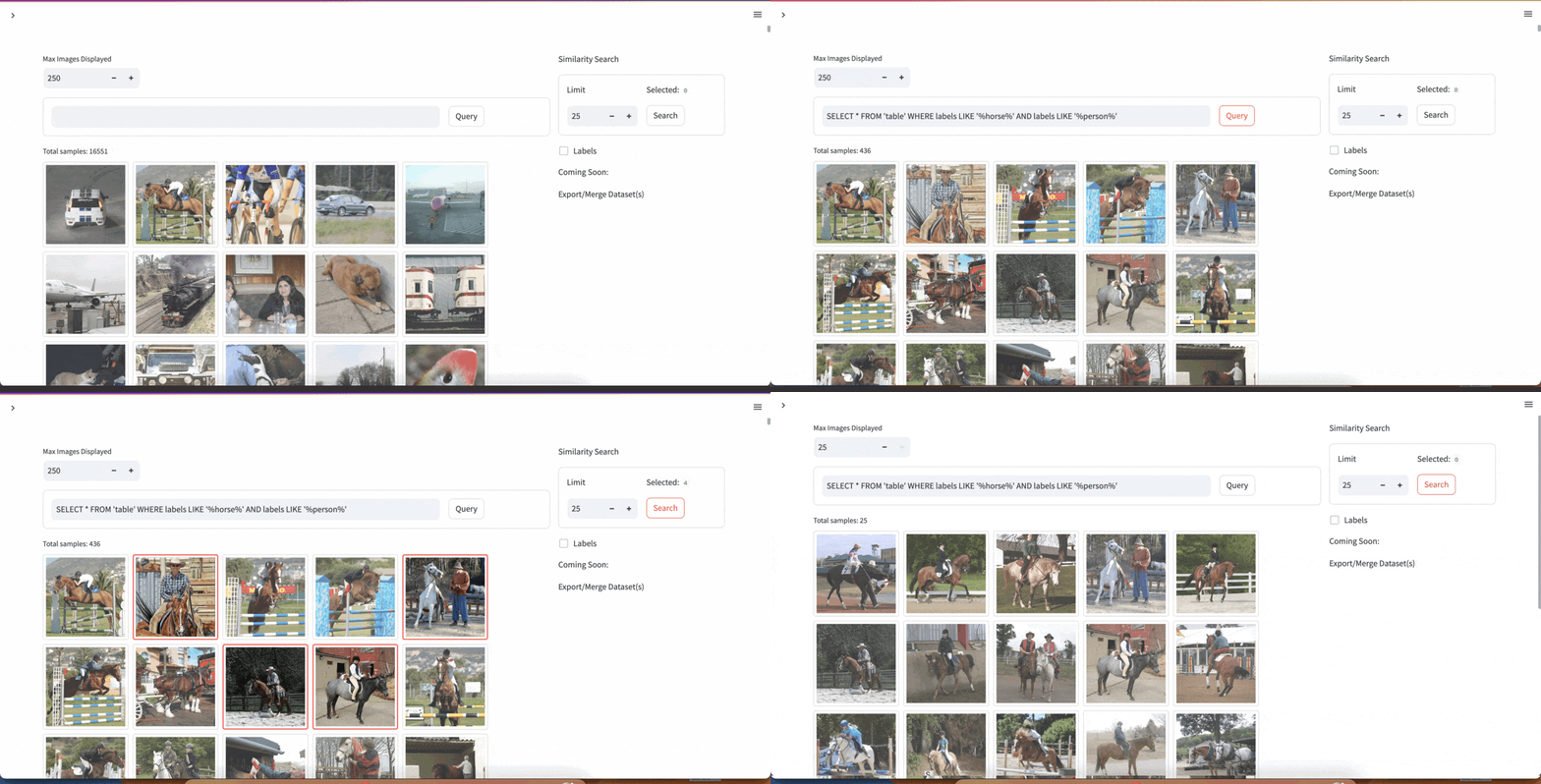 |
|
||||
| [Website Chatbot (Deployable Vercel Template)](https://github.com/lancedb/lancedb-vercel-chatbot) | Create a chatbot from the sitemap of any website/docs of your choice. Built using vectorDB serverless native javascript package. |  |
|
||||
|
||||
@@ -1,6 +1,7 @@
|
||||
# Examples: JavaScript
|
||||
# Examples
|
||||
|
||||
To help you get started, we provide some examples, projects and applications that use the LanceDB JavaScript API. You can always find the latest examples in our [VectorDB Recipes](https://github.com/lancedb/vectordb-recipes) repository.
|
||||
Here are some of the examples, projects and applications using vectordb native javascript library.
|
||||
Some examples are covered in detail in the next sections. You can find more on [VectorDB Recipes](https://github.com/lancedb/vectordb-recipes)
|
||||
|
||||
| Example | Scripts |
|
||||
|-------- | ------ |
|
||||
@@ -9,3 +10,10 @@ To help you get started, we provide some examples, projects and applications tha
|
||||
| [Langchain: Code Docs QA bot](https://github.com/lancedb/vectordb-recipes/tree/main/examples/Code-Documentation-QA-Bot/) | [](https://github.com/lancedb/vectordb-recipes/tree/main/examples/Code-Documentation-QA-Bot/index.js)|
|
||||
| [AI Agents: Reducing Hallucination](https://github.com/lancedb/vectordb-recipes/tree/main/examples/reducing_hallucinations_ai_agents/) | [](https://github.com/lancedb/vectordb-recipes/tree/main/examples/reducing_hallucinations_ai_agents/index.js)|
|
||||
| [TransformersJS Embedding example](https://github.com/lancedb/vectordb-recipes/tree/main/examples/js-transformers/) | [](https://github.com/lancedb/vectordb-recipes/tree/main/examples/js-transformers/index.js) |
|
||||
|
||||
## Projects & Applications
|
||||
|
||||
| Project Name | Description | Screenshot |
|
||||
|-----------------------------------------------------|----------------------------------------------------------------------------------------------------------------------|-------------------------------------------|
|
||||
| [YOLOExplorer](https://github.com/lancedb/yoloexplorer) | Iterate on your YOLO / CV datasets using SQL, Vector semantic search, and more within seconds |  |
|
||||
| [Website Chatbot (Deployable Vercel Template)](https://github.com/lancedb/lancedb-vercel-chatbot) | Create a chatbot from the sitemap of any website/docs of your choice. Built using vectorDB serverless native javascript package. |  |
|
||||
@@ -1,5 +1,6 @@
|
||||
import pickle
|
||||
import re
|
||||
import sys
|
||||
import zipfile
|
||||
from pathlib import Path
|
||||
|
||||
@@ -78,10 +79,7 @@ def qanda_langchain(query):
|
||||
download_docs()
|
||||
docs = store_docs()
|
||||
|
||||
text_splitter = RecursiveCharacterTextSplitter(
|
||||
chunk_size=1000,
|
||||
chunk_overlap=200,
|
||||
)
|
||||
text_splitter = RecursiveCharacterTextSplitter(chunk_size=1000, chunk_overlap=200,)
|
||||
documents = text_splitter.split_documents(docs)
|
||||
embeddings = OpenAIEmbeddings()
|
||||
|
||||
|
||||
@@ -1,13 +0,0 @@
|
||||
# Build from Scratch with LanceDB 🚀
|
||||
|
||||
Start building your GenAI applications from the ground up using LanceDB's efficient vector-based document retrieval capabilities! 📄
|
||||
|
||||
#### Get Started in Minutes ⏱️
|
||||
|
||||
These examples provide a solid foundation for building your own GenAI applications using LanceDB. Jump from idea to proof of concept quickly with applied examples. Get started and see what you can create! 💻
|
||||
|
||||
| **Build From Scratch** | **Description** | **Links** |
|
||||
|:-------------------------------------------|:-------------------------------------------------------------------------------------------------------------|:-------------------------------------------------------------------------------------------------------------------------------------------------------------------------------------------------------------------------------------------------------------------------------------------------------------------------------------------------------------------------------------------------------------------------|
|
||||
| **Build RAG from Scratch🚀💻** | 📝 Create a **Retrieval-Augmented Generation** (RAG) model from scratch using LanceDB. | [](https://github.com/lancedb/vectordb-recipes/tree/main/tutorials/RAG-from-Scratch)<br>[]() |
|
||||
| **Local RAG from Scratch with Llama3🔥💡** | 🐫 Build a local RAG model using **Llama3** and **LanceDB** for fast and efficient text generation. | [](https://github.com/lancedb/vectordb-recipes/tree/main/tutorials/Local-RAG-from-Scratch)<br>[](https://github.com/lancedb/vectordb-recipes/blob/main/tutorials/Local-RAG-from-Scratch/rag.py) |
|
||||
| **Multi-Head RAG from Scratch📚💻** | 🤯 Develop a **Multi-Head RAG model** from scratch, enabling generation of text based on multiple documents. | [](https://github.com/lancedb/vectordb-recipes/tree/main/tutorials/Multi-Head-RAG-from-Scratch)<br>[](https://github.com/lancedb/vectordb-recipes/tree/main/tutorials/Multi-Head-RAG-from-Scratch) |
|
||||