mirror of
https://github.com/lancedb/lancedb.git
synced 2025-12-23 05:19:58 +00:00
Compare commits
165 Commits
python-v0.
...
python-v0.
| Author | SHA1 | Date | |
|---|---|---|---|

|
38b0d91848 | ||

|
6826039575 | ||

|
3e9321fc40 | ||

|
2ded17452b | ||

|
dfd9d2ac99 | ||
|
|
162880140e | ||
|
|
99d9ced6d5 | ||
|
|
96933d7df8 | ||
|
|
d369233b3d | ||
|
|
43a670ed4b | ||

|
cb9a00a28d | ||

|
72af977a73 | ||
|
|
7cecb71df0 | ||
|
|
285071e5c8 | ||
|
|
114866fbcf | ||

|
5387c0e243 | ||
|
|
53d1535de1 | ||

|
b2f88f0b29 | ||

|
f2e3989831 | ||

|
83ae52938a | ||
|
|
267aa83bf8 | ||
|
|
cc72050206 | ||
|
|
72543c8b9d | ||
|
|
97d6210c33 | ||

|
a3d0c27b0a | ||
|
|
b23d8abcdd | ||

|
e3ea5cf9b9 | ||
|
|
4f8b086175 | ||
|
|
72330fb759 | ||
|
|
e3b2c5f438 | ||
|
|
66a881b33a | ||
|
|
a7515d6ee2 | ||
|
|
587c0824af | ||
|
|
b38a4269d0 | ||
|
|
119d88b9db | ||

|
74f660d223 | ||
|
|
b2b0979b90 | ||
|
|
ee2a40b182 | ||
|
|
4ca0b15354 | ||
|
|
d8c217b47d | ||
|
|
b724b1a01f | ||
|
|
abd75e0ead | ||
|
|
0fd8a50bd7 | ||

|
9f228feb0e | ||

|
90e9c52d0a | ||
|
|
68974a4e06 | ||
|
|
4c9bab0d92 | ||
|
|
5117aecc38 | ||
|
|
729718cb09 | ||
|
|
b1c84e0bda | ||
|
|
cbbc07d0f5 | ||

|
21021f94ca | ||
|
|
0ed77fa990 | ||
|
|
4372c231cd | ||
|
|
fa9ca8f7a6 | ||
|
|
2a35d24ee6 | ||
|
|
dd9ce337e2 | ||
|
|
b9921d56cc | ||
|
|
0cfd9ed18e | ||
|
|
975398c3a8 | ||
|
|
08d5f93f34 | ||
|
|
91cab3b556 | ||
|
|
c61bfc3af8 | ||
|
|
4e8c7b0adf | ||

|
26f4a80e10 | ||
|
|
3604d20ad3 | ||

|
9708d829a9 | ||
|
|
059c9794b5 | ||
|
|
15ed7f75a0 | ||
|
|
96181ab421 | ||
|
|
f3fc339ef6 | ||
|
|
113cd6995b | ||
|
|
02535bdc88 | ||
|
|
facc7d61c0 | ||
|
|
f947259f16 | ||
|
|
e291212ecf | ||
|
|
edc6445f6f | ||
|
|
a324f4ad7a | ||
|
|
55104c5bae | ||

|
d71df4572e | ||
|
|
aa269199ad | ||
|
|
32fdcf97db | ||

|
b9802a0d23 | ||
|
|
2ea5939f85 | ||
|
|
04e1f1ee4c | ||
|
|
bbc588e27d | ||
|
|
5517e102c3 | ||
|
|
82197c54e4 | ||
|
|
48f46d4751 | ||
|
|
437316cbbc | ||
|
|
d406eab2c8 | ||
|
|
1f41101897 | ||
|
|
99e4db0d6a | ||
|
|
46486d4d22 | ||
|
|
f43cb8bba1 | ||

|
38eb05f297 | ||
|
|
679a70231e | ||

|
e7b56b7b2a | ||

|
5ccd0edec2 | ||
|
|
9c74c435e0 | ||
|
|
6de53ce393 | ||
|
|
9f42fbba96 | ||
|
|
d892f7a622 | ||
|
|
515ab5f417 | ||
|
|
8d0055fe6b | ||
|
|
5f9d8509b3 | ||
|
|
f3b6a1f55b | ||
|
|
aff25e3bf9 | ||
|
|
8509f73221 | ||
|
|
607476788e | ||
|
|
4d458d5829 | ||
|
|
e61ba7f4e2 | ||

|
408bc96a44 | ||
|
|
6ceaf8b06e | ||
|
|
e2ca8daee1 | ||
|
|
f305f34d9b | ||
|
|
a416925ca1 | ||
|
|
2c4b07eb17 | ||
|
|
33b402c861 | ||
|
|
7b2cdd2269 | ||

|
d6b5054778 | ||
|
|
f0e7f5f665 | ||
|
|
f958f4d2e8 | ||
|
|
c1d9d6f70b | ||
|
|
1778219ea9 | ||
|
|
ee6c18f207 | ||

|
e606a455df | ||
|
|
8f0eb34109 | ||
|
|
2f2721e242 | ||
|
|
f00b21c98c | ||
|
|
962b3afd17 | ||
|
|
b72ac073ab | ||
|
|
3152ccd13c | ||
|
|
d5021356b4 | ||
|
|
e82f63b40a | ||
|
|
f81ce68e41 | ||
|
|
f5c25b6fff | ||
|
|
86978e7588 | ||
|
|
7c314d61cc | ||
|
|
7a8d2f37c4 | ||
|
|
11072b9edc | ||
|
|
915d828cee | ||
|
|
d9a72adc58 | ||
|
|
d6cf2dafc6 | ||
|
|
38f0031d0b | ||

|
e118c37228 | ||
|
|
abeaae3d80 | ||
|
|
b3c0227065 | ||
|
|
521e665f57 | ||
|
|
ffb28dd4fc | ||
|
|
32af962c0c | ||
|
|
18484d0b6c | ||
|
|
c02ee3c80c | ||
|
|
dcd5f51036 | ||

|
9b8472850e | ||
|
|
36d05ea641 | ||
|
|
7ed86cadfb | ||
|
|
1c123b58d8 | ||
|
|
bf7d2d6fb0 | ||
|
|
c7732585bf | ||
|
|
b3bf6386c3 | ||
|
|
4b79db72bf | ||
|
|
622a2922e2 | ||
|
|
c91221d710 | ||
|
|
56da5ebd13 |

@@ -1,5 +1,5 @@
|
||||
[tool.bumpversion]
|
||||
current_version = "0.10.0-beta.1"
|
||||
current_version = "0.13.1-beta.0"
|
||||
parse = """(?x)
|
||||
(?P<major>0|[1-9]\\d*)\\.
|
||||
(?P<minor>0|[1-9]\\d*)\\.
|
||||
@@ -24,34 +24,102 @@ commit = true
|
||||
message = "Bump version: {current_version} → {new_version}"
|
||||
commit_args = ""
|
||||
|
||||
# Java maven files
|
||||
pre_commit_hooks = [
|
||||
"""
|
||||
NEW_VERSION="${BVHOOK_NEW_MAJOR}.${BVHOOK_NEW_MINOR}.${BVHOOK_NEW_PATCH}"
|
||||
if [ ! -z "$BVHOOK_NEW_PRE_L" ] && [ ! -z "$BVHOOK_NEW_PRE_N" ]; then
|
||||
NEW_VERSION="${NEW_VERSION}-${BVHOOK_NEW_PRE_L}.${BVHOOK_NEW_PRE_N}"
|
||||
fi
|
||||
echo "Constructed new version: $NEW_VERSION"
|
||||
cd java && mvn versions:set -DnewVersion=$NEW_VERSION && mvn versions:commit
|
||||
|
||||
# Check for any modified but unstaged pom.xml files
|
||||
MODIFIED_POMS=$(git ls-files -m | grep pom.xml)
|
||||
if [ ! -z "$MODIFIED_POMS" ]; then
|
||||
echo "The following pom.xml files were modified but not staged. Adding them now:"
|
||||
echo "$MODIFIED_POMS" | while read -r file; do
|
||||
git add "$file"
|
||||
echo "Added: $file"
|
||||
done
|
||||
fi
|
||||
""",
|
||||
]
|
||||
|
||||
[tool.bumpversion.parts.pre_l]
|
||||
values = ["beta", "final"]
|
||||
optional_value = "final"
|
||||
values = ["beta", "final"]
|
||||
|
||||
[[tool.bumpversion.files]]
|
||||
filename = "node/package.json"
|
||||
search = "\"version\": \"{current_version}\","
|
||||
replace = "\"version\": \"{new_version}\","
|
||||
search = "\"version\": \"{current_version}\","
|
||||
|
||||
[[tool.bumpversion.files]]
|
||||
filename = "nodejs/package.json"
|
||||
search = "\"version\": \"{current_version}\","
|
||||
replace = "\"version\": \"{new_version}\","
|
||||
search = "\"version\": \"{current_version}\","
|
||||
|
||||
# nodejs binary packages
|
||||
[[tool.bumpversion.files]]
|
||||
glob = "nodejs/npm/*/package.json"
|
||||
search = "\"version\": \"{current_version}\","
|
||||
replace = "\"version\": \"{new_version}\","
|
||||
search = "\"version\": \"{current_version}\","
|
||||
|
||||
# vectodb node binary packages
|
||||
[[tool.bumpversion.files]]
|
||||
glob = "node/package.json"
|
||||
replace = "\"@lancedb/vectordb-darwin-arm64\": \"{new_version}\""
|
||||
search = "\"@lancedb/vectordb-darwin-arm64\": \"{current_version}\""
|
||||
|
||||
[[tool.bumpversion.files]]
|
||||
glob = "node/package.json"
|
||||
replace = "\"@lancedb/vectordb-darwin-x64\": \"{new_version}\""
|
||||
search = "\"@lancedb/vectordb-darwin-x64\": \"{current_version}\""
|
||||
|
||||
[[tool.bumpversion.files]]
|
||||
glob = "node/package.json"
|
||||
replace = "\"@lancedb/vectordb-linux-arm64-gnu\": \"{new_version}\""
|
||||
search = "\"@lancedb/vectordb-linux-arm64-gnu\": \"{current_version}\""
|
||||
|
||||
[[tool.bumpversion.files]]
|
||||
glob = "node/package.json"
|
||||
replace = "\"@lancedb/vectordb-linux-x64-gnu\": \"{new_version}\""
|
||||
search = "\"@lancedb/vectordb-linux-x64-gnu\": \"{current_version}\""
|
||||
|
||||
[[tool.bumpversion.files]]
|
||||
glob = "node/package.json"
|
||||
replace = "\"@lancedb/vectordb-linux-arm64-musl\": \"{new_version}\""
|
||||
search = "\"@lancedb/vectordb-linux-arm64-musl\": \"{current_version}\""
|
||||
|
||||
[[tool.bumpversion.files]]
|
||||
glob = "node/package.json"
|
||||
replace = "\"@lancedb/vectordb-linux-x64-musl\": \"{new_version}\""
|
||||
search = "\"@lancedb/vectordb-linux-x64-musl\": \"{current_version}\""
|
||||
|
||||
[[tool.bumpversion.files]]
|
||||
glob = "node/package.json"
|
||||
replace = "\"@lancedb/vectordb-win32-x64-msvc\": \"{new_version}\""
|
||||
search = "\"@lancedb/vectordb-win32-x64-msvc\": \"{current_version}\""
|
||||
|
||||
[[tool.bumpversion.files]]
|
||||
glob = "node/package.json"
|
||||
replace = "\"@lancedb/vectordb-win32-arm64-msvc\": \"{new_version}\""
|
||||
search = "\"@lancedb/vectordb-win32-arm64-msvc\": \"{current_version}\""
|
||||
|
||||
# Cargo files
|
||||
# ------------
|
||||
[[tool.bumpversion.files]]
|
||||
filename = "rust/ffi/node/Cargo.toml"
|
||||
search = "\nversion = \"{current_version}\""
|
||||
replace = "\nversion = \"{new_version}\""
|
||||
search = "\nversion = \"{current_version}\""
|
||||
|
||||
[[tool.bumpversion.files]]
|
||||
filename = "rust/lancedb/Cargo.toml"
|
||||
search = "\nversion = \"{current_version}\""
|
||||
replace = "\nversion = \"{new_version}\""
|
||||
search = "\nversion = \"{current_version}\""
|
||||
|
||||
[[tool.bumpversion.files]]
|
||||
filename = "nodejs/Cargo.toml"
|
||||
replace = "\nversion = \"{new_version}\""
|
||||
search = "\nversion = \"{current_version}\""
|
||||
|
||||
@@ -31,6 +31,9 @@ rustflags = [
|
||||
[target.x86_64-unknown-linux-gnu]
|
||||
rustflags = ["-C", "target-cpu=haswell", "-C", "target-feature=+avx2,+fma,+f16c"]
|
||||
|
||||
[target.x86_64-unknown-linux-musl]
|
||||
rustflags = ["-C", "target-cpu=haswell", "-C", "target-feature=-crt-static,+avx2,+fma,+f16c"]
|
||||
|
||||
[target.aarch64-apple-darwin]
|
||||
rustflags = ["-C", "target-cpu=apple-m1", "-C", "target-feature=+neon,+fp16,+fhm,+dotprod"]
|
||||
|
||||
@@ -38,3 +41,7 @@ rustflags = ["-C", "target-cpu=apple-m1", "-C", "target-feature=+neon,+fp16,+fhm
|
||||
# not found errors on systems that are missing it.
|
||||
[target.x86_64-pc-windows-msvc]
|
||||
rustflags = ["-Ctarget-feature=+crt-static"]
|
||||
|
||||
# Experimental target for Arm64 Windows
|
||||
[target.aarch64-pc-windows-msvc]
|
||||
rustflags = ["-Ctarget-feature=+crt-static"]
|
||||
6
.github/workflows/docs.yml
vendored
6
.github/workflows/docs.yml
vendored
@@ -31,7 +31,7 @@ jobs:
|
||||
- name: Install dependecies needed for ubuntu
|
||||
run: |
|
||||
sudo apt install -y protobuf-compiler libssl-dev
|
||||
rustup update && rustup default
|
||||
rustup update && rustup default
|
||||
- name: Set up Python
|
||||
uses: actions/setup-python@v5
|
||||
with:
|
||||
@@ -41,8 +41,8 @@ jobs:
|
||||
- name: Build Python
|
||||
working-directory: python
|
||||
run: |
|
||||
python -m pip install -e .
|
||||
python -m pip install -r ../docs/requirements.txt
|
||||
python -m pip install --extra-index-url https://pypi.fury.io/lancedb/ -e .
|
||||
python -m pip install --extra-index-url https://pypi.fury.io/lancedb/ -r ../docs/requirements.txt
|
||||
- name: Set up node
|
||||
uses: actions/setup-node@v3
|
||||
with:
|
||||
|
||||
6
.github/workflows/docs_test.yml
vendored
6
.github/workflows/docs_test.yml
vendored
@@ -24,7 +24,7 @@ env:
|
||||
jobs:
|
||||
test-python:
|
||||
name: Test doc python code
|
||||
runs-on: "warp-ubuntu-latest-x64-4x"
|
||||
runs-on: ubuntu-24.04
|
||||
steps:
|
||||
- name: Checkout
|
||||
uses: actions/checkout@v4
|
||||
@@ -49,7 +49,7 @@ jobs:
|
||||
- name: Build Python
|
||||
working-directory: docs/test
|
||||
run:
|
||||
python -m pip install -r requirements.txt
|
||||
python -m pip install --extra-index-url https://pypi.fury.io/lancedb/ -r requirements.txt
|
||||
- name: Create test files
|
||||
run: |
|
||||
cd docs/test
|
||||
@@ -60,7 +60,7 @@ jobs:
|
||||
for d in *; do cd "$d"; echo "$d".py; python "$d".py; cd ..; done
|
||||
test-node:
|
||||
name: Test doc nodejs code
|
||||
runs-on: "warp-ubuntu-latest-x64-4x"
|
||||
runs-on: ubuntu-24.04
|
||||
timeout-minutes: 60
|
||||
strategy:
|
||||
fail-fast: false
|
||||
|
||||
5
.github/workflows/java-publish.yml
vendored
5
.github/workflows/java-publish.yml
vendored
@@ -94,11 +94,16 @@ jobs:
|
||||
mkdir -p ./core/target/classes/nativelib/darwin-aarch64 ./core/target/classes/nativelib/linux-aarch64
|
||||
cp ../liblancedb_jni_darwin_aarch64.zip/liblancedb_jni.dylib ./core/target/classes/nativelib/darwin-aarch64/liblancedb_jni.dylib
|
||||
cp ../liblancedb_jni_linux_aarch64.zip/liblancedb_jni.so ./core/target/classes/nativelib/linux-aarch64/liblancedb_jni.so
|
||||
- name: Dry run
|
||||
if: github.event_name == 'pull_request'
|
||||
run: |
|
||||
mvn --batch-mode -DskipTests package
|
||||
- name: Set github
|
||||
run: |
|
||||
git config --global user.email "LanceDB Github Runner"
|
||||
git config --global user.name "dev+gha@lancedb.com"
|
||||
- name: Publish with Java 8
|
||||
if: github.event_name == 'release'
|
||||
run: |
|
||||
echo "use-agent" >> ~/.gnupg/gpg.conf
|
||||
echo "pinentry-mode loopback" >> ~/.gnupg/gpg.conf
|
||||
|
||||
2
.github/workflows/make-release-commit.yml
vendored
2
.github/workflows/make-release-commit.yml
vendored
@@ -30,7 +30,7 @@ on:
|
||||
default: true
|
||||
type: boolean
|
||||
other:
|
||||
description: 'Make a Node/Rust release'
|
||||
description: 'Make a Node/Rust/Java release'
|
||||
required: true
|
||||
default: true
|
||||
type: boolean
|
||||
|
||||
15
.github/workflows/nodejs.yml
vendored
15
.github/workflows/nodejs.yml
vendored
@@ -53,6 +53,9 @@ jobs:
|
||||
cargo clippy --all --all-features -- -D warnings
|
||||
npm ci
|
||||
npm run lint-ci
|
||||
- name: Lint examples
|
||||
working-directory: nodejs/examples
|
||||
run: npm ci && npm run lint-ci
|
||||
linux:
|
||||
name: Linux (NodeJS ${{ matrix.node-version }})
|
||||
timeout-minutes: 30
|
||||
@@ -91,6 +94,18 @@ jobs:
|
||||
env:
|
||||
S3_TEST: "1"
|
||||
run: npm run test
|
||||
- name: Setup examples
|
||||
working-directory: nodejs/examples
|
||||
run: npm ci
|
||||
- name: Test examples
|
||||
working-directory: ./
|
||||
env:
|
||||
OPENAI_API_KEY: test
|
||||
OPENAI_BASE_URL: http://0.0.0.0:8000
|
||||
run: |
|
||||
python ci/mock_openai.py &
|
||||
cd nodejs/examples
|
||||
npm test
|
||||
macos:
|
||||
timeout-minutes: 30
|
||||
runs-on: "macos-14"
|
||||
|
||||
320
.github/workflows/npm-publish.yml
vendored
320
.github/workflows/npm-publish.yml
vendored
@@ -101,7 +101,7 @@ jobs:
|
||||
path: |
|
||||
nodejs/dist/*.node
|
||||
|
||||
node-linux:
|
||||
node-linux-gnu:
|
||||
name: vectordb (${{ matrix.config.arch}}-unknown-linux-gnu)
|
||||
runs-on: ${{ matrix.config.runner }}
|
||||
# Only runs on tags that matches the make-release action
|
||||
@@ -137,11 +137,63 @@ jobs:
|
||||
- name: Upload Linux Artifacts
|
||||
uses: actions/upload-artifact@v4
|
||||
with:
|
||||
name: node-native-linux-${{ matrix.config.arch }}
|
||||
name: node-native-linux-${{ matrix.config.arch }}-gnu
|
||||
path: |
|
||||
node/dist/lancedb-vectordb-linux*.tgz
|
||||
|
||||
nodejs-linux:
|
||||
node-linux-musl:
|
||||
name: vectordb (${{ matrix.config.arch}}-unknown-linux-musl)
|
||||
runs-on: ubuntu-latest
|
||||
container: alpine:edge
|
||||
# Only runs on tags that matches the make-release action
|
||||
if: startsWith(github.ref, 'refs/tags/v')
|
||||
strategy:
|
||||
fail-fast: false
|
||||
matrix:
|
||||
config:
|
||||
- arch: x86_64
|
||||
- arch: aarch64
|
||||
steps:
|
||||
- name: Checkout
|
||||
uses: actions/checkout@v4
|
||||
- name: Install common dependencies
|
||||
run: |
|
||||
apk add protobuf-dev curl clang mold grep npm bash
|
||||
curl --proto '=https' --tlsv1.3 -sSf https://raw.githubusercontent.com/rust-lang/rustup/refs/heads/master/rustup-init.sh | sh -s -- -y --default-toolchain 1.80.0
|
||||
echo "source $HOME/.cargo/env" >> saved_env
|
||||
echo "export CC=clang" >> saved_env
|
||||
echo "export RUSTFLAGS='-Ctarget-cpu=haswell -Ctarget-feature=-crt-static,+avx2,+fma,+f16c -Clinker=clang -Clink-arg=-fuse-ld=mold'" >> saved_env
|
||||
- name: Configure aarch64 build
|
||||
if: ${{ matrix.config.arch == 'aarch64' }}
|
||||
run: |
|
||||
source "$HOME/.cargo/env"
|
||||
rustup target add aarch64-unknown-linux-musl --toolchain 1.80.0
|
||||
crt=$(realpath $(dirname $(rustup which rustc))/../lib/rustlib/aarch64-unknown-linux-musl/lib/self-contained)
|
||||
sysroot_lib=/usr/aarch64-unknown-linux-musl/usr/lib
|
||||
apk_url=https://dl-cdn.alpinelinux.org/alpine/latest-stable/main/aarch64/
|
||||
curl -sSf $apk_url > apk_list
|
||||
for pkg in gcc libgcc musl; do curl -sSf $apk_url$(cat apk_list | grep -oP '(?<=")'$pkg'-\d.*?(?=")') | tar zxf -; done
|
||||
mkdir -p $sysroot_lib
|
||||
echo 'GROUP ( libgcc_s.so.1 -lgcc )' > $sysroot_lib/libgcc_s.so
|
||||
cp usr/lib/libgcc_s.so.1 $sysroot_lib
|
||||
cp usr/lib/gcc/aarch64-alpine-linux-musl/*/libgcc.a $sysroot_lib
|
||||
cp lib/ld-musl-aarch64.so.1 $sysroot_lib/libc.so
|
||||
echo '!<arch>' > $sysroot_lib/libdl.a
|
||||
(cd $crt && cp crti.o crtbeginS.o crtendS.o crtn.o -t $sysroot_lib)
|
||||
echo "export CARGO_BUILD_TARGET=aarch64-unknown-linux-musl" >> saved_env
|
||||
echo "export RUSTFLAGS='-Ctarget-cpu=apple-m1 -Ctarget-feature=-crt-static,+neon,+fp16,+fhm,+dotprod -Clinker=clang -Clink-arg=-fuse-ld=mold -Clink-arg=--target=aarch64-unknown-linux-musl -Clink-arg=--sysroot=/usr/aarch64-unknown-linux-musl -Clink-arg=-lc'" >> saved_env
|
||||
- name: Build Linux Artifacts
|
||||
run: |
|
||||
source ./saved_env
|
||||
bash ci/manylinux_node/build_vectordb.sh ${{ matrix.config.arch }}
|
||||
- name: Upload Linux Artifacts
|
||||
uses: actions/upload-artifact@v4
|
||||
with:
|
||||
name: node-native-linux-${{ matrix.config.arch }}-musl
|
||||
path: |
|
||||
node/dist/lancedb-vectordb-linux*.tgz
|
||||
|
||||
nodejs-linux-gnu:
|
||||
name: lancedb (${{ matrix.config.arch}}-unknown-linux-gnu
|
||||
runs-on: ${{ matrix.config.runner }}
|
||||
# Only runs on tags that matches the make-release action
|
||||
@@ -178,7 +230,7 @@ jobs:
|
||||
- name: Upload Linux Artifacts
|
||||
uses: actions/upload-artifact@v4
|
||||
with:
|
||||
name: nodejs-native-linux-${{ matrix.config.arch }}
|
||||
name: nodejs-native-linux-${{ matrix.config.arch }}-gnu
|
||||
path: |
|
||||
nodejs/dist/*.node
|
||||
# The generic files are the same in all distros so we just pick
|
||||
@@ -192,6 +244,62 @@ jobs:
|
||||
nodejs/dist/*
|
||||
!nodejs/dist/*.node
|
||||
|
||||
nodejs-linux-musl:
|
||||
name: lancedb (${{ matrix.config.arch}}-unknown-linux-musl
|
||||
runs-on: ubuntu-latest
|
||||
container: alpine:edge
|
||||
# Only runs on tags that matches the make-release action
|
||||
if: startsWith(github.ref, 'refs/tags/v')
|
||||
strategy:
|
||||
fail-fast: false
|
||||
matrix:
|
||||
config:
|
||||
- arch: x86_64
|
||||
- arch: aarch64
|
||||
steps:
|
||||
- name: Checkout
|
||||
uses: actions/checkout@v4
|
||||
- name: Install common dependencies
|
||||
run: |
|
||||
apk add protobuf-dev curl clang mold grep npm bash openssl-dev openssl-libs-static
|
||||
curl --proto '=https' --tlsv1.3 -sSf https://raw.githubusercontent.com/rust-lang/rustup/refs/heads/master/rustup-init.sh | sh -s -- -y --default-toolchain 1.80.0
|
||||
echo "source $HOME/.cargo/env" >> saved_env
|
||||
echo "export CC=clang" >> saved_env
|
||||
echo "export RUSTFLAGS='-Ctarget-cpu=haswell -Ctarget-feature=-crt-static,+avx2,+fma,+f16c -Clinker=clang -Clink-arg=-fuse-ld=mold'" >> saved_env
|
||||
echo "export X86_64_UNKNOWN_LINUX_MUSL_OPENSSL_INCLUDE_DIR=/usr/include" >> saved_env
|
||||
echo "export X86_64_UNKNOWN_LINUX_MUSL_OPENSSL_LIB_DIR=/usr/lib" >> saved_env
|
||||
- name: Configure aarch64 build
|
||||
if: ${{ matrix.config.arch == 'aarch64' }}
|
||||
run: |
|
||||
source "$HOME/.cargo/env"
|
||||
rustup target add aarch64-unknown-linux-musl --toolchain 1.80.0
|
||||
crt=$(realpath $(dirname $(rustup which rustc))/../lib/rustlib/aarch64-unknown-linux-musl/lib/self-contained)
|
||||
sysroot_lib=/usr/aarch64-unknown-linux-musl/usr/lib
|
||||
apk_url=https://dl-cdn.alpinelinux.org/alpine/latest-stable/main/aarch64/
|
||||
curl -sSf $apk_url > apk_list
|
||||
for pkg in gcc libgcc musl openssl-dev openssl-libs-static; do curl -sSf $apk_url$(cat apk_list | grep -oP '(?<=")'$pkg'-\d.*?(?=")') | tar zxf -; done
|
||||
mkdir -p $sysroot_lib
|
||||
echo 'GROUP ( libgcc_s.so.1 -lgcc )' > $sysroot_lib/libgcc_s.so
|
||||
cp usr/lib/libgcc_s.so.1 $sysroot_lib
|
||||
cp usr/lib/gcc/aarch64-alpine-linux-musl/*/libgcc.a $sysroot_lib
|
||||
cp lib/ld-musl-aarch64.so.1 $sysroot_lib/libc.so
|
||||
echo '!<arch>' > $sysroot_lib/libdl.a
|
||||
(cd $crt && cp crti.o crtbeginS.o crtendS.o crtn.o -t $sysroot_lib)
|
||||
echo "export CARGO_BUILD_TARGET=aarch64-unknown-linux-musl" >> saved_env
|
||||
echo "export RUSTFLAGS='-Ctarget-feature=-crt-static,+neon,+fp16,+fhm,+dotprod -Clinker=clang -Clink-arg=-fuse-ld=mold -Clink-arg=--target=aarch64-unknown-linux-musl -Clink-arg=--sysroot=/usr/aarch64-unknown-linux-musl -Clink-arg=-lc'" >> saved_env
|
||||
echo "export AARCH64_UNKNOWN_LINUX_MUSL_OPENSSL_INCLUDE_DIR=$(realpath usr/include)" >> saved_env
|
||||
echo "export AARCH64_UNKNOWN_LINUX_MUSL_OPENSSL_LIB_DIR=$(realpath usr/lib)" >> saved_env
|
||||
- name: Build Linux Artifacts
|
||||
run: |
|
||||
source ./saved_env
|
||||
bash ci/manylinux_node/build_lancedb.sh ${{ matrix.config.arch }}
|
||||
- name: Upload Linux Artifacts
|
||||
uses: actions/upload-artifact@v4
|
||||
with:
|
||||
name: nodejs-native-linux-${{ matrix.config.arch }}-musl
|
||||
path: |
|
||||
nodejs/dist/*.node
|
||||
|
||||
node-windows:
|
||||
name: vectordb ${{ matrix.target }}
|
||||
runs-on: windows-2022
|
||||
@@ -226,6 +334,110 @@ jobs:
|
||||
path: |
|
||||
node/dist/lancedb-vectordb-win32*.tgz
|
||||
|
||||
# TODO: re-enable once working https://github.com/lancedb/lancedb/pull/1831
|
||||
# node-windows-arm64:
|
||||
# name: vectordb win32-arm64-msvc
|
||||
# runs-on: windows-4x-arm
|
||||
# if: startsWith(github.ref, 'refs/tags/v')
|
||||
# steps:
|
||||
# - uses: actions/checkout@v4
|
||||
# - name: Install Git
|
||||
# run: |
|
||||
# Invoke-WebRequest -Uri "https://github.com/git-for-windows/git/releases/download/v2.44.0.windows.1/Git-2.44.0-64-bit.exe" -OutFile "git-installer.exe"
|
||||
# Start-Process -FilePath "git-installer.exe" -ArgumentList "/VERYSILENT", "/NORESTART" -Wait
|
||||
# shell: powershell
|
||||
# - name: Add Git to PATH
|
||||
# run: |
|
||||
# Add-Content $env:GITHUB_PATH "C:\Program Files\Git\bin"
|
||||
# $env:Path = [System.Environment]::GetEnvironmentVariable("Path","Machine") + ";" + [System.Environment]::GetEnvironmentVariable("Path","User")
|
||||
# shell: powershell
|
||||
# - name: Configure Git symlinks
|
||||
# run: git config --global core.symlinks true
|
||||
# - uses: actions/checkout@v4
|
||||
# - uses: actions/setup-python@v5
|
||||
# with:
|
||||
# python-version: "3.13"
|
||||
# - name: Install Visual Studio Build Tools
|
||||
# run: |
|
||||
# Invoke-WebRequest -Uri "https://aka.ms/vs/17/release/vs_buildtools.exe" -OutFile "vs_buildtools.exe"
|
||||
# Start-Process -FilePath "vs_buildtools.exe" -ArgumentList "--quiet", "--wait", "--norestart", "--nocache", `
|
||||
# "--installPath", "C:\BuildTools", `
|
||||
# "--add", "Microsoft.VisualStudio.Component.VC.Tools.ARM64", `
|
||||
# "--add", "Microsoft.VisualStudio.Component.VC.Tools.x86.x64", `
|
||||
# "--add", "Microsoft.VisualStudio.Component.Windows11SDK.22621", `
|
||||
# "--add", "Microsoft.VisualStudio.Component.VC.ATL", `
|
||||
# "--add", "Microsoft.VisualStudio.Component.VC.ATLMFC", `
|
||||
# "--add", "Microsoft.VisualStudio.Component.VC.Llvm.Clang" -Wait
|
||||
# shell: powershell
|
||||
# - name: Add Visual Studio Build Tools to PATH
|
||||
# run: |
|
||||
# $vsPath = "C:\BuildTools\VC\Tools\MSVC"
|
||||
# $latestVersion = (Get-ChildItem $vsPath | Sort-Object {[version]$_.Name} -Descending)[0].Name
|
||||
# Add-Content $env:GITHUB_PATH "C:\BuildTools\VC\Tools\MSVC\$latestVersion\bin\Hostx64\arm64"
|
||||
# Add-Content $env:GITHUB_PATH "C:\BuildTools\VC\Tools\MSVC\$latestVersion\bin\Hostx64\x64"
|
||||
# Add-Content $env:GITHUB_PATH "C:\Program Files (x86)\Windows Kits\10\bin\10.0.22621.0\arm64"
|
||||
# Add-Content $env:GITHUB_PATH "C:\Program Files (x86)\Windows Kits\10\bin\10.0.22621.0\x64"
|
||||
# Add-Content $env:GITHUB_PATH "C:\BuildTools\VC\Tools\Llvm\x64\bin"
|
||||
|
||||
# # Add MSVC runtime libraries to LIB
|
||||
# $env:LIB = "C:\BuildTools\VC\Tools\MSVC\$latestVersion\lib\arm64;" +
|
||||
# "C:\Program Files (x86)\Windows Kits\10\Lib\10.0.22621.0\um\arm64;" +
|
||||
# "C:\Program Files (x86)\Windows Kits\10\Lib\10.0.22621.0\ucrt\arm64"
|
||||
# Add-Content $env:GITHUB_ENV "LIB=$env:LIB"
|
||||
|
||||
# # Add INCLUDE paths
|
||||
# $env:INCLUDE = "C:\BuildTools\VC\Tools\MSVC\$latestVersion\include;" +
|
||||
# "C:\Program Files (x86)\Windows Kits\10\Include\10.0.22621.0\ucrt;" +
|
||||
# "C:\Program Files (x86)\Windows Kits\10\Include\10.0.22621.0\um;" +
|
||||
# "C:\Program Files (x86)\Windows Kits\10\Include\10.0.22621.0\shared"
|
||||
# Add-Content $env:GITHUB_ENV "INCLUDE=$env:INCLUDE"
|
||||
# shell: powershell
|
||||
# - name: Install Rust
|
||||
# run: |
|
||||
# Invoke-WebRequest https://win.rustup.rs/x86_64 -OutFile rustup-init.exe
|
||||
# .\rustup-init.exe -y --default-host aarch64-pc-windows-msvc
|
||||
# shell: powershell
|
||||
# - name: Add Rust to PATH
|
||||
# run: |
|
||||
# Add-Content $env:GITHUB_PATH "$env:USERPROFILE\.cargo\bin"
|
||||
# shell: powershell
|
||||
|
||||
# - uses: Swatinem/rust-cache@v2
|
||||
# with:
|
||||
# workspaces: rust
|
||||
# - name: Install 7-Zip ARM
|
||||
# run: |
|
||||
# New-Item -Path 'C:\7zip' -ItemType Directory
|
||||
# Invoke-WebRequest https://7-zip.org/a/7z2408-arm64.exe -OutFile C:\7zip\7z-installer.exe
|
||||
# Start-Process -FilePath C:\7zip\7z-installer.exe -ArgumentList '/S' -Wait
|
||||
# shell: powershell
|
||||
# - name: Add 7-Zip to PATH
|
||||
# run: Add-Content $env:GITHUB_PATH "C:\Program Files\7-Zip"
|
||||
# shell: powershell
|
||||
# - name: Install Protoc v21.12
|
||||
# working-directory: C:\
|
||||
# run: |
|
||||
# if (Test-Path 'C:\protoc') {
|
||||
# Write-Host "Protoc directory exists, skipping installation"
|
||||
# return
|
||||
# }
|
||||
# New-Item -Path 'C:\protoc' -ItemType Directory
|
||||
# Set-Location C:\protoc
|
||||
# Invoke-WebRequest https://github.com/protocolbuffers/protobuf/releases/download/v21.12/protoc-21.12-win64.zip -OutFile C:\protoc\protoc.zip
|
||||
# & 'C:\Program Files\7-Zip\7z.exe' x protoc.zip
|
||||
# shell: powershell
|
||||
# - name: Add Protoc to PATH
|
||||
# run: Add-Content $env:GITHUB_PATH "C:\protoc\bin"
|
||||
# shell: powershell
|
||||
# - name: Build Windows native node modules
|
||||
# run: .\ci\build_windows_artifacts.ps1 aarch64-pc-windows-msvc
|
||||
# - name: Upload Windows ARM64 Artifacts
|
||||
# uses: actions/upload-artifact@v4
|
||||
# with:
|
||||
# name: node-native-windows-arm64
|
||||
# path: |
|
||||
# node/dist/*.node
|
||||
|
||||
nodejs-windows:
|
||||
name: lancedb ${{ matrix.target }}
|
||||
runs-on: windows-2022
|
||||
@@ -260,9 +472,103 @@ jobs:
|
||||
path: |
|
||||
nodejs/dist/*.node
|
||||
|
||||
# TODO: re-enable once working https://github.com/lancedb/lancedb/pull/1831
|
||||
# nodejs-windows-arm64:
|
||||
# name: lancedb win32-arm64-msvc
|
||||
# runs-on: windows-4x-arm
|
||||
# if: startsWith(github.ref, 'refs/tags/v')
|
||||
# steps:
|
||||
# - uses: actions/checkout@v4
|
||||
# - name: Install Git
|
||||
# run: |
|
||||
# Invoke-WebRequest -Uri "https://github.com/git-for-windows/git/releases/download/v2.44.0.windows.1/Git-2.44.0-64-bit.exe" -OutFile "git-installer.exe"
|
||||
# Start-Process -FilePath "git-installer.exe" -ArgumentList "/VERYSILENT", "/NORESTART" -Wait
|
||||
# shell: powershell
|
||||
# - name: Add Git to PATH
|
||||
# run: |
|
||||
# Add-Content $env:GITHUB_PATH "C:\Program Files\Git\bin"
|
||||
# $env:Path = [System.Environment]::GetEnvironmentVariable("Path","Machine") + ";" + [System.Environment]::GetEnvironmentVariable("Path","User")
|
||||
# shell: powershell
|
||||
# - name: Configure Git symlinks
|
||||
# run: git config --global core.symlinks true
|
||||
# - uses: actions/checkout@v4
|
||||
# - uses: actions/setup-python@v5
|
||||
# with:
|
||||
# python-version: "3.13"
|
||||
# - name: Install Visual Studio Build Tools
|
||||
# run: |
|
||||
# Invoke-WebRequest -Uri "https://aka.ms/vs/17/release/vs_buildtools.exe" -OutFile "vs_buildtools.exe"
|
||||
# Start-Process -FilePath "vs_buildtools.exe" -ArgumentList "--quiet", "--wait", "--norestart", "--nocache", `
|
||||
# "--installPath", "C:\BuildTools", `
|
||||
# "--add", "Microsoft.VisualStudio.Component.VC.Tools.ARM64", `
|
||||
# "--add", "Microsoft.VisualStudio.Component.VC.Tools.x86.x64", `
|
||||
# "--add", "Microsoft.VisualStudio.Component.Windows11SDK.22621", `
|
||||
# "--add", "Microsoft.VisualStudio.Component.VC.ATL", `
|
||||
# "--add", "Microsoft.VisualStudio.Component.VC.ATLMFC", `
|
||||
# "--add", "Microsoft.VisualStudio.Component.VC.Llvm.Clang" -Wait
|
||||
# shell: powershell
|
||||
# - name: Add Visual Studio Build Tools to PATH
|
||||
# run: |
|
||||
# $vsPath = "C:\BuildTools\VC\Tools\MSVC"
|
||||
# $latestVersion = (Get-ChildItem $vsPath | Sort-Object {[version]$_.Name} -Descending)[0].Name
|
||||
# Add-Content $env:GITHUB_PATH "C:\BuildTools\VC\Tools\MSVC\$latestVersion\bin\Hostx64\arm64"
|
||||
# Add-Content $env:GITHUB_PATH "C:\BuildTools\VC\Tools\MSVC\$latestVersion\bin\Hostx64\x64"
|
||||
# Add-Content $env:GITHUB_PATH "C:\Program Files (x86)\Windows Kits\10\bin\10.0.22621.0\arm64"
|
||||
# Add-Content $env:GITHUB_PATH "C:\Program Files (x86)\Windows Kits\10\bin\10.0.22621.0\x64"
|
||||
# Add-Content $env:GITHUB_PATH "C:\BuildTools\VC\Tools\Llvm\x64\bin"
|
||||
|
||||
# $env:LIB = ""
|
||||
# Add-Content $env:GITHUB_ENV "LIB=C:\Program Files (x86)\Windows Kits\10\Lib\10.0.22621.0\um\arm64;C:\Program Files (x86)\Windows Kits\10\Lib\10.0.22621.0\ucrt\arm64"
|
||||
# shell: powershell
|
||||
# - name: Install Rust
|
||||
# run: |
|
||||
# Invoke-WebRequest https://win.rustup.rs/x86_64 -OutFile rustup-init.exe
|
||||
# .\rustup-init.exe -y --default-host aarch64-pc-windows-msvc
|
||||
# shell: powershell
|
||||
# - name: Add Rust to PATH
|
||||
# run: |
|
||||
# Add-Content $env:GITHUB_PATH "$env:USERPROFILE\.cargo\bin"
|
||||
# shell: powershell
|
||||
|
||||
# - uses: Swatinem/rust-cache@v2
|
||||
# with:
|
||||
# workspaces: rust
|
||||
# - name: Install 7-Zip ARM
|
||||
# run: |
|
||||
# New-Item -Path 'C:\7zip' -ItemType Directory
|
||||
# Invoke-WebRequest https://7-zip.org/a/7z2408-arm64.exe -OutFile C:\7zip\7z-installer.exe
|
||||
# Start-Process -FilePath C:\7zip\7z-installer.exe -ArgumentList '/S' -Wait
|
||||
# shell: powershell
|
||||
# - name: Add 7-Zip to PATH
|
||||
# run: Add-Content $env:GITHUB_PATH "C:\Program Files\7-Zip"
|
||||
# shell: powershell
|
||||
# - name: Install Protoc v21.12
|
||||
# working-directory: C:\
|
||||
# run: |
|
||||
# if (Test-Path 'C:\protoc') {
|
||||
# Write-Host "Protoc directory exists, skipping installation"
|
||||
# return
|
||||
# }
|
||||
# New-Item -Path 'C:\protoc' -ItemType Directory
|
||||
# Set-Location C:\protoc
|
||||
# Invoke-WebRequest https://github.com/protocolbuffers/protobuf/releases/download/v21.12/protoc-21.12-win64.zip -OutFile C:\protoc\protoc.zip
|
||||
# & 'C:\Program Files\7-Zip\7z.exe' x protoc.zip
|
||||
# shell: powershell
|
||||
# - name: Add Protoc to PATH
|
||||
# run: Add-Content $env:GITHUB_PATH "C:\protoc\bin"
|
||||
# shell: powershell
|
||||
# - name: Build Windows native node modules
|
||||
# run: .\ci\build_windows_artifacts_nodejs.ps1 aarch64-pc-windows-msvc
|
||||
# - name: Upload Windows ARM64 Artifacts
|
||||
# uses: actions/upload-artifact@v4
|
||||
# with:
|
||||
# name: nodejs-native-windows-arm64
|
||||
# path: |
|
||||
# nodejs/dist/*.node
|
||||
|
||||
release:
|
||||
name: vectordb NPM Publish
|
||||
needs: [node, node-macos, node-linux, node-windows]
|
||||
needs: [node, node-macos, node-linux-gnu, node-linux-musl, node-windows]
|
||||
runs-on: ubuntu-latest
|
||||
# Only runs on tags that matches the make-release action
|
||||
if: startsWith(github.ref, 'refs/tags/v')
|
||||
@@ -280,7 +586,7 @@ jobs:
|
||||
env:
|
||||
NODE_AUTH_TOKEN: ${{ secrets.LANCEDB_NPM_REGISTRY_TOKEN }}
|
||||
run: |
|
||||
# Tag beta as "preview" instead of default "latest". See lancedb
|
||||
# Tag beta as "preview" instead of default "latest". See lancedb
|
||||
# npm publish step for more info.
|
||||
if [[ $GITHUB_REF =~ refs/tags/v(.*)-beta.* ]]; then
|
||||
PUBLISH_ARGS="--tag preview"
|
||||
@@ -302,7 +608,7 @@ jobs:
|
||||
|
||||
release-nodejs:
|
||||
name: lancedb NPM Publish
|
||||
needs: [nodejs-macos, nodejs-linux, nodejs-windows]
|
||||
needs: [nodejs-macos, nodejs-linux-gnu, nodejs-linux-musl, nodejs-windows]
|
||||
runs-on: ubuntu-latest
|
||||
# Only runs on tags that matches the make-release action
|
||||
if: startsWith(github.ref, 'refs/tags/v')
|
||||
|
||||
2
.github/workflows/python.yml
vendored
2
.github/workflows/python.yml
vendored
@@ -138,7 +138,7 @@ jobs:
|
||||
run: rm -rf target/wheels
|
||||
windows:
|
||||
name: "Windows: ${{ matrix.config.name }}"
|
||||
timeout-minutes: 30
|
||||
timeout-minutes: 60
|
||||
strategy:
|
||||
matrix:
|
||||
config:
|
||||
|
||||
178
.github/workflows/rust.yml
vendored
178
.github/workflows/rust.yml
vendored
@@ -26,71 +26,78 @@ env:
|
||||
jobs:
|
||||
lint:
|
||||
timeout-minutes: 30
|
||||
runs-on: ubuntu-22.04
|
||||
runs-on: ubuntu-24.04
|
||||
defaults:
|
||||
run:
|
||||
shell: bash
|
||||
working-directory: rust
|
||||
env:
|
||||
# Need up-to-date compilers for kernels
|
||||
CC: gcc-12
|
||||
CXX: g++-12
|
||||
CC: clang-18
|
||||
CXX: clang++-18
|
||||
steps:
|
||||
- uses: actions/checkout@v4
|
||||
with:
|
||||
- uses: actions/checkout@v4
|
||||
with:
|
||||
fetch-depth: 0
|
||||
lfs: true
|
||||
- uses: Swatinem/rust-cache@v2
|
||||
with:
|
||||
workspaces: rust
|
||||
- name: Install dependencies
|
||||
run: |
|
||||
- uses: Swatinem/rust-cache@v2
|
||||
with:
|
||||
workspaces: rust
|
||||
- name: Install dependencies
|
||||
run: |
|
||||
sudo apt update
|
||||
sudo apt install -y protobuf-compiler libssl-dev
|
||||
- name: Run format
|
||||
run: cargo fmt --all -- --check
|
||||
- name: Run clippy
|
||||
run: cargo clippy --all --all-features -- -D warnings
|
||||
- name: Run format
|
||||
run: cargo fmt --all -- --check
|
||||
- name: Run clippy
|
||||
run: cargo clippy --workspace --tests --all-features -- -D warnings
|
||||
|
||||
linux:
|
||||
timeout-minutes: 30
|
||||
# To build all features, we need more disk space than is available
|
||||
# on the GitHub-provided runner. This is mostly due to the the
|
||||
# on the free OSS github runner. This is mostly due to the the
|
||||
# sentence-transformers feature.
|
||||
runs-on: warp-ubuntu-latest-x64-4x
|
||||
runs-on: ubuntu-2404-4x-x64
|
||||
defaults:
|
||||
run:
|
||||
shell: bash
|
||||
working-directory: rust
|
||||
env:
|
||||
# Need up-to-date compilers for kernels
|
||||
CC: gcc-12
|
||||
CXX: g++-12
|
||||
CC: clang-18
|
||||
CXX: clang++-18
|
||||
steps:
|
||||
- uses: actions/checkout@v4
|
||||
with:
|
||||
- uses: actions/checkout@v4
|
||||
with:
|
||||
fetch-depth: 0
|
||||
lfs: true
|
||||
- uses: Swatinem/rust-cache@v2
|
||||
with:
|
||||
- uses: Swatinem/rust-cache@v2
|
||||
with:
|
||||
workspaces: rust
|
||||
- name: Install dependencies
|
||||
run: |
|
||||
- name: Install dependencies
|
||||
run: |
|
||||
sudo apt update
|
||||
sudo apt install -y protobuf-compiler libssl-dev
|
||||
- name: Start S3 integration test environment
|
||||
working-directory: .
|
||||
run: docker compose up --detach --wait
|
||||
- name: Build
|
||||
run: cargo build --all-features
|
||||
- name: Run tests
|
||||
run: cargo test --all-features
|
||||
- name: Run examples
|
||||
run: cargo run --example simple
|
||||
- name: Make Swap
|
||||
run: |
|
||||
sudo fallocate -l 16G /swapfile
|
||||
sudo chmod 600 /swapfile
|
||||
sudo mkswap /swapfile
|
||||
sudo swapon /swapfile
|
||||
- name: Start S3 integration test environment
|
||||
working-directory: .
|
||||
run: docker compose up --detach --wait
|
||||
- name: Build
|
||||
run: cargo build --all-features
|
||||
- name: Run tests
|
||||
run: cargo test --all-features
|
||||
- name: Run examples
|
||||
run: cargo run --example simple
|
||||
|
||||
macos:
|
||||
timeout-minutes: 30
|
||||
strategy:
|
||||
matrix:
|
||||
mac-runner: [ "macos-13", "macos-14" ]
|
||||
mac-runner: ["macos-13", "macos-14"]
|
||||
runs-on: "${{ matrix.mac-runner }}"
|
||||
defaults:
|
||||
run:
|
||||
@@ -99,8 +106,8 @@ jobs:
|
||||
steps:
|
||||
- uses: actions/checkout@v4
|
||||
with:
|
||||
fetch-depth: 0
|
||||
lfs: true
|
||||
fetch-depth: 0
|
||||
lfs: true
|
||||
- name: CPU features
|
||||
run: sysctl -a | grep cpu
|
||||
- uses: Swatinem/rust-cache@v2
|
||||
@@ -113,6 +120,7 @@ jobs:
|
||||
- name: Run tests
|
||||
# Run with everything except the integration tests.
|
||||
run: cargo test --features remote,fp16kernels
|
||||
|
||||
windows:
|
||||
runs-on: windows-2022
|
||||
steps:
|
||||
@@ -134,3 +142,99 @@ jobs:
|
||||
$env:VCPKG_ROOT = $env:VCPKG_INSTALLATION_ROOT
|
||||
cargo build
|
||||
cargo test
|
||||
|
||||
windows-arm64:
|
||||
runs-on: windows-4x-arm
|
||||
steps:
|
||||
- name: Install Git
|
||||
run: |
|
||||
Invoke-WebRequest -Uri "https://github.com/git-for-windows/git/releases/download/v2.44.0.windows.1/Git-2.44.0-64-bit.exe" -OutFile "git-installer.exe"
|
||||
Start-Process -FilePath "git-installer.exe" -ArgumentList "/VERYSILENT", "/NORESTART" -Wait
|
||||
shell: powershell
|
||||
- name: Add Git to PATH
|
||||
run: |
|
||||
Add-Content $env:GITHUB_PATH "C:\Program Files\Git\bin"
|
||||
$env:Path = [System.Environment]::GetEnvironmentVariable("Path","Machine") + ";" + [System.Environment]::GetEnvironmentVariable("Path","User")
|
||||
shell: powershell
|
||||
- name: Configure Git symlinks
|
||||
run: git config --global core.symlinks true
|
||||
- uses: actions/checkout@v4
|
||||
- uses: actions/setup-python@v5
|
||||
with:
|
||||
python-version: "3.13"
|
||||
- name: Install Visual Studio Build Tools
|
||||
run: |
|
||||
Invoke-WebRequest -Uri "https://aka.ms/vs/17/release/vs_buildtools.exe" -OutFile "vs_buildtools.exe"
|
||||
Start-Process -FilePath "vs_buildtools.exe" -ArgumentList "--quiet", "--wait", "--norestart", "--nocache", `
|
||||
"--installPath", "C:\BuildTools", `
|
||||
"--add", "Microsoft.VisualStudio.Component.VC.Tools.ARM64", `
|
||||
"--add", "Microsoft.VisualStudio.Component.VC.Tools.x86.x64", `
|
||||
"--add", "Microsoft.VisualStudio.Component.Windows11SDK.22621", `
|
||||
"--add", "Microsoft.VisualStudio.Component.VC.ATL", `
|
||||
"--add", "Microsoft.VisualStudio.Component.VC.ATLMFC", `
|
||||
"--add", "Microsoft.VisualStudio.Component.VC.Llvm.Clang" -Wait
|
||||
shell: powershell
|
||||
- name: Add Visual Studio Build Tools to PATH
|
||||
run: |
|
||||
$vsPath = "C:\BuildTools\VC\Tools\MSVC"
|
||||
$latestVersion = (Get-ChildItem $vsPath | Sort-Object {[version]$_.Name} -Descending)[0].Name
|
||||
Add-Content $env:GITHUB_PATH "C:\BuildTools\VC\Tools\MSVC\$latestVersion\bin\Hostx64\arm64"
|
||||
Add-Content $env:GITHUB_PATH "C:\BuildTools\VC\Tools\MSVC\$latestVersion\bin\Hostx64\x64"
|
||||
Add-Content $env:GITHUB_PATH "C:\Program Files (x86)\Windows Kits\10\bin\10.0.22621.0\arm64"
|
||||
Add-Content $env:GITHUB_PATH "C:\Program Files (x86)\Windows Kits\10\bin\10.0.22621.0\x64"
|
||||
Add-Content $env:GITHUB_PATH "C:\BuildTools\VC\Tools\Llvm\x64\bin"
|
||||
|
||||
# Add MSVC runtime libraries to LIB
|
||||
$env:LIB = "C:\BuildTools\VC\Tools\MSVC\$latestVersion\lib\arm64;" +
|
||||
"C:\Program Files (x86)\Windows Kits\10\Lib\10.0.22621.0\um\arm64;" +
|
||||
"C:\Program Files (x86)\Windows Kits\10\Lib\10.0.22621.0\ucrt\arm64"
|
||||
Add-Content $env:GITHUB_ENV "LIB=$env:LIB"
|
||||
|
||||
# Add INCLUDE paths
|
||||
$env:INCLUDE = "C:\BuildTools\VC\Tools\MSVC\$latestVersion\include;" +
|
||||
"C:\Program Files (x86)\Windows Kits\10\Include\10.0.22621.0\ucrt;" +
|
||||
"C:\Program Files (x86)\Windows Kits\10\Include\10.0.22621.0\um;" +
|
||||
"C:\Program Files (x86)\Windows Kits\10\Include\10.0.22621.0\shared"
|
||||
Add-Content $env:GITHUB_ENV "INCLUDE=$env:INCLUDE"
|
||||
shell: powershell
|
||||
- name: Install Rust
|
||||
run: |
|
||||
Invoke-WebRequest https://win.rustup.rs/x86_64 -OutFile rustup-init.exe
|
||||
.\rustup-init.exe -y --default-host aarch64-pc-windows-msvc
|
||||
shell: powershell
|
||||
- name: Add Rust to PATH
|
||||
run: |
|
||||
Add-Content $env:GITHUB_PATH "$env:USERPROFILE\.cargo\bin"
|
||||
shell: powershell
|
||||
- uses: Swatinem/rust-cache@v2
|
||||
with:
|
||||
workspaces: rust
|
||||
- name: Install 7-Zip ARM
|
||||
run: |
|
||||
New-Item -Path 'C:\7zip' -ItemType Directory
|
||||
Invoke-WebRequest https://7-zip.org/a/7z2408-arm64.exe -OutFile C:\7zip\7z-installer.exe
|
||||
Start-Process -FilePath C:\7zip\7z-installer.exe -ArgumentList '/S' -Wait
|
||||
shell: powershell
|
||||
- name: Add 7-Zip to PATH
|
||||
run: Add-Content $env:GITHUB_PATH "C:\Program Files\7-Zip"
|
||||
shell: powershell
|
||||
- name: Install Protoc v21.12
|
||||
working-directory: C:\
|
||||
run: |
|
||||
if (Test-Path 'C:\protoc') {
|
||||
Write-Host "Protoc directory exists, skipping installation"
|
||||
return
|
||||
}
|
||||
New-Item -Path 'C:\protoc' -ItemType Directory
|
||||
Set-Location C:\protoc
|
||||
Invoke-WebRequest https://github.com/protocolbuffers/protobuf/releases/download/v21.12/protoc-21.12-win64.zip -OutFile C:\protoc\protoc.zip
|
||||
& 'C:\Program Files\7-Zip\7z.exe' x protoc.zip
|
||||
shell: powershell
|
||||
- name: Add Protoc to PATH
|
||||
run: Add-Content $env:GITHUB_PATH "C:\protoc\bin"
|
||||
shell: powershell
|
||||
- name: Run tests
|
||||
run: |
|
||||
$env:VCPKG_ROOT = $env:VCPKG_INSTALLATION_ROOT
|
||||
cargo build --target aarch64-pc-windows-msvc
|
||||
cargo test --target aarch64-pc-windows-msvc
|
||||
|
||||
23
Cargo.toml
23
Cargo.toml
@@ -18,15 +18,18 @@ repository = "https://github.com/lancedb/lancedb"
|
||||
description = "Serverless, low-latency vector database for AI applications"
|
||||
keywords = ["lancedb", "lance", "database", "vector", "search"]
|
||||
categories = ["database-implementations"]
|
||||
rust-version = "1.80.0" # TODO: lower this once we upgrade Lance again.
|
||||
|
||||
[workspace.dependencies]
|
||||
lance = { "version" = "=0.17.0", "features" = ["dynamodb"] }
|
||||
lance-index = { "version" = "=0.17.0" }
|
||||
lance-linalg = { "version" = "=0.17.0" }
|
||||
lance-table = { "version" = "=0.17.0" }
|
||||
lance-testing = { "version" = "=0.17.0" }
|
||||
lance-datafusion = { "version" = "=0.17.0" }
|
||||
lance-encoding = { "version" = "=0.17.0" }
|
||||
lance = { "version" = "=0.20.0", "features" = [
|
||||
"dynamodb",
|
||||
], git = "https://github.com/lancedb/lance.git", tag = "v0.20.0-beta.2" }
|
||||
lance-index = { version = "=0.20.0", git = "https://github.com/lancedb/lance.git", tag = "v0.20.0-beta.2" }
|
||||
lance-linalg = { version = "=0.20.0", git = "https://github.com/lancedb/lance.git", tag = "v0.20.0-beta.2" }
|
||||
lance-table = { version = "=0.20.0", git = "https://github.com/lancedb/lance.git", tag = "v0.20.0-beta.2" }
|
||||
lance-testing = { version = "=0.20.0", git = "https://github.com/lancedb/lance.git", tag = "v0.20.0-beta.2" }
|
||||
lance-datafusion = { version = "=0.20.0", git = "https://github.com/lancedb/lance.git", tag = "v0.20.0-beta.2" }
|
||||
lance-encoding = { version = "=0.20.0", git = "https://github.com/lancedb/lance.git", tag = "v0.20.0-beta.2" }
|
||||
# Note that this one does not include pyarrow
|
||||
arrow = { version = "52.2", optional = false }
|
||||
arrow-array = "52.2"
|
||||
@@ -38,16 +41,20 @@ arrow-arith = "52.2"
|
||||
arrow-cast = "52.2"
|
||||
async-trait = "0"
|
||||
chrono = "0.4.35"
|
||||
datafusion-physical-plan = "40.0"
|
||||
datafusion-common = "41.0"
|
||||
datafusion-physical-plan = "41.0"
|
||||
env_logger = "0.10"
|
||||
half = { "version" = "=2.4.1", default-features = false, features = [
|
||||
"num-traits",
|
||||
] }
|
||||
futures = "0"
|
||||
log = "0.4"
|
||||
moka = { version = "0.11", features = ["future"] }
|
||||
object_store = "0.10.2"
|
||||
pin-project = "1.0.7"
|
||||
snafu = "0.7.4"
|
||||
url = "2"
|
||||
num-traits = "0.2"
|
||||
rand = "0.8"
|
||||
regex = "1.10"
|
||||
lazy_static = "1"
|
||||
|
||||
@@ -10,6 +10,7 @@
|
||||
[](https://blog.lancedb.com/)
|
||||
[](https://discord.gg/zMM32dvNtd)
|
||||
[](https://twitter.com/lancedb)
|
||||
[](https://gurubase.io/g/lancedb)
|
||||
|
||||
</p>
|
||||
|
||||
@@ -82,4 +83,4 @@ result = table.search([100, 100]).limit(2).to_pandas()
|
||||
|
||||
## Blogs, Tutorials & Videos
|
||||
* 📈 <a href="https://blog.lancedb.com/benchmarking-random-access-in-lance/">2000x better performance with Lance over Parquet</a>
|
||||
* 🤖 <a href="https://github.com/lancedb/lancedb/blob/main/docs/src/notebooks/youtube_transcript_search.ipynb">Build a question and answer bot with LanceDB</a>
|
||||
* 🤖 <a href="https://github.com/lancedb/vectordb-recipes/tree/main/examples/Youtube-Search-QA-Bot">Build a question and answer bot with LanceDB</a>
|
||||
|
||||
@@ -3,6 +3,7 @@
|
||||
# Targets supported:
|
||||
# - x86_64-pc-windows-msvc
|
||||
# - i686-pc-windows-msvc
|
||||
# - aarch64-pc-windows-msvc
|
||||
|
||||
function Prebuild-Rust {
|
||||
param (
|
||||
@@ -31,7 +32,7 @@ function Build-NodeBinaries {
|
||||
|
||||
$targets = $args[0]
|
||||
if (-not $targets) {
|
||||
$targets = "x86_64-pc-windows-msvc"
|
||||
$targets = "x86_64-pc-windows-msvc", "aarch64-pc-windows-msvc"
|
||||
}
|
||||
|
||||
Write-Host "Building artifacts for targets: $targets"
|
||||
|
||||
@@ -3,6 +3,7 @@
|
||||
# Targets supported:
|
||||
# - x86_64-pc-windows-msvc
|
||||
# - i686-pc-windows-msvc
|
||||
# - aarch64-pc-windows-msvc
|
||||
|
||||
function Prebuild-Rust {
|
||||
param (
|
||||
@@ -31,7 +32,7 @@ function Build-NodeBinaries {
|
||||
|
||||
$targets = $args[0]
|
||||
if (-not $targets) {
|
||||
$targets = "x86_64-pc-windows-msvc"
|
||||
$targets = "x86_64-pc-windows-msvc", "aarch64-pc-windows-msvc"
|
||||
}
|
||||
|
||||
Write-Host "Building artifacts for targets: $targets"
|
||||
|
||||
@@ -11,7 +11,8 @@ fi
|
||||
export OPENSSL_STATIC=1
|
||||
export OPENSSL_INCLUDE_DIR=/usr/local/include/openssl
|
||||
|
||||
source $HOME/.bashrc
|
||||
#Alpine doesn't have .bashrc
|
||||
FILE=$HOME/.bashrc && test -f $FILE && source $FILE
|
||||
|
||||
cd nodejs
|
||||
npm ci
|
||||
|
||||
@@ -5,13 +5,14 @@ ARCH=${1:-x86_64}
|
||||
|
||||
if [ "$ARCH" = "x86_64" ]; then
|
||||
export OPENSSL_LIB_DIR=/usr/local/lib64/
|
||||
else
|
||||
else
|
||||
export OPENSSL_LIB_DIR=/usr/local/lib/
|
||||
fi
|
||||
export OPENSSL_STATIC=1
|
||||
export OPENSSL_INCLUDE_DIR=/usr/local/include/openssl
|
||||
|
||||
source $HOME/.bashrc
|
||||
#Alpine doesn't have .bashrc
|
||||
FILE=$HOME/.bashrc && test -f $FILE && source $FILE
|
||||
|
||||
cd node
|
||||
npm ci
|
||||
|
||||
57
ci/mock_openai.py
Normal file
57
ci/mock_openai.py
Normal file
@@ -0,0 +1,57 @@
|
||||
# SPDX-License-Identifier: Apache-2.0
|
||||
# SPDX-FileCopyrightText: Copyright The LanceDB Authors
|
||||
"""A zero-dependency mock OpenAI embeddings API endpoint for testing purposes."""
|
||||
import argparse
|
||||
import json
|
||||
import http.server
|
||||
|
||||
|
||||
class MockOpenAIRequestHandler(http.server.BaseHTTPRequestHandler):
|
||||
def do_POST(self):
|
||||
content_length = int(self.headers["Content-Length"])
|
||||
post_data = self.rfile.read(content_length)
|
||||
post_data = json.loads(post_data.decode("utf-8"))
|
||||
# See: https://platform.openai.com/docs/api-reference/embeddings/create
|
||||
|
||||
if isinstance(post_data["input"], str):
|
||||
num_inputs = 1
|
||||
else:
|
||||
num_inputs = len(post_data["input"])
|
||||
|
||||
model = post_data.get("model", "text-embedding-ada-002")
|
||||
|
||||
data = []
|
||||
for i in range(num_inputs):
|
||||
data.append({
|
||||
"object": "embedding",
|
||||
"embedding": [0.1] * 1536,
|
||||
"index": i,
|
||||
})
|
||||
|
||||
response = {
|
||||
"object": "list",
|
||||
"data": data,
|
||||
"model": model,
|
||||
"usage": {
|
||||
"prompt_tokens": 0,
|
||||
"total_tokens": 0,
|
||||
}
|
||||
}
|
||||
|
||||
self.send_response(200)
|
||||
self.send_header("Content-type", "application/json")
|
||||
self.end_headers()
|
||||
self.wfile.write(json.dumps(response).encode("utf-8"))
|
||||
|
||||
|
||||
if __name__ == "__main__":
|
||||
parser = argparse.ArgumentParser(description="Mock OpenAI embeddings API endpoint")
|
||||
parser.add_argument("--port", type=int, default=8000, help="Port to listen on")
|
||||
args = parser.parse_args()
|
||||
port = args.port
|
||||
|
||||
print(f"server started on port {port}. Press Ctrl-C to stop.")
|
||||
print(f"To use, set OPENAI_BASE_URL=http://localhost:{port} in your environment.")
|
||||
|
||||
with http.server.HTTPServer(("0.0.0.0", port), MockOpenAIRequestHandler) as server:
|
||||
server.serve_forever()
|
||||
@@ -34,6 +34,7 @@ theme:
|
||||
- navigation.footer
|
||||
- navigation.tracking
|
||||
- navigation.instant
|
||||
- content.footnote.tooltips
|
||||
icon:
|
||||
repo: fontawesome/brands/github
|
||||
annotation: material/arrow-right-circle
|
||||
@@ -65,6 +66,11 @@ plugins:
|
||||
markdown_extensions:
|
||||
- admonition
|
||||
- footnotes
|
||||
- pymdownx.critic
|
||||
- pymdownx.caret
|
||||
- pymdownx.keys
|
||||
- pymdownx.mark
|
||||
- pymdownx.tilde
|
||||
- pymdownx.details
|
||||
- pymdownx.highlight:
|
||||
anchor_linenums: true
|
||||
@@ -84,6 +90,9 @@ markdown_extensions:
|
||||
- pymdownx.emoji:
|
||||
emoji_index: !!python/name:material.extensions.emoji.twemoji
|
||||
emoji_generator: !!python/name:material.extensions.emoji.to_svg
|
||||
- markdown.extensions.toc:
|
||||
baselevel: 1
|
||||
permalink: ""
|
||||
|
||||
nav:
|
||||
- Home:
|
||||
@@ -91,7 +100,7 @@ nav:
|
||||
- 🏃🏼♂️ Quick start: basic.md
|
||||
- 📚 Concepts:
|
||||
- Vector search: concepts/vector_search.md
|
||||
- Indexing:
|
||||
- Indexing:
|
||||
- IVFPQ: concepts/index_ivfpq.md
|
||||
- HNSW: concepts/index_hnsw.md
|
||||
- Storage: concepts/storage.md
|
||||
@@ -100,12 +109,25 @@ nav:
|
||||
- Working with tables: guides/tables.md
|
||||
- Building a vector index: ann_indexes.md
|
||||
- Vector Search: search.md
|
||||
- Full-text search: fts.md
|
||||
- Full-text search (native): fts.md
|
||||
- Full-text search (tantivy-based): fts_tantivy.md
|
||||
- Building a scalar index: guides/scalar_index.md
|
||||
- Hybrid search:
|
||||
- Overview: hybrid_search/hybrid_search.md
|
||||
- Comparing Rerankers: hybrid_search/eval.md
|
||||
- Airbnb financial data example: notebooks/hybrid_search.ipynb
|
||||
- RAG:
|
||||
- Vanilla RAG: rag/vanilla_rag.md
|
||||
- Multi-head RAG: rag/multi_head_rag.md
|
||||
- Corrective RAG: rag/corrective_rag.md
|
||||
- Agentic RAG: rag/agentic_rag.md
|
||||
- Graph RAG: rag/graph_rag.md
|
||||
- Self RAG: rag/self_rag.md
|
||||
- Adaptive RAG: rag/adaptive_rag.md
|
||||
- SFR RAG: rag/sfr_rag.md
|
||||
- Advanced Techniques:
|
||||
- HyDE: rag/advanced_techniques/hyde.md
|
||||
- FLARE: rag/advanced_techniques/flare.md
|
||||
- Reranking:
|
||||
- Quickstart: reranking/index.md
|
||||
- Cohere Reranker: reranking/cohere.md
|
||||
@@ -116,6 +138,7 @@ nav:
|
||||
- Jina Reranker: reranking/jina.md
|
||||
- OpenAI Reranker: reranking/openai.md
|
||||
- AnswerDotAi Rerankers: reranking/answerdotai.md
|
||||
- Voyage AI Rerankers: reranking/voyageai.md
|
||||
- Building Custom Rerankers: reranking/custom_reranker.md
|
||||
- Example: notebooks/lancedb_reranking.ipynb
|
||||
- Filtering: sql.md
|
||||
@@ -127,9 +150,10 @@ nav:
|
||||
- Reranking: guides/tuning_retrievers/2_reranking.md
|
||||
- Embedding fine-tuning: guides/tuning_retrievers/3_embed_tuning.md
|
||||
- 🧬 Managing embeddings:
|
||||
- Overview: embeddings/index.md
|
||||
- Understand Embeddings: embeddings/understanding_embeddings.md
|
||||
- Get Started: embeddings/index.md
|
||||
- Embedding functions: embeddings/embedding_functions.md
|
||||
- Available models:
|
||||
- Available models:
|
||||
- Overview: embeddings/default_embedding_functions.md
|
||||
- Text Embedding Functions:
|
||||
- Sentence Transformers: embeddings/available_embedding_models/text_embedding_functions/sentence_transformers.md
|
||||
@@ -142,6 +166,7 @@ nav:
|
||||
- Jina Embeddings: embeddings/available_embedding_models/text_embedding_functions/jina_embedding.md
|
||||
- AWS Bedrock Text Embedding Functions: embeddings/available_embedding_models/text_embedding_functions/aws_bedrock_embedding.md
|
||||
- IBM watsonx.ai Embeddings: embeddings/available_embedding_models/text_embedding_functions/ibm_watsonx_ai_embedding.md
|
||||
- Voyage AI Embeddings: embeddings/available_embedding_models/text_embedding_functions/voyageai_embedding.md
|
||||
- Multimodal Embedding Functions:
|
||||
- OpenClip embeddings: embeddings/available_embedding_models/multimodal_embedding_functions/openclip_embedding.md
|
||||
- Imagebind embeddings: embeddings/available_embedding_models/multimodal_embedding_functions/imagebind_embedding.md
|
||||
@@ -165,6 +190,7 @@ nav:
|
||||
- Voxel51: integrations/voxel51.md
|
||||
- PromptTools: integrations/prompttools.md
|
||||
- dlt: integrations/dlt.md
|
||||
- phidata: integrations/phidata.md
|
||||
- 🎯 Examples:
|
||||
- Overview: examples/index.md
|
||||
- 🐍 Python:
|
||||
@@ -177,7 +203,7 @@ nav:
|
||||
- Evaluation: examples/python_examples/evaluations.md
|
||||
- AI Agent: examples/python_examples/aiagent.md
|
||||
- Recommender System: examples/python_examples/recommendersystem.md
|
||||
- Miscellaneous:
|
||||
- Miscellaneous:
|
||||
- Serverless QA Bot with S3 and Lambda: examples/serverless_lancedb_with_s3_and_lambda.md
|
||||
- Serverless QA Bot with Modal: examples/serverless_qa_bot_with_modal_and_langchain.md
|
||||
- 👾 JavaScript:
|
||||
@@ -187,9 +213,10 @@ nav:
|
||||
- TransformersJS Embedding Search: examples/transformerjs_embedding_search_nodejs.md
|
||||
- 🦀 Rust:
|
||||
- Overview: examples/examples_rust.md
|
||||
- Studies:
|
||||
- 📓 Studies:
|
||||
- ↗Improve retrievers with hybrid search and reranking: https://blog.lancedb.com/hybrid-search-and-reranking-report/
|
||||
- 💭 FAQs: faq.md
|
||||
- 🔍 Troubleshooting: troubleshooting.md
|
||||
- ⚙️ API reference:
|
||||
- 🐍 Python: python/python.md
|
||||
- 👾 JavaScript (vectordb): javascript/modules.md
|
||||
@@ -205,7 +232,7 @@ nav:
|
||||
- Quick start: basic.md
|
||||
- Concepts:
|
||||
- Vector search: concepts/vector_search.md
|
||||
- Indexing:
|
||||
- Indexing:
|
||||
- IVFPQ: concepts/index_ivfpq.md
|
||||
- HNSW: concepts/index_hnsw.md
|
||||
- Storage: concepts/storage.md
|
||||
@@ -214,12 +241,25 @@ nav:
|
||||
- Working with tables: guides/tables.md
|
||||
- Building an ANN index: ann_indexes.md
|
||||
- Vector Search: search.md
|
||||
- Full-text search: fts.md
|
||||
- Full-text search (native): fts.md
|
||||
- Full-text search (tantivy-based): fts_tantivy.md
|
||||
- Building a scalar index: guides/scalar_index.md
|
||||
- Hybrid search:
|
||||
- Overview: hybrid_search/hybrid_search.md
|
||||
- Comparing Rerankers: hybrid_search/eval.md
|
||||
- Airbnb financial data example: notebooks/hybrid_search.ipynb
|
||||
- RAG:
|
||||
- Vanilla RAG: rag/vanilla_rag.md
|
||||
- Multi-head RAG: rag/multi_head_rag.md
|
||||
- Corrective RAG: rag/corrective_rag.md
|
||||
- Agentic RAG: rag/agentic_rag.md
|
||||
- Graph RAG: rag/graph_rag.md
|
||||
- Self RAG: rag/self_rag.md
|
||||
- Adaptive RAG: rag/adaptive_rag.md
|
||||
- SFR RAG: rag/sfr_rag.md
|
||||
- Advanced Techniques:
|
||||
- HyDE: rag/advanced_techniques/hyde.md
|
||||
- FLARE: rag/advanced_techniques/flare.md
|
||||
- Reranking:
|
||||
- Quickstart: reranking/index.md
|
||||
- Cohere Reranker: reranking/cohere.md
|
||||
@@ -241,9 +281,10 @@ nav:
|
||||
- Reranking: guides/tuning_retrievers/2_reranking.md
|
||||
- Embedding fine-tuning: guides/tuning_retrievers/3_embed_tuning.md
|
||||
- Managing Embeddings:
|
||||
- Overview: embeddings/index.md
|
||||
- Understand Embeddings: embeddings/understanding_embeddings.md
|
||||
- Get Started: embeddings/index.md
|
||||
- Embedding functions: embeddings/embedding_functions.md
|
||||
- Available models:
|
||||
- Available models:
|
||||
- Overview: embeddings/default_embedding_functions.md
|
||||
- Text Embedding Functions:
|
||||
- Sentence Transformers: embeddings/available_embedding_models/text_embedding_functions/sentence_transformers.md
|
||||
@@ -275,6 +316,7 @@ nav:
|
||||
- Voxel51: integrations/voxel51.md
|
||||
- PromptTools: integrations/prompttools.md
|
||||
- dlt: integrations/dlt.md
|
||||
- phidata: integrations/phidata.md
|
||||
- Examples:
|
||||
- examples/index.md
|
||||
- 🐍 Python:
|
||||
@@ -287,7 +329,7 @@ nav:
|
||||
- Evaluation: examples/python_examples/evaluations.md
|
||||
- AI Agent: examples/python_examples/aiagent.md
|
||||
- Recommender System: examples/python_examples/recommendersystem.md
|
||||
- Miscellaneous:
|
||||
- Miscellaneous:
|
||||
- Serverless QA Bot with S3 and Lambda: examples/serverless_lancedb_with_s3_and_lambda.md
|
||||
- Serverless QA Bot with Modal: examples/serverless_qa_bot_with_modal_and_langchain.md
|
||||
- 👾 JavaScript:
|
||||
|
||||
21
docs/package-lock.json
generated
21
docs/package-lock.json
generated
@@ -19,7 +19,7 @@
|
||||
},
|
||||
"../node": {
|
||||
"name": "vectordb",
|
||||
"version": "0.4.6",
|
||||
"version": "0.12.0",
|
||||
"cpu": [
|
||||
"x64",
|
||||
"arm64"
|
||||
@@ -31,9 +31,7 @@
|
||||
"win32"
|
||||
],
|
||||
"dependencies": {
|
||||
"@apache-arrow/ts": "^14.0.2",
|
||||
"@neon-rs/load": "^0.0.74",
|
||||
"apache-arrow": "^14.0.2",
|
||||
"axios": "^1.4.0"
|
||||
},
|
||||
"devDependencies": {
|
||||
@@ -46,6 +44,7 @@
|
||||
"@types/temp": "^0.9.1",
|
||||
"@types/uuid": "^9.0.3",
|
||||
"@typescript-eslint/eslint-plugin": "^5.59.1",
|
||||
"apache-arrow-old": "npm:apache-arrow@13.0.0",
|
||||
"cargo-cp-artifact": "^0.1",
|
||||
"chai": "^4.3.7",
|
||||
"chai-as-promised": "^7.1.1",
|
||||
@@ -62,15 +61,19 @@
|
||||
"ts-node-dev": "^2.0.0",
|
||||
"typedoc": "^0.24.7",
|
||||
"typedoc-plugin-markdown": "^3.15.3",
|
||||
"typescript": "*",
|
||||
"typescript": "^5.1.0",
|
||||
"uuid": "^9.0.0"
|
||||
},
|
||||
"optionalDependencies": {
|
||||
"@lancedb/vectordb-darwin-arm64": "0.4.6",
|
||||
"@lancedb/vectordb-darwin-x64": "0.4.6",
|
||||
"@lancedb/vectordb-linux-arm64-gnu": "0.4.6",
|
||||
"@lancedb/vectordb-linux-x64-gnu": "0.4.6",
|
||||
"@lancedb/vectordb-win32-x64-msvc": "0.4.6"
|
||||
"@lancedb/vectordb-darwin-arm64": "0.12.0",
|
||||
"@lancedb/vectordb-darwin-x64": "0.12.0",
|
||||
"@lancedb/vectordb-linux-arm64-gnu": "0.12.0",
|
||||
"@lancedb/vectordb-linux-x64-gnu": "0.12.0",
|
||||
"@lancedb/vectordb-win32-x64-msvc": "0.12.0"
|
||||
},
|
||||
"peerDependencies": {
|
||||
"@apache-arrow/ts": "^14.0.2",
|
||||
"apache-arrow": "^14.0.2"
|
||||
}
|
||||
},
|
||||
"../node/node_modules/apache-arrow": {
|
||||
|
||||
@@ -45,9 +45,9 @@ Lance supports `IVF_PQ` index type by default.
|
||||
Creating indexes is done via the [lancedb.Table.createIndex](../js/classes/Table.md/#createIndex) method.
|
||||
|
||||
```typescript
|
||||
--8<--- "nodejs/examples/ann_indexes.ts:import"
|
||||
--8<--- "nodejs/examples/ann_indexes.test.ts:import"
|
||||
|
||||
--8<-- "nodejs/examples/ann_indexes.ts:ingest"
|
||||
--8<-- "nodejs/examples/ann_indexes.test.ts:ingest"
|
||||
```
|
||||
|
||||
=== "vectordb (deprecated)"
|
||||
@@ -140,13 +140,15 @@ There are a couple of parameters that can be used to fine-tune the search:
|
||||
|
||||
- **limit** (default: 10): The amount of results that will be returned
|
||||
- **nprobes** (default: 20): The number of probes used. A higher number makes search more accurate but also slower.<br/>
|
||||
Most of the time, setting nprobes to cover 5-10% of the dataset should achieve high recall with low latency.<br/>
|
||||
e.g., for 1M vectors divided up into 256 partitions, nprobes should be set to ~20-40.<br/>
|
||||
Note: nprobes is only applicable if an ANN index is present. If specified on a table without an ANN index, it is ignored.
|
||||
Most of the time, setting nprobes to cover 5-15% of the dataset should achieve high recall with low latency.<br/>
|
||||
- _For example_, For a dataset of 1 million vectors divided into 256 partitions, `nprobes` should be set to ~20-40. This value can be adjusted to achieve the optimal balance between search latency and search quality. <br/>
|
||||
|
||||
- **refine_factor** (default: None): Refine the results by reading extra elements and re-ranking them in memory.<br/>
|
||||
A higher number makes search more accurate but also slower. If you find the recall is less than ideal, try refine_factor=10 to start.<br/>
|
||||
e.g., for 1M vectors divided into 256 partitions, if you're looking for top 20, then refine_factor=200 reranks the whole partition.<br/>
|
||||
Note: refine_factor is only applicable if an ANN index is present. If specified on a table without an ANN index, it is ignored.
|
||||
- _For example_, For a dataset of 1 million vectors divided into 256 partitions, setting the `refine_factor` to 200 will initially retrieve the top 4,000 candidates (top k * refine_factor) from all searched partitions. These candidates are then reranked to determine the final top 20 results.<br/>
|
||||
!!! note
|
||||
Both `nprobes` and `refine_factor` are only applicable if an ANN index is present. If specified on a table without an ANN index, those parameters are ignored.
|
||||
|
||||
|
||||
=== "Python"
|
||||
|
||||
@@ -169,7 +171,7 @@ There are a couple of parameters that can be used to fine-tune the search:
|
||||
=== "@lancedb/lancedb"
|
||||
|
||||
```typescript
|
||||
--8<-- "nodejs/examples/ann_indexes.ts:search1"
|
||||
--8<-- "nodejs/examples/ann_indexes.test.ts:search1"
|
||||
```
|
||||
|
||||
=== "vectordb (deprecated)"
|
||||
@@ -203,7 +205,7 @@ You can further filter the elements returned by a search using a where clause.
|
||||
=== "@lancedb/lancedb"
|
||||
|
||||
```typescript
|
||||
--8<-- "nodejs/examples/ann_indexes.ts:search2"
|
||||
--8<-- "nodejs/examples/ann_indexes.test.ts:search2"
|
||||
```
|
||||
|
||||
=== "vectordb (deprecated)"
|
||||
@@ -235,7 +237,7 @@ You can select the columns returned by the query using a select clause.
|
||||
=== "@lancedb/lancedb"
|
||||
|
||||
```typescript
|
||||
--8<-- "nodejs/examples/ann_indexes.ts:search3"
|
||||
--8<-- "nodejs/examples/ann_indexes.test.ts:search3"
|
||||
```
|
||||
|
||||
=== "vectordb (deprecated)"
|
||||
@@ -275,7 +277,15 @@ Product quantization can lead to approximately `16 * sizeof(float32) / 1 = 64` t
|
||||
Higher number of partitions could lead to more efficient I/O during queries and better accuracy, but it takes much more time to train.
|
||||
On `SIFT-1M` dataset, our benchmark shows that keeping each partition 1K-4K rows lead to a good latency / recall.
|
||||
|
||||
`num_sub_vectors` specifies how many Product Quantization (PQ) short codes to generate on each vector. Because
|
||||
`num_sub_vectors` specifies how many Product Quantization (PQ) short codes to generate on each vector. The number should be a factor of the vector dimension. Because
|
||||
PQ is a lossy compression of the original vector, a higher `num_sub_vectors` usually results in
|
||||
less space distortion, and thus yields better accuracy. However, a higher `num_sub_vectors` also causes heavier I/O and
|
||||
more PQ computation, and thus, higher latency. `dimension / num_sub_vectors` should be a multiple of 8 for optimum SIMD efficiency.
|
||||
less space distortion, and thus yields better accuracy. However, a higher `num_sub_vectors` also causes heavier I/O and more PQ computation, and thus, higher latency. `dimension / num_sub_vectors` should be a multiple of 8 for optimum SIMD efficiency.
|
||||
|
||||
!!! note
|
||||
if `num_sub_vectors` is set to be greater than the vector dimension, you will see errors like `attempt to divide by zero`
|
||||
|
||||
### How to choose `m` and `ef_construction` for `IVF_HNSW_*` index?
|
||||
|
||||
`m` determines the number of connections a new node establishes with its closest neighbors upon entering the graph. Typically, `m` falls within the range of 5 to 48. Lower `m` values are suitable for low-dimensional data or scenarios where recall is less critical. Conversely, higher `m` values are beneficial for high-dimensional data or when high recall is required. In essence, a larger `m` results in a denser graph with increased connectivity, but at the expense of higher memory consumption.
|
||||
|
||||
`ef_construction` balances build speed and accuracy. Higher values increase accuracy but slow down the build process. A typical range is 150 to 300. For good search results, a minimum value of 100 is recommended. In most cases, setting this value above 500 offers no additional benefit. Ensure that `ef_construction` is always set to a value equal to or greater than `ef` in the search phase
|
||||
@@ -157,7 +157,7 @@ recommend switching to stable releases.
|
||||
import * as lancedb from "@lancedb/lancedb";
|
||||
import * as arrow from "apache-arrow";
|
||||
|
||||
--8<-- "nodejs/examples/basic.ts:connect"
|
||||
--8<-- "nodejs/examples/basic.test.ts:connect"
|
||||
```
|
||||
|
||||
=== "vectordb (deprecated)"
|
||||
@@ -212,7 +212,7 @@ table.
|
||||
=== "@lancedb/lancedb"
|
||||
|
||||
```typescript
|
||||
--8<-- "nodejs/examples/basic.ts:create_table"
|
||||
--8<-- "nodejs/examples/basic.test.ts:create_table"
|
||||
```
|
||||
|
||||
=== "vectordb (deprecated)"
|
||||
@@ -268,7 +268,7 @@ similar to a `CREATE TABLE` statement in SQL.
|
||||
=== "@lancedb/lancedb"
|
||||
|
||||
```typescript
|
||||
--8<-- "nodejs/examples/basic.ts:create_empty_table"
|
||||
--8<-- "nodejs/examples/basic.test.ts:create_empty_table"
|
||||
```
|
||||
|
||||
=== "vectordb (deprecated)"
|
||||
@@ -298,7 +298,7 @@ Once created, you can open a table as follows:
|
||||
=== "@lancedb/lancedb"
|
||||
|
||||
```typescript
|
||||
--8<-- "nodejs/examples/basic.ts:open_table"
|
||||
--8<-- "nodejs/examples/basic.test.ts:open_table"
|
||||
```
|
||||
|
||||
=== "vectordb (deprecated)"
|
||||
@@ -327,7 +327,7 @@ If you forget the name of your table, you can always get a listing of all table
|
||||
=== "@lancedb/lancedb"
|
||||
|
||||
```typescript
|
||||
--8<-- "nodejs/examples/basic.ts:table_names"
|
||||
--8<-- "nodejs/examples/basic.test.ts:table_names"
|
||||
```
|
||||
|
||||
=== "vectordb (deprecated)"
|
||||
@@ -357,7 +357,7 @@ After a table has been created, you can always add more data to it as follows:
|
||||
=== "@lancedb/lancedb"
|
||||
|
||||
```typescript
|
||||
--8<-- "nodejs/examples/basic.ts:add_data"
|
||||
--8<-- "nodejs/examples/basic.test.ts:add_data"
|
||||
```
|
||||
|
||||
=== "vectordb (deprecated)"
|
||||
@@ -389,7 +389,7 @@ Once you've embedded the query, you can find its nearest neighbors as follows:
|
||||
=== "@lancedb/lancedb"
|
||||
|
||||
```typescript
|
||||
--8<-- "nodejs/examples/basic.ts:vector_search"
|
||||
--8<-- "nodejs/examples/basic.test.ts:vector_search"
|
||||
```
|
||||
|
||||
=== "vectordb (deprecated)"
|
||||
@@ -429,7 +429,7 @@ LanceDB allows you to create an ANN index on a table as follows:
|
||||
=== "@lancedb/lancedb"
|
||||
|
||||
```typescript
|
||||
--8<-- "nodejs/examples/basic.ts:create_index"
|
||||
--8<-- "nodejs/examples/basic.test.ts:create_index"
|
||||
```
|
||||
|
||||
=== "vectordb (deprecated)"
|
||||
@@ -469,7 +469,7 @@ This can delete any number of rows that match the filter.
|
||||
=== "@lancedb/lancedb"
|
||||
|
||||
```typescript
|
||||
--8<-- "nodejs/examples/basic.ts:delete_rows"
|
||||
--8<-- "nodejs/examples/basic.test.ts:delete_rows"
|
||||
```
|
||||
|
||||
=== "vectordb (deprecated)"
|
||||
@@ -527,7 +527,7 @@ Use the `drop_table()` method on the database to remove a table.
|
||||
=== "@lancedb/lancedb"
|
||||
|
||||
```typescript
|
||||
--8<-- "nodejs/examples/basic.ts:drop_table"
|
||||
--8<-- "nodejs/examples/basic.test.ts:drop_table"
|
||||
```
|
||||
|
||||
=== "vectordb (deprecated)"
|
||||
@@ -561,8 +561,8 @@ You can use the embedding API when working with embedding models. It automatical
|
||||
=== "@lancedb/lancedb"
|
||||
|
||||
```typescript
|
||||
--8<-- "nodejs/examples/embedding.ts:imports"
|
||||
--8<-- "nodejs/examples/embedding.ts:openai_embeddings"
|
||||
--8<-- "nodejs/examples/embedding.test.ts:imports"
|
||||
--8<-- "nodejs/examples/embedding.test.ts:openai_embeddings"
|
||||
```
|
||||
|
||||
=== "Rust"
|
||||
|
||||
@@ -57,6 +57,13 @@ Then the greedy search routine operates as follows:
|
||||
|
||||
## Usage
|
||||
|
||||
There are three key parameters to set when constructing an HNSW index:
|
||||
|
||||
* `metric`: Use an `L2` euclidean distance metric. We also support `dot` and `cosine` distance.
|
||||
* `m`: The number of neighbors to select for each vector in the HNSW graph.
|
||||
* `ef_construction`: The number of candidates to evaluate during the construction of the HNSW graph.
|
||||
|
||||
|
||||
We can combine the above concepts to understand how to build and query an HNSW index in LanceDB.
|
||||
|
||||
### Construct index
|
||||
|
||||
@@ -58,8 +58,10 @@ In Python, the index can be created as follows:
|
||||
# Make sure you have enough data in the table for an effective training step
|
||||
tbl.create_index(metric="L2", num_partitions=256, num_sub_vectors=96)
|
||||
```
|
||||
!!! note
|
||||
`num_partitions`=256 and `num_sub_vectors`=96 does not work for every dataset. Those values needs to be adjusted for your particular dataset.
|
||||
|
||||
The `num_partitions` is usually chosen to target a particular number of vectors per partition. `num_sub_vectors` is typically chosen based on the desired recall and the dimensionality of the vector. See the [FAQs](#faq) below for best practices on choosing these parameters.
|
||||
The `num_partitions` is usually chosen to target a particular number of vectors per partition. `num_sub_vectors` is typically chosen based on the desired recall and the dimensionality of the vector. See [here](../ann_indexes.md/#how-to-choose-num_partitions-and-num_sub_vectors-for-ivf_pq-index) for best practices on choosing these parameters.
|
||||
|
||||
|
||||
### Query the index
|
||||
|
||||
@@ -1,5 +1,5 @@
|
||||
# Huggingface embedding models
|
||||
We offer support for all huggingface models (which can be loaded via [transformers](https://huggingface.co/docs/transformers/en/index) library). The default model is `colbert-ir/colbertv2.0` which also has its own special callout - `registry.get("colbert")`
|
||||
We offer support for all Hugging Face models (which can be loaded via [transformers](https://huggingface.co/docs/transformers/en/index) library). The default model is `colbert-ir/colbertv2.0` which also has its own special callout - `registry.get("colbert")`. Some Hugging Face models might require custom models defined on the HuggingFace Hub in their own modeling files. You may enable this by setting `trust_remote_code=True`. This option should only be set to True for repositories you trust and in which you have read the code, as it will execute code present on the Hub on your local machine.
|
||||
|
||||
Example usage -
|
||||
```python
|
||||
|
||||
@@ -0,0 +1,51 @@
|
||||
# VoyageAI Embeddings
|
||||
|
||||
Voyage AI provides cutting-edge embedding and rerankers.
|
||||
|
||||
|
||||
Using voyageai API requires voyageai package, which can be installed using `pip install voyageai`. Voyage AI embeddings are used to generate embeddings for text data. The embeddings can be used for various tasks like semantic search, clustering, and classification.
|
||||
You also need to set the `VOYAGE_API_KEY` environment variable to use the VoyageAI API.
|
||||
|
||||
Supported models are:
|
||||
|
||||
- voyage-3
|
||||
- voyage-3-lite
|
||||
- voyage-finance-2
|
||||
- voyage-multilingual-2
|
||||
- voyage-law-2
|
||||
- voyage-code-2
|
||||
|
||||
|
||||
Supported parameters (to be passed in `create` method) are:
|
||||
|
||||
| Parameter | Type | Default Value | Description |
|
||||
|---|---|--------|---------|
|
||||
| `name` | `str` | `None` | The model ID of the model to use. Supported base models for Text Embeddings: voyage-3, voyage-3-lite, voyage-finance-2, voyage-multilingual-2, voyage-law-2, voyage-code-2 |
|
||||
| `input_type` | `str` | `None` | Type of the input text. Default to None. Other options: query, document. |
|
||||
| `truncation` | `bool` | `True` | Whether to truncate the input texts to fit within the context length. |
|
||||
|
||||
|
||||
Usage Example:
|
||||
|
||||
```python
|
||||
import lancedb
|
||||
from lancedb.pydantic import LanceModel, Vector
|
||||
from lancedb.embeddings import EmbeddingFunctionRegistry
|
||||
|
||||
voyageai = EmbeddingFunctionRegistry
|
||||
.get_instance()
|
||||
.get("voyageai")
|
||||
.create(name="voyage-3")
|
||||
|
||||
class TextModel(LanceModel):
|
||||
text: str = voyageai.SourceField()
|
||||
vector: Vector(voyageai.ndims()) = voyageai.VectorField()
|
||||
|
||||
data = [ { "text": "hello world" },
|
||||
{ "text": "goodbye world" }]
|
||||
|
||||
db = lancedb.connect("~/.lancedb")
|
||||
tbl = db.create_table("test", schema=TextModel, mode="overwrite")
|
||||
|
||||
tbl.add(data)
|
||||
```
|
||||
@@ -47,9 +47,9 @@ Let's implement `SentenceTransformerEmbeddings` class. All you need to do is imp
|
||||
=== "TypeScript"
|
||||
|
||||
```ts
|
||||
--8<--- "nodejs/examples/custom_embedding_function.ts:imports"
|
||||
--8<--- "nodejs/examples/custom_embedding_function.test.ts:imports"
|
||||
|
||||
--8<--- "nodejs/examples/custom_embedding_function.ts:embedding_impl"
|
||||
--8<--- "nodejs/examples/custom_embedding_function.test.ts:embedding_impl"
|
||||
```
|
||||
|
||||
|
||||
@@ -78,7 +78,7 @@ Now you can use this embedding function to create your table schema and that's i
|
||||
=== "TypeScript"
|
||||
|
||||
```ts
|
||||
--8<--- "nodejs/examples/custom_embedding_function.ts:call_custom_function"
|
||||
--8<--- "nodejs/examples/custom_embedding_function.test.ts:call_custom_function"
|
||||
```
|
||||
|
||||
!!! note
|
||||
|
||||
@@ -53,6 +53,7 @@ These functions are registered by default to handle text embeddings.
|
||||
| [**Jina Embeddings**](available_embedding_models/text_embedding_functions/jina_embedding.md "jina") | 🔗 World-class embedding models to improve your search and RAG systems. You will need **jina api key**. | [<img src="https://raw.githubusercontent.com/lancedb/assets/main/docs/assets/logos/jina.png" alt="Jina Icon" width="90" height="35">](available_embedding_models/text_embedding_functions/jina_embedding.md) |
|
||||
| [ **AWS Bedrock Functions**](available_embedding_models/text_embedding_functions/aws_bedrock_embedding.md "bedrock-text") | ☁️ AWS Bedrock supports multiple base models for generating text embeddings. You need to setup the AWS credentials to use this embedding function. | [<img src="https://raw.githubusercontent.com/lancedb/assets/main/docs/assets/logos/aws_bedrock.png" alt="AWS Bedrock Icon" width="120" height="35">](available_embedding_models/text_embedding_functions/aws_bedrock_embedding.md) |
|
||||
| [**IBM Watsonx.ai**](available_embedding_models/text_embedding_functions/ibm_watsonx_ai_embedding.md "watsonx") | 💡 Generate text embeddings using IBM's watsonx.ai platform. **Note**: watsonx.ai library is an optional dependency. | [<img src="https://raw.githubusercontent.com/lancedb/assets/main/docs/assets/logos/watsonx.png" alt="Watsonx Icon" width="140" height="35">](available_embedding_models/text_embedding_functions/ibm_watsonx_ai_embedding.md) |
|
||||
| [**VoyageAI Embeddings**](available_embedding_models/text_embedding_functions/voyageai_embedding.md "voyageai") | 🌕 Voyage AI provides cutting-edge embedding and rerankers. This will help you get started with **VoyageAI** embedding models using LanceDB. Using voyageai API requires voyageai package. Install it via `pip`. | [<img src="https://www.voyageai.com/logo.svg" alt="VoyageAI Icon" width="140" height="35">](available_embedding_models/text_embedding_functions/voyageai_embedding.md) |
|
||||
|
||||
|
||||
|
||||
@@ -66,6 +67,7 @@ These functions are registered by default to handle text embeddings.
|
||||
[jina-key]: "jina"
|
||||
[aws-key]: "bedrock-text"
|
||||
[watsonx-key]: "watsonx"
|
||||
[voyageai-key]: "voyageai"
|
||||
|
||||
|
||||
## Multi-modal Embedding Functions🖼️
|
||||
|
||||
@@ -94,8 +94,8 @@ the embeddings at all:
|
||||
=== "@lancedb/lancedb"
|
||||
|
||||
```ts
|
||||
--8<-- "nodejs/examples/embedding.ts:imports"
|
||||
--8<-- "nodejs/examples/embedding.ts:embedding_function"
|
||||
--8<-- "nodejs/examples/embedding.test.ts:imports"
|
||||
--8<-- "nodejs/examples/embedding.test.ts:embedding_function"
|
||||
```
|
||||
|
||||
=== "vectordb (deprecated)"
|
||||
@@ -150,7 +150,7 @@ need to worry about it when you query the table:
|
||||
.toArray()
|
||||
```
|
||||
|
||||
=== "vectordb (deprecated)
|
||||
=== "vectordb (deprecated)"
|
||||
|
||||
```ts
|
||||
const results = await table
|
||||
|
||||
@@ -51,8 +51,8 @@ LanceDB registers the OpenAI embeddings function in the registry as `openai`. Yo
|
||||
=== "TypeScript"
|
||||
|
||||
```typescript
|
||||
--8<--- "nodejs/examples/embedding.ts:imports"
|
||||
--8<--- "nodejs/examples/embedding.ts:openai_embeddings"
|
||||
--8<--- "nodejs/examples/embedding.test.ts:imports"
|
||||
--8<--- "nodejs/examples/embedding.test.ts:openai_embeddings"
|
||||
```
|
||||
|
||||
=== "Rust"
|
||||
@@ -121,12 +121,10 @@ class Words(LanceModel):
|
||||
vector: Vector(func.ndims()) = func.VectorField()
|
||||
|
||||
table = db.create_table("words", schema=Words)
|
||||
table.add(
|
||||
[
|
||||
{"text": "hello world"},
|
||||
{"text": "goodbye world"}
|
||||
]
|
||||
)
|
||||
table.add([
|
||||
{"text": "hello world"},
|
||||
{"text": "goodbye world"}
|
||||
])
|
||||
|
||||
query = "greetings"
|
||||
actual = table.search(query).limit(1).to_pydantic(Words)[0]
|
||||
|
||||
133
docs/src/embeddings/understanding_embeddings.md
Normal file
133
docs/src/embeddings/understanding_embeddings.md
Normal file
@@ -0,0 +1,133 @@
|
||||
# Understand Embeddings
|
||||
|
||||
The term **dimension** is a synonym for the number of elements in a feature vector. Each feature can be thought of as a different axis in a geometric space.
|
||||
|
||||
High-dimensional data means there are many features(or attributes) in the data.
|
||||
|
||||
!!! example
|
||||
1. An image is a data point and it might have thousands of dimensions because each pixel could be considered as a feature.
|
||||
|
||||
2. Text data, when represented by each word or character, can also lead to high dimensions, especially when considering all possible words in a language.
|
||||
|
||||
Embedding captures **meaning and relationships** within data by mapping high-dimensional data into a lower-dimensional space. It captures it by placing inputs that are more **similar in meaning** closer together in the **embedding space**.
|
||||
|
||||
## What are Vector Embeddings?
|
||||
|
||||
Vector embeddings is a way to convert complex data, like text, images, or audio into numerical coordinates (called vectors) that can be plotted in an n-dimensional space(embedding space).
|
||||
|
||||
The closer these data points are related in the real world, the closer their corresponding numerical coordinates (vectors) will be to each other in the embedding space. This proximity in the embedding space reflects their semantic similarities, allowing machines to intuitively understand and process the data in a way that mirrors human perception of relationships and meaning.
|
||||
|
||||
In a way, it captures the most important aspects of the data while ignoring the less important ones. As a result, tasks like searching for related content or identifying patterns become more efficient and accurate, as the embeddings make it possible to quantify how **closely related** different **data points** are and **reduce** the **computational complexity**.
|
||||
|
||||
??? question "Are vectors and embeddings the same thing?"
|
||||
|
||||
When we say “vectors” we mean - **list of numbers** that **represents the data**.
|
||||
When we say “embeddings” we mean - **list of numbers** that **capture important details and relationships**.
|
||||
|
||||
Although the terms are often used interchangeably, “embeddings” highlight how the data is represented with meaning and structure, while “vector” simply refers to the numerical form of that representation.
|
||||
|
||||
## Embedding vs Indexing
|
||||
|
||||
We already saw that creating **embeddings** on data is a method of creating **vectors** for a **n-dimensional embedding space** that captures the meaning and relationships inherent in the data.
|
||||
|
||||
Once we have these **vectors**, indexing comes into play. Indexing is a method of organizing these vector embeddings, that allows us to quickly and efficiently locate and retrieve them from the entire dataset of vector embeddings.
|
||||
|
||||
## What types of data/objects can be embedded?
|
||||
|
||||
The following are common types of data that can be embedded:
|
||||
|
||||
1. **Text**: Text data includes sentences, paragraphs, documents, or any written content.
|
||||
2. **Images**: Image data encompasses photographs, illustrations, or any visual content.
|
||||
3. **Audio**: Audio data includes sounds, music, speech, or any auditory content.
|
||||
4. **Video**: Video data consists of moving images and sound, which can convey complex information.
|
||||
|
||||
Large datasets of multi-modal data (text, audio, images, etc.) can be converted into embeddings with the appropriate model.
|
||||
|
||||
!!! tip "LanceDB vs Other traditional Vector DBs"
|
||||
While many vector databases primarily focus on the storage and retrieval of vector embeddings, **LanceDB** uses **Lance file format** (operates on a disk-based architecture), which allows for the storage and management of not just embeddings but also **raw file data (bytes)**. This capability means that users can integrate various types of data, including images and text, alongside their vector embeddings in a unified system.
|
||||
|
||||
With the ability to store both vectors and associated file data, LanceDB enhances the querying process. Users can perform semantic searches that not only retrieve similar embeddings but also access related files and metadata, thus streamlining the workflow.
|
||||
|
||||
## How does embedding works?
|
||||
|
||||
As mentioned, after creating embedding, each data point is represented as a vector in a n-dimensional space (embedding space). The dimensionality of this space can vary depending on the complexity of the data and the specific embedding technique used.
|
||||
|
||||
Points that are close to each other in vector space are considered similar (or appear in similar contexts), and points that are far away are considered dissimilar. To quantify this closeness, we use distance as a metric which can be measured in the following way -
|
||||
|
||||
1. **Euclidean Distance (L2)**: It calculates the straight-line distance between two points (vectors) in a multidimensional space.
|
||||
2. **Cosine Similarity**: It measures the cosine of the angle between two vectors, providing a normalized measure of similarity based on their direction.
|
||||
3. **Dot product**: It is calculated as the sum of the products of their corresponding components. To measure relatedness it considers both the magnitude and direction of the vectors.
|
||||
|
||||
## How do you create and store vector embeddings for your data?
|
||||
|
||||
1. **Creating embeddings**: Choose an embedding model, it can be a pre-trained model (open-source or commercial) or you can train a custom embedding model for your scenario. Then feed your preprocessed data into the chosen model to obtain embeddings.
|
||||
|
||||
??? question "Popular choices for embedding models"
|
||||
For text data, popular choices are OpenAI’s text-embedding models, Google Gemini text-embedding models, Cohere’s Embed models, and SentenceTransformers, etc.
|
||||
|
||||
For image data, popular choices are CLIP (Contrastive Language–Image Pretraining), Imagebind embeddings by meta (supports audio, video, and image), and Jina multi-modal embeddings, etc.
|
||||
|
||||
2. **Storing vector embeddings**: This effectively requires **specialized databases** that can handle the complexity of vector data, as traditional databases often struggle with this task. Vector databases are designed specifically for storing and querying vector embeddings. They optimize for efficient nearest-neighbor searches and provide built-in indexing mechanisms.
|
||||
|
||||
!!! tip "Why LanceDB"
|
||||
LanceDB **automates** the entire process of creating and storing embeddings for your data. LanceDB allows you to define and use **embedding functions**, which can be **pre-trained models** or **custom models**.
|
||||
|
||||
This enables you to **generate** embeddings tailored to the nature of your data (e.g., text, images) and **store** both the **original data** and **embeddings** in a **structured schema** thus providing efficient querying capabilities for similarity searches.
|
||||
|
||||
Let's quickly [get started](./index.md) and learn how to manage embeddings in LanceDB.
|
||||
|
||||
## Bonus: As a developer, what you can create using embeddings?
|
||||
|
||||
As a developer, you can create a variety of innovative applications using vector embeddings. Check out the following -
|
||||
|
||||
<div class="grid cards" markdown>
|
||||
|
||||
- __Chatbots__
|
||||
|
||||
---
|
||||
|
||||
Develop chatbots that utilize embeddings to retrieve relevant context and generate coherent, contextually aware responses to user queries.
|
||||
|
||||
[:octicons-arrow-right-24: Check out examples](../examples/python_examples/chatbot.md)
|
||||
|
||||
- __Recommendation Systems__
|
||||
|
||||
---
|
||||
|
||||
Develop systems that recommend content (such as articles, movies, or products) based on the similarity of keywords and descriptions, enhancing user experience.
|
||||
|
||||
[:octicons-arrow-right-24: Check out examples](../examples/python_examples/recommendersystem.md)
|
||||
|
||||
- __Vector Search__
|
||||
|
||||
---
|
||||
|
||||
Build powerful applications that harness the full potential of semantic search, enabling them to retrieve relevant data quickly and effectively.
|
||||
|
||||
[:octicons-arrow-right-24: Check out examples](../examples/python_examples/vector_search.md)
|
||||
|
||||
- __RAG Applications__
|
||||
|
||||
---
|
||||
|
||||
Combine the strengths of large language models (LLMs) with retrieval-based approaches to create more useful applications.
|
||||
|
||||
[:octicons-arrow-right-24: Check out examples](../examples/python_examples/rag.md)
|
||||
|
||||
- __Many more examples__
|
||||
|
||||
---
|
||||
|
||||
Explore applied examples available as Colab notebooks or Python scripts to integrate into your applications.
|
||||
|
||||
[:octicons-arrow-right-24: More](../examples/examples_python.md)
|
||||
|
||||
</div>
|
||||
|
||||
|
||||
|
||||
|
||||
|
||||
|
||||
|
||||
|
||||
@@ -8,9 +8,15 @@ LanceDB provides language APIs, allowing you to embed a database in your languag
|
||||
* 👾 [JavaScript](examples_js.md) examples
|
||||
* 🦀 Rust examples (coming soon)
|
||||
|
||||
## Applications powered by LanceDB
|
||||
## Python Applications powered by LanceDB
|
||||
|
||||
| Project Name | Description |
|
||||
| --- | --- |
|
||||
| **Ultralytics Explorer 🚀**<br>[](https://docs.ultralytics.com/datasets/explorer/)<br>[](https://colab.research.google.com/github/ultralytics/ultralytics/blob/main/docs/en/datasets/explorer/explorer.ipynb) | - 🔍 **Explore CV Datasets**: Semantic search, SQL queries, vector similarity, natural language.<br>- 🖥️ **GUI & Python API**: Seamless dataset interaction.<br>- ⚡ **Efficient & Scalable**: Leverages LanceDB for large datasets.<br>- 📊 **Detailed Analysis**: Easily analyze data patterns.<br>- 🌐 **Browser GUI Demo**: Create embeddings, search images, run queries. |
|
||||
| **Website Chatbot🤖**<br>[](https://github.com/lancedb/lancedb-vercel-chatbot)<br>[](https://vercel.com/new/clone?repository-url=https%3A%2F%2Fgithub.com%2Flancedb%2Flancedb-vercel-chatbot&env=OPENAI_API_KEY&envDescription=OpenAI%20API%20Key%20for%20chat%20completion.&project-name=lancedb-vercel-chatbot&repository-name=lancedb-vercel-chatbot&demo-title=LanceDB%20Chatbot%20Demo&demo-description=Demo%20website%20chatbot%20with%20LanceDB.&demo-url=https%3A%2F%2Flancedb.vercel.app&demo-image=https%3A%2F%2Fi.imgur.com%2FazVJtvr.png) | - 🌐 **Chatbot from Sitemap/Docs**: Create a chatbot using site or document context.<br>- 🚀 **Embed LanceDB in Next.js**: Lightweight, on-prem storage.<br>- 🧠 **AI-Powered Context Retrieval**: Efficiently access relevant data.<br>- 🔧 **Serverless & Native JS**: Seamless integration with Next.js.<br>- ⚡ **One-Click Deploy on Vercel**: Quick and easy setup.. |
|
||||
|
||||
## Nodejs Applications powered by LanceDB
|
||||
|
||||
| Project Name | Description |
|
||||
| --- | --- |
|
||||
| **Langchain Writing Assistant✍️ **<br>[](https://github.com/lancedb/vectordb-recipes/tree/main/applications/node/lanchain_writing_assistant) | - **📂 Data Source Integration**: Use your own data by specifying data source file, and the app instantly processes it to provide insights. <br>- **🧠 Intelligent Suggestions**: Powered by LangChain.js and LanceDB, it improves writing productivity and accuracy. <br>- **💡 Enhanced Writing Experience**: It delivers real-time contextual insights and factual suggestions while the user writes. |
|
||||
@@ -36,6 +36,6 @@
|
||||
[aware_colab]: https://colab.research.google.com/github/lancedb/vectordb-recipes/blob/main/tutorials/chatbot_using_Llama2_&_lanceDB/main.ipynb
|
||||
[aware_ghost]: https://blog.lancedb.com/context-aware-chatbot-using-llama-2-lancedb-as-vector-database-4d771d95c755
|
||||
|
||||
[csv_github]: https://github.com/lancedb/vectordb-recipes/blob/main/tutorials/Chat_with_csv_file
|
||||
[csv_colab]: https://colab.research.google.com/github/lancedb/vectordb-recipes/blob/main/tutorials/Chat_with_csv_file/main.ipynb
|
||||
[csv_github]: https://github.com/lancedb/vectordb-recipes/tree/main/examples/archived_examples/Chat_with_csv_file
|
||||
[csv_colab]: https://colab.research.google.com/github/lancedb/vectordb-recipes/blob/main/examples/archived_examples/Chat_with_csv_file/main.ipynb
|
||||
[csv_ghost]: https://blog.lancedb.com/p/d8c71df4-e55f-479a-819e-cde13354a6a3/
|
||||
|
||||
@@ -12,7 +12,7 @@ LanceDB supports multimodal search by indexing and querying vector representatio
|
||||
|:----------------|:-----------------|:-----------|
|
||||
| **Multimodal CLIP: DiffusionDB 🌐💥** | Multi-Modal Search with **CLIP** and **LanceDB** Using **DiffusionDB** Data for Combined Text and Image Understanding ! 🔓 | [][Clip_diffusionDB_github] <br>[][Clip_diffusionDB_colab] <br>[][Clip_diffusionDB_python] <br>[][Clip_diffusionDB_ghost] |
|
||||
| **Multimodal CLIP: Youtube Videos 📹👀** | Search **Youtube videos** using Multimodal CLIP, finding relevant content with ease and accuracy! 🎯 | [][Clip_youtube_github] <br>[][Clip_youtube_colab] <br> [][Clip_youtube_python] <br>[][Clip_youtube_python] |
|
||||
| **Multimodal Image + Text Search 📸🔍** | Find **relevant documents** and **images** with a single query using **LanceDB's** multimodal search capabilities, to seamlessly integrate text and visuals ! 🌉 | [](https://github.com/lancedb/vectordb-recipes/blob/main/examples/multimodal_search) <br>[](https://colab.research.google.com/github/lancedb/vectordb-recipes/blob/main/examples/multimodal_search/main.ipynb) <br> [](https://github.com/lancedb/vectordb-recipes/blob/main/examples/multimodal_search/main.py)<br> [](https://blog.lancedb.com/multi-modal-ai-made-easy-with-lancedb-clip-5aaf8801c939/) |
|
||||
| **Multimodal Image + Text Search 📸🔍** | Find **relevant documents** and **images** with a single query using **LanceDB's** multimodal search capabilities, to seamlessly integrate text and visuals ! 🌉 | [](https://github.com/lancedb/vectordb-recipes/tree/main/examples/archived_examples/multimodal_search) <br>[](https://colab.research.google.com/github/lancedb/vectordb-recipes/blob/main/examples/archived_examples/multimodal_search/main.ipynb) <br> [](https://github.com/lancedb/vectordb-recipes/blob/main/examples/multimodal_search/main.py)<br> [](https://blog.lancedb.com/multi-modal-ai-made-easy-with-lancedb-clip-5aaf8801c939/) |
|
||||
| **Cambrian-1: Vision-Centric Image Exploration 🔍👀** | Learn how **Cambrian-1** works, using an example of **Vision-Centric** exploration on images found through vector search ! Work on **Flickr-8k** dataset 🔎 | [](https://www.kaggle.com/code/prasantdixit/cambrian-1-vision-centric-exploration-of-images/)<br> [](https://blog.lancedb.com/cambrian-1-vision-centric-exploration/) |
|
||||
|
||||
|
||||
|
||||
@@ -70,12 +70,12 @@ Build RAG (Retrieval-Augmented Generation) with LanceDB, a powerful solution fo
|
||||
[flare_colab]: https://colab.research.google.com/github/lancedb/vectordb-recipes/blob/main/examples/better-rag-FLAIR/main.ipynb
|
||||
[flare_ghost]: https://blog.lancedb.com/better-rag-with-active-retrieval-augmented-generation-flare-3b66646e2a9f/
|
||||
|
||||
[query_github]: https://github.com/lancedb/vectordb-recipes/blob/main/examples/QueryExpansion&Reranker
|
||||
[query_colab]: https://colab.research.google.com/github/lancedb/vectordb-recipes/blob/main/examples/QueryExpansion&Reranker/main.ipynb
|
||||
[query_github]: https://github.com/lancedb/vectordb-recipes/tree/main/examples/archived_examples/QueryExpansion%26Reranker
|
||||
[query_colab]: https://colab.research.google.com/github/lancedb/vectordb-recipes/blob/main/examples/archived_examples/QueryExpansion&Reranker/main.ipynb
|
||||
|
||||
|
||||
[fusion_github]: https://github.com/lancedb/vectordb-recipes/blob/main/examples/RAG_Fusion
|
||||
[fusion_colab]: https://colab.research.google.com/github/lancedb/vectordb-recipes/blob/main/examples/RAG_Fusion/main.ipynb
|
||||
[fusion_github]: https://github.com/lancedb/vectordb-recipes/tree/main/examples/archived_examples/RAG_Fusion
|
||||
[fusion_colab]: https://colab.research.google.com/github/lancedb/vectordb-recipes/blob/main/examples/archived_examples/RAG_Fusion/main.ipynb
|
||||
|
||||
[agentic_github]: https://github.com/lancedb/vectordb-recipes/blob/main/tutorials/Agentic_RAG
|
||||
[agentic_colab]: https://colab.research.google.com/github/lancedb/vectordb-recipes/blob/main/tutorials/Agentic_RAG/main.ipynb
|
||||
|
||||
@@ -19,8 +19,8 @@ Deliver personalized experiences with Recommender Systems. 🎁
|
||||
[movie_python]: https://github.com/lancedb/vectordb-recipes/blob/main/examples/movie-recommender/main.py
|
||||
|
||||
|
||||
[genre_github]: https://github.com/lancedb/vectordb-recipes/blob/main/examples/movie-recommendation-with-genres
|
||||
[genre_colab]: https://colab.research.google.com/github/lancedb/vectordb-recipes/blob/main/examples/movie-recommendation-with-genres/movie_recommendation_with_doc2vec_and_lancedb.ipynb
|
||||
[genre_github]: https://github.com/lancedb/vectordb-recipes/tree/main/examples/archived_examples/movie-recommendation-with-genres
|
||||
[genre_colab]: https://colab.research.google.com/github/lancedb/vectordb-recipes/blob/main/examples/archived_examples/movie-recommendation-with-genres/movie_recommendation_with_doc2vec_and_lancedb.ipynb
|
||||
[genre_ghost]: https://blog.lancedb.com/movie-recommendation-system-using-lancedb-and-doc2vec/
|
||||
|
||||
[product_github]: https://github.com/lancedb/vectordb-recipes/blob/main/examples/product-recommender
|
||||
@@ -33,5 +33,5 @@ Deliver personalized experiences with Recommender Systems. 🎁
|
||||
[arxiv_python]: https://github.com/lancedb/vectordb-recipes/blob/main/examples/arxiv-recommender/main.py
|
||||
|
||||
|
||||
[food_github]: https://github.com/lancedb/vectordb-recipes/blob/main/examples/Food_recommendation
|
||||
[food_colab]: https://colab.research.google.com/github/lancedb/vectordb-recipes/blob/main/examples/Food_recommendation/main.ipynb
|
||||
[food_github]: https://github.com/lancedb/vectordb-recipes/tree/main/examples/archived_examples/Food_recommendation
|
||||
[food_colab]: https://colab.research.google.com/github/lancedb/vectordb-recipes/blob/main/examples/archived_examples/Food_recommendation/main.ipynb
|
||||
|
||||
@@ -37,16 +37,16 @@ LanceDB implements vector search algorithms for efficient document retrieval and
|
||||
[NER_colab]: https://colab.research.google.com/github/lancedb/vectordb-recipes/blob/main/tutorials/NER-powered-Semantic-Search/NER_powered_Semantic_Search_with_LanceDB.ipynb
|
||||
[NER_ghost]: https://blog.lancedb.com/ner-powered-semantic-search-using-lancedb-51051dc3e493
|
||||
|
||||
[audio_search_github]: https://github.com/lancedb/vectordb-recipes/blob/main/examples/audio_search
|
||||
[audio_search_colab]: https://colab.research.google.com/github/lancedb/vectordb-recipes/blob/main/examples/audio_search/main.ipynb
|
||||
[audio_search_python]: https://github.com/lancedb/vectordb-recipes/blob/main/examples/audio_search/main.py
|
||||
[audio_search_github]: https://github.com/lancedb/vectordb-recipes/tree/main/examples/archived_examples/audio_search
|
||||
[audio_search_colab]: https://colab.research.google.com/github/lancedb/vectordb-recipes/blob/main/examples/archived_examples/audio_search/main.ipynb
|
||||
[audio_search_python]: https://github.com/lancedb/vectordb-recipes/blob/main/examples/archived_examples/audio_search/main.py
|
||||
|
||||
[mls_github]: https://github.com/lancedb/vectordb-recipes/blob/main/examples/multi-lingual-wiki-qa
|
||||
[mls_colab]: https://colab.research.google.com/github/lancedb/vectordb-recipes/blob/main/examples/multi-lingual-wiki-qa/main.ipynb
|
||||
[mls_python]: https://github.com/lancedb/vectordb-recipes/blob/main/examples/multi-lingual-wiki-qa/main.py
|
||||
[mls_github]: https://github.com/lancedb/vectordb-recipes/tree/main/examples/archived_examples/multi-lingual-wiki-qa
|
||||
[mls_colab]: https://colab.research.google.com/github/lancedb/vectordb-recipes/blob/main/examples/archived_examples/multi-lingual-wiki-qa/main.ipynb
|
||||
[mls_python]: https://github.com/lancedb/vectordb-recipes/blob/main/examples/archived_examples/multi-lingual-wiki-qa/main.py
|
||||
|
||||
[fr_github]: https://github.com/lancedb/vectordb-recipes/blob/main/examples/facial_recognition
|
||||
[fr_colab]: https://colab.research.google.com/github/lancedb/vectordb-recipes/blob/main/examples/facial_recognition/main.ipynb
|
||||
[fr_github]: https://github.com/lancedb/vectordb-recipes/tree/main/examples/archived_examples/facial_recognition
|
||||
[fr_colab]: https://colab.research.google.com/github/lancedb/vectordb-recipes/blob/main/examples/archived_examples/facial_recognition/main.ipynb
|
||||
|
||||
[sentiment_analysis_github]: https://github.com/lancedb/vectordb-recipes/blob/main/examples/Sentiment-Analysis-Analyse-Hotel-Reviews
|
||||
[sentiment_analysis_colab]: https://colab.research.google.com/github/lancedb/vectordb-recipes/blob/main/examples/Sentiment-Analysis-Analyse-Hotel-Reviews/Sentiment_Analysis_using_LanceDB.ipynb
|
||||
@@ -70,8 +70,8 @@ LanceDB implements vector search algorithms for efficient document retrieval and
|
||||
[openvino_colab]: https://colab.research.google.com/github/lancedb/vectordb-recipes/blob/main/examples/Accelerate-Vector-Search-Applications-Using-OpenVINO/clip_text_image_search.ipynb
|
||||
[openvino_ghost]: https://blog.lancedb.com/accelerate-vector-search-applications-using-openvino-lancedb/
|
||||
|
||||
[zsic_github]: https://github.com/lancedb/vectordb-recipes/blob/main/examples/zero-shot-image-classification
|
||||
[zsic_colab]: https://colab.research.google.com/github/lancedb/vectordb-recipes/blob/main/examples/zero-shot-image-classification/main.ipynb
|
||||
[zsic_github]: https://github.com/lancedb/vectordb-recipes/tree/main/examples/archived_examples/zero-shot-image-classification
|
||||
[zsic_colab]: https://colab.research.google.com/github/lancedb/vectordb-recipes/blob/main/examples/archived_examples/zero-shot-image-classification/main.ipynb
|
||||
[zsic_ghost]: https://blog.lancedb.com/zero-shot-image-classification-with-vector-search/
|
||||
|
||||
|
||||
|
||||
221
docs/src/fts.md
221
docs/src/fts.md
@@ -1,21 +1,9 @@
|
||||
# Full-text search
|
||||
# Full-text search (Native FTS)
|
||||
|
||||
LanceDB provides support for full-text search via Lance (before via [Tantivy](https://github.com/quickwit-oss/tantivy) (Python only)), allowing you to incorporate keyword-based search (based on BM25) in your retrieval solutions.
|
||||
|
||||
Currently, the Lance full text search is missing some features that are in the Tantivy full text search. This includes phrase queries, re-ranking, and customizing the tokenizer. Thus, in Python, Tantivy is still the default way to do full text search and many of the instructions below apply just to Tantivy-based indices.
|
||||
|
||||
|
||||
## Installation (Only for Tantivy-based FTS)
|
||||
LanceDB provides support for full-text search via Lance, allowing you to incorporate keyword-based search (based on BM25) in your retrieval solutions.
|
||||
|
||||
!!! note
|
||||
No need to install the tantivy dependency if using native FTS
|
||||
|
||||
To use full-text search, install the dependency [`tantivy-py`](https://github.com/quickwit-oss/tantivy-py):
|
||||
|
||||
```sh
|
||||
# Say you want to use tantivy==0.20.1
|
||||
pip install tantivy==0.20.1
|
||||
```
|
||||
The Python SDK uses tantivy-based FTS by default, need to pass `use_tantivy=False` to use native FTS.
|
||||
|
||||
## Example
|
||||
|
||||
@@ -39,7 +27,7 @@ Consider that we have a LanceDB table named `my_table`, whose string column `tex
|
||||
|
||||
# passing `use_tantivy=False` to use lance FTS index
|
||||
# `use_tantivy=True` by default
|
||||
table.create_fts_index("text")
|
||||
table.create_fts_index("text", use_tantivy=False)
|
||||
table.search("puppy").limit(10).select(["text"]).to_list()
|
||||
# [{'text': 'Frodo was a happy puppy', '_score': 0.6931471824645996}]
|
||||
# ...
|
||||
@@ -93,56 +81,78 @@ Consider that we have a LanceDB table named `my_table`, whose string column `tex
|
||||
```
|
||||
|
||||
It would search on all indexed columns by default, so it's useful when there are multiple indexed columns.
|
||||
For now, this is supported in tantivy way only.
|
||||
|
||||
Passing `fts_columns="text"` if you want to specify the columns to search, but it's not available for Tantivy-based full text search.
|
||||
Passing `fts_columns="text"` if you want to specify the columns to search.
|
||||
|
||||
!!! note
|
||||
LanceDB automatically searches on the existing FTS index if the input to the search is of type `str`. If you provide a vector as input, LanceDB will search the ANN index instead.
|
||||
|
||||
## Tokenization
|
||||
By default the text is tokenized by splitting on punctuation and whitespaces and then removing tokens that are longer than 40 chars. For more language specific tokenization then provide the argument tokenizer_name with the 2 letter language code followed by "_stem". So for english it would be "en_stem".
|
||||
By default the text is tokenized by splitting on punctuation and whitespaces, and would filter out words that are with length greater than 40, and lowercase all words.
|
||||
|
||||
For now, only the Tantivy-based FTS index supports to specify the tokenizer, so it's only available in Python with `use_tantivy=True`.
|
||||
Stemming is useful for improving search results by reducing words to their root form, e.g. "running" to "run". LanceDB supports stemming for multiple languages, you can specify the tokenizer name to enable stemming by the pattern `tokenizer_name="{language_code}_stem"`, e.g. `en_stem` for English.
|
||||
|
||||
=== "use_tantivy=True"
|
||||
|
||||
```python
|
||||
table.create_fts_index("text", use_tantivy=True, tokenizer_name="en_stem")
|
||||
```
|
||||
|
||||
=== "use_tantivy=False"
|
||||
|
||||
[**Not supported yet**](https://github.com/lancedb/lance/issues/1195)
|
||||
For example, to enable stemming for English:
|
||||
```python
|
||||
table.create_fts_index("text", use_tantivy=True, tokenizer_name="en_stem")
|
||||
```
|
||||
|
||||
the following [languages](https://docs.rs/tantivy/latest/tantivy/tokenizer/enum.Language.html) are currently supported.
|
||||
|
||||
## Index multiple columns
|
||||
The tokenizer is customizable, you can specify how the tokenizer splits the text, and how it filters out words, etc.
|
||||
|
||||
If you have multiple string columns to index, there's no need to combine them manually -- simply pass them all as a list to `create_fts_index`:
|
||||
|
||||
=== "use_tantivy=True"
|
||||
|
||||
```python
|
||||
table.create_fts_index(["text1", "text2"])
|
||||
```
|
||||
|
||||
=== "use_tantivy=False"
|
||||
|
||||
[**Not supported yet**](https://github.com/lancedb/lance/issues/1195)
|
||||
|
||||
Note that the search API call does not change - you can search over all indexed columns at once.
|
||||
For example, for language with accents, you can specify the tokenizer to use `ascii_folding` to remove accents, e.g. 'é' to 'e':
|
||||
```python
|
||||
table.create_fts_index("text",
|
||||
use_tantivy=False,
|
||||
language="French",
|
||||
stem=True,
|
||||
ascii_folding=True)
|
||||
```
|
||||
|
||||
## Filtering
|
||||
|
||||
Currently the LanceDB full text search feature supports *post-filtering*, meaning filters are
|
||||
applied on top of the full text search results. This can be invoked via the familiar
|
||||
`where` syntax:
|
||||
LanceDB full text search supports to filter the search results by a condition, both pre-filtering and post-filtering are supported.
|
||||
|
||||
This can be invoked via the familiar `where` syntax.
|
||||
|
||||
With pre-filtering:
|
||||
=== "Python"
|
||||
|
||||
```python
|
||||
table.search("puppy").limit(10).where("meta='foo'").to_list()
|
||||
table.search("puppy").limit(10).where("meta='foo'", prefilte=True).to_list()
|
||||
```
|
||||
|
||||
=== "TypeScript"
|
||||
|
||||
```typescript
|
||||
await tbl
|
||||
.search("puppy")
|
||||
.select(["id", "doc"])
|
||||
.limit(10)
|
||||
.where("meta='foo'")
|
||||
.prefilter(true)
|
||||
.toArray();
|
||||
```
|
||||
|
||||
=== "Rust"
|
||||
|
||||
```rust
|
||||
table
|
||||
.query()
|
||||
.full_text_search(FullTextSearchQuery::new("puppy".to_owned()))
|
||||
.select(lancedb::query::Select::Columns(vec!["doc".to_owned()]))
|
||||
.limit(10)
|
||||
.only_if("meta='foo'")
|
||||
.execute()
|
||||
.await?;
|
||||
```
|
||||
|
||||
With post-filtering:
|
||||
=== "Python"
|
||||
|
||||
```python
|
||||
table.search("puppy").limit(10).where("meta='foo'", prefilte=False).to_list()
|
||||
```
|
||||
|
||||
=== "TypeScript"
|
||||
@@ -153,6 +163,7 @@ applied on top of the full text search results. This can be invoked via the fami
|
||||
.select(["id", "doc"])
|
||||
.limit(10)
|
||||
.where("meta='foo'")
|
||||
.prefilter(false)
|
||||
.toArray();
|
||||
```
|
||||
|
||||
@@ -163,104 +174,56 @@ applied on top of the full text search results. This can be invoked via the fami
|
||||
.query()
|
||||
.full_text_search(FullTextSearchQuery::new(words[0].to_owned()))
|
||||
.select(lancedb::query::Select::Columns(vec!["doc".to_owned()]))
|
||||
.postfilter()
|
||||
.limit(10)
|
||||
.only_if("meta='foo'")
|
||||
.execute()
|
||||
.await?;
|
||||
```
|
||||
|
||||
## Sorting
|
||||
|
||||
!!! warning "Warn"
|
||||
Sorting is available for only Tantivy-based FTS
|
||||
|
||||
You can pre-sort the documents by specifying `ordering_field_names` when
|
||||
creating the full-text search index. Once pre-sorted, you can then specify
|
||||
`ordering_field_name` while searching to return results sorted by the given
|
||||
field. For example,
|
||||
|
||||
```python
|
||||
table.create_fts_index(["text_field"], use_tantivy=True, ordering_field_names=["sort_by_field"])
|
||||
|
||||
(table.search("terms", ordering_field_name="sort_by_field")
|
||||
.limit(20)
|
||||
.to_list())
|
||||
```
|
||||
|
||||
!!! note
|
||||
If you wish to specify an ordering field at query time, you must also
|
||||
have specified it during indexing time. Otherwise at query time, an
|
||||
error will be raised that looks like `ValueError: The field does not exist: xxx`
|
||||
|
||||
!!! note
|
||||
The fields to sort on must be of typed unsigned integer, or else you will see
|
||||
an error during indexing that looks like
|
||||
`TypeError: argument 'value': 'float' object cannot be interpreted as an integer`.
|
||||
|
||||
!!! note
|
||||
You can specify multiple fields for ordering at indexing time.
|
||||
But at query time only one ordering field is supported.
|
||||
|
||||
|
||||
## Phrase queries vs. terms queries
|
||||
|
||||
!!! warning "Warn"
|
||||
Lance-based FTS doesn't support queries combining by boolean operators `OR`, `AND`.
|
||||
Lance-based FTS doesn't support queries using boolean operators `OR`, `AND`.
|
||||
|
||||
For full-text search you can specify either a **phrase** query like `"the old man and the sea"`,
|
||||
or a **terms** search query like `"(Old AND Man) AND Sea"`. For more details on the terms
|
||||
or a **terms** search query like `old man sea`. For more details on the terms
|
||||
query syntax, see Tantivy's [query parser rules](https://docs.rs/tantivy/latest/tantivy/query/struct.QueryParser.html).
|
||||
|
||||
!!! tip "Note"
|
||||
The query parser will raise an exception on queries that are ambiguous. For example, in the query `they could have been dogs OR cats`, `OR` is capitalized so it's considered a keyword query operator. But it's ambiguous how the left part should be treated. So if you submit this search query as is, you'll get `Syntax Error: they could have been dogs OR cats`.
|
||||
|
||||
```py
|
||||
# This raises a syntax error
|
||||
table.search("they could have been dogs OR cats")
|
||||
```
|
||||
|
||||
On the other hand, lowercasing `OR` to `or` will work, because there are no capitalized logical operators and
|
||||
the query is treated as a phrase query.
|
||||
|
||||
```py
|
||||
# This works!
|
||||
table.search("they could have been dogs or cats")
|
||||
```
|
||||
|
||||
It can be cumbersome to have to remember what will cause a syntax error depending on the type of
|
||||
query you want to perform. To make this simpler, when you want to perform a phrase query, you can
|
||||
enforce it in one of two ways:
|
||||
|
||||
1. Place the double-quoted query inside single quotes. For example, `table.search('"they could have been dogs OR cats"')` is treated as
|
||||
a phrase query.
|
||||
1. Explicitly declare the `phrase_query()` method. This is useful when you have a phrase query that
|
||||
itself contains double quotes. For example, `table.search('the cats OR dogs were not really "pets" at all').phrase_query()`
|
||||
is treated as a phrase query.
|
||||
|
||||
In general, a query that's declared as a phrase query will be wrapped in double quotes during parsing, with nested
|
||||
double quotes replaced by single quotes.
|
||||
|
||||
|
||||
## Configurations (Only for Tantivy-based FTS)
|
||||
|
||||
By default, LanceDB configures a 1GB heap size limit for creating the index. You can
|
||||
reduce this if running on a smaller node, or increase this for faster performance while
|
||||
indexing a larger corpus.
|
||||
|
||||
To search for a phrase, the index must be created with `with_position=True`:
|
||||
```python
|
||||
# configure a 512MB heap size
|
||||
heap = 1024 * 1024 * 512
|
||||
table.create_fts_index(["text1", "text2"], writer_heap_size=heap, replace=True)
|
||||
table.create_fts_index("text", use_tantivy=False, with_position=True)
|
||||
```
|
||||
This will allow you to search for phrases, but it will also significantly increase the index size and indexing time.
|
||||
|
||||
## Current limitations
|
||||
|
||||
For that Tantivy-based FTS:
|
||||
## Incremental indexing
|
||||
|
||||
1. Currently we do not yet support incremental writes.
|
||||
If you add data after FTS index creation, it won't be reflected
|
||||
in search results until you do a full reindex.
|
||||
LanceDB supports incremental indexing, which means you can add new records to the table without reindexing the entire table.
|
||||
|
||||
2. We currently only support local filesystem paths for the FTS index.
|
||||
This is a tantivy limitation. We've implemented an object store plugin
|
||||
but there's no way in tantivy-py to specify to use it.
|
||||
This can make the query more efficient, especially when the table is large and the new records are relatively small.
|
||||
|
||||
=== "Python"
|
||||
|
||||
```python
|
||||
table.add([{"vector": [3.1, 4.1], "text": "Frodo was a happy puppy"}])
|
||||
table.optimize()
|
||||
```
|
||||
|
||||
=== "TypeScript"
|
||||
|
||||
```typescript
|
||||
await tbl.add([{ vector: [3.1, 4.1], text: "Frodo was a happy puppy" }]);
|
||||
await tbl.optimize();
|
||||
```
|
||||
|
||||
=== "Rust"
|
||||
|
||||
```rust
|
||||
let more_data: Box<dyn RecordBatchReader + Send> = create_some_records()?;
|
||||
tbl.add(more_data).execute().await?;
|
||||
tbl.optimize(OptimizeAction::All).execute().await?;
|
||||
```
|
||||
!!! note
|
||||
|
||||
New data added after creating the FTS index will appear in search results while incremental index is still progress, but with increased latency due to a flat search on the unindexed portion. LanceDB Cloud automates this merging process, minimizing the impact on search speed.
|
||||
160
docs/src/fts_tantivy.md
Normal file
160
docs/src/fts_tantivy.md
Normal file
@@ -0,0 +1,160 @@
|
||||
# Full-text search (Tantivy-based FTS)
|
||||
|
||||
LanceDB also provides support for full-text search via [Tantivy](https://github.com/quickwit-oss/tantivy), allowing you to incorporate keyword-based search (based on BM25) in your retrieval solutions.
|
||||
|
||||
The tantivy-based FTS is only available in Python and does not support building indexes on object storage or incremental indexing. If you need these features, try native FTS [native FTS](fts.md).
|
||||
|
||||
## Installation
|
||||
|
||||
To use full-text search, install the dependency [`tantivy-py`](https://github.com/quickwit-oss/tantivy-py):
|
||||
|
||||
```sh
|
||||
# Say you want to use tantivy==0.20.1
|
||||
pip install tantivy==0.20.1
|
||||
```
|
||||
|
||||
## Example
|
||||
|
||||
Consider that we have a LanceDB table named `my_table`, whose string column `content` we want to index and query via keyword search, the FTS index must be created before you can search via keywords.
|
||||
|
||||
```python
|
||||
import lancedb
|
||||
|
||||
uri = "data/sample-lancedb"
|
||||
db = lancedb.connect(uri)
|
||||
|
||||
table = db.create_table(
|
||||
"my_table",
|
||||
data=[
|
||||
{"id": 1, "vector": [3.1, 4.1], "title": "happy puppy", "content": "Frodo was a happy puppy", "meta": "foo"},
|
||||
{"id": 2, "vector": [5.9, 26.5], "title": "playing kittens", "content": "There are several kittens playing around the puppy", "meta": "bar"},
|
||||
],
|
||||
)
|
||||
|
||||
# passing `use_tantivy=False` to use lance FTS index
|
||||
# `use_tantivy=True` by default
|
||||
table.create_fts_index("content", use_tantivy=True)
|
||||
table.search("puppy").limit(10).select(["content"]).to_list()
|
||||
# [{'text': 'Frodo was a happy puppy', '_score': 0.6931471824645996}]
|
||||
# ...
|
||||
```
|
||||
|
||||
It would search on all indexed columns by default, so it's useful when there are multiple indexed columns.
|
||||
|
||||
!!! note
|
||||
LanceDB automatically searches on the existing FTS index if the input to the search is of type `str`. If you provide a vector as input, LanceDB will search the ANN index instead.
|
||||
|
||||
## Tokenization
|
||||
By default the text is tokenized by splitting on punctuation and whitespaces and then removing tokens that are longer than 40 chars. For more language specific tokenization then provide the argument tokenizer_name with the 2 letter language code followed by "_stem". So for english it would be "en_stem".
|
||||
|
||||
```python
|
||||
table.create_fts_index("content", use_tantivy=True, tokenizer_name="en_stem", replace=True)
|
||||
```
|
||||
|
||||
the following [languages](https://docs.rs/tantivy/latest/tantivy/tokenizer/enum.Language.html) are currently supported.
|
||||
|
||||
## Index multiple columns
|
||||
|
||||
If you have multiple string columns to index, there's no need to combine them manually -- simply pass them all as a list to `create_fts_index`:
|
||||
|
||||
```python
|
||||
table.create_fts_index(["title", "content"], use_tantivy=True, replace=True)
|
||||
```
|
||||
|
||||
Note that the search API call does not change - you can search over all indexed columns at once.
|
||||
|
||||
## Filtering
|
||||
|
||||
Currently the LanceDB full text search feature supports *post-filtering*, meaning filters are
|
||||
applied on top of the full text search results (see [native FTS](fts.md) if you need pre-filtering). This can be invoked via the familiar
|
||||
`where` syntax:
|
||||
|
||||
```python
|
||||
table.search("puppy").limit(10).where("meta='foo'").to_list()
|
||||
```
|
||||
|
||||
## Sorting
|
||||
|
||||
You can pre-sort the documents by specifying `ordering_field_names` when
|
||||
creating the full-text search index. Once pre-sorted, you can then specify
|
||||
`ordering_field_name` while searching to return results sorted by the given
|
||||
field. For example,
|
||||
|
||||
```python
|
||||
table.create_fts_index(["content"], use_tantivy=True, ordering_field_names=["id"], replace=True)
|
||||
|
||||
(table.search("puppy", ordering_field_name="id")
|
||||
.limit(20)
|
||||
.to_list())
|
||||
```
|
||||
|
||||
!!! note
|
||||
If you wish to specify an ordering field at query time, you must also
|
||||
have specified it during indexing time. Otherwise at query time, an
|
||||
error will be raised that looks like `ValueError: The field does not exist: xxx`
|
||||
|
||||
!!! note
|
||||
The fields to sort on must be of typed unsigned integer, or else you will see
|
||||
an error during indexing that looks like
|
||||
`TypeError: argument 'value': 'float' object cannot be interpreted as an integer`.
|
||||
|
||||
!!! note
|
||||
You can specify multiple fields for ordering at indexing time.
|
||||
But at query time only one ordering field is supported.
|
||||
|
||||
|
||||
## Phrase queries vs. terms queries
|
||||
|
||||
For full-text search you can specify either a **phrase** query like `"the old man and the sea"`,
|
||||
or a **terms** search query like `"(Old AND Man) AND Sea"`. For more details on the terms
|
||||
query syntax, see Tantivy's [query parser rules](https://docs.rs/tantivy/latest/tantivy/query/struct.QueryParser.html).
|
||||
|
||||
!!! tip "Note"
|
||||
The query parser will raise an exception on queries that are ambiguous. For example, in the query `they could have been dogs OR cats`, `OR` is capitalized so it's considered a keyword query operator. But it's ambiguous how the left part should be treated. So if you submit this search query as is, you'll get `Syntax Error: they could have been dogs OR cats`.
|
||||
|
||||
```py
|
||||
# This raises a syntax error
|
||||
table.search("they could have been dogs OR cats")
|
||||
```
|
||||
|
||||
On the other hand, lowercasing `OR` to `or` will work, because there are no capitalized logical operators and
|
||||
the query is treated as a phrase query.
|
||||
|
||||
```py
|
||||
# This works!
|
||||
table.search("they could have been dogs or cats")
|
||||
```
|
||||
|
||||
It can be cumbersome to have to remember what will cause a syntax error depending on the type of
|
||||
query you want to perform. To make this simpler, when you want to perform a phrase query, you can
|
||||
enforce it in one of two ways:
|
||||
|
||||
1. Place the double-quoted query inside single quotes. For example, `table.search('"they could have been dogs OR cats"')` is treated as
|
||||
a phrase query.
|
||||
1. Explicitly declare the `phrase_query()` method. This is useful when you have a phrase query that
|
||||
itself contains double quotes. For example, `table.search('the cats OR dogs were not really "pets" at all').phrase_query()`
|
||||
is treated as a phrase query.
|
||||
|
||||
In general, a query that's declared as a phrase query will be wrapped in double quotes during parsing, with nested
|
||||
double quotes replaced by single quotes.
|
||||
|
||||
|
||||
## Configurations
|
||||
|
||||
By default, LanceDB configures a 1GB heap size limit for creating the index. You can
|
||||
reduce this if running on a smaller node, or increase this for faster performance while
|
||||
indexing a larger corpus.
|
||||
|
||||
```python
|
||||
# configure a 512MB heap size
|
||||
heap = 1024 * 1024 * 512
|
||||
table.create_fts_index(["title", "content"], use_tantivy=True, writer_heap_size=heap, replace=True)
|
||||
```
|
||||
|
||||
## Current limitations
|
||||
|
||||
1. New data added after creating the FTS index will appear in search results, but with increased latency due to a flat search on the unindexed portion. Re-indexing with `create_fts_index` will reduce latency. LanceDB Cloud automates this merging process, minimizing the impact on search speed.
|
||||
|
||||
2. We currently only support local filesystem paths for the FTS index.
|
||||
This is a tantivy limitation. We've implemented an object store plugin
|
||||
but there's no way in tantivy-py to specify to use it.
|
||||
@@ -1,23 +1,35 @@
|
||||
# Building Scalar Index
|
||||
# Building a Scalar Index
|
||||
|
||||
Similar to many SQL databases, LanceDB supports several types of Scalar indices to accelerate search
|
||||
Scalar indices organize data by scalar attributes (e.g. numbers, categorical values), enabling fast filtering of vector data. In vector databases, scalar indices accelerate the retrieval of scalar data associated with vectors, thus enhancing the query performance when searching for vectors that meet certain scalar criteria.
|
||||
|
||||
Similar to many SQL databases, LanceDB supports several types of scalar indices to accelerate search
|
||||
over scalar columns.
|
||||
|
||||
- `BTREE`: The most common type is BTREE. This index is inspired by the btree data structure
|
||||
although only the first few layers of the btree are cached in memory.
|
||||
It will perform well on columns with a large number of unique values and few rows per value.
|
||||
- `BITMAP`: this index stores a bitmap for each unique value in the column.
|
||||
This index is useful for columns with a finite number of unique values and many rows per value.
|
||||
For example, columns that represent "categories", "labels", or "tags"
|
||||
- `LABEL_LIST`: a special index that is used to index list columns whose values have a finite set of possibilities.
|
||||
- `BTREE`: The most common type is BTREE. The index stores a copy of the
|
||||
column in sorted order. This sorted copy allows a binary search to be used to
|
||||
satisfy queries.
|
||||
- `BITMAP`: this index stores a bitmap for each unique value in the column. It
|
||||
uses a series of bits to indicate whether a value is present in a row of a table
|
||||
- `LABEL_LIST`: a special index that can be used on `List<T>` columns to
|
||||
support queries with `array_contains_all` and `array_contains_any`
|
||||
using an underlying bitmap index.
|
||||
For example, a column that contains lists of tags (e.g. `["tag1", "tag2", "tag3"]`) can be indexed with a `LABEL_LIST` index.
|
||||
|
||||
!!! tips "How to choose the right scalar index type"
|
||||
|
||||
`BTREE`: This index is good for scalar columns with mostly distinct values and does best when the query is highly selective.
|
||||
|
||||
`BITMAP`: This index works best for low-cardinality numeric or string columns, where the number of unique values is small (i.e., less than a few thousands).
|
||||
|
||||
`LABEL_LIST`: This index should be used for columns containing list-type data.
|
||||
|
||||
| Data Type | Filter | Index Type |
|
||||
| --------------------------------------------------------------- | ----------------------------------------- | ------------ |
|
||||
| Numeric, String, Temporal | `<`, `=`, `>`, `in`, `between`, `is null` | `BTREE` |
|
||||
| Boolean, numbers or strings with fewer than 1,000 unique values | `<`, `=`, `>`, `in`, `between`, `is null` | `BITMAP` |
|
||||
| List of low cardinality of numbers or strings | `array_has_any`, `array_has_all` | `LABEL_LIST` |
|
||||
|
||||
### Create a scalar index
|
||||
=== "Python"
|
||||
|
||||
```python
|
||||
@@ -46,7 +58,7 @@ over scalar columns.
|
||||
await tlb.create_index("publisher", { config: lancedb.Index.bitmap() })
|
||||
```
|
||||
|
||||
For example, the following scan will be faster if the column `my_col` has a scalar index:
|
||||
The following scan will be faster if the column `book_id` has a scalar index:
|
||||
|
||||
=== "Python"
|
||||
|
||||
@@ -106,3 +118,30 @@ Scalar indices can also speed up scans containing a vector search or full text s
|
||||
.limit(10)
|
||||
.toArray();
|
||||
```
|
||||
### Update a scalar index
|
||||
Updating the table data (adding, deleting, or modifying records) requires that you also update the scalar index. This can be done by calling `optimize`, which will trigger an update to the existing scalar index.
|
||||
=== "Python"
|
||||
|
||||
```python
|
||||
table.add([{"vector": [7, 8], "book_id": 4}])
|
||||
table.optimize()
|
||||
```
|
||||
|
||||
=== "TypeScript"
|
||||
|
||||
```typescript
|
||||
await tbl.add([{ vector: [7, 8], book_id: 4 }]);
|
||||
await tbl.optimize();
|
||||
```
|
||||
|
||||
=== "Rust"
|
||||
|
||||
```rust
|
||||
let more_data: Box<dyn RecordBatchReader + Send> = create_some_records()?;
|
||||
tbl.add(more_data).execute().await?;
|
||||
tbl.optimize(OptimizeAction::All).execute().await?;
|
||||
```
|
||||
|
||||
!!! note
|
||||
|
||||
New data added after creating the scalar index will still appear in search results if optimize is not used, but with increased latency due to a flat search on the unindexed portion. LanceDB Cloud automates the optimize process, minimizing the impact on search speed.
|
||||
@@ -498,7 +498,7 @@ This can also be done with the ``AWS_ENDPOINT`` and ``AWS_DEFAULT_REGION`` envir
|
||||
|
||||
#### S3 Express
|
||||
|
||||
LanceDB supports [S3 Express One Zone](https://aws.amazon.com/s3/storage-classes/express-one-zone/) endpoints, but requires additional configuration. Also, S3 Express endpoints only support connecting from an EC2 instance within the same region.
|
||||
LanceDB supports [S3 Express One Zone](https://aws.amazon.com/s3/storage-classes/express-one-zone/) endpoints, but requires additional infrastructure configuration for the compute service, such as EC2 or Lambda. Please refer to [Networking requirements for S3 Express One Zone](https://docs.aws.amazon.com/AmazonS3/latest/userguide/s3-express-networking.html).
|
||||
|
||||
To configure LanceDB to use an S3 Express endpoint, you must set the storage option `s3_express`. The bucket name in your table URI should **include the suffix**.
|
||||
|
||||
|
||||
@@ -85,13 +85,13 @@ Initialize a LanceDB connection and create a table
|
||||
|
||||
|
||||
```ts
|
||||
--8<-- "nodejs/examples/basic.ts:create_table"
|
||||
--8<-- "nodejs/examples/basic.test.ts:create_table"
|
||||
```
|
||||
|
||||
This will infer the schema from the provided data. If you want to explicitly provide a schema, you can use `apache-arrow` to declare a schema
|
||||
|
||||
```ts
|
||||
--8<-- "nodejs/examples/basic.ts:create_table_with_schema"
|
||||
--8<-- "nodejs/examples/basic.test.ts:create_table_with_schema"
|
||||
```
|
||||
|
||||
!!! info "Note"
|
||||
@@ -100,14 +100,14 @@ Initialize a LanceDB connection and create a table
|
||||
passed in will NOT be appended to the table in that case.
|
||||
|
||||
```ts
|
||||
--8<-- "nodejs/examples/basic.ts:create_table_exists_ok"
|
||||
--8<-- "nodejs/examples/basic.test.ts:create_table_exists_ok"
|
||||
```
|
||||
|
||||
Sometimes you want to make sure that you start fresh. If you want to
|
||||
overwrite the table, you can pass in mode: "overwrite" to the createTable function.
|
||||
|
||||
```ts
|
||||
--8<-- "nodejs/examples/basic.ts:create_table_overwrite"
|
||||
--8<-- "nodejs/examples/basic.test.ts:create_table_overwrite"
|
||||
```
|
||||
|
||||
=== "vectordb (deprecated)"
|
||||
@@ -227,7 +227,7 @@ LanceDB supports float16 data type!
|
||||
=== "@lancedb/lancedb"
|
||||
|
||||
```typescript
|
||||
--8<-- "nodejs/examples/basic.ts:create_f16_table"
|
||||
--8<-- "nodejs/examples/basic.test.ts:create_f16_table"
|
||||
```
|
||||
|
||||
=== "vectordb (deprecated)"
|
||||
@@ -274,7 +274,7 @@ table = db.create_table(table_name, schema=Content)
|
||||
|
||||
Sometimes your data model may contain nested objects.
|
||||
For example, you may want to store the document string
|
||||
and the document soure name as a nested Document object:
|
||||
and the document source name as a nested Document object:
|
||||
|
||||
```python
|
||||
class Document(BaseModel):
|
||||
@@ -455,7 +455,7 @@ You can create an empty table for scenarios where you want to add data to the ta
|
||||
=== "@lancedb/lancedb"
|
||||
|
||||
```typescript
|
||||
--8<-- "nodejs/examples/basic.ts:create_empty_table"
|
||||
--8<-- "nodejs/examples/basic.test.ts:create_empty_table"
|
||||
```
|
||||
|
||||
=== "vectordb (deprecated)"
|
||||
@@ -466,7 +466,7 @@ You can create an empty table for scenarios where you want to add data to the ta
|
||||
|
||||
## Adding to a table
|
||||
|
||||
After a table has been created, you can always add more data to it usind the `add` method
|
||||
After a table has been created, you can always add more data to it using the `add` method
|
||||
|
||||
=== "Python"
|
||||
You can add any of the valid data structures accepted by LanceDB table, i.e, `dict`, `list[dict]`, `pd.DataFrame`, or `Iterator[pa.RecordBatch]`. Below are some examples.
|
||||
@@ -535,7 +535,7 @@ After a table has been created, you can always add more data to it usind the `ad
|
||||
```
|
||||
|
||||
??? "Ingesting Pydantic models with LanceDB embedding API"
|
||||
When using LanceDB's embedding API, you can add Pydantic models directly to the table. LanceDB will automatically convert the `vector` field to a vector before adding it to the table. You need to specify the default value of `vector` feild as None to allow LanceDB to automatically vectorize the data.
|
||||
When using LanceDB's embedding API, you can add Pydantic models directly to the table. LanceDB will automatically convert the `vector` field to a vector before adding it to the table. You need to specify the default value of `vector` field as None to allow LanceDB to automatically vectorize the data.
|
||||
|
||||
```python
|
||||
import lancedb
|
||||
@@ -790,6 +790,27 @@ Use the `drop_table()` method on the database to remove a table.
|
||||
This permanently removes the table and is not recoverable, unlike deleting rows.
|
||||
If the table does not exist an exception is raised.
|
||||
|
||||
## Handling bad vectors
|
||||
|
||||
In LanceDB Python, you can use the `on_bad_vectors` parameter to choose how
|
||||
invalid vector values are handled. Invalid vectors are vectors that are not valid
|
||||
because:
|
||||
|
||||
1. They are the wrong dimension
|
||||
2. They contain NaN values
|
||||
3. They are null but are on a non-nullable field
|
||||
|
||||
By default, LanceDB will raise an error if it encounters a bad vector. You can
|
||||
also choose one of the following options:
|
||||
|
||||
* `drop`: Ignore rows with bad vectors
|
||||
* `fill`: Replace bad values (NaNs) or missing values (too few dimensions) with
|
||||
the fill value specified in the `fill_value` parameter. An input like
|
||||
`[1.0, NaN, 3.0]` will be replaced with `[1.0, 0.0, 3.0]` if `fill_value=0.0`.
|
||||
* `null`: Replace bad vectors with null (only works if the column is nullable).
|
||||
A bad vector `[1.0, NaN, 3.0]` will be replaced with `null` if the column is
|
||||
nullable. If the vector column is non-nullable, then bad vectors will cause an
|
||||
error
|
||||
|
||||
## Consistency
|
||||
|
||||
@@ -859,4 +880,4 @@ There are three possible settings for `read_consistency_interval`:
|
||||
|
||||
Learn the best practices on creating an ANN index and getting the most out of it.
|
||||
|
||||
[^1]: The `vectordb` package is a legacy package that is deprecated in favor of `@lancedb/lancedb`. The `vectordb` package will continue to receive bug fixes and security updates until September 2024. We recommend all new projects use `@lancedb/lancedb`. See the [migration guide](migration.md) for more information.
|
||||
[^1]: The `vectordb` package is a legacy package that is deprecated in favor of `@lancedb/lancedb`. The `vectordb` package will continue to receive bug fixes and security updates until September 2024. We recommend all new projects use `@lancedb/lancedb`. See the [migration guide](../migration.md) for more information.
|
||||
|
||||
@@ -49,7 +49,8 @@ The following pages go deeper into the internal of LanceDB and how to use it.
|
||||
* [Working with tables](guides/tables.md): Learn how to work with tables and their associated functions
|
||||
* [Indexing](ann_indexes.md): Understand how to create indexes
|
||||
* [Vector search](search.md): Learn how to perform vector similarity search
|
||||
* [Full-text search](fts.md): Learn how to perform full-text search
|
||||
* [Full-text search (native)](fts.md): Learn how to perform full-text search
|
||||
* [Full-text search (tantivy-based)](fts_tantivy.md): Learn how to perform full-text search using Tantivy
|
||||
* [Managing embeddings](embeddings/index.md): Managing embeddings and the embedding functions API in LanceDB
|
||||
* [Ecosystem Integrations](integrations/index.md): Integrate LanceDB with other tools in the data ecosystem
|
||||
* [Python API Reference](python/python.md): Python OSS and Cloud API references
|
||||
|
||||
@@ -1,5 +1,10 @@
|
||||
# Langchain
|
||||

|
||||
**LangChain** is a framework designed for building applications with large language models (LLMs) by chaining together various components. It supports a range of functionalities including memory, agents, and chat models, enabling developers to create context-aware applications.
|
||||
|
||||

|
||||
|
||||
LangChain streamlines these stages (in figure above) by providing pre-built components and tools for integration, memory management, and deployment, allowing developers to focus on application logic rather than underlying complexities.
|
||||
|
||||
Integration of **Langchain** with **LanceDB** enables applications to retrieve the most relevant data by comparing query vectors against stored vectors, facilitating effective information retrieval. It results in better and context aware replies and actions by the LLMs.
|
||||
|
||||
## Quick Start
|
||||
You can load your document data using langchain's loaders, for this example we are using `TextLoader` and `OpenAIEmbeddings` as the embedding model. Checkout Complete example here - [LangChain demo](../notebooks/langchain_example.ipynb)
|
||||
@@ -26,20 +31,28 @@ print(docs[0].page_content)
|
||||
|
||||
## Documentation
|
||||
In the above example `LanceDB` vector store class object is created using `from_documents()` method which is a `classmethod` and returns the initialized class object.
|
||||
|
||||
You can also use `LanceDB.from_texts(texts: List[str],embedding: Embeddings)` class method.
|
||||
|
||||
The exhaustive list of parameters for `LanceDB` vector store are :
|
||||
- `connection`: (Optional) `lancedb.db.LanceDBConnection` connection object to use. If not provided, a new connection will be created.
|
||||
- `embedding`: Langchain embedding model.
|
||||
- `vector_key`: (Optional) Column name to use for vector's in the table. Defaults to `'vector'`.
|
||||
- `id_key`: (Optional) Column name to use for id's in the table. Defaults to `'id'`.
|
||||
- `text_key`: (Optional) Column name to use for text in the table. Defaults to `'text'`.
|
||||
- `table_name`: (Optional) Name of your table in the database. Defaults to `'vectorstore'`.
|
||||
- `api_key`: (Optional) API key to use for LanceDB cloud database. Defaults to `None`.
|
||||
- `region`: (Optional) Region to use for LanceDB cloud database. Only for LanceDB Cloud, defaults to `None`.
|
||||
- `mode`: (Optional) Mode to use for adding data to the table. Defaults to `'overwrite'`.
|
||||
- `reranker`: (Optional) The reranker to use for LanceDB.
|
||||
- `relevance_score_fn`: (Optional[Callable[[float], float]]) Langchain relevance score function to be used. Defaults to `None`.
|
||||
The exhaustive list of parameters for `LanceDB` vector store are :
|
||||
|
||||
|Name|type|Purpose|default|
|
||||
|:----|:----|:----|:----|
|
||||
|`connection`| (Optional) `Any` |`lancedb.db.LanceDBConnection` connection object to use. If not provided, a new connection will be created.|`None`|
|
||||
|`embedding`| (Optional) `Embeddings` | Langchain embedding model.|Provided by user.|
|
||||
|`uri`| (Optional) `str` |It specifies the directory location of **LanceDB database** and establishes a connection that can be used to interact with the database. |`/tmp/lancedb`|
|
||||
|`vector_key` |(Optional) `str`| Column name to use for vector's in the table.|`'vector'`|
|
||||
|`id_key` |(Optional) `str`| Column name to use for id's in the table.|`'id'`|
|
||||
|`text_key` |(Optional) `str` |Column name to use for text in the table.|`'text'`|
|
||||
|`table_name` |(Optional) `str`| Name of your table in the database.|`'vectorstore'`|
|
||||
|`api_key` |(Optional `str`) |API key to use for LanceDB cloud database.|`None`|
|
||||
|`region` |(Optional) `str`| Region to use for LanceDB cloud database.|Only for LanceDB Cloud : `None`.|
|
||||
|`mode` |(Optional) `str` |Mode to use for adding data to the table. Valid values are "append" and "overwrite".|`'overwrite'`|
|
||||
|`table`| (Optional) `Any`|You can connect to an existing table of LanceDB, created outside of langchain, and utilize it.|`None`|
|
||||
|`distance`|(Optional) `str`|The choice of distance metric used to calculate the similarity between vectors.|`'l2'`|
|
||||
|`reranker` |(Optional) `Any`|The reranker to use for LanceDB.|`None`|
|
||||
|`relevance_score_fn` |(Optional) `Callable[[float], float]` | Langchain relevance score function to be used.|`None`|
|
||||
|`limit`|`int`|Set the maximum number of results to return.|`DEFAULT_K` (it is 4)|
|
||||
|
||||
```python
|
||||
db_url = "db://lang_test" # url of db you created
|
||||
@@ -51,19 +64,24 @@ vector_store = LanceDB(
|
||||
api_key=api_key, #(dont include for local API)
|
||||
region=region, #(dont include for local API)
|
||||
embedding=embeddings,
|
||||
table_name='langchain_test' #Optional
|
||||
table_name='langchain_test' # Optional
|
||||
)
|
||||
```
|
||||
|
||||
### Methods
|
||||
|
||||
##### add_texts()
|
||||
- `texts`: `Iterable` of strings to add to the vectorstore.
|
||||
- `metadatas`: Optional `list[dict()]` of metadatas associated with the texts.
|
||||
- `ids`: Optional `list` of ids to associate with the texts.
|
||||
- `kwargs`: `Any`
|
||||
|
||||
This method adds texts and stores respective embeddings automatically.
|
||||
This method turn texts into embedding and add it to the database.
|
||||
|
||||
|Name|Purpose|defaults|
|
||||
|:---|:---|:---|
|
||||
|`texts`|`Iterable` of strings to add to the vectorstore.|Provided by user|
|
||||
|`metadatas`|Optional `list[dict()]` of metadatas associated with the texts.|`None`|
|
||||
|`ids`|Optional `list` of ids to associate with the texts.|`None`|
|
||||
|`kwargs`| Other keyworded arguments provided by the user. |-|
|
||||
|
||||
It returns list of ids of the added texts.
|
||||
|
||||
```python
|
||||
vector_store.add_texts(texts = ['test_123'], metadatas =[{'source' :'wiki'}])
|
||||
@@ -78,14 +96,25 @@ pd_df.to_csv("docsearch.csv", index=False)
|
||||
# you can also create a new vector store object using an older connection object:
|
||||
vector_store = LanceDB(connection=tbl, embedding=embeddings)
|
||||
```
|
||||
##### create_index()
|
||||
- `col_name`: `Optional[str] = None`
|
||||
- `vector_col`: `Optional[str] = None`
|
||||
- `num_partitions`: `Optional[int] = 256`
|
||||
- `num_sub_vectors`: `Optional[int] = 96`
|
||||
- `index_cache_size`: `Optional[int] = None`
|
||||
|
||||
This method creates an index for the vector store. For index creation make sure your table has enough data in it. An ANN index is ususally not needed for datasets ~100K vectors. For large-scale (>1M) or higher dimension vectors, it is beneficial to create an ANN index.
|
||||
------
|
||||
|
||||
|
||||
##### create_index()
|
||||
|
||||
This method creates a scalar(for non-vector cols) or a vector index on a table.
|
||||
|
||||
|Name|type|Purpose|defaults|
|
||||
|:---|:---|:---|:---|
|
||||
|`vector_col`|`Optional[str]`| Provide if you want to create index on a vector column. |`None`|
|
||||
|`col_name`|`Optional[str]`| Provide if you want to create index on a non-vector column. |`None`|
|
||||
|`metric`|`Optional[str]` |Provide the metric to use for vector index. choice of metrics: 'L2', 'dot', 'cosine'. |`L2`|
|
||||
|`num_partitions`|`Optional[int]`|Number of partitions to use for the index.|`256`|
|
||||
|`num_sub_vectors`|`Optional[int]` |Number of sub-vectors to use for the index.|`96`|
|
||||
|`index_cache_size`|`Optional[int]` |Size of the index cache.|`None`|
|
||||
|`name`|`Optional[str]` |Name of the table to create index on.|`None`|
|
||||
|
||||
For index creation make sure your table has enough data in it. An ANN index is ususally not needed for datasets ~100K vectors. For large-scale (>1M) or higher dimension vectors, it is beneficial to create an ANN index.
|
||||
|
||||
```python
|
||||
# for creating vector index
|
||||
@@ -96,42 +125,63 @@ vector_store.create_index(col_name='text')
|
||||
|
||||
```
|
||||
|
||||
##### similarity_search()
|
||||
- `query`: `str`
|
||||
- `k`: `Optional[int] = None`
|
||||
- `filter`: `Optional[Dict[str, str]] = None`
|
||||
- `fts`: `Optional[bool] = False`
|
||||
- `name`: `Optional[str] = None`
|
||||
- `kwargs`: `Any`
|
||||
------
|
||||
|
||||
Return documents most similar to the query without relevance scores
|
||||
##### similarity_search()
|
||||
|
||||
This method performs similarity search based on **text query**.
|
||||
|
||||
| Name | Type | Purpose | Default |
|
||||
|---------|----------------------|---------|---------|
|
||||
| `query` | `str` | A `str` representing the text query that you want to search for in the vector store. | N/A |
|
||||
| `k` | `Optional[int]` | It specifies the number of documents to return. | `None` |
|
||||
| `filter` | `Optional[Dict[str, str]]`| It is used to filter the search results by specific metadata criteria. | `None` |
|
||||
| `fts` | `Optional[bool]` | It indicates whether to perform a full-text search (FTS). | `False` |
|
||||
| `name` | `Optional[str]` | It is used for specifying the name of the table to query. If not provided, it uses the default table set during the initialization of the LanceDB instance. | `None` |
|
||||
| `kwargs` | `Any` | Other keyworded arguments provided by the user. | N/A |
|
||||
|
||||
Return documents most similar to the query **without relevance scores**.
|
||||
|
||||
```python
|
||||
docs = docsearch.similarity_search(query)
|
||||
print(docs[0].page_content)
|
||||
```
|
||||
|
||||
##### similarity_search_by_vector()
|
||||
- `embedding`: `List[float]`
|
||||
- `k`: `Optional[int] = None`
|
||||
- `filter`: `Optional[Dict[str, str]] = None`
|
||||
- `name`: `Optional[str] = None`
|
||||
- `kwargs`: `Any`
|
||||
------
|
||||
|
||||
Returns documents most similar to the query vector.
|
||||
##### similarity_search_by_vector()
|
||||
|
||||
The method returns documents that are most similar to the specified **embedding (query) vector**.
|
||||
|
||||
| Name | Type | Purpose | Default |
|
||||
|-------------|---------------------------|---------|---------|
|
||||
| `embedding` | `List[float]` | The embedding vector you want to use to search for similar documents in the vector store. | N/A |
|
||||
| `k` | `Optional[int]` | It specifies the number of documents to return. | `None` |
|
||||
| `filter` | `Optional[Dict[str, str]]`| It is used to filter the search results by specific metadata criteria. | `None` |
|
||||
| `name` | `Optional[str]` | It is used for specifying the name of the table to query. If not provided, it uses the default table set during the initialization of the LanceDB instance. | `None` |
|
||||
| `kwargs` | `Any` | Other keyworded arguments provided by the user. | N/A |
|
||||
|
||||
**It does not provide relevance scores.**
|
||||
|
||||
```python
|
||||
docs = docsearch.similarity_search_by_vector(query)
|
||||
print(docs[0].page_content)
|
||||
```
|
||||
|
||||
##### similarity_search_with_score()
|
||||
- `query`: `str`
|
||||
- `k`: `Optional[int] = None`
|
||||
- `filter`: `Optional[Dict[str, str]] = None`
|
||||
- `kwargs`: `Any`
|
||||
------
|
||||
|
||||
Returns documents most similar to the query string with relevance scores, gets called by base class's `similarity_search_with_relevance_scores` which selects relevance score based on our `_select_relevance_score_fn`.
|
||||
##### similarity_search_with_score()
|
||||
|
||||
Returns documents most similar to the **query string** along with their relevance scores.
|
||||
|
||||
| Name | Type | Purpose | Default |
|
||||
|----------|---------------------------|---------|---------|
|
||||
| `query` | `str` |A `str` representing the text query you want to search for in the vector store. This query will be converted into an embedding using the specified embedding function. | N/A |
|
||||
| `k` | `Optional[int]` | It specifies the number of documents to return. | `None` |
|
||||
| `filter` | `Optional[Dict[str, str]]`| It is used to filter the search results by specific metadata criteria. This allows you to narrow down the search results based on certain metadata attributes associated with the documents. | `None` |
|
||||
| `kwargs` | `Any` | Other keyworded arguments provided by the user. | N/A |
|
||||
|
||||
It gets called by base class's `similarity_search_with_relevance_scores` which selects relevance score based on our `_select_relevance_score_fn`.
|
||||
|
||||
```python
|
||||
docs = docsearch.similarity_search_with_relevance_scores(query)
|
||||
@@ -139,15 +189,21 @@ print("relevance score - ", docs[0][1])
|
||||
print("text- ", docs[0][0].page_content[:1000])
|
||||
```
|
||||
|
||||
##### similarity_search_by_vector_with_relevance_scores()
|
||||
- `embedding`: `List[float]`
|
||||
- `k`: `Optional[int] = None`
|
||||
- `filter`: `Optional[Dict[str, str]] = None`
|
||||
- `name`: `Optional[str] = None`
|
||||
- `kwargs`: `Any`
|
||||
------
|
||||
|
||||
Return documents most similar to the query vector with relevance scores.
|
||||
Relevance score
|
||||
##### similarity_search_by_vector_with_relevance_scores()
|
||||
|
||||
Similarity search using **query vector**.
|
||||
|
||||
| Name | Type | Purpose | Default |
|
||||
|-------------|---------------------------|---------|---------|
|
||||
| `embedding` | `List[float]` | The embedding vector you want to use to search for similar documents in the vector store. | N/A |
|
||||
| `k` | `Optional[int]` | It specifies the number of documents to return. | `None` |
|
||||
| `filter` | `Optional[Dict[str, str]]`| It is used to filter the search results by specific metadata criteria. | `None` |
|
||||
| `name` | `Optional[str]` | It is used for specifying the name of the table to query. | `None` |
|
||||
| `kwargs` | `Any` | Other keyworded arguments provided by the user. | N/A |
|
||||
|
||||
The method returns documents most similar to the specified embedding (query) vector, along with their relevance scores.
|
||||
|
||||
```python
|
||||
docs = docsearch.similarity_search_by_vector_with_relevance_scores(query_embedding)
|
||||
@@ -155,20 +211,22 @@ print("relevance score - ", docs[0][1])
|
||||
print("text- ", docs[0][0].page_content[:1000])
|
||||
```
|
||||
|
||||
##### max_marginal_relevance_search()
|
||||
- `query`: `str`
|
||||
- `k`: `Optional[int] = None`
|
||||
- `fetch_k` : Number of Documents to fetch to pass to MMR algorithm, `Optional[int] = None`
|
||||
- `lambda_mult`: Number between 0 and 1 that determines the degree
|
||||
of diversity among the results with 0 corresponding
|
||||
to maximum diversity and 1 to minimum diversity.
|
||||
Defaults to 0.5. `float = 0.5`
|
||||
- `filter`: `Optional[Dict[str, str]] = None`
|
||||
- `kwargs`: `Any`
|
||||
------
|
||||
|
||||
Returns docs selected using the maximal marginal relevance(MMR).
|
||||
##### max_marginal_relevance_search()
|
||||
|
||||
This method returns docs selected using the maximal marginal relevance(MMR).
|
||||
Maximal marginal relevance optimizes for similarity to query AND diversity among selected documents.
|
||||
|
||||
| Name | Type | Purpose | Default |
|
||||
|---------------|-----------------|-----------|---------|
|
||||
| `query` | `str` | Text to look up documents similar to. | N/A |
|
||||
| `k` | `Optional[int]` | Number of Documents to return.| `4` |
|
||||
| `fetch_k`| `Optional[int]`| Number of Documents to fetch to pass to MMR algorithm.| `None` |
|
||||
| `lambda_mult` | `float` | Number between 0 and 1 that determines the degree of diversity among the results with 0 corresponding to maximum diversity and 1 to minimum diversity. | `0.5` |
|
||||
| `filter`| `Optional[Dict[str, str]]`| Filter by metadata. | `None` |
|
||||
|`kwargs`| Other keyworded arguments provided by the user. |-|
|
||||
|
||||
Similarly, `max_marginal_relevance_search_by_vector()` function returns docs most similar to the embedding passed to the function using MMR. instead of a string query you need to pass the embedding to be searched for.
|
||||
|
||||
```python
|
||||
@@ -186,12 +244,19 @@ result_texts = [doc.page_content for doc in result]
|
||||
print(result_texts)
|
||||
```
|
||||
|
||||
##### add_images()
|
||||
- `uris` : File path to the image. `List[str]`.
|
||||
- `metadatas` : Optional list of metadatas. `(Optional[List[dict]], optional)`
|
||||
- `ids` : Optional list of IDs. `(Optional[List[str]], optional)`
|
||||
------
|
||||
|
||||
Adds images by automatically creating their embeddings and adds them to the vectorstore.
|
||||
##### add_images()
|
||||
|
||||
This method ddds images by automatically creating their embeddings and adds them to the vectorstore.
|
||||
|
||||
| Name | Type | Purpose | Default |
|
||||
|------------|-------------------------------|--------------------------------|---------|
|
||||
| `uris` | `List[str]` | File path to the image | N/A |
|
||||
| `metadatas`| `Optional[List[dict]]` | Optional list of metadatas | `None` |
|
||||
| `ids` | `Optional[List[str]]` | Optional list of IDs | `None` |
|
||||
|
||||
It returns list of IDs of the added images.
|
||||
|
||||
```python
|
||||
vec_store.add_images(uris=image_uris)
|
||||
|
||||
383
docs/src/integrations/phidata.md
Normal file
383
docs/src/integrations/phidata.md
Normal file
@@ -0,0 +1,383 @@
|
||||
**phidata** is a framework for building **AI Assistants** with long-term memory, contextual knowledge, and the ability to take actions using function calling. It helps turn general-purpose LLMs into specialized assistants tailored to your use case by extending its capabilities using **memory**, **knowledge**, and **tools**.
|
||||
|
||||
- **Memory**: Stores chat history in a **database** and enables LLMs to have long-term conversations.
|
||||
- **Knowledge**: Stores information in a **vector database** and provides LLMs with business context. (Here we will use LanceDB)
|
||||
- **Tools**: Enable LLMs to take actions like pulling data from an **API**, **sending emails** or **querying a database**, etc.
|
||||
|
||||

|
||||
|
||||
Memory & knowledge make LLMs smarter while tools make them autonomous.
|
||||
|
||||
LanceDB is a vector database and its integration into phidata makes it easy for us to provide a **knowledge base** to LLMs. It enables us to store information as [embeddings](../embeddings/understanding_embeddings.md) and search for the **results** similar to ours using **query**.
|
||||
|
||||
??? Question "What is Knowledge Base?"
|
||||
Knowledge Base is a database of information that the Assistant can search to improve its responses. This information is stored in a vector database and provides LLMs with business context, which makes them respond in a context-aware manner.
|
||||
|
||||
While any type of storage can act as a knowledge base, vector databases offer the best solution for retrieving relevant results from dense information quickly.
|
||||
|
||||
Let's see how using LanceDB inside phidata helps in making LLM more useful:
|
||||
|
||||
## Prerequisites: install and import necessary dependencies
|
||||
|
||||
**Create a virtual environment**
|
||||
|
||||
1. install virtualenv package
|
||||
```python
|
||||
pip install virtualenv
|
||||
```
|
||||
2. Create a directory for your project and go to the directory and create a virtual environment inside it.
|
||||
```python
|
||||
mkdir phi
|
||||
```
|
||||
```python
|
||||
cd phi
|
||||
```
|
||||
```python
|
||||
python -m venv phidata_
|
||||
```
|
||||
|
||||
**Activating virtual environment**
|
||||
|
||||
1. from inside the project directory, run the following command to activate the virtual environment.
|
||||
```python
|
||||
phidata_/Scripts/activate
|
||||
```
|
||||
|
||||
**Install the following packages in the virtual environment**
|
||||
```python
|
||||
pip install lancedb phidata youtube_transcript_api openai ollama numpy pandas
|
||||
```
|
||||
|
||||
**Create python files and import necessary libraries**
|
||||
|
||||
You need to create two files - `transcript.py` and `ollama_assistant.py` or `openai_assistant.py`
|
||||
|
||||
=== "openai_assistant.py"
|
||||
|
||||
```python
|
||||
import os, openai
|
||||
from rich.prompt import Prompt
|
||||
from phi.assistant import Assistant
|
||||
from phi.knowledge.text import TextKnowledgeBase
|
||||
from phi.vectordb.lancedb import LanceDb
|
||||
from phi.llm.openai import OpenAIChat
|
||||
from phi.embedder.openai import OpenAIEmbedder
|
||||
from transcript import extract_transcript
|
||||
|
||||
if "OPENAI_API_KEY" not in os.environ:
|
||||
# OR set the key here as a variable
|
||||
openai.api_key = "sk-..."
|
||||
|
||||
# The code below creates a file "transcript.txt" in the directory, the txt file will be used below
|
||||
youtube_url = "https://www.youtube.com/watch?v=Xs33-Gzl8Mo"
|
||||
segment_duration = 20
|
||||
transcript_text,dict_transcript = extract_transcript(youtube_url,segment_duration)
|
||||
```
|
||||
|
||||
=== "ollama_assistant.py"
|
||||
|
||||
```python
|
||||
from rich.prompt import Prompt
|
||||
from phi.assistant import Assistant
|
||||
from phi.knowledge.text import TextKnowledgeBase
|
||||
from phi.vectordb.lancedb import LanceDb
|
||||
from phi.llm.ollama import Ollama
|
||||
from phi.embedder.ollama import OllamaEmbedder
|
||||
from transcript import extract_transcript
|
||||
|
||||
# The code below creates a file "transcript.txt" in the directory, the txt file will be used below
|
||||
youtube_url = "https://www.youtube.com/watch?v=Xs33-Gzl8Mo"
|
||||
segment_duration = 20
|
||||
transcript_text,dict_transcript = extract_transcript(youtube_url,segment_duration)
|
||||
```
|
||||
|
||||
=== "transcript.py"
|
||||
|
||||
``` python
|
||||
from youtube_transcript_api import YouTubeTranscriptApi
|
||||
import re
|
||||
|
||||
def smodify(seconds):
|
||||
hours, remainder = divmod(seconds, 3600)
|
||||
minutes, seconds = divmod(remainder, 60)
|
||||
return f"{int(hours):02}:{int(minutes):02}:{int(seconds):02}"
|
||||
|
||||
def extract_transcript(youtube_url,segment_duration):
|
||||
# Extract video ID from the URL
|
||||
video_id = re.search(r'(?<=v=)[\w-]+', youtube_url)
|
||||
if not video_id:
|
||||
video_id = re.search(r'(?<=be/)[\w-]+', youtube_url)
|
||||
if not video_id:
|
||||
return None
|
||||
|
||||
video_id = video_id.group(0)
|
||||
|
||||
# Attempt to fetch the transcript
|
||||
try:
|
||||
# Try to get the official transcript
|
||||
transcript = YouTubeTranscriptApi.get_transcript(video_id, languages=['en'])
|
||||
except Exception:
|
||||
# If no official transcript is found, try to get auto-generated transcript
|
||||
try:
|
||||
transcript_list = YouTubeTranscriptApi.list_transcripts(video_id)
|
||||
for transcript in transcript_list:
|
||||
transcript = transcript.translate('en').fetch()
|
||||
except Exception:
|
||||
return None
|
||||
|
||||
# Format the transcript into 120s chunks
|
||||
transcript_text,dict_transcript = format_transcript(transcript,segment_duration)
|
||||
# Open the file in write mode, which creates it if it doesn't exist
|
||||
with open("transcript.txt", "w",encoding="utf-8") as file:
|
||||
file.write(transcript_text)
|
||||
return transcript_text,dict_transcript
|
||||
|
||||
def format_transcript(transcript,segment_duration):
|
||||
chunked_transcript = []
|
||||
chunk_dict = []
|
||||
current_chunk = []
|
||||
current_time = 0
|
||||
# 2 minutes in seconds
|
||||
start_time_chunk = 0 # To track the start time of the current chunk
|
||||
|
||||
for segment in transcript:
|
||||
start_time = segment['start']
|
||||
end_time_x = start_time + segment['duration']
|
||||
text = segment['text']
|
||||
|
||||
# Add text to the current chunk
|
||||
current_chunk.append(text)
|
||||
|
||||
# Update the current time with the duration of the current segment
|
||||
# The duration of the current segment is given by segment['start'] - start_time_chunk
|
||||
if current_chunk:
|
||||
current_time = start_time - start_time_chunk
|
||||
|
||||
# If current chunk duration reaches or exceeds 2 minutes, save the chunk
|
||||
if current_time >= segment_duration:
|
||||
# Use the start time of the first segment in the current chunk as the timestamp
|
||||
chunked_transcript.append(f"[{smodify(start_time_chunk)} to {smodify(end_time_x)}] " + " ".join(current_chunk))
|
||||
current_chunk = re.sub(r'[\xa0\n]', lambda x: '' if x.group() == '\xa0' else ' ', "\n".join(current_chunk))
|
||||
chunk_dict.append({"timestamp":f"[{smodify(start_time_chunk)} to {smodify(end_time_x)}]", "text": "".join(current_chunk)})
|
||||
current_chunk = [] # Reset the chunk
|
||||
start_time_chunk = start_time + segment['duration'] # Update the start time for the next chunk
|
||||
current_time = 0 # Reset current time
|
||||
|
||||
# Add any remaining text in the last chunk
|
||||
if current_chunk:
|
||||
chunked_transcript.append(f"[{smodify(start_time_chunk)} to {smodify(end_time_x)}] " + " ".join(current_chunk))
|
||||
current_chunk = re.sub(r'[\xa0\n]', lambda x: '' if x.group() == '\xa0' else ' ', "\n".join(current_chunk))
|
||||
chunk_dict.append({"timestamp":f"[{smodify(start_time_chunk)} to {smodify(end_time_x)}]", "text": "".join(current_chunk)})
|
||||
|
||||
return "\n\n".join(chunked_transcript), chunk_dict
|
||||
```
|
||||
|
||||
!!! warning
|
||||
If creating Ollama assistant, download and install Ollama [from here](https://ollama.com/) and then run the Ollama instance in the background. Also, download the required models using `ollama pull <model-name>`. Check out the models [here](https://ollama.com/library)
|
||||
|
||||
|
||||
**Run the following command to deactivate the virtual environment if needed**
|
||||
```python
|
||||
deactivate
|
||||
```
|
||||
|
||||
## **Step 1** - Create a Knowledge Base for AI Assistant using LanceDB
|
||||
|
||||
=== "openai_assistant.py"
|
||||
|
||||
```python
|
||||
# Create knowledge Base with OpenAIEmbedder in LanceDB
|
||||
knowledge_base = TextKnowledgeBase(
|
||||
path="transcript.txt",
|
||||
vector_db=LanceDb(
|
||||
embedder=OpenAIEmbedder(api_key = openai.api_key),
|
||||
table_name="transcript_documents",
|
||||
uri="./t3mp/.lancedb",
|
||||
),
|
||||
num_documents = 10
|
||||
)
|
||||
```
|
||||
|
||||
=== "ollama_assistant.py"
|
||||
|
||||
```python
|
||||
# Create knowledge Base with OllamaEmbedder in LanceDB
|
||||
knowledge_base = TextKnowledgeBase(
|
||||
path="transcript.txt",
|
||||
vector_db=LanceDb(
|
||||
embedder=OllamaEmbedder(model="nomic-embed-text",dimensions=768),
|
||||
table_name="transcript_documents",
|
||||
uri="./t2mp/.lancedb",
|
||||
),
|
||||
num_documents = 10
|
||||
)
|
||||
```
|
||||
Check out the list of **embedders** supported by **phidata** and their usage [here](https://docs.phidata.com/embedder/introduction).
|
||||
|
||||
Here we have used `TextKnowledgeBase`, which loads text/docx files to the knowledge base.
|
||||
|
||||
Let's see all the parameters that `TextKnowledgeBase` takes -
|
||||
|
||||
| Name| Type | Purpose | Default |
|
||||
|:----|:-----|:--------|:--------|
|
||||
|`path`|`Union[str, Path]`| Path to text file(s). It can point to a single text file or a directory of text files.| provided by user |
|
||||
|`formats`|`List[str]`| File formats accepted by this knowledge base. |`[".txt"]`|
|
||||
|`vector_db`|`VectorDb`| Vector Database for the Knowledge Base. phidata provides a wrapper around many vector DBs, you can import it like this - `from phi.vectordb.lancedb import LanceDb` | provided by user |
|
||||
|`num_documents`|`int`| Number of results (documents/vectors) that vector search should return. |`5`|
|
||||
|`reader`|`TextReader`| phidata provides many types of reader objects which read data, clean it and create chunks of data, encapsulate each chunk inside an object of the `Document` class, and return **`List[Document]`**. | `TextReader()` |
|
||||
|`optimize_on`|`int`| It is used to specify the number of documents on which to optimize the vector database. Supposed to create an index. |`1000`|
|
||||
|
||||
??? Tip "Wonder! What is `Document` class?"
|
||||
We know that, before storing the data in vectorDB, we need to split the data into smaller chunks upon which embeddings will be created and these embeddings along with the chunks will be stored in vectorDB. When the user queries over the vectorDB, some of these embeddings will be returned as the result based on the semantic similarity with the query.
|
||||
|
||||
When the user queries over vectorDB, the queries are converted into embeddings, and a nearest neighbor search is performed over these query embeddings which returns the embeddings that correspond to most semantically similar chunks(parts of our data) present in vectorDB.
|
||||
|
||||
Here, a “Document” is a class in phidata. Since there is an option to let phidata create and manage embeddings, it splits our data into smaller chunks(as expected). It does not directly create embeddings on it. Instead, it takes each chunk and encapsulates it inside the object of the `Document` class along with various other metadata related to the chunk. Then embeddings are created on these `Document` objects and stored in vectorDB.
|
||||
|
||||
```python
|
||||
class Document(BaseModel):
|
||||
"""Model for managing a document"""
|
||||
|
||||
content: str # <--- here data of chunk is stored
|
||||
id: Optional[str] = None
|
||||
name: Optional[str] = None
|
||||
meta_data: Dict[str, Any] = {}
|
||||
embedder: Optional[Embedder] = None
|
||||
embedding: Optional[List[float]] = None
|
||||
usage: Optional[Dict[str, Any]] = None
|
||||
```
|
||||
|
||||
However, using phidata you can load many other types of data in the knowledge base(other than text). Check out [phidata Knowledge Base](https://docs.phidata.com/knowledge/introduction) for more information.
|
||||
|
||||
Let's dig deeper into the `vector_db` parameter and see what parameters `LanceDb` takes -
|
||||
|
||||
| Name| Type | Purpose | Default |
|
||||
|:----|:-----|:--------|:--------|
|
||||
|`embedder`|`Embedder`| phidata provides many Embedders that abstract the interaction with embedding APIs and utilize it to generate embeddings. Check out other embedders [here](https://docs.phidata.com/embedder/introduction) | `OpenAIEmbedder` |
|
||||
|`distance`|`List[str]`| The choice of distance metric used to calculate the similarity between vectors, which directly impacts search results and performance in vector databases. |`Distance.cosine`|
|
||||
|`connection`|`lancedb.db.LanceTable`| LanceTable can be accessed through `.connection`. You can connect to an existing table of LanceDB, created outside of phidata, and utilize it. If not provided, it creates a new table using `table_name` parameter and adds it to `connection`. |`None`|
|
||||
|`uri`|`str`| It specifies the directory location of **LanceDB database** and establishes a connection that can be used to interact with the database. | `"/tmp/lancedb"` |
|
||||
|`table_name`|`str`| If `connection` is not provided, it initializes and connects to a new **LanceDB table** with a specified(or default) name in the database present at `uri`. |`"phi"`|
|
||||
|`nprobes`|`int`| It refers to the number of partitions that the search algorithm examines to find the nearest neighbors of a given query vector. Higher values will yield better recall (more likely to find vectors if they exist) at the expense of latency. |`20`|
|
||||
|
||||
|
||||
!!! note
|
||||
Since we just initialized the KnowledgeBase. The VectorDB table that corresponds to this Knowledge Base is not yet populated with our data. It will be populated in **Step 3**, once we perform the `load` operation.
|
||||
|
||||
You can check the state of the LanceDB table using - `knowledge_base.vector_db.connection.to_pandas()`
|
||||
|
||||
Now that the Knowledge Base is initialized, , we can go to **step 2**.
|
||||
|
||||
## **Step 2** - Create an assistant with our choice of LLM and reference to the knowledge base.
|
||||
|
||||
|
||||
=== "openai_assistant.py"
|
||||
|
||||
```python
|
||||
# define an assistant with gpt-4o-mini llm and reference to the knowledge base created above
|
||||
assistant = Assistant(
|
||||
llm=OpenAIChat(model="gpt-4o-mini", max_tokens=1000, temperature=0.3,api_key = openai.api_key),
|
||||
description="""You are an Expert in explaining youtube video transcripts. You are a bot that takes transcript of a video and answer the question based on it.
|
||||
|
||||
This is transcript for the above timestamp: {relevant_document}
|
||||
The user input is: {user_input}
|
||||
generate highlights only when asked.
|
||||
When asked to generate highlights from the video, understand the context for each timestamp and create key highlight points, answer in following way -
|
||||
[timestamp] - highlight 1
|
||||
[timestamp] - highlight 2
|
||||
... so on
|
||||
|
||||
Your task is to understand the user question, and provide an answer using the provided contexts. Your answers are correct, high-quality, and written by an domain expert. If the provided context does not contain the answer, simply state,'The provided context does not have the answer.'""",
|
||||
knowledge_base=knowledge_base,
|
||||
add_references_to_prompt=True,
|
||||
)
|
||||
```
|
||||
|
||||
=== "ollama_assistant.py"
|
||||
|
||||
```python
|
||||
# define an assistant with llama3.1 llm and reference to the knowledge base created above
|
||||
assistant = Assistant(
|
||||
llm=Ollama(model="llama3.1"),
|
||||
description="""You are an Expert in explaining youtube video transcripts. You are a bot that takes transcript of a video and answer the question based on it.
|
||||
|
||||
This is transcript for the above timestamp: {relevant_document}
|
||||
The user input is: {user_input}
|
||||
generate highlights only when asked.
|
||||
When asked to generate highlights from the video, understand the context for each timestamp and create key highlight points, answer in following way -
|
||||
[timestamp] - highlight 1
|
||||
[timestamp] - highlight 2
|
||||
... so on
|
||||
|
||||
Your task is to understand the user question, and provide an answer using the provided contexts. Your answers are correct, high-quality, and written by an domain expert. If the provided context does not contain the answer, simply state,'The provided context does not have the answer.'""",
|
||||
knowledge_base=knowledge_base,
|
||||
add_references_to_prompt=True,
|
||||
)
|
||||
```
|
||||
|
||||
Assistants add **memory**, **knowledge**, and **tools** to LLMs. Here we will add only **knowledge** in this example.
|
||||
|
||||
Whenever we will give a query to LLM, the assistant will retrieve relevant information from our **Knowledge Base**(table in LanceDB) and pass it to LLM along with the user query in a structured way.
|
||||
|
||||
- The `add_references_to_prompt=True` always adds information from the knowledge base to the prompt, regardless of whether it is relevant to the question.
|
||||
|
||||
To know more about an creating assistant in phidata, check out [phidata docs](https://docs.phidata.com/assistants/introduction) here.
|
||||
|
||||
## **Step 3** - Load data to Knowledge Base.
|
||||
|
||||
```python
|
||||
# load out data into the knowledge_base (populating the LanceTable)
|
||||
assistant.knowledge_base.load(recreate=False)
|
||||
```
|
||||
The above code loads the data to the Knowledge Base(LanceDB Table) and now it is ready to be used by the assistant.
|
||||
|
||||
| Name| Type | Purpose | Default |
|
||||
|:----|:-----|:--------|:--------|
|
||||
|`recreate`|`bool`| If True, it drops the existing table and recreates the table in the vectorDB. |`False`|
|
||||
|`upsert`|`bool`| If True and the vectorDB supports upsert, it will upsert documents to the vector db. | `False` |
|
||||
|`skip_existing`|`bool`| If True, skips documents that already exist in the vectorDB when inserting. |`True`|
|
||||
|
||||
??? tip "What is upsert?"
|
||||
Upsert is a database operation that combines "update" and "insert". It updates existing records if a document with the same identifier does exist, or inserts new records if no matching record exists. This is useful for maintaining the most current information without manually checking for existence.
|
||||
|
||||
During the Load operation, phidata directly interacts with the LanceDB library and performs the loading of the table with our data in the following steps -
|
||||
|
||||
1. **Creates** and **initializes** the table if it does not exist.
|
||||
|
||||
2. Then it **splits** our data into smaller **chunks**.
|
||||
|
||||
??? question "How do they create chunks?"
|
||||
**phidata** provides many types of **Knowledge Bases** based on the type of data. Most of them :material-information-outline:{ title="except LlamaIndexKnowledgeBase and LangChainKnowledgeBase"} has a property method called `document_lists` of type `Iterator[List[Document]]`. During the load operation, this property method is invoked. It traverses on the data provided by us (in this case, a text file(s)) using `reader`. Then it **reads**, **creates chunks**, and **encapsulates** each chunk inside a `Document` object and yields **lists of `Document` objects** that contain our data.
|
||||
|
||||
3. Then **embeddings** are created on these chunks are **inserted** into the LanceDB Table
|
||||
|
||||
??? question "How do they insert your data as different rows in LanceDB Table?"
|
||||
The chunks of your data are in the form - **lists of `Document` objects**. It was yielded in the step above.
|
||||
|
||||
for each `Document` in `List[Document]`, it does the following operations:
|
||||
|
||||
- Creates embedding on `Document`.
|
||||
- Cleans the **content attribute**(chunks of our data is here) of `Document`.
|
||||
- Prepares data by creating `id` and loading `payload` with the metadata related to this chunk. (1)
|
||||
{ .annotate }
|
||||
|
||||
1. Three columns will be added to the table - `"id"`, `"vector"`, and `"payload"` (payload contains various metadata including **`content`**)
|
||||
|
||||
- Then add this data to LanceTable.
|
||||
|
||||
4. Now the internal state of `knowledge_base` is changed (embeddings are created and loaded in the table ) and it **ready to be used by assistant**.
|
||||
|
||||
## **Step 4** - Start a cli chatbot with access to the Knowledge base
|
||||
|
||||
```python
|
||||
# start cli chatbot with knowledge base
|
||||
assistant.print_response("Ask me about something from the knowledge base")
|
||||
while True:
|
||||
message = Prompt.ask(f"[bold] :sunglasses: User [/bold]")
|
||||
if message in ("exit", "bye"):
|
||||
break
|
||||
assistant.print_response(message, markdown=True)
|
||||
```
|
||||
|
||||
|
||||
For more information and amazing cookbooks of phidata, read the [phidata documentation](https://docs.phidata.com/introduction) and also visit [LanceDB x phidata docmentation](https://docs.phidata.com/vectordb/lancedb).
|
||||
@@ -1,13 +1,73 @@
|
||||
# FiftyOne
|
||||
|
||||
FiftyOne is an open source toolkit for building high-quality datasets and computer vision models. It provides an API to create LanceDB tables and run similarity queries, both programmatically in Python and via point-and-click in the App.
|
||||
FiftyOne is an open source toolkit that enables users to curate better data and build better models. It includes tools for data exploration, visualization, and management, as well as features for collaboration and sharing.
|
||||
|
||||
Any developers, data scientists, and researchers who work with computer vision and machine learning can use FiftyOne to improve the quality of their datasets and deliver insights about their models.
|
||||
|
||||
|
||||

|
||||
|
||||
## Basic recipe
|
||||
**FiftyOne** provides an API to create LanceDB tables and run similarity queries, both **programmatically in Python** and via **point-and-click in the App**.
|
||||
|
||||
The basic workflow shown below uses LanceDB to create a similarity index on your FiftyOne
|
||||
datasets:
|
||||
Let's get started and see how to use **LanceDB** to create a **similarity index** on your FiftyOne datasets.
|
||||
|
||||
## Overview
|
||||
|
||||
**[Embeddings](../embeddings/understanding_embeddings.md)** are foundational to all of the **vector search** features. In FiftyOne, embeddings are managed by the [**FiftyOne Brain**](https://docs.voxel51.com/user_guide/brain.html) that provides powerful machine learning techniques designed to transform how you curate your data from an art into a measurable science.
|
||||
|
||||
!!!question "Have you ever wanted to find the images most similar to an image in your dataset?"
|
||||
The **FiftyOne Brain** makes computing **visual similarity** really easy. You can compute the similarity of samples in your dataset using an embedding model and store the results in the **brain key**.
|
||||
|
||||
You can then sort your samples by similarity or use this information to find potential duplicate images.
|
||||
|
||||
Here we will be doing the following :
|
||||
|
||||
1. **Create Index** - In order to run similarity queries against our media, we need to **index** the data. We can do this via the `compute_similarity()` function.
|
||||
|
||||
- In the function, specify the **model** you want to use to generate the embedding vectors, and what **vector search engine** you want to use on the **backend** (here LanceDB).
|
||||
|
||||
!!!tip
|
||||
You can also give the similarity index a name(`brain_key`), which is useful if you want to run vector searches against multiple indexes.
|
||||
|
||||
2. **Query** - Once you have generated your similarity index, you can query your dataset with `sort_by_similarity()`. The query can be any of the following:
|
||||
|
||||
- An ID (sample or patch)
|
||||
- A query vector of same dimension as the index
|
||||
- A list of IDs (samples or patches)
|
||||
- A text prompt (search semantically)
|
||||
|
||||
## Prerequisites: install necessary dependencies
|
||||
|
||||
1. **Create and activate a virtual environment**
|
||||
|
||||
Install virtualenv package and run the following command in your project directory.
|
||||
```python
|
||||
python -m venv fiftyone_
|
||||
```
|
||||
From inside the project directory run the following to activate the virtual environment.
|
||||
=== "Windows"
|
||||
|
||||
```python
|
||||
fiftyone_/Scripts/activate
|
||||
```
|
||||
|
||||
=== "macOS/Linux"
|
||||
|
||||
```python
|
||||
source fiftyone_/Scripts/activate
|
||||
```
|
||||
|
||||
2. **Install the following packages in the virtual environment**
|
||||
|
||||
To install FiftyOne, ensure you have activated any virtual environment that you are using, then run
|
||||
```python
|
||||
pip install fiftyone
|
||||
```
|
||||
|
||||
|
||||
## Understand basic workflow
|
||||
|
||||
The basic workflow shown below uses LanceDB to create a similarity index on your FiftyOne datasets:
|
||||
|
||||
1. Load a dataset into FiftyOne.
|
||||
|
||||
@@ -19,14 +79,10 @@ datasets:
|
||||
|
||||
5. If desired, delete the table.
|
||||
|
||||
The example below demonstrates this workflow.
|
||||
## Quick Example
|
||||
|
||||
!!! Note
|
||||
Let's jump on a quick example that demonstrates this workflow.
|
||||
|
||||
Install the LanceDB Python client to run the code shown below.
|
||||
```
|
||||
pip install lancedb
|
||||
```
|
||||
|
||||
```python
|
||||
|
||||
@@ -36,7 +92,10 @@ import fiftyone.zoo as foz
|
||||
|
||||
# Step 1: Load your data into FiftyOne
|
||||
dataset = foz.load_zoo_dataset("quickstart")
|
||||
```
|
||||
Make sure you install torch ([guide here](https://pytorch.org/get-started/locally/)) before proceeding.
|
||||
|
||||
```python
|
||||
# Steps 2 and 3: Compute embeddings and create a similarity index
|
||||
lancedb_index = fob.compute_similarity(
|
||||
dataset,
|
||||
@@ -45,8 +104,11 @@ lancedb_index = fob.compute_similarity(
|
||||
backend="lancedb",
|
||||
)
|
||||
```
|
||||
Once the similarity index has been generated, we can query our data in FiftyOne
|
||||
by specifying the `brain_key`:
|
||||
|
||||
!!! note
|
||||
Running the code above will download the clip model (2.6Gb)
|
||||
|
||||
Once the similarity index has been generated, we can query our data in FiftyOne by specifying the `brain_key`:
|
||||
|
||||
```python
|
||||
# Step 4: Query your data
|
||||
@@ -56,7 +118,22 @@ view = dataset.sort_by_similarity(
|
||||
brain_key="lancedb_index",
|
||||
k=10, # limit to 10 most similar samples
|
||||
)
|
||||
```
|
||||
The returned result are of type - `DatasetView`.
|
||||
|
||||
!!! note
|
||||
`DatasetView` does not hold its contents in-memory. Views simply store the rule(s) that are applied to extract the content of interest from the underlying Dataset when the view is iterated/aggregated on.
|
||||
|
||||
This means, for example, that the contents of a `DatasetView` may change as the underlying Dataset is modified.
|
||||
|
||||
??? question "Can you query a view instead of dataset?"
|
||||
Yes, you can also query a view.
|
||||
|
||||
Performing a similarity search on a `DatasetView` will only return results from the view; if the view contains samples that were not included in the index, they will never be included in the result.
|
||||
|
||||
This means that you can index an entire Dataset once and then perform searches on subsets of the dataset by constructing views that contain the images of interest.
|
||||
|
||||
```python
|
||||
# Step 5 (optional): Cleanup
|
||||
|
||||
# Delete the LanceDB table
|
||||
@@ -66,4 +143,90 @@ lancedb_index.cleanup()
|
||||
dataset.delete_brain_run("lancedb_index")
|
||||
```
|
||||
|
||||
|
||||
## Using LanceDB backend
|
||||
By default, calling `compute_similarity()` or `sort_by_similarity()` will use an sklearn backend.
|
||||
|
||||
To use the LanceDB backend, simply set the optional `backend` parameter of `compute_similarity()` to `"lancedb"`:
|
||||
|
||||
```python
|
||||
import fiftyone.brain as fob
|
||||
#... rest of the code
|
||||
fob.compute_similarity(..., backend="lancedb", ...)
|
||||
```
|
||||
|
||||
Alternatively, you can configure FiftyOne to use the LanceDB backend by setting the following environment variable.
|
||||
|
||||
In your terminal, set the environment variable using:
|
||||
=== "Windows"
|
||||
|
||||
```python
|
||||
$Env:FIFTYONE_BRAIN_DEFAULT_SIMILARITY_BACKEND="lancedb" //powershell
|
||||
|
||||
set FIFTYONE_BRAIN_DEFAULT_SIMILARITY_BACKEND=lancedb //cmd
|
||||
```
|
||||
|
||||
=== "macOS/Linux"
|
||||
|
||||
```python
|
||||
export FIFTYONE_BRAIN_DEFAULT_SIMILARITY_BACKEND=lancedb
|
||||
```
|
||||
|
||||
!!! note
|
||||
This will only run during the terminal session. Once terminal is closed, environment variable is deleted.
|
||||
|
||||
Alternatively, you can **permanently** configure FiftyOne to use the LanceDB backend creating a `brain_config.json` at `~/.fiftyone/brain_config.json`. The JSON file may contain any desired subset of config fields that you wish to customize.
|
||||
|
||||
```json
|
||||
{
|
||||
"default_similarity_backend": "lancedb"
|
||||
}
|
||||
```
|
||||
This will override the default `brain_config` and will set it according to your customization. You can check the configuration by running the following code :
|
||||
|
||||
```python
|
||||
import fiftyone.brain as fob
|
||||
# Print your current brain config
|
||||
print(fob.brain_config)
|
||||
```
|
||||
|
||||
## LanceDB config parameters
|
||||
|
||||
The LanceDB backend supports query parameters that can be used to customize your similarity queries. These parameters include:
|
||||
|
||||
| Name| Purpose | Default |
|
||||
|:----|:--------|:--------|
|
||||
|**table_name**|The name of the LanceDB table to use. If none is provided, a new table will be created|`None`|
|
||||
|**metric**|The embedding distance metric to use when creating a new table. The supported values are ("cosine", "euclidean")|`"cosine"`|
|
||||
|**uri**| The database URI to use. In this Database URI, tables will be created. |`"/tmp/lancedb"`|
|
||||
|
||||
There are two ways to specify/customize the parameters:
|
||||
|
||||
1. **Using `brain_config.json` file**
|
||||
|
||||
```json
|
||||
{
|
||||
"similarity_backends": {
|
||||
"lancedb": {
|
||||
"table_name": "your-table",
|
||||
"metric": "euclidean",
|
||||
"uri": "/tmp/lancedb"
|
||||
}
|
||||
}
|
||||
}
|
||||
```
|
||||
|
||||
2. **Directly passing to `compute_similarity()` to configure a specific new index** :
|
||||
|
||||
```python
|
||||
lancedb_index = fob.compute_similarity(
|
||||
...
|
||||
backend="lancedb",
|
||||
brain_key="lancedb_index",
|
||||
table_name="your-table",
|
||||
metric="euclidean",
|
||||
uri="/tmp/lancedb",
|
||||
)
|
||||
```
|
||||
|
||||
For a much more in depth walkthrough of the integration, visit the LanceDB x Voxel51 [docs page](https://docs.voxel51.com/integrations/lancedb.html).
|
||||
|
||||
@@ -41,7 +41,6 @@ To build everything fresh:
|
||||
|
||||
```bash
|
||||
npm install
|
||||
npm run tsc
|
||||
npm run build
|
||||
```
|
||||
|
||||
@@ -51,18 +50,6 @@ Then you should be able to run the tests with:
|
||||
npm test
|
||||
```
|
||||
|
||||
### Rebuilding Rust library
|
||||
|
||||
```bash
|
||||
npm run build
|
||||
```
|
||||
|
||||
### Rebuilding Typescript
|
||||
|
||||
```bash
|
||||
npm run tsc
|
||||
```
|
||||
|
||||
### Fix lints
|
||||
|
||||
To run the linter and have it automatically fix all errors
|
||||
|
||||
@@ -38,4 +38,4 @@ A [WriteMode](../enums/WriteMode.md) to use on this operation
|
||||
|
||||
#### Defined in
|
||||
|
||||
[index.ts:1019](https://github.com/lancedb/lancedb/blob/c89d5e6/node/src/index.ts#L1019)
|
||||
[index.ts:1359](https://github.com/lancedb/lancedb/blob/92179835/node/src/index.ts#L1359)
|
||||
|
||||
@@ -30,6 +30,7 @@ A connection to a LanceDB database.
|
||||
- [dropTable](LocalConnection.md#droptable)
|
||||
- [openTable](LocalConnection.md#opentable)
|
||||
- [tableNames](LocalConnection.md#tablenames)
|
||||
- [withMiddleware](LocalConnection.md#withmiddleware)
|
||||
|
||||
## Constructors
|
||||
|
||||
@@ -46,7 +47,7 @@ A connection to a LanceDB database.
|
||||
|
||||
#### Defined in
|
||||
|
||||
[index.ts:489](https://github.com/lancedb/lancedb/blob/c89d5e6/node/src/index.ts#L489)
|
||||
[index.ts:739](https://github.com/lancedb/lancedb/blob/92179835/node/src/index.ts#L739)
|
||||
|
||||
## Properties
|
||||
|
||||
@@ -56,7 +57,7 @@ A connection to a LanceDB database.
|
||||
|
||||
#### Defined in
|
||||
|
||||
[index.ts:487](https://github.com/lancedb/lancedb/blob/c89d5e6/node/src/index.ts#L487)
|
||||
[index.ts:737](https://github.com/lancedb/lancedb/blob/92179835/node/src/index.ts#L737)
|
||||
|
||||
___
|
||||
|
||||
@@ -74,7 +75,7 @@ ___
|
||||
|
||||
#### Defined in
|
||||
|
||||
[index.ts:486](https://github.com/lancedb/lancedb/blob/c89d5e6/node/src/index.ts#L486)
|
||||
[index.ts:736](https://github.com/lancedb/lancedb/blob/92179835/node/src/index.ts#L736)
|
||||
|
||||
## Accessors
|
||||
|
||||
@@ -92,7 +93,7 @@ ___
|
||||
|
||||
#### Defined in
|
||||
|
||||
[index.ts:494](https://github.com/lancedb/lancedb/blob/c89d5e6/node/src/index.ts#L494)
|
||||
[index.ts:744](https://github.com/lancedb/lancedb/blob/92179835/node/src/index.ts#L744)
|
||||
|
||||
## Methods
|
||||
|
||||
@@ -113,7 +114,7 @@ Creates a new Table, optionally initializing it with new data.
|
||||
| Name | Type |
|
||||
| :------ | :------ |
|
||||
| `name` | `string` \| [`CreateTableOptions`](../interfaces/CreateTableOptions.md)\<`T`\> |
|
||||
| `data?` | `Record`\<`string`, `unknown`\>[] |
|
||||
| `data?` | `Table`\<`any`\> \| `Record`\<`string`, `unknown`\>[] |
|
||||
| `optsOrEmbedding?` | [`WriteOptions`](../interfaces/WriteOptions.md) \| [`EmbeddingFunction`](../interfaces/EmbeddingFunction.md)\<`T`\> |
|
||||
| `opt?` | [`WriteOptions`](../interfaces/WriteOptions.md) |
|
||||
|
||||
@@ -127,7 +128,7 @@ Creates a new Table, optionally initializing it with new data.
|
||||
|
||||
#### Defined in
|
||||
|
||||
[index.ts:542](https://github.com/lancedb/lancedb/blob/c89d5e6/node/src/index.ts#L542)
|
||||
[index.ts:788](https://github.com/lancedb/lancedb/blob/92179835/node/src/index.ts#L788)
|
||||
|
||||
___
|
||||
|
||||
@@ -158,7 +159,7 @@ ___
|
||||
|
||||
#### Defined in
|
||||
|
||||
[index.ts:576](https://github.com/lancedb/lancedb/blob/c89d5e6/node/src/index.ts#L576)
|
||||
[index.ts:822](https://github.com/lancedb/lancedb/blob/92179835/node/src/index.ts#L822)
|
||||
|
||||
___
|
||||
|
||||
@@ -184,7 +185,7 @@ Drop an existing table.
|
||||
|
||||
#### Defined in
|
||||
|
||||
[index.ts:630](https://github.com/lancedb/lancedb/blob/c89d5e6/node/src/index.ts#L630)
|
||||
[index.ts:876](https://github.com/lancedb/lancedb/blob/92179835/node/src/index.ts#L876)
|
||||
|
||||
___
|
||||
|
||||
@@ -210,7 +211,7 @@ Open a table in the database.
|
||||
|
||||
#### Defined in
|
||||
|
||||
[index.ts:510](https://github.com/lancedb/lancedb/blob/c89d5e6/node/src/index.ts#L510)
|
||||
[index.ts:760](https://github.com/lancedb/lancedb/blob/92179835/node/src/index.ts#L760)
|
||||
|
||||
▸ **openTable**\<`T`\>(`name`, `embeddings`): `Promise`\<[`Table`](../interfaces/Table.md)\<`T`\>\>
|
||||
|
||||
@@ -239,7 +240,7 @@ Connection.openTable
|
||||
|
||||
#### Defined in
|
||||
|
||||
[index.ts:518](https://github.com/lancedb/lancedb/blob/c89d5e6/node/src/index.ts#L518)
|
||||
[index.ts:768](https://github.com/lancedb/lancedb/blob/92179835/node/src/index.ts#L768)
|
||||
|
||||
▸ **openTable**\<`T`\>(`name`, `embeddings?`): `Promise`\<[`Table`](../interfaces/Table.md)\<`T`\>\>
|
||||
|
||||
@@ -266,7 +267,7 @@ Connection.openTable
|
||||
|
||||
#### Defined in
|
||||
|
||||
[index.ts:522](https://github.com/lancedb/lancedb/blob/c89d5e6/node/src/index.ts#L522)
|
||||
[index.ts:772](https://github.com/lancedb/lancedb/blob/92179835/node/src/index.ts#L772)
|
||||
|
||||
___
|
||||
|
||||
@@ -286,4 +287,36 @@ Get the names of all tables in the database.
|
||||
|
||||
#### Defined in
|
||||
|
||||
[index.ts:501](https://github.com/lancedb/lancedb/blob/c89d5e6/node/src/index.ts#L501)
|
||||
[index.ts:751](https://github.com/lancedb/lancedb/blob/92179835/node/src/index.ts#L751)
|
||||
|
||||
___
|
||||
|
||||
### withMiddleware
|
||||
|
||||
▸ **withMiddleware**(`middleware`): [`Connection`](../interfaces/Connection.md)
|
||||
|
||||
Instrument the behavior of this Connection with middleware.
|
||||
|
||||
The middleware will be called in the order they are added.
|
||||
|
||||
Currently this functionality is only supported for remote Connections.
|
||||
|
||||
#### Parameters
|
||||
|
||||
| Name | Type |
|
||||
| :------ | :------ |
|
||||
| `middleware` | `HttpMiddleware` |
|
||||
|
||||
#### Returns
|
||||
|
||||
[`Connection`](../interfaces/Connection.md)
|
||||
|
||||
- this Connection instrumented by the passed middleware
|
||||
|
||||
#### Implementation of
|
||||
|
||||
[Connection](../interfaces/Connection.md).[withMiddleware](../interfaces/Connection.md#withmiddleware)
|
||||
|
||||
#### Defined in
|
||||
|
||||
[index.ts:880](https://github.com/lancedb/lancedb/blob/92179835/node/src/index.ts#L880)
|
||||
|
||||
@@ -37,6 +37,8 @@ A LanceDB Table is the collection of Records. Each Record has one or more vector
|
||||
### Methods
|
||||
|
||||
- [add](LocalTable.md#add)
|
||||
- [addColumns](LocalTable.md#addcolumns)
|
||||
- [alterColumns](LocalTable.md#altercolumns)
|
||||
- [checkElectron](LocalTable.md#checkelectron)
|
||||
- [cleanupOldVersions](LocalTable.md#cleanupoldversions)
|
||||
- [compactFiles](LocalTable.md#compactfiles)
|
||||
@@ -44,13 +46,16 @@ A LanceDB Table is the collection of Records. Each Record has one or more vector
|
||||
- [createIndex](LocalTable.md#createindex)
|
||||
- [createScalarIndex](LocalTable.md#createscalarindex)
|
||||
- [delete](LocalTable.md#delete)
|
||||
- [dropColumns](LocalTable.md#dropcolumns)
|
||||
- [filter](LocalTable.md#filter)
|
||||
- [getSchema](LocalTable.md#getschema)
|
||||
- [indexStats](LocalTable.md#indexstats)
|
||||
- [listIndices](LocalTable.md#listindices)
|
||||
- [mergeInsert](LocalTable.md#mergeinsert)
|
||||
- [overwrite](LocalTable.md#overwrite)
|
||||
- [search](LocalTable.md#search)
|
||||
- [update](LocalTable.md#update)
|
||||
- [withMiddleware](LocalTable.md#withmiddleware)
|
||||
|
||||
## Constructors
|
||||
|
||||
@@ -74,7 +79,7 @@ A LanceDB Table is the collection of Records. Each Record has one or more vector
|
||||
|
||||
#### Defined in
|
||||
|
||||
[index.ts:642](https://github.com/lancedb/lancedb/blob/c89d5e6/node/src/index.ts#L642)
|
||||
[index.ts:892](https://github.com/lancedb/lancedb/blob/92179835/node/src/index.ts#L892)
|
||||
|
||||
• **new LocalTable**\<`T`\>(`tbl`, `name`, `options`, `embeddings`)
|
||||
|
||||
@@ -95,7 +100,7 @@ A LanceDB Table is the collection of Records. Each Record has one or more vector
|
||||
|
||||
#### Defined in
|
||||
|
||||
[index.ts:649](https://github.com/lancedb/lancedb/blob/c89d5e6/node/src/index.ts#L649)
|
||||
[index.ts:899](https://github.com/lancedb/lancedb/blob/92179835/node/src/index.ts#L899)
|
||||
|
||||
## Properties
|
||||
|
||||
@@ -105,7 +110,7 @@ A LanceDB Table is the collection of Records. Each Record has one or more vector
|
||||
|
||||
#### Defined in
|
||||
|
||||
[index.ts:639](https://github.com/lancedb/lancedb/blob/c89d5e6/node/src/index.ts#L639)
|
||||
[index.ts:889](https://github.com/lancedb/lancedb/blob/92179835/node/src/index.ts#L889)
|
||||
|
||||
___
|
||||
|
||||
@@ -115,7 +120,7 @@ ___
|
||||
|
||||
#### Defined in
|
||||
|
||||
[index.ts:638](https://github.com/lancedb/lancedb/blob/c89d5e6/node/src/index.ts#L638)
|
||||
[index.ts:888](https://github.com/lancedb/lancedb/blob/92179835/node/src/index.ts#L888)
|
||||
|
||||
___
|
||||
|
||||
@@ -125,7 +130,7 @@ ___
|
||||
|
||||
#### Defined in
|
||||
|
||||
[index.ts:637](https://github.com/lancedb/lancedb/blob/c89d5e6/node/src/index.ts#L637)
|
||||
[index.ts:887](https://github.com/lancedb/lancedb/blob/92179835/node/src/index.ts#L887)
|
||||
|
||||
___
|
||||
|
||||
@@ -143,7 +148,7 @@ ___
|
||||
|
||||
#### Defined in
|
||||
|
||||
[index.ts:640](https://github.com/lancedb/lancedb/blob/c89d5e6/node/src/index.ts#L640)
|
||||
[index.ts:890](https://github.com/lancedb/lancedb/blob/92179835/node/src/index.ts#L890)
|
||||
|
||||
___
|
||||
|
||||
@@ -153,7 +158,7 @@ ___
|
||||
|
||||
#### Defined in
|
||||
|
||||
[index.ts:636](https://github.com/lancedb/lancedb/blob/c89d5e6/node/src/index.ts#L636)
|
||||
[index.ts:886](https://github.com/lancedb/lancedb/blob/92179835/node/src/index.ts#L886)
|
||||
|
||||
___
|
||||
|
||||
@@ -179,7 +184,7 @@ Creates a filter query to find all rows matching the specified criteria
|
||||
|
||||
#### Defined in
|
||||
|
||||
[index.ts:688](https://github.com/lancedb/lancedb/blob/c89d5e6/node/src/index.ts#L688)
|
||||
[index.ts:938](https://github.com/lancedb/lancedb/blob/92179835/node/src/index.ts#L938)
|
||||
|
||||
## Accessors
|
||||
|
||||
@@ -197,7 +202,7 @@ Creates a filter query to find all rows matching the specified criteria
|
||||
|
||||
#### Defined in
|
||||
|
||||
[index.ts:668](https://github.com/lancedb/lancedb/blob/c89d5e6/node/src/index.ts#L668)
|
||||
[index.ts:918](https://github.com/lancedb/lancedb/blob/92179835/node/src/index.ts#L918)
|
||||
|
||||
___
|
||||
|
||||
@@ -215,7 +220,7 @@ ___
|
||||
|
||||
#### Defined in
|
||||
|
||||
[index.ts:849](https://github.com/lancedb/lancedb/blob/c89d5e6/node/src/index.ts#L849)
|
||||
[index.ts:1171](https://github.com/lancedb/lancedb/blob/92179835/node/src/index.ts#L1171)
|
||||
|
||||
## Methods
|
||||
|
||||
@@ -229,7 +234,7 @@ Insert records into this Table.
|
||||
|
||||
| Name | Type | Description |
|
||||
| :------ | :------ | :------ |
|
||||
| `data` | `Record`\<`string`, `unknown`\>[] | Records to be inserted into the Table |
|
||||
| `data` | `Table`\<`any`\> \| `Record`\<`string`, `unknown`\>[] | Records to be inserted into the Table |
|
||||
|
||||
#### Returns
|
||||
|
||||
@@ -243,7 +248,59 @@ The number of rows added to the table
|
||||
|
||||
#### Defined in
|
||||
|
||||
[index.ts:696](https://github.com/lancedb/lancedb/blob/c89d5e6/node/src/index.ts#L696)
|
||||
[index.ts:946](https://github.com/lancedb/lancedb/blob/92179835/node/src/index.ts#L946)
|
||||
|
||||
___
|
||||
|
||||
### addColumns
|
||||
|
||||
▸ **addColumns**(`newColumnTransforms`): `Promise`\<`void`\>
|
||||
|
||||
Add new columns with defined values.
|
||||
|
||||
#### Parameters
|
||||
|
||||
| Name | Type | Description |
|
||||
| :------ | :------ | :------ |
|
||||
| `newColumnTransforms` | \{ `name`: `string` ; `valueSql`: `string` }[] | pairs of column names and the SQL expression to use to calculate the value of the new column. These expressions will be evaluated for each row in the table, and can reference existing columns in the table. |
|
||||
|
||||
#### Returns
|
||||
|
||||
`Promise`\<`void`\>
|
||||
|
||||
#### Implementation of
|
||||
|
||||
[Table](../interfaces/Table.md).[addColumns](../interfaces/Table.md#addcolumns)
|
||||
|
||||
#### Defined in
|
||||
|
||||
[index.ts:1195](https://github.com/lancedb/lancedb/blob/92179835/node/src/index.ts#L1195)
|
||||
|
||||
___
|
||||
|
||||
### alterColumns
|
||||
|
||||
▸ **alterColumns**(`columnAlterations`): `Promise`\<`void`\>
|
||||
|
||||
Alter the name or nullability of columns.
|
||||
|
||||
#### Parameters
|
||||
|
||||
| Name | Type | Description |
|
||||
| :------ | :------ | :------ |
|
||||
| `columnAlterations` | [`ColumnAlteration`](../interfaces/ColumnAlteration.md)[] | One or more alterations to apply to columns. |
|
||||
|
||||
#### Returns
|
||||
|
||||
`Promise`\<`void`\>
|
||||
|
||||
#### Implementation of
|
||||
|
||||
[Table](../interfaces/Table.md).[alterColumns](../interfaces/Table.md#altercolumns)
|
||||
|
||||
#### Defined in
|
||||
|
||||
[index.ts:1201](https://github.com/lancedb/lancedb/blob/92179835/node/src/index.ts#L1201)
|
||||
|
||||
___
|
||||
|
||||
@@ -257,7 +314,7 @@ ___
|
||||
|
||||
#### Defined in
|
||||
|
||||
[index.ts:861](https://github.com/lancedb/lancedb/blob/c89d5e6/node/src/index.ts#L861)
|
||||
[index.ts:1183](https://github.com/lancedb/lancedb/blob/92179835/node/src/index.ts#L1183)
|
||||
|
||||
___
|
||||
|
||||
@@ -280,7 +337,7 @@ Clean up old versions of the table, freeing disk space.
|
||||
|
||||
#### Defined in
|
||||
|
||||
[index.ts:808](https://github.com/lancedb/lancedb/blob/c89d5e6/node/src/index.ts#L808)
|
||||
[index.ts:1130](https://github.com/lancedb/lancedb/blob/92179835/node/src/index.ts#L1130)
|
||||
|
||||
___
|
||||
|
||||
@@ -307,16 +364,22 @@ Metrics about the compaction operation.
|
||||
|
||||
#### Defined in
|
||||
|
||||
[index.ts:831](https://github.com/lancedb/lancedb/blob/c89d5e6/node/src/index.ts#L831)
|
||||
[index.ts:1153](https://github.com/lancedb/lancedb/blob/92179835/node/src/index.ts#L1153)
|
||||
|
||||
___
|
||||
|
||||
### countRows
|
||||
|
||||
▸ **countRows**(): `Promise`\<`number`\>
|
||||
▸ **countRows**(`filter?`): `Promise`\<`number`\>
|
||||
|
||||
Returns the number of rows in this table.
|
||||
|
||||
#### Parameters
|
||||
|
||||
| Name | Type |
|
||||
| :------ | :------ |
|
||||
| `filter?` | `string` |
|
||||
|
||||
#### Returns
|
||||
|
||||
`Promise`\<`number`\>
|
||||
@@ -327,7 +390,7 @@ Returns the number of rows in this table.
|
||||
|
||||
#### Defined in
|
||||
|
||||
[index.ts:749](https://github.com/lancedb/lancedb/blob/c89d5e6/node/src/index.ts#L749)
|
||||
[index.ts:1021](https://github.com/lancedb/lancedb/blob/92179835/node/src/index.ts#L1021)
|
||||
|
||||
___
|
||||
|
||||
@@ -357,13 +420,13 @@ VectorIndexParams.
|
||||
|
||||
#### Defined in
|
||||
|
||||
[index.ts:734](https://github.com/lancedb/lancedb/blob/c89d5e6/node/src/index.ts#L734)
|
||||
[index.ts:1003](https://github.com/lancedb/lancedb/blob/92179835/node/src/index.ts#L1003)
|
||||
|
||||
___
|
||||
|
||||
### createScalarIndex
|
||||
|
||||
▸ **createScalarIndex**(`column`, `replace`): `Promise`\<`void`\>
|
||||
▸ **createScalarIndex**(`column`, `replace?`): `Promise`\<`void`\>
|
||||
|
||||
Create a scalar index on this Table for the given column
|
||||
|
||||
@@ -372,7 +435,7 @@ Create a scalar index on this Table for the given column
|
||||
| Name | Type | Description |
|
||||
| :------ | :------ | :------ |
|
||||
| `column` | `string` | The column to index |
|
||||
| `replace` | `boolean` | If false, fail if an index already exists on the column Scalar indices, like vector indices, can be used to speed up scans. A scalar index can speed up scans that contain filter expressions on the indexed column. For example, the following scan will be faster if the column `my_col` has a scalar index: ```ts const con = await lancedb.connect('./.lancedb'); const table = await con.openTable('images'); const results = await table.where('my_col = 7').execute(); ``` Scalar indices can also speed up scans containing a vector search and a prefilter: ```ts const con = await lancedb.connect('././lancedb'); const table = await con.openTable('images'); const results = await table.search([1.0, 2.0]).where('my_col != 7').prefilter(true); ``` Scalar indices can only speed up scans for basic filters using equality, comparison, range (e.g. `my_col BETWEEN 0 AND 100`), and set membership (e.g. `my_col IN (0, 1, 2)`) Scalar indices can be used if the filter contains multiple indexed columns and the filter criteria are AND'd or OR'd together (e.g. `my_col < 0 AND other_col> 100`) Scalar indices may be used if the filter contains non-indexed columns but, depending on the structure of the filter, they may not be usable. For example, if the column `not_indexed` does not have a scalar index then the filter `my_col = 0 OR not_indexed = 1` will not be able to use any scalar index on `my_col`. |
|
||||
| `replace?` | `boolean` | If false, fail if an index already exists on the column it is always set to true for remote connections Scalar indices, like vector indices, can be used to speed up scans. A scalar index can speed up scans that contain filter expressions on the indexed column. For example, the following scan will be faster if the column `my_col` has a scalar index: ```ts const con = await lancedb.connect('./.lancedb'); const table = await con.openTable('images'); const results = await table.where('my_col = 7').execute(); ``` Scalar indices can also speed up scans containing a vector search and a prefilter: ```ts const con = await lancedb.connect('././lancedb'); const table = await con.openTable('images'); const results = await table.search([1.0, 2.0]).where('my_col != 7').prefilter(true); ``` Scalar indices can only speed up scans for basic filters using equality, comparison, range (e.g. `my_col BETWEEN 0 AND 100`), and set membership (e.g. `my_col IN (0, 1, 2)`) Scalar indices can be used if the filter contains multiple indexed columns and the filter criteria are AND'd or OR'd together (e.g. `my_col < 0 AND other_col> 100`) Scalar indices may be used if the filter contains non-indexed columns but, depending on the structure of the filter, they may not be usable. For example, if the column `not_indexed` does not have a scalar index then the filter `my_col = 0 OR not_indexed = 1` will not be able to use any scalar index on `my_col`. |
|
||||
|
||||
#### Returns
|
||||
|
||||
@@ -392,7 +455,7 @@ await table.createScalarIndex('my_col')
|
||||
|
||||
#### Defined in
|
||||
|
||||
[index.ts:742](https://github.com/lancedb/lancedb/blob/c89d5e6/node/src/index.ts#L742)
|
||||
[index.ts:1011](https://github.com/lancedb/lancedb/blob/92179835/node/src/index.ts#L1011)
|
||||
|
||||
___
|
||||
|
||||
@@ -418,7 +481,38 @@ Delete rows from this table.
|
||||
|
||||
#### Defined in
|
||||
|
||||
[index.ts:758](https://github.com/lancedb/lancedb/blob/c89d5e6/node/src/index.ts#L758)
|
||||
[index.ts:1030](https://github.com/lancedb/lancedb/blob/92179835/node/src/index.ts#L1030)
|
||||
|
||||
___
|
||||
|
||||
### dropColumns
|
||||
|
||||
▸ **dropColumns**(`columnNames`): `Promise`\<`void`\>
|
||||
|
||||
Drop one or more columns from the dataset
|
||||
|
||||
This is a metadata-only operation and does not remove the data from the
|
||||
underlying storage. In order to remove the data, you must subsequently
|
||||
call ``compact_files`` to rewrite the data without the removed columns and
|
||||
then call ``cleanup_files`` to remove the old files.
|
||||
|
||||
#### Parameters
|
||||
|
||||
| Name | Type | Description |
|
||||
| :------ | :------ | :------ |
|
||||
| `columnNames` | `string`[] | The names of the columns to drop. These can be nested column references (e.g. "a.b.c") or top-level column names (e.g. "a"). |
|
||||
|
||||
#### Returns
|
||||
|
||||
`Promise`\<`void`\>
|
||||
|
||||
#### Implementation of
|
||||
|
||||
[Table](../interfaces/Table.md).[dropColumns](../interfaces/Table.md#dropcolumns)
|
||||
|
||||
#### Defined in
|
||||
|
||||
[index.ts:1205](https://github.com/lancedb/lancedb/blob/92179835/node/src/index.ts#L1205)
|
||||
|
||||
___
|
||||
|
||||
@@ -438,9 +532,13 @@ Creates a filter query to find all rows matching the specified criteria
|
||||
|
||||
[`Query`](Query.md)\<`T`\>
|
||||
|
||||
#### Implementation of
|
||||
|
||||
[Table](../interfaces/Table.md).[filter](../interfaces/Table.md#filter)
|
||||
|
||||
#### Defined in
|
||||
|
||||
[index.ts:684](https://github.com/lancedb/lancedb/blob/c89d5e6/node/src/index.ts#L684)
|
||||
[index.ts:934](https://github.com/lancedb/lancedb/blob/92179835/node/src/index.ts#L934)
|
||||
|
||||
___
|
||||
|
||||
@@ -454,13 +552,13 @@ ___
|
||||
|
||||
#### Defined in
|
||||
|
||||
[index.ts:854](https://github.com/lancedb/lancedb/blob/c89d5e6/node/src/index.ts#L854)
|
||||
[index.ts:1176](https://github.com/lancedb/lancedb/blob/92179835/node/src/index.ts#L1176)
|
||||
|
||||
___
|
||||
|
||||
### indexStats
|
||||
|
||||
▸ **indexStats**(`indexUuid`): `Promise`\<[`IndexStats`](../interfaces/IndexStats.md)\>
|
||||
▸ **indexStats**(`indexName`): `Promise`\<[`IndexStats`](../interfaces/IndexStats.md)\>
|
||||
|
||||
Get statistics about an index.
|
||||
|
||||
@@ -468,7 +566,7 @@ Get statistics about an index.
|
||||
|
||||
| Name | Type |
|
||||
| :------ | :------ |
|
||||
| `indexUuid` | `string` |
|
||||
| `indexName` | `string` |
|
||||
|
||||
#### Returns
|
||||
|
||||
@@ -480,7 +578,7 @@ Get statistics about an index.
|
||||
|
||||
#### Defined in
|
||||
|
||||
[index.ts:845](https://github.com/lancedb/lancedb/blob/c89d5e6/node/src/index.ts#L845)
|
||||
[index.ts:1167](https://github.com/lancedb/lancedb/blob/92179835/node/src/index.ts#L1167)
|
||||
|
||||
___
|
||||
|
||||
@@ -500,7 +598,57 @@ List the indicies on this table.
|
||||
|
||||
#### Defined in
|
||||
|
||||
[index.ts:841](https://github.com/lancedb/lancedb/blob/c89d5e6/node/src/index.ts#L841)
|
||||
[index.ts:1163](https://github.com/lancedb/lancedb/blob/92179835/node/src/index.ts#L1163)
|
||||
|
||||
___
|
||||
|
||||
### mergeInsert
|
||||
|
||||
▸ **mergeInsert**(`on`, `data`, `args`): `Promise`\<`void`\>
|
||||
|
||||
Runs a "merge insert" operation on the table
|
||||
|
||||
This operation can add rows, update rows, and remove rows all in a single
|
||||
transaction. It is a very generic tool that can be used to create
|
||||
behaviors like "insert if not exists", "update or insert (i.e. upsert)",
|
||||
or even replace a portion of existing data with new data (e.g. replace
|
||||
all data where month="january")
|
||||
|
||||
The merge insert operation works by combining new data from a
|
||||
**source table** with existing data in a **target table** by using a
|
||||
join. There are three categories of records.
|
||||
|
||||
"Matched" records are records that exist in both the source table and
|
||||
the target table. "Not matched" records exist only in the source table
|
||||
(e.g. these are new data) "Not matched by source" records exist only
|
||||
in the target table (this is old data)
|
||||
|
||||
The MergeInsertArgs can be used to customize what should happen for
|
||||
each category of data.
|
||||
|
||||
Please note that the data may appear to be reordered as part of this
|
||||
operation. This is because updated rows will be deleted from the
|
||||
dataset and then reinserted at the end with the new values.
|
||||
|
||||
#### Parameters
|
||||
|
||||
| Name | Type | Description |
|
||||
| :------ | :------ | :------ |
|
||||
| `on` | `string` | a column to join on. This is how records from the source table and target table are matched. |
|
||||
| `data` | `Table`\<`any`\> \| `Record`\<`string`, `unknown`\>[] | the new data to insert |
|
||||
| `args` | [`MergeInsertArgs`](../interfaces/MergeInsertArgs.md) | parameters controlling how the operation should behave |
|
||||
|
||||
#### Returns
|
||||
|
||||
`Promise`\<`void`\>
|
||||
|
||||
#### Implementation of
|
||||
|
||||
[Table](../interfaces/Table.md).[mergeInsert](../interfaces/Table.md#mergeinsert)
|
||||
|
||||
#### Defined in
|
||||
|
||||
[index.ts:1065](https://github.com/lancedb/lancedb/blob/92179835/node/src/index.ts#L1065)
|
||||
|
||||
___
|
||||
|
||||
@@ -514,7 +662,7 @@ Insert records into this Table, replacing its contents.
|
||||
|
||||
| Name | Type | Description |
|
||||
| :------ | :------ | :------ |
|
||||
| `data` | `Record`\<`string`, `unknown`\>[] | Records to be inserted into the Table |
|
||||
| `data` | `Table`\<`any`\> \| `Record`\<`string`, `unknown`\>[] | Records to be inserted into the Table |
|
||||
|
||||
#### Returns
|
||||
|
||||
@@ -528,7 +676,7 @@ The number of rows added to the table
|
||||
|
||||
#### Defined in
|
||||
|
||||
[index.ts:716](https://github.com/lancedb/lancedb/blob/c89d5e6/node/src/index.ts#L716)
|
||||
[index.ts:977](https://github.com/lancedb/lancedb/blob/92179835/node/src/index.ts#L977)
|
||||
|
||||
___
|
||||
|
||||
@@ -554,7 +702,7 @@ Creates a search query to find the nearest neighbors of the given search term
|
||||
|
||||
#### Defined in
|
||||
|
||||
[index.ts:676](https://github.com/lancedb/lancedb/blob/c89d5e6/node/src/index.ts#L676)
|
||||
[index.ts:926](https://github.com/lancedb/lancedb/blob/92179835/node/src/index.ts#L926)
|
||||
|
||||
___
|
||||
|
||||
@@ -580,4 +728,36 @@ Update rows in this table.
|
||||
|
||||
#### Defined in
|
||||
|
||||
[index.ts:771](https://github.com/lancedb/lancedb/blob/c89d5e6/node/src/index.ts#L771)
|
||||
[index.ts:1043](https://github.com/lancedb/lancedb/blob/92179835/node/src/index.ts#L1043)
|
||||
|
||||
___
|
||||
|
||||
### withMiddleware
|
||||
|
||||
▸ **withMiddleware**(`middleware`): [`Table`](../interfaces/Table.md)\<`T`\>
|
||||
|
||||
Instrument the behavior of this Table with middleware.
|
||||
|
||||
The middleware will be called in the order they are added.
|
||||
|
||||
Currently this functionality is only supported for remote tables.
|
||||
|
||||
#### Parameters
|
||||
|
||||
| Name | Type |
|
||||
| :------ | :------ |
|
||||
| `middleware` | `HttpMiddleware` |
|
||||
|
||||
#### Returns
|
||||
|
||||
[`Table`](../interfaces/Table.md)\<`T`\>
|
||||
|
||||
- this Table instrumented by the passed middleware
|
||||
|
||||
#### Implementation of
|
||||
|
||||
[Table](../interfaces/Table.md).[withMiddleware](../interfaces/Table.md#withmiddleware)
|
||||
|
||||
#### Defined in
|
||||
|
||||
[index.ts:1209](https://github.com/lancedb/lancedb/blob/92179835/node/src/index.ts#L1209)
|
||||
|
||||
82
docs/src/javascript/classes/MakeArrowTableOptions.md
Normal file
82
docs/src/javascript/classes/MakeArrowTableOptions.md
Normal file
@@ -0,0 +1,82 @@
|
||||
[vectordb](../README.md) / [Exports](../modules.md) / MakeArrowTableOptions
|
||||
|
||||
# Class: MakeArrowTableOptions
|
||||
|
||||
Options to control the makeArrowTable call.
|
||||
|
||||
## Table of contents
|
||||
|
||||
### Constructors
|
||||
|
||||
- [constructor](MakeArrowTableOptions.md#constructor)
|
||||
|
||||
### Properties
|
||||
|
||||
- [dictionaryEncodeStrings](MakeArrowTableOptions.md#dictionaryencodestrings)
|
||||
- [embeddings](MakeArrowTableOptions.md#embeddings)
|
||||
- [schema](MakeArrowTableOptions.md#schema)
|
||||
- [vectorColumns](MakeArrowTableOptions.md#vectorcolumns)
|
||||
|
||||
## Constructors
|
||||
|
||||
### constructor
|
||||
|
||||
• **new MakeArrowTableOptions**(`values?`)
|
||||
|
||||
#### Parameters
|
||||
|
||||
| Name | Type |
|
||||
| :------ | :------ |
|
||||
| `values?` | `Partial`\<[`MakeArrowTableOptions`](MakeArrowTableOptions.md)\> |
|
||||
|
||||
#### Defined in
|
||||
|
||||
[arrow.ts:98](https://github.com/lancedb/lancedb/blob/92179835/node/src/arrow.ts#L98)
|
||||
|
||||
## Properties
|
||||
|
||||
### dictionaryEncodeStrings
|
||||
|
||||
• **dictionaryEncodeStrings**: `boolean` = `false`
|
||||
|
||||
If true then string columns will be encoded with dictionary encoding
|
||||
|
||||
Set this to true if your string columns tend to repeat the same values
|
||||
often. For more precise control use the `schema` property to specify the
|
||||
data type for individual columns.
|
||||
|
||||
If `schema` is provided then this property is ignored.
|
||||
|
||||
#### Defined in
|
||||
|
||||
[arrow.ts:96](https://github.com/lancedb/lancedb/blob/92179835/node/src/arrow.ts#L96)
|
||||
|
||||
___
|
||||
|
||||
### embeddings
|
||||
|
||||
• `Optional` **embeddings**: [`EmbeddingFunction`](../interfaces/EmbeddingFunction.md)\<`any`\>
|
||||
|
||||
#### Defined in
|
||||
|
||||
[arrow.ts:85](https://github.com/lancedb/lancedb/blob/92179835/node/src/arrow.ts#L85)
|
||||
|
||||
___
|
||||
|
||||
### schema
|
||||
|
||||
• `Optional` **schema**: `Schema`\<`any`\>
|
||||
|
||||
#### Defined in
|
||||
|
||||
[arrow.ts:63](https://github.com/lancedb/lancedb/blob/92179835/node/src/arrow.ts#L63)
|
||||
|
||||
___
|
||||
|
||||
### vectorColumns
|
||||
|
||||
• **vectorColumns**: `Record`\<`string`, `VectorColumnOptions`\>
|
||||
|
||||
#### Defined in
|
||||
|
||||
[arrow.ts:81](https://github.com/lancedb/lancedb/blob/92179835/node/src/arrow.ts#L81)
|
||||
@@ -40,7 +40,7 @@ An embedding function that automatically creates vector representation for a giv
|
||||
|
||||
#### Defined in
|
||||
|
||||
[embedding/openai.ts:21](https://github.com/lancedb/lancedb/blob/c89d5e6/node/src/embedding/openai.ts#L21)
|
||||
[embedding/openai.ts:22](https://github.com/lancedb/lancedb/blob/92179835/node/src/embedding/openai.ts#L22)
|
||||
|
||||
## Properties
|
||||
|
||||
@@ -50,17 +50,17 @@ An embedding function that automatically creates vector representation for a giv
|
||||
|
||||
#### Defined in
|
||||
|
||||
[embedding/openai.ts:19](https://github.com/lancedb/lancedb/blob/c89d5e6/node/src/embedding/openai.ts#L19)
|
||||
[embedding/openai.ts:20](https://github.com/lancedb/lancedb/blob/92179835/node/src/embedding/openai.ts#L20)
|
||||
|
||||
___
|
||||
|
||||
### \_openai
|
||||
|
||||
• `Private` `Readonly` **\_openai**: `any`
|
||||
• `Private` `Readonly` **\_openai**: `OpenAI`
|
||||
|
||||
#### Defined in
|
||||
|
||||
[embedding/openai.ts:18](https://github.com/lancedb/lancedb/blob/c89d5e6/node/src/embedding/openai.ts#L18)
|
||||
[embedding/openai.ts:19](https://github.com/lancedb/lancedb/blob/92179835/node/src/embedding/openai.ts#L19)
|
||||
|
||||
___
|
||||
|
||||
@@ -76,7 +76,7 @@ The name of the column that will be used as input for the Embedding Function.
|
||||
|
||||
#### Defined in
|
||||
|
||||
[embedding/openai.ts:50](https://github.com/lancedb/lancedb/blob/c89d5e6/node/src/embedding/openai.ts#L50)
|
||||
[embedding/openai.ts:56](https://github.com/lancedb/lancedb/blob/92179835/node/src/embedding/openai.ts#L56)
|
||||
|
||||
## Methods
|
||||
|
||||
@@ -102,4 +102,4 @@ Creates a vector representation for the given values.
|
||||
|
||||
#### Defined in
|
||||
|
||||
[embedding/openai.ts:38](https://github.com/lancedb/lancedb/blob/c89d5e6/node/src/embedding/openai.ts#L38)
|
||||
[embedding/openai.ts:43](https://github.com/lancedb/lancedb/blob/92179835/node/src/embedding/openai.ts#L43)
|
||||
|
||||
@@ -19,6 +19,7 @@ A builder for nearest neighbor queries for LanceDB.
|
||||
### Properties
|
||||
|
||||
- [\_embeddings](Query.md#_embeddings)
|
||||
- [\_fastSearch](Query.md#_fastsearch)
|
||||
- [\_filter](Query.md#_filter)
|
||||
- [\_limit](Query.md#_limit)
|
||||
- [\_metricType](Query.md#_metrictype)
|
||||
@@ -34,6 +35,7 @@ A builder for nearest neighbor queries for LanceDB.
|
||||
### Methods
|
||||
|
||||
- [execute](Query.md#execute)
|
||||
- [fastSearch](Query.md#fastsearch)
|
||||
- [filter](Query.md#filter)
|
||||
- [isElectron](Query.md#iselectron)
|
||||
- [limit](Query.md#limit)
|
||||
@@ -65,7 +67,7 @@ A builder for nearest neighbor queries for LanceDB.
|
||||
|
||||
#### Defined in
|
||||
|
||||
[query.ts:38](https://github.com/lancedb/lancedb/blob/c89d5e6/node/src/query.ts#L38)
|
||||
[query.ts:39](https://github.com/lancedb/lancedb/blob/92179835/node/src/query.ts#L39)
|
||||
|
||||
## Properties
|
||||
|
||||
@@ -75,7 +77,17 @@ A builder for nearest neighbor queries for LanceDB.
|
||||
|
||||
#### Defined in
|
||||
|
||||
[query.ts:36](https://github.com/lancedb/lancedb/blob/c89d5e6/node/src/query.ts#L36)
|
||||
[query.ts:37](https://github.com/lancedb/lancedb/blob/92179835/node/src/query.ts#L37)
|
||||
|
||||
___
|
||||
|
||||
### \_fastSearch
|
||||
|
||||
• `Private` **\_fastSearch**: `boolean`
|
||||
|
||||
#### Defined in
|
||||
|
||||
[query.ts:36](https://github.com/lancedb/lancedb/blob/92179835/node/src/query.ts#L36)
|
||||
|
||||
___
|
||||
|
||||
@@ -85,7 +97,7 @@ ___
|
||||
|
||||
#### Defined in
|
||||
|
||||
[query.ts:33](https://github.com/lancedb/lancedb/blob/c89d5e6/node/src/query.ts#L33)
|
||||
[query.ts:33](https://github.com/lancedb/lancedb/blob/92179835/node/src/query.ts#L33)
|
||||
|
||||
___
|
||||
|
||||
@@ -95,7 +107,7 @@ ___
|
||||
|
||||
#### Defined in
|
||||
|
||||
[query.ts:29](https://github.com/lancedb/lancedb/blob/c89d5e6/node/src/query.ts#L29)
|
||||
[query.ts:29](https://github.com/lancedb/lancedb/blob/92179835/node/src/query.ts#L29)
|
||||
|
||||
___
|
||||
|
||||
@@ -105,7 +117,7 @@ ___
|
||||
|
||||
#### Defined in
|
||||
|
||||
[query.ts:34](https://github.com/lancedb/lancedb/blob/c89d5e6/node/src/query.ts#L34)
|
||||
[query.ts:34](https://github.com/lancedb/lancedb/blob/92179835/node/src/query.ts#L34)
|
||||
|
||||
___
|
||||
|
||||
@@ -115,7 +127,7 @@ ___
|
||||
|
||||
#### Defined in
|
||||
|
||||
[query.ts:31](https://github.com/lancedb/lancedb/blob/c89d5e6/node/src/query.ts#L31)
|
||||
[query.ts:31](https://github.com/lancedb/lancedb/blob/92179835/node/src/query.ts#L31)
|
||||
|
||||
___
|
||||
|
||||
@@ -125,7 +137,7 @@ ___
|
||||
|
||||
#### Defined in
|
||||
|
||||
[query.ts:35](https://github.com/lancedb/lancedb/blob/c89d5e6/node/src/query.ts#L35)
|
||||
[query.ts:35](https://github.com/lancedb/lancedb/blob/92179835/node/src/query.ts#L35)
|
||||
|
||||
___
|
||||
|
||||
@@ -135,7 +147,7 @@ ___
|
||||
|
||||
#### Defined in
|
||||
|
||||
[query.ts:26](https://github.com/lancedb/lancedb/blob/c89d5e6/node/src/query.ts#L26)
|
||||
[query.ts:26](https://github.com/lancedb/lancedb/blob/92179835/node/src/query.ts#L26)
|
||||
|
||||
___
|
||||
|
||||
@@ -145,7 +157,7 @@ ___
|
||||
|
||||
#### Defined in
|
||||
|
||||
[query.ts:28](https://github.com/lancedb/lancedb/blob/c89d5e6/node/src/query.ts#L28)
|
||||
[query.ts:28](https://github.com/lancedb/lancedb/blob/92179835/node/src/query.ts#L28)
|
||||
|
||||
___
|
||||
|
||||
@@ -155,7 +167,7 @@ ___
|
||||
|
||||
#### Defined in
|
||||
|
||||
[query.ts:30](https://github.com/lancedb/lancedb/blob/c89d5e6/node/src/query.ts#L30)
|
||||
[query.ts:30](https://github.com/lancedb/lancedb/blob/92179835/node/src/query.ts#L30)
|
||||
|
||||
___
|
||||
|
||||
@@ -165,7 +177,7 @@ ___
|
||||
|
||||
#### Defined in
|
||||
|
||||
[query.ts:32](https://github.com/lancedb/lancedb/blob/c89d5e6/node/src/query.ts#L32)
|
||||
[query.ts:32](https://github.com/lancedb/lancedb/blob/92179835/node/src/query.ts#L32)
|
||||
|
||||
___
|
||||
|
||||
@@ -175,7 +187,7 @@ ___
|
||||
|
||||
#### Defined in
|
||||
|
||||
[query.ts:27](https://github.com/lancedb/lancedb/blob/c89d5e6/node/src/query.ts#L27)
|
||||
[query.ts:27](https://github.com/lancedb/lancedb/blob/92179835/node/src/query.ts#L27)
|
||||
|
||||
___
|
||||
|
||||
@@ -201,7 +213,7 @@ A filter statement to be applied to this query.
|
||||
|
||||
#### Defined in
|
||||
|
||||
[query.ts:87](https://github.com/lancedb/lancedb/blob/c89d5e6/node/src/query.ts#L87)
|
||||
[query.ts:90](https://github.com/lancedb/lancedb/blob/92179835/node/src/query.ts#L90)
|
||||
|
||||
## Methods
|
||||
|
||||
@@ -223,7 +235,30 @@ Execute the query and return the results as an Array of Objects
|
||||
|
||||
#### Defined in
|
||||
|
||||
[query.ts:115](https://github.com/lancedb/lancedb/blob/c89d5e6/node/src/query.ts#L115)
|
||||
[query.ts:127](https://github.com/lancedb/lancedb/blob/92179835/node/src/query.ts#L127)
|
||||
|
||||
___
|
||||
|
||||
### fastSearch
|
||||
|
||||
▸ **fastSearch**(`value`): [`Query`](Query.md)\<`T`\>
|
||||
|
||||
Skip searching un-indexed data. This can make search faster, but will miss
|
||||
any data that is not yet indexed.
|
||||
|
||||
#### Parameters
|
||||
|
||||
| Name | Type |
|
||||
| :------ | :------ |
|
||||
| `value` | `boolean` |
|
||||
|
||||
#### Returns
|
||||
|
||||
[`Query`](Query.md)\<`T`\>
|
||||
|
||||
#### Defined in
|
||||
|
||||
[query.ts:119](https://github.com/lancedb/lancedb/blob/92179835/node/src/query.ts#L119)
|
||||
|
||||
___
|
||||
|
||||
@@ -245,7 +280,7 @@ A filter statement to be applied to this query.
|
||||
|
||||
#### Defined in
|
||||
|
||||
[query.ts:82](https://github.com/lancedb/lancedb/blob/c89d5e6/node/src/query.ts#L82)
|
||||
[query.ts:85](https://github.com/lancedb/lancedb/blob/92179835/node/src/query.ts#L85)
|
||||
|
||||
___
|
||||
|
||||
@@ -259,7 +294,7 @@ ___
|
||||
|
||||
#### Defined in
|
||||
|
||||
[query.ts:142](https://github.com/lancedb/lancedb/blob/c89d5e6/node/src/query.ts#L142)
|
||||
[query.ts:155](https://github.com/lancedb/lancedb/blob/92179835/node/src/query.ts#L155)
|
||||
|
||||
___
|
||||
|
||||
@@ -268,6 +303,7 @@ ___
|
||||
▸ **limit**(`value`): [`Query`](Query.md)\<`T`\>
|
||||
|
||||
Sets the number of results that will be returned
|
||||
default value is 10
|
||||
|
||||
#### Parameters
|
||||
|
||||
@@ -281,7 +317,7 @@ Sets the number of results that will be returned
|
||||
|
||||
#### Defined in
|
||||
|
||||
[query.ts:55](https://github.com/lancedb/lancedb/blob/c89d5e6/node/src/query.ts#L55)
|
||||
[query.ts:58](https://github.com/lancedb/lancedb/blob/92179835/node/src/query.ts#L58)
|
||||
|
||||
___
|
||||
|
||||
@@ -307,7 +343,7 @@ MetricType for the different options
|
||||
|
||||
#### Defined in
|
||||
|
||||
[query.ts:102](https://github.com/lancedb/lancedb/blob/c89d5e6/node/src/query.ts#L102)
|
||||
[query.ts:105](https://github.com/lancedb/lancedb/blob/92179835/node/src/query.ts#L105)
|
||||
|
||||
___
|
||||
|
||||
@@ -329,7 +365,7 @@ The number of probes used. A higher number makes search more accurate but also s
|
||||
|
||||
#### Defined in
|
||||
|
||||
[query.ts:73](https://github.com/lancedb/lancedb/blob/c89d5e6/node/src/query.ts#L73)
|
||||
[query.ts:76](https://github.com/lancedb/lancedb/blob/92179835/node/src/query.ts#L76)
|
||||
|
||||
___
|
||||
|
||||
@@ -349,7 +385,7 @@ ___
|
||||
|
||||
#### Defined in
|
||||
|
||||
[query.ts:107](https://github.com/lancedb/lancedb/blob/c89d5e6/node/src/query.ts#L107)
|
||||
[query.ts:110](https://github.com/lancedb/lancedb/blob/92179835/node/src/query.ts#L110)
|
||||
|
||||
___
|
||||
|
||||
@@ -371,7 +407,7 @@ Refine the results by reading extra elements and re-ranking them in memory.
|
||||
|
||||
#### Defined in
|
||||
|
||||
[query.ts:64](https://github.com/lancedb/lancedb/blob/c89d5e6/node/src/query.ts#L64)
|
||||
[query.ts:67](https://github.com/lancedb/lancedb/blob/92179835/node/src/query.ts#L67)
|
||||
|
||||
___
|
||||
|
||||
@@ -393,4 +429,4 @@ Return only the specified columns.
|
||||
|
||||
#### Defined in
|
||||
|
||||
[query.ts:93](https://github.com/lancedb/lancedb/blob/c89d5e6/node/src/query.ts#L93)
|
||||
[query.ts:96](https://github.com/lancedb/lancedb/blob/92179835/node/src/query.ts#L96)
|
||||
|
||||
52
docs/src/javascript/enums/IndexStatus.md
Normal file
52
docs/src/javascript/enums/IndexStatus.md
Normal file
@@ -0,0 +1,52 @@
|
||||
[vectordb](../README.md) / [Exports](../modules.md) / IndexStatus
|
||||
|
||||
# Enumeration: IndexStatus
|
||||
|
||||
## Table of contents
|
||||
|
||||
### Enumeration Members
|
||||
|
||||
- [Done](IndexStatus.md#done)
|
||||
- [Failed](IndexStatus.md#failed)
|
||||
- [Indexing](IndexStatus.md#indexing)
|
||||
- [Pending](IndexStatus.md#pending)
|
||||
|
||||
## Enumeration Members
|
||||
|
||||
### Done
|
||||
|
||||
• **Done** = ``"done"``
|
||||
|
||||
#### Defined in
|
||||
|
||||
[index.ts:713](https://github.com/lancedb/lancedb/blob/92179835/node/src/index.ts#L713)
|
||||
|
||||
___
|
||||
|
||||
### Failed
|
||||
|
||||
• **Failed** = ``"failed"``
|
||||
|
||||
#### Defined in
|
||||
|
||||
[index.ts:714](https://github.com/lancedb/lancedb/blob/92179835/node/src/index.ts#L714)
|
||||
|
||||
___
|
||||
|
||||
### Indexing
|
||||
|
||||
• **Indexing** = ``"indexing"``
|
||||
|
||||
#### Defined in
|
||||
|
||||
[index.ts:712](https://github.com/lancedb/lancedb/blob/92179835/node/src/index.ts#L712)
|
||||
|
||||
___
|
||||
|
||||
### Pending
|
||||
|
||||
• **Pending** = ``"pending"``
|
||||
|
||||
#### Defined in
|
||||
|
||||
[index.ts:711](https://github.com/lancedb/lancedb/blob/92179835/node/src/index.ts#L711)
|
||||
@@ -22,7 +22,7 @@ Cosine distance
|
||||
|
||||
#### Defined in
|
||||
|
||||
[index.ts:1041](https://github.com/lancedb/lancedb/blob/c89d5e6/node/src/index.ts#L1041)
|
||||
[index.ts:1381](https://github.com/lancedb/lancedb/blob/92179835/node/src/index.ts#L1381)
|
||||
|
||||
___
|
||||
|
||||
@@ -34,7 +34,7 @@ Dot product
|
||||
|
||||
#### Defined in
|
||||
|
||||
[index.ts:1046](https://github.com/lancedb/lancedb/blob/c89d5e6/node/src/index.ts#L1046)
|
||||
[index.ts:1386](https://github.com/lancedb/lancedb/blob/92179835/node/src/index.ts#L1386)
|
||||
|
||||
___
|
||||
|
||||
@@ -46,4 +46,4 @@ Euclidean distance
|
||||
|
||||
#### Defined in
|
||||
|
||||
[index.ts:1036](https://github.com/lancedb/lancedb/blob/c89d5e6/node/src/index.ts#L1036)
|
||||
[index.ts:1376](https://github.com/lancedb/lancedb/blob/92179835/node/src/index.ts#L1376)
|
||||
|
||||
@@ -22,7 +22,7 @@ Append new data to the table.
|
||||
|
||||
#### Defined in
|
||||
|
||||
[index.ts:1007](https://github.com/lancedb/lancedb/blob/c89d5e6/node/src/index.ts#L1007)
|
||||
[index.ts:1347](https://github.com/lancedb/lancedb/blob/92179835/node/src/index.ts#L1347)
|
||||
|
||||
___
|
||||
|
||||
@@ -34,7 +34,7 @@ Create a new [Table](../interfaces/Table.md).
|
||||
|
||||
#### Defined in
|
||||
|
||||
[index.ts:1003](https://github.com/lancedb/lancedb/blob/c89d5e6/node/src/index.ts#L1003)
|
||||
[index.ts:1343](https://github.com/lancedb/lancedb/blob/92179835/node/src/index.ts#L1343)
|
||||
|
||||
___
|
||||
|
||||
@@ -46,4 +46,4 @@ Overwrite the existing [Table](../interfaces/Table.md) if presented.
|
||||
|
||||
#### Defined in
|
||||
|
||||
[index.ts:1005](https://github.com/lancedb/lancedb/blob/c89d5e6/node/src/index.ts#L1005)
|
||||
[index.ts:1345](https://github.com/lancedb/lancedb/blob/92179835/node/src/index.ts#L1345)
|
||||
|
||||
@@ -18,7 +18,7 @@
|
||||
|
||||
#### Defined in
|
||||
|
||||
[index.ts:54](https://github.com/lancedb/lancedb/blob/c89d5e6/node/src/index.ts#L54)
|
||||
[index.ts:68](https://github.com/lancedb/lancedb/blob/92179835/node/src/index.ts#L68)
|
||||
|
||||
___
|
||||
|
||||
@@ -28,7 +28,7 @@ ___
|
||||
|
||||
#### Defined in
|
||||
|
||||
[index.ts:56](https://github.com/lancedb/lancedb/blob/c89d5e6/node/src/index.ts#L56)
|
||||
[index.ts:70](https://github.com/lancedb/lancedb/blob/92179835/node/src/index.ts#L70)
|
||||
|
||||
___
|
||||
|
||||
@@ -38,4 +38,4 @@ ___
|
||||
|
||||
#### Defined in
|
||||
|
||||
[index.ts:58](https://github.com/lancedb/lancedb/blob/c89d5e6/node/src/index.ts#L58)
|
||||
[index.ts:72](https://github.com/lancedb/lancedb/blob/92179835/node/src/index.ts#L72)
|
||||
|
||||
@@ -19,7 +19,7 @@ The number of bytes removed from disk.
|
||||
|
||||
#### Defined in
|
||||
|
||||
[index.ts:878](https://github.com/lancedb/lancedb/blob/c89d5e6/node/src/index.ts#L878)
|
||||
[index.ts:1218](https://github.com/lancedb/lancedb/blob/92179835/node/src/index.ts#L1218)
|
||||
|
||||
___
|
||||
|
||||
@@ -31,4 +31,4 @@ The number of old table versions removed.
|
||||
|
||||
#### Defined in
|
||||
|
||||
[index.ts:882](https://github.com/lancedb/lancedb/blob/c89d5e6/node/src/index.ts#L882)
|
||||
[index.ts:1222](https://github.com/lancedb/lancedb/blob/92179835/node/src/index.ts#L1222)
|
||||
|
||||
53
docs/src/javascript/interfaces/ColumnAlteration.md
Normal file
53
docs/src/javascript/interfaces/ColumnAlteration.md
Normal file
@@ -0,0 +1,53 @@
|
||||
[vectordb](../README.md) / [Exports](../modules.md) / ColumnAlteration
|
||||
|
||||
# Interface: ColumnAlteration
|
||||
|
||||
A definition of a column alteration. The alteration changes the column at
|
||||
`path` to have the new name `name`, to be nullable if `nullable` is true,
|
||||
and to have the data type `data_type`. At least one of `rename` or `nullable`
|
||||
must be provided.
|
||||
|
||||
## Table of contents
|
||||
|
||||
### Properties
|
||||
|
||||
- [nullable](ColumnAlteration.md#nullable)
|
||||
- [path](ColumnAlteration.md#path)
|
||||
- [rename](ColumnAlteration.md#rename)
|
||||
|
||||
## Properties
|
||||
|
||||
### nullable
|
||||
|
||||
• `Optional` **nullable**: `boolean`
|
||||
|
||||
Set the new nullability. Note that a nullable column cannot be made non-nullable.
|
||||
|
||||
#### Defined in
|
||||
|
||||
[index.ts:638](https://github.com/lancedb/lancedb/blob/92179835/node/src/index.ts#L638)
|
||||
|
||||
___
|
||||
|
||||
### path
|
||||
|
||||
• **path**: `string`
|
||||
|
||||
The path to the column to alter. This is a dot-separated path to the column.
|
||||
If it is a top-level column then it is just the name of the column. If it is
|
||||
a nested column then it is the path to the column, e.g. "a.b.c" for a column
|
||||
`c` nested inside a column `b` nested inside a column `a`.
|
||||
|
||||
#### Defined in
|
||||
|
||||
[index.ts:633](https://github.com/lancedb/lancedb/blob/92179835/node/src/index.ts#L633)
|
||||
|
||||
___
|
||||
|
||||
### rename
|
||||
|
||||
• `Optional` **rename**: `string`
|
||||
|
||||
#### Defined in
|
||||
|
||||
[index.ts:634](https://github.com/lancedb/lancedb/blob/92179835/node/src/index.ts#L634)
|
||||
@@ -22,7 +22,7 @@ fragments added.
|
||||
|
||||
#### Defined in
|
||||
|
||||
[index.ts:933](https://github.com/lancedb/lancedb/blob/c89d5e6/node/src/index.ts#L933)
|
||||
[index.ts:1273](https://github.com/lancedb/lancedb/blob/92179835/node/src/index.ts#L1273)
|
||||
|
||||
___
|
||||
|
||||
@@ -35,7 +35,7 @@ file.
|
||||
|
||||
#### Defined in
|
||||
|
||||
[index.ts:928](https://github.com/lancedb/lancedb/blob/c89d5e6/node/src/index.ts#L928)
|
||||
[index.ts:1268](https://github.com/lancedb/lancedb/blob/92179835/node/src/index.ts#L1268)
|
||||
|
||||
___
|
||||
|
||||
@@ -47,7 +47,7 @@ The number of new fragments that were created.
|
||||
|
||||
#### Defined in
|
||||
|
||||
[index.ts:923](https://github.com/lancedb/lancedb/blob/c89d5e6/node/src/index.ts#L923)
|
||||
[index.ts:1263](https://github.com/lancedb/lancedb/blob/92179835/node/src/index.ts#L1263)
|
||||
|
||||
___
|
||||
|
||||
@@ -59,4 +59,4 @@ The number of fragments that were removed.
|
||||
|
||||
#### Defined in
|
||||
|
||||
[index.ts:919](https://github.com/lancedb/lancedb/blob/c89d5e6/node/src/index.ts#L919)
|
||||
[index.ts:1259](https://github.com/lancedb/lancedb/blob/92179835/node/src/index.ts#L1259)
|
||||
|
||||
@@ -24,7 +24,7 @@ Default is true.
|
||||
|
||||
#### Defined in
|
||||
|
||||
[index.ts:901](https://github.com/lancedb/lancedb/blob/c89d5e6/node/src/index.ts#L901)
|
||||
[index.ts:1241](https://github.com/lancedb/lancedb/blob/92179835/node/src/index.ts#L1241)
|
||||
|
||||
___
|
||||
|
||||
@@ -38,7 +38,7 @@ the deleted rows. Default is 10%.
|
||||
|
||||
#### Defined in
|
||||
|
||||
[index.ts:907](https://github.com/lancedb/lancedb/blob/c89d5e6/node/src/index.ts#L907)
|
||||
[index.ts:1247](https://github.com/lancedb/lancedb/blob/92179835/node/src/index.ts#L1247)
|
||||
|
||||
___
|
||||
|
||||
@@ -46,11 +46,11 @@ ___
|
||||
|
||||
• `Optional` **maxRowsPerGroup**: `number`
|
||||
|
||||
The maximum number of rows per group. Defaults to 1024.
|
||||
The maximum number of T per group. Defaults to 1024.
|
||||
|
||||
#### Defined in
|
||||
|
||||
[index.ts:895](https://github.com/lancedb/lancedb/blob/c89d5e6/node/src/index.ts#L895)
|
||||
[index.ts:1235](https://github.com/lancedb/lancedb/blob/92179835/node/src/index.ts#L1235)
|
||||
|
||||
___
|
||||
|
||||
@@ -63,7 +63,7 @@ the number of cores on the machine.
|
||||
|
||||
#### Defined in
|
||||
|
||||
[index.ts:912](https://github.com/lancedb/lancedb/blob/c89d5e6/node/src/index.ts#L912)
|
||||
[index.ts:1252](https://github.com/lancedb/lancedb/blob/92179835/node/src/index.ts#L1252)
|
||||
|
||||
___
|
||||
|
||||
@@ -77,4 +77,4 @@ Defaults to 1024 * 1024.
|
||||
|
||||
#### Defined in
|
||||
|
||||
[index.ts:891](https://github.com/lancedb/lancedb/blob/c89d5e6/node/src/index.ts#L891)
|
||||
[index.ts:1231](https://github.com/lancedb/lancedb/blob/92179835/node/src/index.ts#L1231)
|
||||
|
||||
@@ -22,6 +22,7 @@ Connection could be local against filesystem or remote against a server.
|
||||
- [dropTable](Connection.md#droptable)
|
||||
- [openTable](Connection.md#opentable)
|
||||
- [tableNames](Connection.md#tablenames)
|
||||
- [withMiddleware](Connection.md#withmiddleware)
|
||||
|
||||
## Properties
|
||||
|
||||
@@ -31,7 +32,7 @@ Connection could be local against filesystem or remote against a server.
|
||||
|
||||
#### Defined in
|
||||
|
||||
[index.ts:183](https://github.com/lancedb/lancedb/blob/c89d5e6/node/src/index.ts#L183)
|
||||
[index.ts:261](https://github.com/lancedb/lancedb/blob/92179835/node/src/index.ts#L261)
|
||||
|
||||
## Methods
|
||||
|
||||
@@ -59,7 +60,7 @@ Creates a new Table, optionally initializing it with new data.
|
||||
|
||||
#### Defined in
|
||||
|
||||
[index.ts:207](https://github.com/lancedb/lancedb/blob/c89d5e6/node/src/index.ts#L207)
|
||||
[index.ts:285](https://github.com/lancedb/lancedb/blob/92179835/node/src/index.ts#L285)
|
||||
|
||||
▸ **createTable**(`name`, `data`): `Promise`\<[`Table`](Table.md)\<`number`[]\>\>
|
||||
|
||||
@@ -70,7 +71,7 @@ Creates a new Table and initialize it with new data.
|
||||
| Name | Type | Description |
|
||||
| :------ | :------ | :------ |
|
||||
| `name` | `string` | The name of the table. |
|
||||
| `data` | `Record`\<`string`, `unknown`\>[] | Non-empty Array of Records to be inserted into the table |
|
||||
| `data` | `Table`\<`any`\> \| `Record`\<`string`, `unknown`\>[] | Non-empty Array of Records to be inserted into the table |
|
||||
|
||||
#### Returns
|
||||
|
||||
@@ -78,7 +79,7 @@ Creates a new Table and initialize it with new data.
|
||||
|
||||
#### Defined in
|
||||
|
||||
[index.ts:221](https://github.com/lancedb/lancedb/blob/c89d5e6/node/src/index.ts#L221)
|
||||
[index.ts:299](https://github.com/lancedb/lancedb/blob/92179835/node/src/index.ts#L299)
|
||||
|
||||
▸ **createTable**(`name`, `data`, `options`): `Promise`\<[`Table`](Table.md)\<`number`[]\>\>
|
||||
|
||||
@@ -89,7 +90,7 @@ Creates a new Table and initialize it with new data.
|
||||
| Name | Type | Description |
|
||||
| :------ | :------ | :------ |
|
||||
| `name` | `string` | The name of the table. |
|
||||
| `data` | `Record`\<`string`, `unknown`\>[] | Non-empty Array of Records to be inserted into the table |
|
||||
| `data` | `Table`\<`any`\> \| `Record`\<`string`, `unknown`\>[] | Non-empty Array of Records to be inserted into the table |
|
||||
| `options` | [`WriteOptions`](WriteOptions.md) | The write options to use when creating the table. |
|
||||
|
||||
#### Returns
|
||||
@@ -98,7 +99,7 @@ Creates a new Table and initialize it with new data.
|
||||
|
||||
#### Defined in
|
||||
|
||||
[index.ts:233](https://github.com/lancedb/lancedb/blob/c89d5e6/node/src/index.ts#L233)
|
||||
[index.ts:311](https://github.com/lancedb/lancedb/blob/92179835/node/src/index.ts#L311)
|
||||
|
||||
▸ **createTable**\<`T`\>(`name`, `data`, `embeddings`): `Promise`\<[`Table`](Table.md)\<`T`\>\>
|
||||
|
||||
@@ -115,7 +116,7 @@ Creates a new Table and initialize it with new data.
|
||||
| Name | Type | Description |
|
||||
| :------ | :------ | :------ |
|
||||
| `name` | `string` | The name of the table. |
|
||||
| `data` | `Record`\<`string`, `unknown`\>[] | Non-empty Array of Records to be inserted into the table |
|
||||
| `data` | `Table`\<`any`\> \| `Record`\<`string`, `unknown`\>[] | Non-empty Array of Records to be inserted into the table |
|
||||
| `embeddings` | [`EmbeddingFunction`](EmbeddingFunction.md)\<`T`\> | An embedding function to use on this table |
|
||||
|
||||
#### Returns
|
||||
@@ -124,7 +125,7 @@ Creates a new Table and initialize it with new data.
|
||||
|
||||
#### Defined in
|
||||
|
||||
[index.ts:246](https://github.com/lancedb/lancedb/blob/c89d5e6/node/src/index.ts#L246)
|
||||
[index.ts:324](https://github.com/lancedb/lancedb/blob/92179835/node/src/index.ts#L324)
|
||||
|
||||
▸ **createTable**\<`T`\>(`name`, `data`, `embeddings`, `options`): `Promise`\<[`Table`](Table.md)\<`T`\>\>
|
||||
|
||||
@@ -141,7 +142,7 @@ Creates a new Table and initialize it with new data.
|
||||
| Name | Type | Description |
|
||||
| :------ | :------ | :------ |
|
||||
| `name` | `string` | The name of the table. |
|
||||
| `data` | `Record`\<`string`, `unknown`\>[] | Non-empty Array of Records to be inserted into the table |
|
||||
| `data` | `Table`\<`any`\> \| `Record`\<`string`, `unknown`\>[] | Non-empty Array of Records to be inserted into the table |
|
||||
| `embeddings` | [`EmbeddingFunction`](EmbeddingFunction.md)\<`T`\> | An embedding function to use on this table |
|
||||
| `options` | [`WriteOptions`](WriteOptions.md) | The write options to use when creating the table. |
|
||||
|
||||
@@ -151,7 +152,7 @@ Creates a new Table and initialize it with new data.
|
||||
|
||||
#### Defined in
|
||||
|
||||
[index.ts:259](https://github.com/lancedb/lancedb/blob/c89d5e6/node/src/index.ts#L259)
|
||||
[index.ts:337](https://github.com/lancedb/lancedb/blob/92179835/node/src/index.ts#L337)
|
||||
|
||||
___
|
||||
|
||||
@@ -173,7 +174,7 @@ Drop an existing table.
|
||||
|
||||
#### Defined in
|
||||
|
||||
[index.ts:270](https://github.com/lancedb/lancedb/blob/c89d5e6/node/src/index.ts#L270)
|
||||
[index.ts:348](https://github.com/lancedb/lancedb/blob/92179835/node/src/index.ts#L348)
|
||||
|
||||
___
|
||||
|
||||
@@ -202,7 +203,7 @@ Open a table in the database.
|
||||
|
||||
#### Defined in
|
||||
|
||||
[index.ts:193](https://github.com/lancedb/lancedb/blob/c89d5e6/node/src/index.ts#L193)
|
||||
[index.ts:271](https://github.com/lancedb/lancedb/blob/92179835/node/src/index.ts#L271)
|
||||
|
||||
___
|
||||
|
||||
@@ -216,4 +217,32 @@ ___
|
||||
|
||||
#### Defined in
|
||||
|
||||
[index.ts:185](https://github.com/lancedb/lancedb/blob/c89d5e6/node/src/index.ts#L185)
|
||||
[index.ts:263](https://github.com/lancedb/lancedb/blob/92179835/node/src/index.ts#L263)
|
||||
|
||||
___
|
||||
|
||||
### withMiddleware
|
||||
|
||||
▸ **withMiddleware**(`middleware`): [`Connection`](Connection.md)
|
||||
|
||||
Instrument the behavior of this Connection with middleware.
|
||||
|
||||
The middleware will be called in the order they are added.
|
||||
|
||||
Currently this functionality is only supported for remote Connections.
|
||||
|
||||
#### Parameters
|
||||
|
||||
| Name | Type |
|
||||
| :------ | :------ |
|
||||
| `middleware` | `HttpMiddleware` |
|
||||
|
||||
#### Returns
|
||||
|
||||
[`Connection`](Connection.md)
|
||||
|
||||
- this Connection instrumented by the passed middleware
|
||||
|
||||
#### Defined in
|
||||
|
||||
[index.ts:360](https://github.com/lancedb/lancedb/blob/92179835/node/src/index.ts#L360)
|
||||
|
||||
@@ -10,7 +10,10 @@
|
||||
- [awsCredentials](ConnectionOptions.md#awscredentials)
|
||||
- [awsRegion](ConnectionOptions.md#awsregion)
|
||||
- [hostOverride](ConnectionOptions.md#hostoverride)
|
||||
- [readConsistencyInterval](ConnectionOptions.md#readconsistencyinterval)
|
||||
- [region](ConnectionOptions.md#region)
|
||||
- [storageOptions](ConnectionOptions.md#storageoptions)
|
||||
- [timeout](ConnectionOptions.md#timeout)
|
||||
- [uri](ConnectionOptions.md#uri)
|
||||
|
||||
## Properties
|
||||
@@ -19,9 +22,13 @@
|
||||
|
||||
• `Optional` **apiKey**: `string`
|
||||
|
||||
API key for the remote connections
|
||||
|
||||
Can also be passed by setting environment variable `LANCEDB_API_KEY`
|
||||
|
||||
#### Defined in
|
||||
|
||||
[index.ts:81](https://github.com/lancedb/lancedb/blob/c89d5e6/node/src/index.ts#L81)
|
||||
[index.ts:112](https://github.com/lancedb/lancedb/blob/92179835/node/src/index.ts#L112)
|
||||
|
||||
___
|
||||
|
||||
@@ -33,9 +40,14 @@ User provided AWS crednetials.
|
||||
|
||||
If not provided, LanceDB will use the default credentials provider chain.
|
||||
|
||||
**`Deprecated`**
|
||||
|
||||
Pass `aws_access_key_id`, `aws_secret_access_key`, and `aws_session_token`
|
||||
through `storageOptions` instead.
|
||||
|
||||
#### Defined in
|
||||
|
||||
[index.ts:75](https://github.com/lancedb/lancedb/blob/c89d5e6/node/src/index.ts#L75)
|
||||
[index.ts:92](https://github.com/lancedb/lancedb/blob/92179835/node/src/index.ts#L92)
|
||||
|
||||
___
|
||||
|
||||
@@ -43,11 +55,15 @@ ___
|
||||
|
||||
• `Optional` **awsRegion**: `string`
|
||||
|
||||
AWS region to connect to. Default is defaultAwsRegion.
|
||||
AWS region to connect to. Default is defaultAwsRegion
|
||||
|
||||
**`Deprecated`**
|
||||
|
||||
Pass `region` through `storageOptions` instead.
|
||||
|
||||
#### Defined in
|
||||
|
||||
[index.ts:78](https://github.com/lancedb/lancedb/blob/c89d5e6/node/src/index.ts#L78)
|
||||
[index.ts:98](https://github.com/lancedb/lancedb/blob/92179835/node/src/index.ts#L98)
|
||||
|
||||
___
|
||||
|
||||
@@ -55,13 +71,33 @@ ___
|
||||
|
||||
• `Optional` **hostOverride**: `string`
|
||||
|
||||
Override the host URL for the remote connections.
|
||||
Override the host URL for the remote connection.
|
||||
|
||||
This is useful for local testing.
|
||||
|
||||
#### Defined in
|
||||
|
||||
[index.ts:91](https://github.com/lancedb/lancedb/blob/c89d5e6/node/src/index.ts#L91)
|
||||
[index.ts:122](https://github.com/lancedb/lancedb/blob/92179835/node/src/index.ts#L122)
|
||||
|
||||
___
|
||||
|
||||
### readConsistencyInterval
|
||||
|
||||
• `Optional` **readConsistencyInterval**: `number`
|
||||
|
||||
(For LanceDB OSS only): The interval, in seconds, at which to check for
|
||||
updates to the table from other processes. If None, then consistency is not
|
||||
checked. For performance reasons, this is the default. For strong
|
||||
consistency, set this to zero seconds. Then every read will check for
|
||||
updates from other processes. As a compromise, you can set this to a
|
||||
non-zero value for eventual consistency. If more than that interval
|
||||
has passed since the last check, then the table will be checked for updates.
|
||||
Note: this consistency only applies to read operations. Write operations are
|
||||
always consistent.
|
||||
|
||||
#### Defined in
|
||||
|
||||
[index.ts:140](https://github.com/lancedb/lancedb/blob/92179835/node/src/index.ts#L140)
|
||||
|
||||
___
|
||||
|
||||
@@ -69,11 +105,37 @@ ___
|
||||
|
||||
• `Optional` **region**: `string`
|
||||
|
||||
Region to connect
|
||||
Region to connect. Default is 'us-east-1'
|
||||
|
||||
#### Defined in
|
||||
|
||||
[index.ts:84](https://github.com/lancedb/lancedb/blob/c89d5e6/node/src/index.ts#L84)
|
||||
[index.ts:115](https://github.com/lancedb/lancedb/blob/92179835/node/src/index.ts#L115)
|
||||
|
||||
___
|
||||
|
||||
### storageOptions
|
||||
|
||||
• `Optional` **storageOptions**: `Record`\<`string`, `string`\>
|
||||
|
||||
User provided options for object storage. For example, S3 credentials or request timeouts.
|
||||
|
||||
The various options are described at https://lancedb.github.io/lancedb/guides/storage/
|
||||
|
||||
#### Defined in
|
||||
|
||||
[index.ts:105](https://github.com/lancedb/lancedb/blob/92179835/node/src/index.ts#L105)
|
||||
|
||||
___
|
||||
|
||||
### timeout
|
||||
|
||||
• `Optional` **timeout**: `number`
|
||||
|
||||
Duration in milliseconds for request timeout. Default = 10,000 (10 seconds)
|
||||
|
||||
#### Defined in
|
||||
|
||||
[index.ts:127](https://github.com/lancedb/lancedb/blob/92179835/node/src/index.ts#L127)
|
||||
|
||||
___
|
||||
|
||||
@@ -85,8 +147,8 @@ LanceDB database URI.
|
||||
|
||||
- `/path/to/database` - local database
|
||||
- `s3://bucket/path/to/database` or `gs://bucket/path/to/database` - database on cloud storage
|
||||
- `db://host:port` - remote database (SaaS)
|
||||
- `db://host:port` - remote database (LanceDB cloud)
|
||||
|
||||
#### Defined in
|
||||
|
||||
[index.ts:69](https://github.com/lancedb/lancedb/blob/c89d5e6/node/src/index.ts#L69)
|
||||
[index.ts:83](https://github.com/lancedb/lancedb/blob/92179835/node/src/index.ts#L83)
|
||||
|
||||
@@ -26,7 +26,7 @@
|
||||
|
||||
#### Defined in
|
||||
|
||||
[index.ts:116](https://github.com/lancedb/lancedb/blob/c89d5e6/node/src/index.ts#L116)
|
||||
[index.ts:163](https://github.com/lancedb/lancedb/blob/92179835/node/src/index.ts#L163)
|
||||
|
||||
___
|
||||
|
||||
@@ -36,7 +36,7 @@ ___
|
||||
|
||||
#### Defined in
|
||||
|
||||
[index.ts:122](https://github.com/lancedb/lancedb/blob/c89d5e6/node/src/index.ts#L122)
|
||||
[index.ts:169](https://github.com/lancedb/lancedb/blob/92179835/node/src/index.ts#L169)
|
||||
|
||||
___
|
||||
|
||||
@@ -46,7 +46,7 @@ ___
|
||||
|
||||
#### Defined in
|
||||
|
||||
[index.ts:113](https://github.com/lancedb/lancedb/blob/c89d5e6/node/src/index.ts#L113)
|
||||
[index.ts:160](https://github.com/lancedb/lancedb/blob/92179835/node/src/index.ts#L160)
|
||||
|
||||
___
|
||||
|
||||
@@ -56,7 +56,7 @@ ___
|
||||
|
||||
#### Defined in
|
||||
|
||||
[index.ts:119](https://github.com/lancedb/lancedb/blob/c89d5e6/node/src/index.ts#L119)
|
||||
[index.ts:166](https://github.com/lancedb/lancedb/blob/92179835/node/src/index.ts#L166)
|
||||
|
||||
___
|
||||
|
||||
@@ -66,4 +66,4 @@ ___
|
||||
|
||||
#### Defined in
|
||||
|
||||
[index.ts:125](https://github.com/lancedb/lancedb/blob/c89d5e6/node/src/index.ts#L125)
|
||||
[index.ts:172](https://github.com/lancedb/lancedb/blob/92179835/node/src/index.ts#L172)
|
||||
|
||||
@@ -18,11 +18,29 @@ An embedding function that automatically creates vector representation for a giv
|
||||
|
||||
### Properties
|
||||
|
||||
- [destColumn](EmbeddingFunction.md#destcolumn)
|
||||
- [embed](EmbeddingFunction.md#embed)
|
||||
- [embeddingDataType](EmbeddingFunction.md#embeddingdatatype)
|
||||
- [embeddingDimension](EmbeddingFunction.md#embeddingdimension)
|
||||
- [excludeSource](EmbeddingFunction.md#excludesource)
|
||||
- [sourceColumn](EmbeddingFunction.md#sourcecolumn)
|
||||
|
||||
## Properties
|
||||
|
||||
### destColumn
|
||||
|
||||
• `Optional` **destColumn**: `string`
|
||||
|
||||
The name of the column that will contain the embedding
|
||||
|
||||
By default this is "vector"
|
||||
|
||||
#### Defined in
|
||||
|
||||
[embedding/embedding_function.ts:49](https://github.com/lancedb/lancedb/blob/92179835/node/src/embedding/embedding_function.ts#L49)
|
||||
|
||||
___
|
||||
|
||||
### embed
|
||||
|
||||
• **embed**: (`data`: `T`[]) => `Promise`\<`number`[][]\>
|
||||
@@ -45,7 +63,54 @@ Creates a vector representation for the given values.
|
||||
|
||||
#### Defined in
|
||||
|
||||
[embedding/embedding_function.ts:27](https://github.com/lancedb/lancedb/blob/c89d5e6/node/src/embedding/embedding_function.ts#L27)
|
||||
[embedding/embedding_function.ts:62](https://github.com/lancedb/lancedb/blob/92179835/node/src/embedding/embedding_function.ts#L62)
|
||||
|
||||
___
|
||||
|
||||
### embeddingDataType
|
||||
|
||||
• `Optional` **embeddingDataType**: `Float`\<`Floats`\>
|
||||
|
||||
The data type of the embedding
|
||||
|
||||
The embedding function should return `number`. This will be converted into
|
||||
an Arrow float array. By default this will be Float32 but this property can
|
||||
be used to control the conversion.
|
||||
|
||||
#### Defined in
|
||||
|
||||
[embedding/embedding_function.ts:33](https://github.com/lancedb/lancedb/blob/92179835/node/src/embedding/embedding_function.ts#L33)
|
||||
|
||||
___
|
||||
|
||||
### embeddingDimension
|
||||
|
||||
• `Optional` **embeddingDimension**: `number`
|
||||
|
||||
The dimension of the embedding
|
||||
|
||||
This is optional, normally this can be determined by looking at the results of
|
||||
`embed`. If this is not specified, and there is an attempt to apply the embedding
|
||||
to an empty table, then that process will fail.
|
||||
|
||||
#### Defined in
|
||||
|
||||
[embedding/embedding_function.ts:42](https://github.com/lancedb/lancedb/blob/92179835/node/src/embedding/embedding_function.ts#L42)
|
||||
|
||||
___
|
||||
|
||||
### excludeSource
|
||||
|
||||
• `Optional` **excludeSource**: `boolean`
|
||||
|
||||
Should the source column be excluded from the resulting table
|
||||
|
||||
By default the source column is included. Set this to true and
|
||||
only the embedding will be stored.
|
||||
|
||||
#### Defined in
|
||||
|
||||
[embedding/embedding_function.ts:57](https://github.com/lancedb/lancedb/blob/92179835/node/src/embedding/embedding_function.ts#L57)
|
||||
|
||||
___
|
||||
|
||||
@@ -57,4 +122,4 @@ The name of the column that will be used as input for the Embedding Function.
|
||||
|
||||
#### Defined in
|
||||
|
||||
[embedding/embedding_function.ts:22](https://github.com/lancedb/lancedb/blob/c89d5e6/node/src/embedding/embedding_function.ts#L22)
|
||||
[embedding/embedding_function.ts:24](https://github.com/lancedb/lancedb/blob/92179835/node/src/embedding/embedding_function.ts#L24)
|
||||
|
||||
@@ -6,18 +6,51 @@
|
||||
|
||||
### Properties
|
||||
|
||||
- [distanceType](IndexStats.md#distancetype)
|
||||
- [indexType](IndexStats.md#indextype)
|
||||
- [numIndexedRows](IndexStats.md#numindexedrows)
|
||||
- [numIndices](IndexStats.md#numindices)
|
||||
- [numUnindexedRows](IndexStats.md#numunindexedrows)
|
||||
|
||||
## Properties
|
||||
|
||||
### distanceType
|
||||
|
||||
• `Optional` **distanceType**: `string`
|
||||
|
||||
#### Defined in
|
||||
|
||||
[index.ts:728](https://github.com/lancedb/lancedb/blob/92179835/node/src/index.ts#L728)
|
||||
|
||||
___
|
||||
|
||||
### indexType
|
||||
|
||||
• **indexType**: `string`
|
||||
|
||||
#### Defined in
|
||||
|
||||
[index.ts:727](https://github.com/lancedb/lancedb/blob/92179835/node/src/index.ts#L727)
|
||||
|
||||
___
|
||||
|
||||
### numIndexedRows
|
||||
|
||||
• **numIndexedRows**: ``null`` \| `number`
|
||||
|
||||
#### Defined in
|
||||
|
||||
[index.ts:478](https://github.com/lancedb/lancedb/blob/c89d5e6/node/src/index.ts#L478)
|
||||
[index.ts:725](https://github.com/lancedb/lancedb/blob/92179835/node/src/index.ts#L725)
|
||||
|
||||
___
|
||||
|
||||
### numIndices
|
||||
|
||||
• `Optional` **numIndices**: `number`
|
||||
|
||||
#### Defined in
|
||||
|
||||
[index.ts:729](https://github.com/lancedb/lancedb/blob/92179835/node/src/index.ts#L729)
|
||||
|
||||
___
|
||||
|
||||
@@ -27,4 +60,4 @@ ___
|
||||
|
||||
#### Defined in
|
||||
|
||||
[index.ts:479](https://github.com/lancedb/lancedb/blob/c89d5e6/node/src/index.ts#L479)
|
||||
[index.ts:726](https://github.com/lancedb/lancedb/blob/92179835/node/src/index.ts#L726)
|
||||
|
||||
@@ -29,7 +29,7 @@ The column to be indexed
|
||||
|
||||
#### Defined in
|
||||
|
||||
[index.ts:942](https://github.com/lancedb/lancedb/blob/c89d5e6/node/src/index.ts#L942)
|
||||
[index.ts:1282](https://github.com/lancedb/lancedb/blob/92179835/node/src/index.ts#L1282)
|
||||
|
||||
___
|
||||
|
||||
@@ -41,7 +41,7 @@ Cache size of the index
|
||||
|
||||
#### Defined in
|
||||
|
||||
[index.ts:991](https://github.com/lancedb/lancedb/blob/c89d5e6/node/src/index.ts#L991)
|
||||
[index.ts:1331](https://github.com/lancedb/lancedb/blob/92179835/node/src/index.ts#L1331)
|
||||
|
||||
___
|
||||
|
||||
@@ -53,7 +53,7 @@ A unique name for the index
|
||||
|
||||
#### Defined in
|
||||
|
||||
[index.ts:947](https://github.com/lancedb/lancedb/blob/c89d5e6/node/src/index.ts#L947)
|
||||
[index.ts:1287](https://github.com/lancedb/lancedb/blob/92179835/node/src/index.ts#L1287)
|
||||
|
||||
___
|
||||
|
||||
@@ -65,7 +65,7 @@ The max number of iterations for kmeans training.
|
||||
|
||||
#### Defined in
|
||||
|
||||
[index.ts:962](https://github.com/lancedb/lancedb/blob/c89d5e6/node/src/index.ts#L962)
|
||||
[index.ts:1302](https://github.com/lancedb/lancedb/blob/92179835/node/src/index.ts#L1302)
|
||||
|
||||
___
|
||||
|
||||
@@ -77,7 +77,7 @@ Max number of iterations to train OPQ, if `use_opq` is true.
|
||||
|
||||
#### Defined in
|
||||
|
||||
[index.ts:981](https://github.com/lancedb/lancedb/blob/c89d5e6/node/src/index.ts#L981)
|
||||
[index.ts:1321](https://github.com/lancedb/lancedb/blob/92179835/node/src/index.ts#L1321)
|
||||
|
||||
___
|
||||
|
||||
@@ -89,7 +89,7 @@ Metric type, L2 or Cosine
|
||||
|
||||
#### Defined in
|
||||
|
||||
[index.ts:952](https://github.com/lancedb/lancedb/blob/c89d5e6/node/src/index.ts#L952)
|
||||
[index.ts:1292](https://github.com/lancedb/lancedb/blob/92179835/node/src/index.ts#L1292)
|
||||
|
||||
___
|
||||
|
||||
@@ -101,7 +101,7 @@ The number of bits to present one PQ centroid.
|
||||
|
||||
#### Defined in
|
||||
|
||||
[index.ts:976](https://github.com/lancedb/lancedb/blob/c89d5e6/node/src/index.ts#L976)
|
||||
[index.ts:1316](https://github.com/lancedb/lancedb/blob/92179835/node/src/index.ts#L1316)
|
||||
|
||||
___
|
||||
|
||||
@@ -113,7 +113,7 @@ The number of partitions this index
|
||||
|
||||
#### Defined in
|
||||
|
||||
[index.ts:957](https://github.com/lancedb/lancedb/blob/c89d5e6/node/src/index.ts#L957)
|
||||
[index.ts:1297](https://github.com/lancedb/lancedb/blob/92179835/node/src/index.ts#L1297)
|
||||
|
||||
___
|
||||
|
||||
@@ -125,7 +125,7 @@ Number of subvectors to build PQ code
|
||||
|
||||
#### Defined in
|
||||
|
||||
[index.ts:972](https://github.com/lancedb/lancedb/blob/c89d5e6/node/src/index.ts#L972)
|
||||
[index.ts:1312](https://github.com/lancedb/lancedb/blob/92179835/node/src/index.ts#L1312)
|
||||
|
||||
___
|
||||
|
||||
@@ -137,7 +137,7 @@ Replace an existing index with the same name if it exists.
|
||||
|
||||
#### Defined in
|
||||
|
||||
[index.ts:986](https://github.com/lancedb/lancedb/blob/c89d5e6/node/src/index.ts#L986)
|
||||
[index.ts:1326](https://github.com/lancedb/lancedb/blob/92179835/node/src/index.ts#L1326)
|
||||
|
||||
___
|
||||
|
||||
@@ -147,7 +147,7 @@ ___
|
||||
|
||||
#### Defined in
|
||||
|
||||
[index.ts:993](https://github.com/lancedb/lancedb/blob/c89d5e6/node/src/index.ts#L993)
|
||||
[index.ts:1333](https://github.com/lancedb/lancedb/blob/92179835/node/src/index.ts#L1333)
|
||||
|
||||
___
|
||||
|
||||
@@ -159,4 +159,4 @@ Train as optimized product quantization.
|
||||
|
||||
#### Defined in
|
||||
|
||||
[index.ts:967](https://github.com/lancedb/lancedb/blob/c89d5e6/node/src/index.ts#L967)
|
||||
[index.ts:1307](https://github.com/lancedb/lancedb/blob/92179835/node/src/index.ts#L1307)
|
||||
|
||||
73
docs/src/javascript/interfaces/MergeInsertArgs.md
Normal file
73
docs/src/javascript/interfaces/MergeInsertArgs.md
Normal file
@@ -0,0 +1,73 @@
|
||||
[vectordb](../README.md) / [Exports](../modules.md) / MergeInsertArgs
|
||||
|
||||
# Interface: MergeInsertArgs
|
||||
|
||||
## Table of contents
|
||||
|
||||
### Properties
|
||||
|
||||
- [whenMatchedUpdateAll](MergeInsertArgs.md#whenmatchedupdateall)
|
||||
- [whenNotMatchedBySourceDelete](MergeInsertArgs.md#whennotmatchedbysourcedelete)
|
||||
- [whenNotMatchedInsertAll](MergeInsertArgs.md#whennotmatchedinsertall)
|
||||
|
||||
## Properties
|
||||
|
||||
### whenMatchedUpdateAll
|
||||
|
||||
• `Optional` **whenMatchedUpdateAll**: `string` \| `boolean`
|
||||
|
||||
If true then rows that exist in both the source table (new data) and
|
||||
the target table (old data) will be updated, replacing the old row
|
||||
with the corresponding matching row.
|
||||
|
||||
If there are multiple matches then the behavior is undefined.
|
||||
Currently this causes multiple copies of the row to be created
|
||||
but that behavior is subject to change.
|
||||
|
||||
Optionally, a filter can be specified. This should be an SQL
|
||||
filter where fields with the prefix "target." refer to fields
|
||||
in the target table (old data) and fields with the prefix
|
||||
"source." refer to fields in the source table (new data). For
|
||||
example, the filter "target.lastUpdated < source.lastUpdated" will
|
||||
only update matched rows when the incoming `lastUpdated` value is
|
||||
newer.
|
||||
|
||||
Rows that do not match the filter will not be updated. Rows that
|
||||
do not match the filter do become "not matched" rows.
|
||||
|
||||
#### Defined in
|
||||
|
||||
[index.ts:690](https://github.com/lancedb/lancedb/blob/92179835/node/src/index.ts#L690)
|
||||
|
||||
___
|
||||
|
||||
### whenNotMatchedBySourceDelete
|
||||
|
||||
• `Optional` **whenNotMatchedBySourceDelete**: `string` \| `boolean`
|
||||
|
||||
If true then rows that exist only in the target table (old data)
|
||||
will be deleted.
|
||||
|
||||
If this is a string then it will be treated as an SQL filter and
|
||||
only rows that both do not match any row in the source table and
|
||||
match the given filter will be deleted.
|
||||
|
||||
This can be used to replace a selection of existing data with
|
||||
new data.
|
||||
|
||||
#### Defined in
|
||||
|
||||
[index.ts:707](https://github.com/lancedb/lancedb/blob/92179835/node/src/index.ts#L707)
|
||||
|
||||
___
|
||||
|
||||
### whenNotMatchedInsertAll
|
||||
|
||||
• `Optional` **whenNotMatchedInsertAll**: `boolean`
|
||||
|
||||
If true then rows that exist only in the source table (new data)
|
||||
will be inserted into the target table.
|
||||
|
||||
#### Defined in
|
||||
|
||||
[index.ts:695](https://github.com/lancedb/lancedb/blob/92179835/node/src/index.ts#L695)
|
||||
@@ -25,17 +25,26 @@ A LanceDB Table is the collection of Records. Each Record has one or more vector
|
||||
- [delete](Table.md#delete)
|
||||
- [indexStats](Table.md#indexstats)
|
||||
- [listIndices](Table.md#listindices)
|
||||
- [mergeInsert](Table.md#mergeinsert)
|
||||
- [name](Table.md#name)
|
||||
- [overwrite](Table.md#overwrite)
|
||||
- [schema](Table.md#schema)
|
||||
- [search](Table.md#search)
|
||||
- [update](Table.md#update)
|
||||
|
||||
### Methods
|
||||
|
||||
- [addColumns](Table.md#addcolumns)
|
||||
- [alterColumns](Table.md#altercolumns)
|
||||
- [dropColumns](Table.md#dropcolumns)
|
||||
- [filter](Table.md#filter)
|
||||
- [withMiddleware](Table.md#withmiddleware)
|
||||
|
||||
## Properties
|
||||
|
||||
### add
|
||||
|
||||
• **add**: (`data`: `Record`\<`string`, `unknown`\>[]) => `Promise`\<`number`\>
|
||||
• **add**: (`data`: `Table`\<`any`\> \| `Record`\<`string`, `unknown`\>[]) => `Promise`\<`number`\>
|
||||
|
||||
#### Type declaration
|
||||
|
||||
@@ -47,7 +56,7 @@ Insert records into this Table.
|
||||
|
||||
| Name | Type | Description |
|
||||
| :------ | :------ | :------ |
|
||||
| `data` | `Record`\<`string`, `unknown`\>[] | Records to be inserted into the Table |
|
||||
| `data` | `Table`\<`any`\> \| `Record`\<`string`, `unknown`\>[] | Records to be inserted into the Table |
|
||||
|
||||
##### Returns
|
||||
|
||||
@@ -57,27 +66,33 @@ The number of rows added to the table
|
||||
|
||||
#### Defined in
|
||||
|
||||
[index.ts:291](https://github.com/lancedb/lancedb/blob/c89d5e6/node/src/index.ts#L291)
|
||||
[index.ts:381](https://github.com/lancedb/lancedb/blob/92179835/node/src/index.ts#L381)
|
||||
|
||||
___
|
||||
|
||||
### countRows
|
||||
|
||||
• **countRows**: () => `Promise`\<`number`\>
|
||||
• **countRows**: (`filter?`: `string`) => `Promise`\<`number`\>
|
||||
|
||||
#### Type declaration
|
||||
|
||||
▸ (): `Promise`\<`number`\>
|
||||
▸ (`filter?`): `Promise`\<`number`\>
|
||||
|
||||
Returns the number of rows in this table.
|
||||
|
||||
##### Parameters
|
||||
|
||||
| Name | Type |
|
||||
| :------ | :------ |
|
||||
| `filter?` | `string` |
|
||||
|
||||
##### Returns
|
||||
|
||||
`Promise`\<`number`\>
|
||||
|
||||
#### Defined in
|
||||
|
||||
[index.ts:361](https://github.com/lancedb/lancedb/blob/c89d5e6/node/src/index.ts#L361)
|
||||
[index.ts:454](https://github.com/lancedb/lancedb/blob/92179835/node/src/index.ts#L454)
|
||||
|
||||
___
|
||||
|
||||
@@ -107,17 +122,17 @@ VectorIndexParams.
|
||||
|
||||
#### Defined in
|
||||
|
||||
[index.ts:306](https://github.com/lancedb/lancedb/blob/c89d5e6/node/src/index.ts#L306)
|
||||
[index.ts:398](https://github.com/lancedb/lancedb/blob/92179835/node/src/index.ts#L398)
|
||||
|
||||
___
|
||||
|
||||
### createScalarIndex
|
||||
|
||||
• **createScalarIndex**: (`column`: `string`, `replace`: `boolean`) => `Promise`\<`void`\>
|
||||
• **createScalarIndex**: (`column`: `string`, `replace?`: `boolean`) => `Promise`\<`void`\>
|
||||
|
||||
#### Type declaration
|
||||
|
||||
▸ (`column`, `replace`): `Promise`\<`void`\>
|
||||
▸ (`column`, `replace?`): `Promise`\<`void`\>
|
||||
|
||||
Create a scalar index on this Table for the given column
|
||||
|
||||
@@ -126,7 +141,7 @@ Create a scalar index on this Table for the given column
|
||||
| Name | Type | Description |
|
||||
| :------ | :------ | :------ |
|
||||
| `column` | `string` | The column to index |
|
||||
| `replace` | `boolean` | If false, fail if an index already exists on the column Scalar indices, like vector indices, can be used to speed up scans. A scalar index can speed up scans that contain filter expressions on the indexed column. For example, the following scan will be faster if the column `my_col` has a scalar index: ```ts const con = await lancedb.connect('./.lancedb'); const table = await con.openTable('images'); const results = await table.where('my_col = 7').execute(); ``` Scalar indices can also speed up scans containing a vector search and a prefilter: ```ts const con = await lancedb.connect('././lancedb'); const table = await con.openTable('images'); const results = await table.search([1.0, 2.0]).where('my_col != 7').prefilter(true); ``` Scalar indices can only speed up scans for basic filters using equality, comparison, range (e.g. `my_col BETWEEN 0 AND 100`), and set membership (e.g. `my_col IN (0, 1, 2)`) Scalar indices can be used if the filter contains multiple indexed columns and the filter criteria are AND'd or OR'd together (e.g. `my_col < 0 AND other_col> 100`) Scalar indices may be used if the filter contains non-indexed columns but, depending on the structure of the filter, they may not be usable. For example, if the column `not_indexed` does not have a scalar index then the filter `my_col = 0 OR not_indexed = 1` will not be able to use any scalar index on `my_col`. |
|
||||
| `replace?` | `boolean` | If false, fail if an index already exists on the column it is always set to true for remote connections Scalar indices, like vector indices, can be used to speed up scans. A scalar index can speed up scans that contain filter expressions on the indexed column. For example, the following scan will be faster if the column `my_col` has a scalar index: ```ts const con = await lancedb.connect('./.lancedb'); const table = await con.openTable('images'); const results = await table.where('my_col = 7').execute(); ``` Scalar indices can also speed up scans containing a vector search and a prefilter: ```ts const con = await lancedb.connect('././lancedb'); const table = await con.openTable('images'); const results = await table.search([1.0, 2.0]).where('my_col != 7').prefilter(true); ``` Scalar indices can only speed up scans for basic filters using equality, comparison, range (e.g. `my_col BETWEEN 0 AND 100`), and set membership (e.g. `my_col IN (0, 1, 2)`) Scalar indices can be used if the filter contains multiple indexed columns and the filter criteria are AND'd or OR'd together (e.g. `my_col < 0 AND other_col> 100`) Scalar indices may be used if the filter contains non-indexed columns but, depending on the structure of the filter, they may not be usable. For example, if the column `not_indexed` does not have a scalar index then the filter `my_col = 0 OR not_indexed = 1` will not be able to use any scalar index on `my_col`. |
|
||||
|
||||
##### Returns
|
||||
|
||||
@@ -142,7 +157,7 @@ await table.createScalarIndex('my_col')
|
||||
|
||||
#### Defined in
|
||||
|
||||
[index.ts:356](https://github.com/lancedb/lancedb/blob/c89d5e6/node/src/index.ts#L356)
|
||||
[index.ts:449](https://github.com/lancedb/lancedb/blob/92179835/node/src/index.ts#L449)
|
||||
|
||||
___
|
||||
|
||||
@@ -194,17 +209,17 @@ await tbl.countRows() // Returns 1
|
||||
|
||||
#### Defined in
|
||||
|
||||
[index.ts:395](https://github.com/lancedb/lancedb/blob/c89d5e6/node/src/index.ts#L395)
|
||||
[index.ts:488](https://github.com/lancedb/lancedb/blob/92179835/node/src/index.ts#L488)
|
||||
|
||||
___
|
||||
|
||||
### indexStats
|
||||
|
||||
• **indexStats**: (`indexUuid`: `string`) => `Promise`\<[`IndexStats`](IndexStats.md)\>
|
||||
• **indexStats**: (`indexName`: `string`) => `Promise`\<[`IndexStats`](IndexStats.md)\>
|
||||
|
||||
#### Type declaration
|
||||
|
||||
▸ (`indexUuid`): `Promise`\<[`IndexStats`](IndexStats.md)\>
|
||||
▸ (`indexName`): `Promise`\<[`IndexStats`](IndexStats.md)\>
|
||||
|
||||
Get statistics about an index.
|
||||
|
||||
@@ -212,7 +227,7 @@ Get statistics about an index.
|
||||
|
||||
| Name | Type |
|
||||
| :------ | :------ |
|
||||
| `indexUuid` | `string` |
|
||||
| `indexName` | `string` |
|
||||
|
||||
##### Returns
|
||||
|
||||
@@ -220,7 +235,7 @@ Get statistics about an index.
|
||||
|
||||
#### Defined in
|
||||
|
||||
[index.ts:438](https://github.com/lancedb/lancedb/blob/c89d5e6/node/src/index.ts#L438)
|
||||
[index.ts:567](https://github.com/lancedb/lancedb/blob/92179835/node/src/index.ts#L567)
|
||||
|
||||
___
|
||||
|
||||
@@ -240,7 +255,57 @@ List the indicies on this table.
|
||||
|
||||
#### Defined in
|
||||
|
||||
[index.ts:433](https://github.com/lancedb/lancedb/blob/c89d5e6/node/src/index.ts#L433)
|
||||
[index.ts:562](https://github.com/lancedb/lancedb/blob/92179835/node/src/index.ts#L562)
|
||||
|
||||
___
|
||||
|
||||
### mergeInsert
|
||||
|
||||
• **mergeInsert**: (`on`: `string`, `data`: `Table`\<`any`\> \| `Record`\<`string`, `unknown`\>[], `args`: [`MergeInsertArgs`](MergeInsertArgs.md)) => `Promise`\<`void`\>
|
||||
|
||||
#### Type declaration
|
||||
|
||||
▸ (`on`, `data`, `args`): `Promise`\<`void`\>
|
||||
|
||||
Runs a "merge insert" operation on the table
|
||||
|
||||
This operation can add rows, update rows, and remove rows all in a single
|
||||
transaction. It is a very generic tool that can be used to create
|
||||
behaviors like "insert if not exists", "update or insert (i.e. upsert)",
|
||||
or even replace a portion of existing data with new data (e.g. replace
|
||||
all data where month="january")
|
||||
|
||||
The merge insert operation works by combining new data from a
|
||||
**source table** with existing data in a **target table** by using a
|
||||
join. There are three categories of records.
|
||||
|
||||
"Matched" records are records that exist in both the source table and
|
||||
the target table. "Not matched" records exist only in the source table
|
||||
(e.g. these are new data) "Not matched by source" records exist only
|
||||
in the target table (this is old data)
|
||||
|
||||
The MergeInsertArgs can be used to customize what should happen for
|
||||
each category of data.
|
||||
|
||||
Please note that the data may appear to be reordered as part of this
|
||||
operation. This is because updated rows will be deleted from the
|
||||
dataset and then reinserted at the end with the new values.
|
||||
|
||||
##### Parameters
|
||||
|
||||
| Name | Type | Description |
|
||||
| :------ | :------ | :------ |
|
||||
| `on` | `string` | a column to join on. This is how records from the source table and target table are matched. |
|
||||
| `data` | `Table`\<`any`\> \| `Record`\<`string`, `unknown`\>[] | the new data to insert |
|
||||
| `args` | [`MergeInsertArgs`](MergeInsertArgs.md) | parameters controlling how the operation should behave |
|
||||
|
||||
##### Returns
|
||||
|
||||
`Promise`\<`void`\>
|
||||
|
||||
#### Defined in
|
||||
|
||||
[index.ts:553](https://github.com/lancedb/lancedb/blob/92179835/node/src/index.ts#L553)
|
||||
|
||||
___
|
||||
|
||||
@@ -250,13 +315,13 @@ ___
|
||||
|
||||
#### Defined in
|
||||
|
||||
[index.ts:277](https://github.com/lancedb/lancedb/blob/c89d5e6/node/src/index.ts#L277)
|
||||
[index.ts:367](https://github.com/lancedb/lancedb/blob/92179835/node/src/index.ts#L367)
|
||||
|
||||
___
|
||||
|
||||
### overwrite
|
||||
|
||||
• **overwrite**: (`data`: `Record`\<`string`, `unknown`\>[]) => `Promise`\<`number`\>
|
||||
• **overwrite**: (`data`: `Table`\<`any`\> \| `Record`\<`string`, `unknown`\>[]) => `Promise`\<`number`\>
|
||||
|
||||
#### Type declaration
|
||||
|
||||
@@ -268,7 +333,7 @@ Insert records into this Table, replacing its contents.
|
||||
|
||||
| Name | Type | Description |
|
||||
| :------ | :------ | :------ |
|
||||
| `data` | `Record`\<`string`, `unknown`\>[] | Records to be inserted into the Table |
|
||||
| `data` | `Table`\<`any`\> \| `Record`\<`string`, `unknown`\>[] | Records to be inserted into the Table |
|
||||
|
||||
##### Returns
|
||||
|
||||
@@ -278,7 +343,7 @@ The number of rows added to the table
|
||||
|
||||
#### Defined in
|
||||
|
||||
[index.ts:299](https://github.com/lancedb/lancedb/blob/c89d5e6/node/src/index.ts#L299)
|
||||
[index.ts:389](https://github.com/lancedb/lancedb/blob/92179835/node/src/index.ts#L389)
|
||||
|
||||
___
|
||||
|
||||
@@ -288,7 +353,7 @@ ___
|
||||
|
||||
#### Defined in
|
||||
|
||||
[index.ts:440](https://github.com/lancedb/lancedb/blob/c89d5e6/node/src/index.ts#L440)
|
||||
[index.ts:571](https://github.com/lancedb/lancedb/blob/92179835/node/src/index.ts#L571)
|
||||
|
||||
___
|
||||
|
||||
@@ -314,7 +379,7 @@ Creates a search query to find the nearest neighbors of the given search term
|
||||
|
||||
#### Defined in
|
||||
|
||||
[index.ts:283](https://github.com/lancedb/lancedb/blob/c89d5e6/node/src/index.ts#L283)
|
||||
[index.ts:373](https://github.com/lancedb/lancedb/blob/92179835/node/src/index.ts#L373)
|
||||
|
||||
___
|
||||
|
||||
@@ -365,4 +430,123 @@ let results = await tbl.search([1, 1]).execute();
|
||||
|
||||
#### Defined in
|
||||
|
||||
[index.ts:428](https://github.com/lancedb/lancedb/blob/c89d5e6/node/src/index.ts#L428)
|
||||
[index.ts:521](https://github.com/lancedb/lancedb/blob/92179835/node/src/index.ts#L521)
|
||||
|
||||
## Methods
|
||||
|
||||
### addColumns
|
||||
|
||||
▸ **addColumns**(`newColumnTransforms`): `Promise`\<`void`\>
|
||||
|
||||
Add new columns with defined values.
|
||||
|
||||
#### Parameters
|
||||
|
||||
| Name | Type | Description |
|
||||
| :------ | :------ | :------ |
|
||||
| `newColumnTransforms` | \{ `name`: `string` ; `valueSql`: `string` }[] | pairs of column names and the SQL expression to use to calculate the value of the new column. These expressions will be evaluated for each row in the table, and can reference existing columns in the table. |
|
||||
|
||||
#### Returns
|
||||
|
||||
`Promise`\<`void`\>
|
||||
|
||||
#### Defined in
|
||||
|
||||
[index.ts:582](https://github.com/lancedb/lancedb/blob/92179835/node/src/index.ts#L582)
|
||||
|
||||
___
|
||||
|
||||
### alterColumns
|
||||
|
||||
▸ **alterColumns**(`columnAlterations`): `Promise`\<`void`\>
|
||||
|
||||
Alter the name or nullability of columns.
|
||||
|
||||
#### Parameters
|
||||
|
||||
| Name | Type | Description |
|
||||
| :------ | :------ | :------ |
|
||||
| `columnAlterations` | [`ColumnAlteration`](ColumnAlteration.md)[] | One or more alterations to apply to columns. |
|
||||
|
||||
#### Returns
|
||||
|
||||
`Promise`\<`void`\>
|
||||
|
||||
#### Defined in
|
||||
|
||||
[index.ts:591](https://github.com/lancedb/lancedb/blob/92179835/node/src/index.ts#L591)
|
||||
|
||||
___
|
||||
|
||||
### dropColumns
|
||||
|
||||
▸ **dropColumns**(`columnNames`): `Promise`\<`void`\>
|
||||
|
||||
Drop one or more columns from the dataset
|
||||
|
||||
This is a metadata-only operation and does not remove the data from the
|
||||
underlying storage. In order to remove the data, you must subsequently
|
||||
call ``compact_files`` to rewrite the data without the removed columns and
|
||||
then call ``cleanup_files`` to remove the old files.
|
||||
|
||||
#### Parameters
|
||||
|
||||
| Name | Type | Description |
|
||||
| :------ | :------ | :------ |
|
||||
| `columnNames` | `string`[] | The names of the columns to drop. These can be nested column references (e.g. "a.b.c") or top-level column names (e.g. "a"). |
|
||||
|
||||
#### Returns
|
||||
|
||||
`Promise`\<`void`\>
|
||||
|
||||
#### Defined in
|
||||
|
||||
[index.ts:605](https://github.com/lancedb/lancedb/blob/92179835/node/src/index.ts#L605)
|
||||
|
||||
___
|
||||
|
||||
### filter
|
||||
|
||||
▸ **filter**(`value`): [`Query`](../classes/Query.md)\<`T`\>
|
||||
|
||||
#### Parameters
|
||||
|
||||
| Name | Type |
|
||||
| :------ | :------ |
|
||||
| `value` | `string` |
|
||||
|
||||
#### Returns
|
||||
|
||||
[`Query`](../classes/Query.md)\<`T`\>
|
||||
|
||||
#### Defined in
|
||||
|
||||
[index.ts:569](https://github.com/lancedb/lancedb/blob/92179835/node/src/index.ts#L569)
|
||||
|
||||
___
|
||||
|
||||
### withMiddleware
|
||||
|
||||
▸ **withMiddleware**(`middleware`): [`Table`](Table.md)\<`T`\>
|
||||
|
||||
Instrument the behavior of this Table with middleware.
|
||||
|
||||
The middleware will be called in the order they are added.
|
||||
|
||||
Currently this functionality is only supported for remote tables.
|
||||
|
||||
#### Parameters
|
||||
|
||||
| Name | Type |
|
||||
| :------ | :------ |
|
||||
| `middleware` | `HttpMiddleware` |
|
||||
|
||||
#### Returns
|
||||
|
||||
[`Table`](Table.md)\<`T`\>
|
||||
|
||||
- this Table instrumented by the passed middleware
|
||||
|
||||
#### Defined in
|
||||
|
||||
[index.ts:617](https://github.com/lancedb/lancedb/blob/92179835/node/src/index.ts#L617)
|
||||
|
||||
@@ -20,7 +20,7 @@ new values to set
|
||||
|
||||
#### Defined in
|
||||
|
||||
[index.ts:454](https://github.com/lancedb/lancedb/blob/c89d5e6/node/src/index.ts#L454)
|
||||
[index.ts:652](https://github.com/lancedb/lancedb/blob/92179835/node/src/index.ts#L652)
|
||||
|
||||
___
|
||||
|
||||
@@ -33,4 +33,4 @@ in which case all rows will be updated.
|
||||
|
||||
#### Defined in
|
||||
|
||||
[index.ts:448](https://github.com/lancedb/lancedb/blob/c89d5e6/node/src/index.ts#L448)
|
||||
[index.ts:646](https://github.com/lancedb/lancedb/blob/92179835/node/src/index.ts#L646)
|
||||
|
||||
@@ -20,7 +20,7 @@ new values to set as SQL expressions.
|
||||
|
||||
#### Defined in
|
||||
|
||||
[index.ts:468](https://github.com/lancedb/lancedb/blob/c89d5e6/node/src/index.ts#L468)
|
||||
[index.ts:666](https://github.com/lancedb/lancedb/blob/92179835/node/src/index.ts#L666)
|
||||
|
||||
___
|
||||
|
||||
@@ -33,4 +33,4 @@ in which case all rows will be updated.
|
||||
|
||||
#### Defined in
|
||||
|
||||
[index.ts:462](https://github.com/lancedb/lancedb/blob/c89d5e6/node/src/index.ts#L462)
|
||||
[index.ts:660](https://github.com/lancedb/lancedb/blob/92179835/node/src/index.ts#L660)
|
||||
|
||||
@@ -8,6 +8,7 @@
|
||||
|
||||
- [columns](VectorIndex.md#columns)
|
||||
- [name](VectorIndex.md#name)
|
||||
- [status](VectorIndex.md#status)
|
||||
- [uuid](VectorIndex.md#uuid)
|
||||
|
||||
## Properties
|
||||
@@ -18,7 +19,7 @@
|
||||
|
||||
#### Defined in
|
||||
|
||||
[index.ts:472](https://github.com/lancedb/lancedb/blob/c89d5e6/node/src/index.ts#L472)
|
||||
[index.ts:718](https://github.com/lancedb/lancedb/blob/92179835/node/src/index.ts#L718)
|
||||
|
||||
___
|
||||
|
||||
@@ -28,7 +29,17 @@ ___
|
||||
|
||||
#### Defined in
|
||||
|
||||
[index.ts:473](https://github.com/lancedb/lancedb/blob/c89d5e6/node/src/index.ts#L473)
|
||||
[index.ts:719](https://github.com/lancedb/lancedb/blob/92179835/node/src/index.ts#L719)
|
||||
|
||||
___
|
||||
|
||||
### status
|
||||
|
||||
• **status**: [`IndexStatus`](../enums/IndexStatus.md)
|
||||
|
||||
#### Defined in
|
||||
|
||||
[index.ts:721](https://github.com/lancedb/lancedb/blob/92179835/node/src/index.ts#L721)
|
||||
|
||||
___
|
||||
|
||||
@@ -38,4 +49,4 @@ ___
|
||||
|
||||
#### Defined in
|
||||
|
||||
[index.ts:474](https://github.com/lancedb/lancedb/blob/c89d5e6/node/src/index.ts#L474)
|
||||
[index.ts:720](https://github.com/lancedb/lancedb/blob/92179835/node/src/index.ts#L720)
|
||||
|
||||
@@ -24,4 +24,4 @@ A [WriteMode](../enums/WriteMode.md) to use on this operation
|
||||
|
||||
#### Defined in
|
||||
|
||||
[index.ts:1015](https://github.com/lancedb/lancedb/blob/c89d5e6/node/src/index.ts#L1015)
|
||||
[index.ts:1355](https://github.com/lancedb/lancedb/blob/92179835/node/src/index.ts#L1355)
|
||||
|
||||
@@ -6,6 +6,7 @@
|
||||
|
||||
### Enumerations
|
||||
|
||||
- [IndexStatus](enums/IndexStatus.md)
|
||||
- [MetricType](enums/MetricType.md)
|
||||
- [WriteMode](enums/WriteMode.md)
|
||||
|
||||
@@ -14,6 +15,7 @@
|
||||
- [DefaultWriteOptions](classes/DefaultWriteOptions.md)
|
||||
- [LocalConnection](classes/LocalConnection.md)
|
||||
- [LocalTable](classes/LocalTable.md)
|
||||
- [MakeArrowTableOptions](classes/MakeArrowTableOptions.md)
|
||||
- [OpenAIEmbeddingFunction](classes/OpenAIEmbeddingFunction.md)
|
||||
- [Query](classes/Query.md)
|
||||
|
||||
@@ -21,6 +23,7 @@
|
||||
|
||||
- [AwsCredentials](interfaces/AwsCredentials.md)
|
||||
- [CleanupStats](interfaces/CleanupStats.md)
|
||||
- [ColumnAlteration](interfaces/ColumnAlteration.md)
|
||||
- [CompactionMetrics](interfaces/CompactionMetrics.md)
|
||||
- [CompactionOptions](interfaces/CompactionOptions.md)
|
||||
- [Connection](interfaces/Connection.md)
|
||||
@@ -29,6 +32,7 @@
|
||||
- [EmbeddingFunction](interfaces/EmbeddingFunction.md)
|
||||
- [IndexStats](interfaces/IndexStats.md)
|
||||
- [IvfPQIndexConfig](interfaces/IvfPQIndexConfig.md)
|
||||
- [MergeInsertArgs](interfaces/MergeInsertArgs.md)
|
||||
- [Table](interfaces/Table.md)
|
||||
- [UpdateArgs](interfaces/UpdateArgs.md)
|
||||
- [UpdateSqlArgs](interfaces/UpdateSqlArgs.md)
|
||||
@@ -42,7 +46,9 @@
|
||||
### Functions
|
||||
|
||||
- [connect](modules.md#connect)
|
||||
- [convertToTable](modules.md#converttotable)
|
||||
- [isWriteOptions](modules.md#iswriteoptions)
|
||||
- [makeArrowTable](modules.md#makearrowtable)
|
||||
|
||||
## Type Aliases
|
||||
|
||||
@@ -52,7 +58,7 @@
|
||||
|
||||
#### Defined in
|
||||
|
||||
[index.ts:996](https://github.com/lancedb/lancedb/blob/c89d5e6/node/src/index.ts#L996)
|
||||
[index.ts:1336](https://github.com/lancedb/lancedb/blob/92179835/node/src/index.ts#L1336)
|
||||
|
||||
## Functions
|
||||
|
||||
@@ -62,11 +68,11 @@
|
||||
|
||||
Connect to a LanceDB instance at the given URI.
|
||||
|
||||
Accpeted formats:
|
||||
Accepted formats:
|
||||
|
||||
- `/path/to/database` - local database
|
||||
- `s3://bucket/path/to/database` or `gs://bucket/path/to/database` - database on cloud storage
|
||||
- `db://host:port` - remote database (SaaS)
|
||||
- `db://host:port` - remote database (LanceDB cloud)
|
||||
|
||||
#### Parameters
|
||||
|
||||
@@ -84,7 +90,7 @@ Accpeted formats:
|
||||
|
||||
#### Defined in
|
||||
|
||||
[index.ts:141](https://github.com/lancedb/lancedb/blob/c89d5e6/node/src/index.ts#L141)
|
||||
[index.ts:188](https://github.com/lancedb/lancedb/blob/92179835/node/src/index.ts#L188)
|
||||
|
||||
▸ **connect**(`opts`): `Promise`\<[`Connection`](interfaces/Connection.md)\>
|
||||
|
||||
@@ -102,7 +108,35 @@ Connect to a LanceDB instance with connection options.
|
||||
|
||||
#### Defined in
|
||||
|
||||
[index.ts:147](https://github.com/lancedb/lancedb/blob/c89d5e6/node/src/index.ts#L147)
|
||||
[index.ts:194](https://github.com/lancedb/lancedb/blob/92179835/node/src/index.ts#L194)
|
||||
|
||||
___
|
||||
|
||||
### convertToTable
|
||||
|
||||
▸ **convertToTable**\<`T`\>(`data`, `embeddings?`, `makeTableOptions?`): `Promise`\<`ArrowTable`\>
|
||||
|
||||
#### Type parameters
|
||||
|
||||
| Name |
|
||||
| :------ |
|
||||
| `T` |
|
||||
|
||||
#### Parameters
|
||||
|
||||
| Name | Type |
|
||||
| :------ | :------ |
|
||||
| `data` | `Record`\<`string`, `unknown`\>[] |
|
||||
| `embeddings?` | [`EmbeddingFunction`](interfaces/EmbeddingFunction.md)\<`T`\> |
|
||||
| `makeTableOptions?` | `Partial`\<[`MakeArrowTableOptions`](classes/MakeArrowTableOptions.md)\> |
|
||||
|
||||
#### Returns
|
||||
|
||||
`Promise`\<`ArrowTable`\>
|
||||
|
||||
#### Defined in
|
||||
|
||||
[arrow.ts:465](https://github.com/lancedb/lancedb/blob/92179835/node/src/arrow.ts#L465)
|
||||
|
||||
___
|
||||
|
||||
@@ -122,4 +156,116 @@ value is WriteOptions
|
||||
|
||||
#### Defined in
|
||||
|
||||
[index.ts:1022](https://github.com/lancedb/lancedb/blob/c89d5e6/node/src/index.ts#L1022)
|
||||
[index.ts:1362](https://github.com/lancedb/lancedb/blob/92179835/node/src/index.ts#L1362)
|
||||
|
||||
___
|
||||
|
||||
### makeArrowTable
|
||||
|
||||
▸ **makeArrowTable**(`data`, `options?`): `ArrowTable`
|
||||
|
||||
An enhanced version of the makeTable function from Apache Arrow
|
||||
that supports nested fields and embeddings columns.
|
||||
|
||||
This function converts an array of Record<String, any> (row-major JS objects)
|
||||
to an Arrow Table (a columnar structure)
|
||||
|
||||
Note that it currently does not support nulls.
|
||||
|
||||
If a schema is provided then it will be used to determine the resulting array
|
||||
types. Fields will also be reordered to fit the order defined by the schema.
|
||||
|
||||
If a schema is not provided then the types will be inferred and the field order
|
||||
will be controlled by the order of properties in the first record.
|
||||
|
||||
If the input is empty then a schema must be provided to create an empty table.
|
||||
|
||||
When a schema is not specified then data types will be inferred. The inference
|
||||
rules are as follows:
|
||||
|
||||
- boolean => Bool
|
||||
- number => Float64
|
||||
- String => Utf8
|
||||
- Buffer => Binary
|
||||
- Record<String, any> => Struct
|
||||
- Array<any> => List
|
||||
|
||||
#### Parameters
|
||||
|
||||
| Name | Type | Description |
|
||||
| :------ | :------ | :------ |
|
||||
| `data` | `Record`\<`string`, `any`\>[] | input data |
|
||||
| `options?` | `Partial`\<[`MakeArrowTableOptions`](classes/MakeArrowTableOptions.md)\> | options to control the makeArrowTable call. |
|
||||
|
||||
#### Returns
|
||||
|
||||
`ArrowTable`
|
||||
|
||||
**`Example`**
|
||||
|
||||
```ts
|
||||
|
||||
import { fromTableToBuffer, makeArrowTable } from "../arrow";
|
||||
import { Field, FixedSizeList, Float16, Float32, Int32, Schema } from "apache-arrow";
|
||||
|
||||
const schema = new Schema([
|
||||
new Field("a", new Int32()),
|
||||
new Field("b", new Float32()),
|
||||
new Field("c", new FixedSizeList(3, new Field("item", new Float16()))),
|
||||
]);
|
||||
const table = makeArrowTable([
|
||||
{ a: 1, b: 2, c: [1, 2, 3] },
|
||||
{ a: 4, b: 5, c: [4, 5, 6] },
|
||||
{ a: 7, b: 8, c: [7, 8, 9] },
|
||||
], { schema });
|
||||
```
|
||||
|
||||
By default it assumes that the column named `vector` is a vector column
|
||||
and it will be converted into a fixed size list array of type float32.
|
||||
The `vectorColumns` option can be used to support other vector column
|
||||
names and data types.
|
||||
|
||||
```ts
|
||||
|
||||
const schema = new Schema([
|
||||
new Field("a", new Float64()),
|
||||
new Field("b", new Float64()),
|
||||
new Field(
|
||||
"vector",
|
||||
new FixedSizeList(3, new Field("item", new Float32()))
|
||||
),
|
||||
]);
|
||||
const table = makeArrowTable([
|
||||
{ a: 1, b: 2, vector: [1, 2, 3] },
|
||||
{ a: 4, b: 5, vector: [4, 5, 6] },
|
||||
{ a: 7, b: 8, vector: [7, 8, 9] },
|
||||
]);
|
||||
assert.deepEqual(table.schema, schema);
|
||||
```
|
||||
|
||||
You can specify the vector column types and names using the options as well
|
||||
|
||||
```typescript
|
||||
|
||||
const schema = new Schema([
|
||||
new Field('a', new Float64()),
|
||||
new Field('b', new Float64()),
|
||||
new Field('vec1', new FixedSizeList(3, new Field('item', new Float16()))),
|
||||
new Field('vec2', new FixedSizeList(3, new Field('item', new Float16())))
|
||||
]);
|
||||
const table = makeArrowTable([
|
||||
{ a: 1, b: 2, vec1: [1, 2, 3], vec2: [2, 4, 6] },
|
||||
{ a: 4, b: 5, vec1: [4, 5, 6], vec2: [8, 10, 12] },
|
||||
{ a: 7, b: 8, vec1: [7, 8, 9], vec2: [14, 16, 18] }
|
||||
], {
|
||||
vectorColumns: {
|
||||
vec1: { type: new Float16() },
|
||||
vec2: { type: new Float16() }
|
||||
}
|
||||
}
|
||||
assert.deepEqual(table.schema, schema)
|
||||
```
|
||||
|
||||
#### Defined in
|
||||
|
||||
[arrow.ts:198](https://github.com/lancedb/lancedb/blob/92179835/node/src/arrow.ts#L198)
|
||||
|
||||
@@ -68,3 +68,25 @@ currently is also a memory intensive operation.
|
||||
#### Returns
|
||||
|
||||
[`Index`](Index.md)
|
||||
|
||||
### fts()
|
||||
|
||||
> `static` **fts**(`options`?): [`Index`](Index.md)
|
||||
|
||||
Create a full text search index
|
||||
|
||||
This index is used to search for text data. The index is created by tokenizing the text
|
||||
into words and then storing occurrences of these words in a data structure called inverted index
|
||||
that allows for fast search.
|
||||
|
||||
During a search the query is tokenized and the inverted index is used to find the rows that
|
||||
contain the query words. The rows are then scored based on BM25 and the top scoring rows are
|
||||
sorted and returned.
|
||||
|
||||
#### Parameters
|
||||
|
||||
• **options?**: `Partial`<[`FtsOptions`](../interfaces/FtsOptions.md)>
|
||||
|
||||
#### Returns
|
||||
|
||||
[`Index`](Index.md)
|
||||
|
||||
@@ -501,16 +501,28 @@ Get the schema of the table.
|
||||
|
||||
#### search(query)
|
||||
|
||||
> `abstract` **search**(`query`): [`VectorQuery`](VectorQuery.md)
|
||||
> `abstract` **search**(`query`, `queryType`, `ftsColumns`): [`VectorQuery`](VectorQuery.md)
|
||||
|
||||
Create a search query to find the nearest neighbors
|
||||
of the given query vector
|
||||
of the given query vector, or the documents
|
||||
with the highest relevance to the query string.
|
||||
|
||||
##### Parameters
|
||||
|
||||
• **query**: `string`
|
||||
|
||||
the query. This will be converted to a vector using the table's provided embedding function
|
||||
the query. This will be converted to a vector using the table's provided embedding function,
|
||||
or the query string for full-text search if `queryType` is "fts".
|
||||
|
||||
• **queryType**: `string` = `"auto"` \| `"fts"`
|
||||
|
||||
the type of query to run. If "auto", the query type will be determined based on the query.
|
||||
|
||||
• **ftsColumns**: `string[] | str` = undefined
|
||||
|
||||
the columns to search in. If not provided, all indexed columns will be searched.
|
||||
|
||||
For now, this can support to search only one column.
|
||||
|
||||
##### Returns
|
||||
|
||||
|
||||
@@ -37,6 +37,7 @@
|
||||
- [IndexOptions](interfaces/IndexOptions.md)
|
||||
- [IndexStatistics](interfaces/IndexStatistics.md)
|
||||
- [IvfPqOptions](interfaces/IvfPqOptions.md)
|
||||
- [FtsOptions](interfaces/FtsOptions.md)
|
||||
- [TableNamesOptions](interfaces/TableNamesOptions.md)
|
||||
- [UpdateOptions](interfaces/UpdateOptions.md)
|
||||
- [WriteOptions](interfaces/WriteOptions.md)
|
||||
|
||||
25
docs/src/js/interfaces/FtsOptions.md
Normal file
25
docs/src/js/interfaces/FtsOptions.md
Normal file
@@ -0,0 +1,25 @@
|
||||
[**@lancedb/lancedb**](../README.md) • **Docs**
|
||||
|
||||
***
|
||||
|
||||
[@lancedb/lancedb](../globals.md) / FtsOptions
|
||||
|
||||
# Interface: FtsOptions
|
||||
|
||||
Options to create an `FTS` index
|
||||
|
||||
## Properties
|
||||
|
||||
### withPosition?
|
||||
|
||||
> `optional` **withPosition**: `boolean`
|
||||
|
||||
Whether to store the positions of the term in the document.
|
||||
|
||||
If this is true then the index will store the positions of the term in the document.
|
||||
This allows phrase queries to be run. But it also increases the size of the index,
|
||||
and the time to build the index.
|
||||
|
||||
The default value is true.
|
||||
|
||||
***
|
||||
File diff suppressed because it is too large
Load Diff
51
docs/src/rag/adaptive_rag.md
Normal file
51
docs/src/rag/adaptive_rag.md
Normal file
@@ -0,0 +1,51 @@
|
||||
**Adaptive RAG 🤹♂️**
|
||||
====================================================================
|
||||
Adaptive RAG introduces a RAG technique that combines query analysis with self-corrective RAG.
|
||||
|
||||
For Query Analysis, it uses a small classifier(LLM), to decide the query’s complexity. Query Analysis helps routing smoothly to adjust between different retrieval strategies No retrieval, Single-shot RAG or Iterative RAG.
|
||||
|
||||
**[Official Paper](https://arxiv.org/pdf/2403.14403)**
|
||||
|
||||
<figure markdown="span">
|
||||

|
||||
<figcaption>Adaptive-RAG: <a href="https://github.com/starsuzi/Adaptive-RAG">Source</a>
|
||||
</figcaption>
|
||||
</figure>
|
||||
|
||||
**[Offical Implementation](https://github.com/starsuzi/Adaptive-RAG)**
|
||||
|
||||
Here’s a code snippet for query analysis
|
||||
|
||||
```python
|
||||
from langchain_core.prompts import ChatPromptTemplate
|
||||
from langchain_core.pydantic_v1 import BaseModel, Field
|
||||
from langchain_openai import ChatOpenAI
|
||||
|
||||
class RouteQuery(BaseModel):
|
||||
"""Route a user query to the most relevant datasource."""
|
||||
|
||||
datasource: Literal["vectorstore", "web_search"] = Field(
|
||||
...,
|
||||
description="Given a user question choose to route it to web search or a vectorstore.",
|
||||
)
|
||||
|
||||
|
||||
# LLM with function call
|
||||
llm = ChatOpenAI(model="gpt-3.5-turbo-0125", temperature=0)
|
||||
structured_llm_router = llm.with_structured_output(RouteQuery)
|
||||
```
|
||||
|
||||
For defining and querying retriever
|
||||
|
||||
```python
|
||||
# add documents in LanceDB
|
||||
vectorstore = LanceDB.from_documents(
|
||||
documents=doc_splits,
|
||||
embedding=OpenAIEmbeddings(),
|
||||
)
|
||||
retriever = vectorstore.as_retriever()
|
||||
|
||||
# query using defined retriever
|
||||
question = "How adaptive RAG works"
|
||||
docs = retriever.get_relevant_documents(question)
|
||||
```
|
||||
38
docs/src/rag/advanced_techniques/flare.md
Normal file
38
docs/src/rag/advanced_techniques/flare.md
Normal file
@@ -0,0 +1,38 @@
|
||||
**FLARE 💥**
|
||||
====================================================================
|
||||
FLARE, stands for Forward-Looking Active REtrieval augmented generation is a generic retrieval-augmented generation method that actively decides when and what to retrieve using a prediction of the upcoming sentence to anticipate future content and utilize it as the query to retrieve relevant documents if it contains low-confidence tokens.
|
||||
|
||||
**[Official Paper](https://arxiv.org/abs/2305.06983)**
|
||||
|
||||
<figure markdown="span">
|
||||

|
||||
<figcaption>FLARE: <a href="https://github.com/jzbjyb/FLARE">Source</a></figcaption>
|
||||
</figure>
|
||||
|
||||
[](https://colab.research.google.com/github/lancedb/vectordb-recipes/blob/main/examples/better-rag-FLAIR/main.ipynb)
|
||||
|
||||
Here’s a code snippet for using FLARE with Langchain
|
||||
|
||||
```python
|
||||
from langchain.vectorstores import LanceDB
|
||||
from langchain.document_loaders import ArxivLoader
|
||||
from langchain.chains import FlareChain
|
||||
from langchain.prompts import PromptTemplate
|
||||
from langchain.chains import LLMChain
|
||||
from langchain.llms import OpenAI
|
||||
|
||||
llm = OpenAI()
|
||||
|
||||
# load dataset
|
||||
|
||||
# LanceDB retriever
|
||||
vector_store = LanceDB.from_documents(doc_chunks, embeddings, connection=table)
|
||||
retriever = vector_store.as_retriever()
|
||||
|
||||
# define flare chain
|
||||
flare = FlareChain.from_llm(llm=llm,retriever=vector_store_retriever,max_generation_len=300,min_prob=0.45)
|
||||
|
||||
result = flare.run(input_text)
|
||||
```
|
||||
|
||||
[](https://colab.research.google.com/github/lancedb/vectordb-recipes/blob/main/examples/better-rag-FLAIR/main.ipynb)
|
||||
55
docs/src/rag/advanced_techniques/hyde.md
Normal file
55
docs/src/rag/advanced_techniques/hyde.md
Normal file
@@ -0,0 +1,55 @@
|
||||
**HyDE: Hypothetical Document Embeddings 🤹♂️**
|
||||
====================================================================
|
||||
HyDE, stands for Hypothetical Document Embeddings is an approach used for precise zero-shot dense retrieval without relevance labels. It focuses on augmenting and improving similarity searches, often intertwined with vector stores in information retrieval. The method generates a hypothetical document for an incoming query, which is then embedded and used to look up real documents that are similar to the hypothetical document.
|
||||
|
||||
**[Official Paper](https://arxiv.org/pdf/2212.10496)**
|
||||
|
||||
<figure markdown="span">
|
||||

|
||||
<figcaption>HyDE: <a href="https://arxiv.org/pdf/2212.10496">Source</a></figcaption>
|
||||
</figure>
|
||||
|
||||
[](https://colab.research.google.com/github/lancedb/vectordb-recipes/blob/main/examples/Advance-RAG-with-HyDE/main.ipynb)
|
||||
|
||||
Here’s a code snippet for using HyDE with Langchain
|
||||
|
||||
```python
|
||||
from langchain.llms import OpenAI
|
||||
from langchain.embeddings import OpenAIEmbeddings
|
||||
from langchain.prompts import PromptTemplate
|
||||
from langchain.chains import LLMChain, HypotheticalDocumentEmbedder
|
||||
from langchain.vectorstores import LanceDB
|
||||
|
||||
# set OPENAI_API_KEY as env variable before this step
|
||||
# initialize LLM and embedding function
|
||||
llm = OpenAI()
|
||||
emebeddings = OpenAIEmbeddings()
|
||||
|
||||
# HyDE embedding
|
||||
embeddings = HypotheticalDocumentEmbedder(llm_chain=llm_chain,base_embeddings=embeddings)
|
||||
|
||||
# load dataset
|
||||
|
||||
# LanceDB retriever
|
||||
retriever = LanceDB.from_documents(documents, embeddings, connection=table)
|
||||
|
||||
# prompt template
|
||||
prompt_template = """
|
||||
As a knowledgeable and helpful research assistant, your task is to provide informative answers based on the given context. Use your extensive knowledge base to offer clear, concise, and accurate responses to the user's inquiries.
|
||||
if quetion is not related to documents simply say you dont know
|
||||
Question: {question}
|
||||
|
||||
Answer:
|
||||
"""
|
||||
|
||||
prompt = PromptTemplate(input_variables=["question"], template=prompt_template)
|
||||
|
||||
# LLM Chain
|
||||
llm_chain = LLMChain(llm=llm, prompt=prompt)
|
||||
|
||||
# vector search
|
||||
retriever.similarity_search(query)
|
||||
llm_chain.run(query)
|
||||
```
|
||||
|
||||
[](https://colab.research.google.com/github/lancedb/vectordb-recipes/blob/main/examples/Advance-RAG-with-HyDE/main.ipynb)
|
||||
101
docs/src/rag/agentic_rag.md
Normal file
101
docs/src/rag/agentic_rag.md
Normal file
@@ -0,0 +1,101 @@
|
||||
**Agentic RAG 🤖**
|
||||
====================================================================
|
||||
Agentic RAG is Agent-based RAG introduces an advanced framework for answering questions by using intelligent agents instead of just relying on large language models. These agents act like expert researchers, handling complex tasks such as detailed planning, multi-step reasoning, and using external tools. They navigate multiple documents, compare information, and generate accurate answers. This system is easily scalable, with each new document set managed by a sub-agent, making it a powerful tool for tackling a wide range of information needs.
|
||||
|
||||
<figure markdown="span">
|
||||
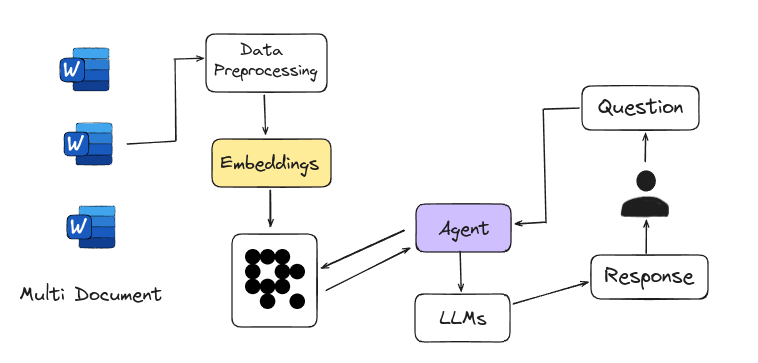
|
||||
<figcaption>Agent-based RAG</figcaption>
|
||||
</figure>
|
||||
|
||||
[](https://colab.research.google.com/github/lancedb/vectordb-recipes/blob/main/tutorials/Agentic_RAG/main.ipynb)
|
||||
|
||||
Here’s a code snippet for defining retriever using Langchain
|
||||
|
||||
```python
|
||||
from langchain.text_splitter import RecursiveCharacterTextSplitter
|
||||
from langchain_community.document_loaders import WebBaseLoader
|
||||
from langchain_community.vectorstores import LanceDB
|
||||
from langchain_openai import OpenAIEmbeddings
|
||||
|
||||
urls = [
|
||||
"https://content.dgft.gov.in/Website/CIEP.pdf",
|
||||
"https://content.dgft.gov.in/Website/GAE.pdf",
|
||||
"https://content.dgft.gov.in/Website/HTE.pdf",
|
||||
]
|
||||
|
||||
|
||||
docs = [WebBaseLoader(url).load() for url in urls]
|
||||
docs_list = [item for sublist in docs for item in sublist]
|
||||
|
||||
text_splitter = RecursiveCharacterTextSplitter.from_tiktoken_encoder(
|
||||
chunk_size=100, chunk_overlap=50
|
||||
)
|
||||
doc_splits = text_splitter.split_documents(docs_list)
|
||||
|
||||
# add documents in LanceDB
|
||||
vectorstore = LanceDB.from_documents(
|
||||
documents=doc_splits,
|
||||
embedding=OpenAIEmbeddings(),
|
||||
)
|
||||
retriever = vectorstore.as_retriever()
|
||||
|
||||
```
|
||||
|
||||
Agent that formulates an improved query for better retrieval results and then grades the retrieved documents
|
||||
|
||||
```python
|
||||
def grade_documents(state) -> Literal["generate", "rewrite"]:
|
||||
class grade(BaseModel):
|
||||
binary_score: str = Field(description="Relevance score 'yes' or 'no'")
|
||||
|
||||
model = ChatOpenAI(temperature=0, model="gpt-4-0125-preview", streaming=True)
|
||||
llm_with_tool = model.with_structured_output(grade)
|
||||
prompt = PromptTemplate(
|
||||
template="""You are a grader assessing relevance of a retrieved document to a user question. \n
|
||||
Here is the retrieved document: \n\n {context} \n\n
|
||||
Here is the user question: {question} \n
|
||||
If the document contains keyword(s) or semantic meaning related to the user question, grade it as relevant. \n
|
||||
Give a binary score 'yes' or 'no' score to indicate whether the document is relevant to the question.""",
|
||||
input_variables=["context", "question"],
|
||||
)
|
||||
chain = prompt | llm_with_tool
|
||||
|
||||
messages = state["messages"]
|
||||
last_message = messages[-1]
|
||||
question = messages[0].content
|
||||
docs = last_message.content
|
||||
|
||||
scored_result = chain.invoke({"question": question, "context": docs})
|
||||
score = scored_result.binary_score
|
||||
|
||||
return "generate" if score == "yes" else "rewrite"
|
||||
|
||||
|
||||
def agent(state):
|
||||
messages = state["messages"]
|
||||
model = ChatOpenAI(temperature=0, streaming=True, model="gpt-4-turbo")
|
||||
model = model.bind_tools(tools)
|
||||
response = model.invoke(messages)
|
||||
return {"messages": [response]}
|
||||
|
||||
|
||||
def rewrite(state):
|
||||
messages = state["messages"]
|
||||
question = messages[0].content
|
||||
msg = [
|
||||
HumanMessage(
|
||||
content=f""" \n
|
||||
Look at the input and try to reason about the underlying semantic intent / meaning. \n
|
||||
Here is the initial question:
|
||||
\n ------- \n
|
||||
{question}
|
||||
\n ------- \n
|
||||
Formulate an improved question: """,
|
||||
)
|
||||
]
|
||||
model = ChatOpenAI(temperature=0, model="gpt-4-0125-preview", streaming=True)
|
||||
response = model.invoke(msg)
|
||||
return {"messages": [response]}
|
||||
```
|
||||
|
||||
[](https://colab.research.google.com/github/lancedb/vectordb-recipes/blob/main/tutorials/Agentic_RAG/main.ipynb)
|
||||
120
docs/src/rag/corrective_rag.md
Normal file
120
docs/src/rag/corrective_rag.md
Normal file
@@ -0,0 +1,120 @@
|
||||
**Corrective RAG ✅**
|
||||
====================================================================
|
||||
|
||||
Corrective-RAG (CRAG) is a strategy for Retrieval-Augmented Generation (RAG) that includes self-reflection and self-grading of retrieved documents. Here’s a simplified breakdown of the steps involved:
|
||||
|
||||
1. **Relevance Check**: If at least one document meets the relevance threshold, the process moves forward to the generation phase.
|
||||
2. **Knowledge Refinement**: Before generating an answer, the process refines the knowledge by dividing the document into smaller segments called "knowledge strips."
|
||||
3. **Grading and Filtering**: Each "knowledge strip" is graded, and irrelevant ones are filtered out.
|
||||
4. **Additional Data Source**: If all documents are below the relevance threshold, or if the system is unsure about their relevance, it will seek additional information by performing a web search to supplement the retrieved data.
|
||||
|
||||
Above steps are mentioned in
|
||||
**[Official Paper](https://arxiv.org/abs/2401.15884)**
|
||||
|
||||
<figure markdown="span">
|
||||

|
||||
<figcaption>Corrective RAG: <a href="https://github.com/HuskyInSalt/CRAG">Source</a>
|
||||
</figcaption>
|
||||
</figure>
|
||||
|
||||
Corrective Retrieval-Augmented Generation (CRAG) is a method that works like a **built-in fact-checker**.
|
||||
|
||||
**[Offical Implementation](https://github.com/HuskyInSalt/CRAG)**
|
||||
|
||||
[](https://colab.research.google.com/github/lancedb/vectordb-recipes/blob/main/tutorials/Corrective-RAG-with_Langgraph/CRAG_with_Langgraph.ipynb)
|
||||
|
||||
Here’s a code snippet for defining a table with the [Embedding API](https://lancedb.github.io/lancedb/embeddings/embedding_functions/), and retrieves the relevant documents.
|
||||
|
||||
```python
|
||||
import pandas as pd
|
||||
import lancedb
|
||||
from lancedb.pydantic import LanceModel, Vector
|
||||
from lancedb.embeddings import get_registry
|
||||
|
||||
db = lancedb.connect("/tmp/db")
|
||||
model = get_registry().get("sentence-transformers").create(name="BAAI/bge-small-en-v1.5", device="cpu")
|
||||
|
||||
class Docs(LanceModel):
|
||||
text: str = model.SourceField()
|
||||
vector: Vector(model.ndims()) = model.VectorField()
|
||||
|
||||
table = db.create_table("docs", schema=Docs)
|
||||
|
||||
# considering chunks are in list format
|
||||
df = pd.DataFrame({'text':chunks})
|
||||
table.add(data=df)
|
||||
|
||||
# as per document feeded
|
||||
query = "How Transformers work?"
|
||||
actual = table.search(query).limit(1).to_list()[0]
|
||||
print(actual.text)
|
||||
```
|
||||
|
||||
Code snippet for grading retrieved documents, filtering out irrelevant ones, and performing a web search if necessary:
|
||||
|
||||
```python
|
||||
def grade_documents(state):
|
||||
"""
|
||||
Determines whether the retrieved documents are relevant to the question
|
||||
|
||||
Args:
|
||||
state (dict): The current graph state
|
||||
|
||||
Returns:
|
||||
state (dict): Updates documents key with relevant documents
|
||||
"""
|
||||
|
||||
state_dict = state["keys"]
|
||||
question = state_dict["question"]
|
||||
documents = state_dict["documents"]
|
||||
|
||||
class grade(BaseModel):
|
||||
"""
|
||||
Binary score for relevance check
|
||||
"""
|
||||
|
||||
binary_score: str = Field(description="Relevance score 'yes' or 'no'")
|
||||
|
||||
model = ChatOpenAI(temperature=0, model="gpt-4-0125-preview", streaming=True)
|
||||
# grading using openai
|
||||
grade_tool_oai = convert_to_openai_tool(grade)
|
||||
llm_with_tool = model.bind(
|
||||
tools=[convert_to_openai_tool(grade_tool_oai)],
|
||||
tool_choice={"type": "function", "function": {"name": "grade"}},
|
||||
)
|
||||
|
||||
parser_tool = PydanticToolsParser(tools=[grade])
|
||||
prompt = PromptTemplate(
|
||||
template="""You are a grader assessing relevance of a retrieved document to a user question. \n
|
||||
Here is the retrieved document: \n\n {context} \n\n
|
||||
Here is the user question: {question} \n
|
||||
If the document contains keyword(s) or semantic meaning related to the user question, grade it as relevant. \n
|
||||
Give a binary score 'yes' or 'no' score to indicate whether the document is relevant to the question.""",
|
||||
input_variables=["context", "question"],
|
||||
)
|
||||
|
||||
chain = prompt | llm_with_tool | parser_tool
|
||||
|
||||
filtered_docs = []
|
||||
search = "No"
|
||||
for d in documents:
|
||||
score = chain.invoke({"question": question, "context": d.page_content})
|
||||
grade = score[0].binary_score
|
||||
if grade == "yes":
|
||||
filtered_docs.append(d)
|
||||
else:
|
||||
search = "Yes"
|
||||
continue
|
||||
|
||||
return {
|
||||
"keys": {
|
||||
"documents": filtered_docs,
|
||||
"question": question,
|
||||
"run_web_search": search,
|
||||
}
|
||||
}
|
||||
```
|
||||
|
||||
Check Colab for the Implementation of CRAG with Langgraph
|
||||
|
||||
[](https://colab.research.google.com/github/lancedb/vectordb-recipes/blob/main/tutorials/Corrective-RAG-with_Langgraph/CRAG_with_Langgraph.ipynb)
|
||||
54
docs/src/rag/graph_rag.md
Normal file
54
docs/src/rag/graph_rag.md
Normal file
@@ -0,0 +1,54 @@
|
||||
**Graph RAG 📊**
|
||||
====================================================================
|
||||
Graph RAG uses knowledge graphs together with large language models (LLMs) to improve how information is retrieved and generated. It overcomes the limits of traditional search methods by using knowledge graphs, which organize data as connected entities and relationships.
|
||||
|
||||
One of the main benefits of Graph RAG is its ability to capture and represent complex relationships between entities, something that traditional text-based retrieval systems struggle with. By using this structured knowledge, LLMs can better grasp the context and details of a query, resulting in more accurate and insightful answers.
|
||||
|
||||
**[Official Paper](https://arxiv.org/pdf/2404.16130)**
|
||||
|
||||
**[Offical Implementation](https://github.com/microsoft/graphrag)**
|
||||
|
||||
[Microsoft Research Blog](https://www.microsoft.com/en-us/research/blog/graphrag-unlocking-llm-discovery-on-narrative-private-data/)
|
||||
|
||||
!!! note "Default VectorDB"
|
||||
|
||||
Graph RAG uses LanceDB as the default vector database for performing vector search to retrieve relevant entities.
|
||||
|
||||
Working with Graph RAG is quite straightforward
|
||||
|
||||
- **Installation and API KEY as env variable**
|
||||
|
||||
Set `OPENAI_API_KEY` as `GRAPHRAG_API_KEY`
|
||||
|
||||
```bash
|
||||
pip install graphrag
|
||||
export GRAPHRAG_API_KEY="sk-..."
|
||||
```
|
||||
|
||||
- **Initial structure for indexing dataset**
|
||||
|
||||
```bash
|
||||
python3 -m graphrag.index --init --root dataset-dir
|
||||
```
|
||||
|
||||
- **Index Dataset**
|
||||
|
||||
```bash
|
||||
python3 -m graphrag.index --root dataset-dir
|
||||
```
|
||||
|
||||
- **Execute Query**
|
||||
|
||||
Global Query Execution gives a broad overview of dataset
|
||||
|
||||
```bash
|
||||
python3 -m graphrag.query --root dataset-dir --method global "query-question"
|
||||
```
|
||||
|
||||
Local Query Execution gives a detailed and specific answers based on the context of the entities
|
||||
|
||||
```bash
|
||||
python3 -m graphrag.query --root dataset-dir --method local "query-question"
|
||||
```
|
||||
|
||||
[](https://colab.research.google.com/github/lancedb/vectordb-recipes/blob/main/examples/Graphrag/main.ipynb)
|
||||
49
docs/src/rag/multi_head_rag.md
Normal file
49
docs/src/rag/multi_head_rag.md
Normal file
@@ -0,0 +1,49 @@
|
||||
**Multi-Head RAG 📃**
|
||||
====================================================================
|
||||
|
||||
Multi-head RAG (MRAG) is designed to handle queries that need multiple documents with diverse content. These queries are tough because the documents’ embeddings can be far apart, making retrieval difficult. MRAG simplifies this by using the activations from a Transformer's multi-head attention layer, rather than the decoder layer, to fetch these varied documents. Different attention heads capture different aspects of the data, so using these activations helps create embeddings that better represent various data facets and improves retrieval accuracy for complex queries.
|
||||
|
||||
**[Official Paper](https://arxiv.org/pdf/2406.05085)**
|
||||
|
||||
<figure markdown="span">
|
||||

|
||||
<figcaption>Multi-Head RAG: <a href="https://github.com/spcl/MRAG">Source</a>
|
||||
</figcaption>
|
||||
</figure>
|
||||
|
||||
MRAG is cost-effective and energy-efficient because it avoids extra LLM queries, multiple model instances, increased storage, and additional inference passes.
|
||||
|
||||
**[Official Implementation](https://github.com/spcl/MRAG)**
|
||||
|
||||
Here’s a code snippet for defining different embedding spaces with the [Embedding API](https://lancedb.github.io/lancedb/embeddings/embedding_functions/)
|
||||
|
||||
```python
|
||||
import lancedb
|
||||
from lancedb.pydantic import LanceModel, Vector
|
||||
from lancedb.embeddings import get_registry
|
||||
|
||||
# model definition using LanceDB Embedding API
|
||||
model1 = get_registry().get("openai").create()
|
||||
model2 = get_registry().get("ollama").create(name="llama3")
|
||||
model3 = get_registry().get("ollama").create(name="mistral")
|
||||
|
||||
|
||||
# define schema for creating embedding spaces with Embedding API
|
||||
class Space1(LanceModel):
|
||||
text: str = model1.SourceField()
|
||||
vector: Vector(model1.ndims()) = model1.VectorField()
|
||||
|
||||
|
||||
class Space2(LanceModel):
|
||||
text: str = model2.SourceField()
|
||||
vector: Vector(model2.ndims()) = model2.VectorField()
|
||||
|
||||
|
||||
class Space3(LanceModel):
|
||||
text: str = model3.SourceField()
|
||||
vector: Vector(model3.ndims()) = model3.VectorField()
|
||||
```
|
||||
|
||||
Create different tables using defined embedding spaces, then make queries to each embedding space. Use the resulted closest documents from each embedding space to generate answers.
|
||||
|
||||
|
||||
96
docs/src/rag/self_rag.md
Normal file
96
docs/src/rag/self_rag.md
Normal file
@@ -0,0 +1,96 @@
|
||||
**Self RAG 🤳**
|
||||
====================================================================
|
||||
Self-RAG is a strategy for Retrieval-Augmented Generation (RAG) to get better retrieved information, generated text, and checking their own work, all without losing their flexibility. Unlike the traditional Retrieval-Augmented Generation (RAG) method, Self-RAG retrieves information as needed, can skip retrieval if not needed, and evaluates its own output while generating text. It also uses a process to pick the best output based on different preferences.
|
||||
|
||||
**[Official Paper](https://arxiv.org/pdf/2310.11511)**
|
||||
|
||||
<figure markdown="span">
|
||||

|
||||
<figcaption>Self RAG: <a href="https://github.com/AkariAsai/self-rag">Source</a>
|
||||
</figcaption>
|
||||
</figure>
|
||||
|
||||
**[Offical Implementation](https://github.com/AkariAsai/self-rag)**
|
||||
|
||||
Self-RAG starts by generating a response without retrieving extra info if it's not needed. For questions that need more details, it retrieves to get the necessary information.
|
||||
|
||||
Here’s a code snippet for defining retriever using Langchain
|
||||
|
||||
```python
|
||||
from langchain.text_splitter import RecursiveCharacterTextSplitter
|
||||
from langchain_community.document_loaders import WebBaseLoader
|
||||
from langchain_community.vectorstores import LanceDB
|
||||
from langchain_openai import OpenAIEmbeddings
|
||||
|
||||
urls = [
|
||||
"https://lilianweng.github.io/posts/2023-06-23-agent/",
|
||||
"https://lilianweng.github.io/posts/2023-03-15-prompt-engineering/",
|
||||
"https://lilianweng.github.io/posts/2023-10-25-adv-attack-llm/",
|
||||
]
|
||||
|
||||
|
||||
docs = [WebBaseLoader(url).load() for url in urls]
|
||||
docs_list = [item for sublist in docs for item in sublist]
|
||||
|
||||
text_splitter = RecursiveCharacterTextSplitter.from_tiktoken_encoder(
|
||||
chunk_size=100, chunk_overlap=50
|
||||
)
|
||||
doc_splits = text_splitter.split_documents(docs_list)
|
||||
|
||||
# add documents in LanceDB
|
||||
vectorstore = LanceDB.from_documents(
|
||||
documents=doc_splits,
|
||||
embedding=OpenAIEmbeddings(),
|
||||
)
|
||||
retriever = vectorstore.as_retriever()
|
||||
|
||||
```
|
||||
|
||||
Functions that grades the retrieved documents and if required formulates an improved query for better retrieval results
|
||||
|
||||
```python
|
||||
def grade_documents(state) -> Literal["generate", "rewrite"]:
|
||||
class grade(BaseModel):
|
||||
binary_score: str = Field(description="Relevance score 'yes' or 'no'")
|
||||
|
||||
model = ChatOpenAI(temperature=0, model="gpt-4-0125-preview", streaming=True)
|
||||
llm_with_tool = model.with_structured_output(grade)
|
||||
prompt = PromptTemplate(
|
||||
template="""You are a grader assessing relevance of a retrieved document to a user question. \n
|
||||
Here is the retrieved document: \n\n {context} \n\n
|
||||
Here is the user question: {question} \n
|
||||
If the document contains keyword(s) or semantic meaning related to the user question, grade it as relevant. \n
|
||||
Give a binary score 'yes' or 'no' score to indicate whether the document is relevant to the question.""",
|
||||
input_variables=["context", "question"],
|
||||
)
|
||||
chain = prompt | llm_with_tool
|
||||
|
||||
messages = state["messages"]
|
||||
last_message = messages[-1]
|
||||
question = messages[0].content
|
||||
docs = last_message.content
|
||||
|
||||
scored_result = chain.invoke({"question": question, "context": docs})
|
||||
score = scored_result.binary_score
|
||||
|
||||
return "generate" if score == "yes" else "rewrite"
|
||||
|
||||
|
||||
def rewrite(state):
|
||||
messages = state["messages"]
|
||||
question = messages[0].content
|
||||
msg = [
|
||||
HumanMessage(
|
||||
content=f""" \n
|
||||
Look at the input and try to reason about the underlying semantic intent / meaning. \n
|
||||
Here is the initial question:
|
||||
\n ------- \n
|
||||
{question}
|
||||
\n ------- \n
|
||||
Formulate an improved question: """,
|
||||
)
|
||||
]
|
||||
model = ChatOpenAI(temperature=0, model="gpt-4-0125-preview", streaming=True)
|
||||
response = model.invoke(msg)
|
||||
return {"messages": [response]}
|
||||
```
|
||||
17
docs/src/rag/sfr_rag.md
Normal file
17
docs/src/rag/sfr_rag.md
Normal file
@@ -0,0 +1,17 @@
|
||||
**SFR RAG 📑**
|
||||
====================================================================
|
||||
Salesforce AI Research introduces SFR-RAG, a 9-billion-parameter language model trained with a significant emphasis on reliable, precise, and faithful contextual generation abilities specific to real-world RAG use cases and relevant agentic tasks. They include precise factual knowledge extraction, distinguishing relevant against distracting contexts, citing appropriate sources along with answers, producing complex and multi-hop reasoning over multiple contexts, consistent format following, as well as refraining from hallucination over unanswerable queries.
|
||||
|
||||
**[Offical Implementation](https://github.com/SalesforceAIResearch/SFR-RAG)**
|
||||
|
||||
<figure markdown="span">
|
||||

|
||||
<figcaption>Average Scores in ContextualBench: <a href="https://blog.salesforceairesearch.com/sfr-rag/">Source</a>
|
||||
</figcaption>
|
||||
</figure>
|
||||
|
||||
To reliably evaluate LLMs in contextual question-answering for RAG, Saleforce introduced [ContextualBench](https://huggingface.co/datasets/Salesforce/ContextualBench?ref=blog.salesforceairesearch.com), featuring 7 benchmarks like [HotpotQA](https://arxiv.org/abs/1809.09600?ref=blog.salesforceairesearch.com) and [2WikiHopQA](https://www.aclweb.org/anthology/2020.coling-main.580/?ref=blog.salesforceairesearch.com) with consistent setups.
|
||||
|
||||
SFR-RAG outperforms GPT-4o, achieving state-of-the-art results in 3 out of 7 benchmarks, and significantly surpasses Command-R+ while using 10 times fewer parameters. It also excels at handling context, even when facts are altered or conflicting.
|
||||
|
||||
[Saleforce AI Research Blog](https://blog.salesforceairesearch.com/sfr-rag/)
|
||||
54
docs/src/rag/vanilla_rag.md
Normal file
54
docs/src/rag/vanilla_rag.md
Normal file
@@ -0,0 +1,54 @@
|
||||
**Vanilla RAG 🌱**
|
||||
====================================================================
|
||||
|
||||
RAG(Retrieval-Augmented Generation) works by finding documents related to the user's question, combining them with a prompt for a large language model (LLM), and then using the LLM to create more accurate and relevant answers.
|
||||
|
||||
Here’s a simple guide to building a RAG pipeline from scratch:
|
||||
|
||||
1. **Data Loading**: Gather and load the documents you want to use for answering questions.
|
||||
|
||||
2. **Chunking and Embedding**: Split the documents into smaller chunks and convert them into numerical vectors (embeddings) that capture their meaning.
|
||||
|
||||
3. **Vector Store**: Create a LanceDB table to store and manage these vectors for quick access during retrieval.
|
||||
|
||||
4. **Retrieval & Prompt Preparation**: When a question is asked, find the most relevant document chunks from the table and prepare a prompt combining these chunks with the question.
|
||||
|
||||
5. **Answer Generation**: Send the prepared prompt to a LLM to generate a detailed and accurate answer.
|
||||
|
||||
<figure markdown="span">
|
||||

|
||||
<figcaption>Vanilla RAG
|
||||
</figcaption>
|
||||
</figure>
|
||||
|
||||
[](https://colab.research.google.com/github/lancedb/vectordb-recipes/blob/main/tutorials/RAG-from-Scratch/RAG_from_Scratch.ipynb)
|
||||
|
||||
Here’s a code snippet for defining a table with the [Embedding API](https://lancedb.github.io/lancedb/embeddings/embedding_functions/), which simplifies the process by handling embedding extraction and querying in one step.
|
||||
|
||||
```python
|
||||
import pandas as pd
|
||||
import lancedb
|
||||
from lancedb.pydantic import LanceModel, Vector
|
||||
from lancedb.embeddings import get_registry
|
||||
|
||||
db = lancedb.connect("/tmp/db")
|
||||
model = get_registry().get("sentence-transformers").create(name="BAAI/bge-small-en-v1.5", device="cpu")
|
||||
|
||||
class Docs(LanceModel):
|
||||
text: str = model.SourceField()
|
||||
vector: Vector(model.ndims()) = model.VectorField()
|
||||
|
||||
table = db.create_table("docs", schema=Docs)
|
||||
|
||||
# considering chunks are in list format
|
||||
df = pd.DataFrame({'text':chunks})
|
||||
table.add(data=df)
|
||||
|
||||
query = "What is issue date of lease?"
|
||||
actual = table.search(query).limit(1).to_list()[0]
|
||||
print(actual.text)
|
||||
```
|
||||
|
||||
Check Colab for the complete code
|
||||
|
||||
[](https://colab.research.google.com/github/lancedb/vectordb-recipes/blob/main/tutorials/RAG-from-Scratch/RAG_from_Scratch.ipynb)
|
||||
@@ -6,6 +6,9 @@ This re-ranker uses the [Cohere](https://cohere.ai/) API to rerank the search re
|
||||
!!! note
|
||||
Supported Query Types: Hybrid, Vector, FTS
|
||||
|
||||
```shell
|
||||
pip install cohere
|
||||
```
|
||||
|
||||
```python
|
||||
import numpy
|
||||
|
||||
@@ -9,6 +9,7 @@ LanceDB comes with some built-in rerankers. Some of the rerankers that are avail
|
||||
| `CrossEncoderReranker` | Uses a cross-encoder model to rerank search results | Vector, FTS, Hybrid |
|
||||
| `ColbertReranker` | Uses a colbert model to rerank search results | Vector, FTS, Hybrid |
|
||||
| `OpenaiReranker`(Experimental) | Uses OpenAI's chat model to rerank search results | Vector, FTS, Hybrid |
|
||||
| `VoyageAIReranker` | Uses voyageai Reranker API to rerank results | Vector, FTS, Hybrid |
|
||||
|
||||
|
||||
## Using a Reranker
|
||||
@@ -73,6 +74,7 @@ LanceDB comes with some built-in rerankers. Here are some of the rerankers that
|
||||
- [Jina Reranker](./jina.md)
|
||||
- [AnswerDotAI Rerankers](./answerdotai.md)
|
||||
- [Reciprocal Rank Fusion Reranker](./rrf.md)
|
||||
- [VoyageAI Reranker](./voyageai.md)
|
||||
|
||||
## Creating Custom Rerankers
|
||||
|
||||
|
||||
@@ -1,6 +1,9 @@
|
||||
# Linear Combination Reranker
|
||||
|
||||
This is the default re-ranker used by LanceDB hybrid search. It combines the results of semantic and full-text search using a linear combination of the scores. The weights for the linear combination can be specified. It defaults to 0.7, i.e, 70% weight for semantic search and 30% weight for full-text search.
|
||||
!!! note
|
||||
This is depricated. It is recommended to use the `RRFReranker` instead, if you want to use a score based reranker.
|
||||
|
||||
It combines the results of semantic and full-text search using a linear combination of the scores. The weights for the linear combination can be specified. It defaults to 0.7, i.e, 70% weight for semantic search and 30% weight for full-text search.
|
||||
|
||||
!!! note
|
||||
Supported Query Types: Hybrid
|
||||
|
||||
@@ -1,6 +1,6 @@
|
||||
# Reciprocal Rank Fusion Reranker
|
||||
|
||||
Reciprocal Rank Fusion (RRF) is an algorithm that evaluates the search scores by leveraging the positions/rank of the documents. The implementation follows this [paper](https://plg.uwaterloo.ca/~gvcormac/cormacksigir09-rrf.pdf).
|
||||
This is the default re-ranker used by LanceDB hybrid search. Reciprocal Rank Fusion (RRF) is an algorithm that evaluates the search scores by leveraging the positions/rank of the documents. The implementation follows this [paper](https://plg.uwaterloo.ca/~gvcormac/cormacksigir09-rrf.pdf).
|
||||
|
||||
|
||||
!!! note
|
||||
|
||||
77
docs/src/reranking/voyageai.md
Normal file
77
docs/src/reranking/voyageai.md
Normal file
@@ -0,0 +1,77 @@
|
||||
# Voyage AI Reranker
|
||||
|
||||
Voyage AI provides cutting-edge embedding and rerankers.
|
||||
|
||||
This re-ranker uses the [VoyageAI](https://docs.voyageai.com/docs/) API to rerank the search results. You can use this re-ranker by passing `VoyageAIReranker()` to the `rerank()` method. Note that you'll either need to set the `VOYAGE_API_KEY` environment variable or pass the `api_key` argument to use this re-ranker.
|
||||
|
||||
|
||||
!!! note
|
||||
Supported Query Types: Hybrid, Vector, FTS
|
||||
|
||||
|
||||
```python
|
||||
import numpy
|
||||
import lancedb
|
||||
from lancedb.embeddings import get_registry
|
||||
from lancedb.pydantic import LanceModel, Vector
|
||||
from lancedb.rerankers import VoyageAIReranker
|
||||
|
||||
embedder = get_registry().get("sentence-transformers").create()
|
||||
db = lancedb.connect("~/.lancedb")
|
||||
|
||||
class Schema(LanceModel):
|
||||
text: str = embedder.SourceField()
|
||||
vector: Vector(embedder.ndims()) = embedder.VectorField()
|
||||
|
||||
data = [
|
||||
{"text": "hello world"},
|
||||
{"text": "goodbye world"}
|
||||
]
|
||||
tbl = db.create_table("test", schema=Schema, mode="overwrite")
|
||||
tbl.add(data)
|
||||
reranker = VoyageAIReranker(model_name="rerank-2")
|
||||
|
||||
# Run vector search with a reranker
|
||||
result = tbl.search("hello").rerank(reranker=reranker).to_list()
|
||||
|
||||
# Run FTS search with a reranker
|
||||
result = tbl.search("hello", query_type="fts").rerank(reranker=reranker).to_list()
|
||||
|
||||
# Run hybrid search with a reranker
|
||||
tbl.create_fts_index("text", replace=True)
|
||||
result = tbl.search("hello", query_type="hybrid").rerank(reranker=reranker).to_list()
|
||||
|
||||
```
|
||||
|
||||
Accepted Arguments
|
||||
----------------
|
||||
| Argument | Type | Default | Description |
|
||||
| --- | --- | --- | --- |
|
||||
| `model_name` | `str` | `None` | The name of the reranker model to use. Available models are: rerank-2, rerank-2-lite |
|
||||
| `column` | `str` | `"text"` | The name of the column to use as input to the cross encoder model. |
|
||||
| `top_n` | `str` | `None` | The number of results to return. If None, will return all results. |
|
||||
| `api_key` | `str` | `None` | The API key for the Voyage AI API. If not provided, the `VOYAGE_API_KEY` environment variable is used. |
|
||||
| `return_score` | str | `"relevance"` | Options are "relevance" or "all". The type of score to return. If "relevance", will return only the `_relevance_score. If "all" is supported, will return relevance score along with the vector and/or fts scores depending on query type |
|
||||
| `truncation` | `bool` | `None` | Whether to truncate the input to satisfy the "context length limit" on the query and the documents. |
|
||||
|
||||
|
||||
## Supported Scores for each query type
|
||||
You can specify the type of scores you want the reranker to return. The following are the supported scores for each query type:
|
||||
|
||||
### Hybrid Search
|
||||
|`return_score`| Status | Description |
|
||||
| --- | --- | --- |
|
||||
| `relevance` | ✅ Supported | Returns only have the `_relevance_score` column |
|
||||
| `all` | ❌ Not Supported | Returns have vector(`_distance`) and FTS(`score`) along with Hybrid Search score(`_relevance_score`) |
|
||||
|
||||
### Vector Search
|
||||
|`return_score`| Status | Description |
|
||||
| --- | --- | --- |
|
||||
| `relevance` | ✅ Supported | Returns only have the `_relevance_score` column |
|
||||
| `all` | ✅ Supported | Returns have vector(`_distance`) along with Hybrid Search score(`_relevance_score`) |
|
||||
|
||||
### FTS Search
|
||||
|`return_score`| Status | Description |
|
||||
| --- | --- | --- |
|
||||
| `relevance` | ✅ Supported | Returns only have the `_relevance_score` column |
|
||||
| `all` | ✅ Supported | Returns have FTS(`score`) along with Hybrid Search score(`_relevance_score`) |
|
||||
@@ -58,9 +58,9 @@ db.create_table("my_vectors", data=data)
|
||||
=== "@lancedb/lancedb"
|
||||
|
||||
```ts
|
||||
--8<-- "nodejs/examples/search.ts:import"
|
||||
--8<-- "nodejs/examples/search.test.ts:import"
|
||||
|
||||
--8<-- "nodejs/examples/search.ts:search1"
|
||||
--8<-- "nodejs/examples/search.test.ts:search1"
|
||||
```
|
||||
|
||||
|
||||
@@ -89,7 +89,7 @@ By default, `l2` will be used as metric type. You can specify the metric type as
|
||||
=== "@lancedb/lancedb"
|
||||
|
||||
```ts
|
||||
--8<-- "nodejs/examples/search.ts:search2"
|
||||
--8<-- "nodejs/examples/search.test.ts:search2"
|
||||
```
|
||||
|
||||
=== "vectordb (deprecated)"
|
||||
|
||||
@@ -7,6 +7,10 @@ performed on the top-k results returned by the vector search. However, pre-filte
|
||||
option that performs the filter prior to vector search. This can be useful to narrow down on
|
||||
the search space on a very large dataset to reduce query latency.
|
||||
|
||||
Note that both pre-filtering and post-filtering can yield false positives. For pre-filtering, if the filter is too selective, it might eliminate relevant items that the vector search would have otherwise identified as a good match. In this case, increasing `nprobes` parameter will help reduce such false positives. It is recommended to set `use_index=false` if you know that the filter is highly selective.
|
||||
|
||||
Similarly, a highly selective post-filter can lead to false positives. Increasing both `nprobes` and `refine_factor` can mitigate this issue. When deciding between pre-filtering and post-filtering, pre-filtering is generally the safer choice if you're uncertain.
|
||||
|
||||
<!-- Setup Code
|
||||
```python
|
||||
import lancedb
|
||||
@@ -49,7 +53,7 @@ const tbl = await db.createTable('myVectors', data)
|
||||
=== "@lancedb/lancedb"
|
||||
|
||||
```ts
|
||||
--8<-- "nodejs/examples/filtering.ts:search"
|
||||
--8<-- "nodejs/examples/filtering.test.ts:search"
|
||||
```
|
||||
|
||||
=== "vectordb (deprecated)"
|
||||
@@ -57,6 +61,9 @@ const tbl = await db.createTable('myVectors', data)
|
||||
```ts
|
||||
--8<-- "docs/src/sql_legacy.ts:search"
|
||||
```
|
||||
!!! note
|
||||
|
||||
Creating a [scalar index](guides/scalar_index.md) accelerates filtering
|
||||
|
||||
## SQL filters
|
||||
|
||||
@@ -91,7 +98,7 @@ For example, the following filter string is acceptable:
|
||||
=== "@lancedb/lancedb"
|
||||
|
||||
```ts
|
||||
--8<-- "nodejs/examples/filtering.ts:vec_search"
|
||||
--8<-- "nodejs/examples/filtering.test.ts:vec_search"
|
||||
```
|
||||
|
||||
=== "vectordb (deprecated)"
|
||||
@@ -169,7 +176,7 @@ You can also filter your data without search.
|
||||
=== "@lancedb/lancedb"
|
||||
|
||||
```ts
|
||||
--8<-- "nodejs/examples/filtering.ts:sql_search"
|
||||
--8<-- "nodejs/examples/filtering.test.ts:sql_search"
|
||||
```
|
||||
|
||||
=== "vectordb (deprecated)"
|
||||
|
||||
@@ -39,4 +39,46 @@
|
||||
height: 1.2rem;
|
||||
margin-top: -.1rem;
|
||||
}
|
||||
}
|
||||
}
|
||||
|
||||
/* remove pilcrow as permanent link and add chain icon similar to github https://github.com/squidfunk/mkdocs-material/discussions/3535 */
|
||||
|
||||
.headerlink {
|
||||
--permalink-size: 16px; /* for font-relative sizes, 0.6em is a good choice */
|
||||
--permalink-spacing: 4px;
|
||||
|
||||
width: calc(var(--permalink-size) + var(--permalink-spacing));
|
||||
height: var(--permalink-size);
|
||||
vertical-align: middle;
|
||||
background-color: var(--md-default-fg-color--lighter);
|
||||
background-size: var(--permalink-size);
|
||||
mask-size: var(--permalink-size);
|
||||
-webkit-mask-size: var(--permalink-size);
|
||||
mask-repeat: no-repeat;
|
||||
-webkit-mask-repeat: no-repeat;
|
||||
visibility: visible;
|
||||
mask-image: url('data:image/svg+xml;utf8,<svg xmlns="http://www.w3.org/2000/svg" version="1.1" width="16" height="16" aria-hidden="true"><path fill-rule="evenodd" d="M7.775 3.275a.75.75 0 001.06 1.06l1.25-1.25a2 2 0 112.83 2.83l-2.5 2.5a2 2 0 01-2.83 0 .75.75 0 00-1.06 1.06 3.5 3.5 0 004.95 0l2.5-2.5a3.5 3.5 0 00-4.95-4.95l-1.25 1.25zm-4.69 9.64a2 2 0 010-2.83l2.5-2.5a2 2 0 012.83 0 .75.75 0 001.06-1.06 3.5 3.5 0 00-4.95 0l-2.5 2.5a3.5 3.5 0 004.95 4.95l1.25-1.25a.75.75 0 00-1.06-1.06l-1.25 1.25a2 2 0 01-2.83 0z"></path></svg>');
|
||||
-webkit-mask-image: url('data:image/svg+xml;utf8,<svg xmlns="http://www.w3.org/2000/svg" version="1.1" width="16" height="16" aria-hidden="true"><path fill-rule="evenodd" d="M7.775 3.275a.75.75 0 001.06 1.06l1.25-1.25a2 2 0 112.83 2.83l-2.5 2.5a2 2 0 01-2.83 0 .75.75 0 00-1.06 1.06 3.5 3.5 0 004.95 0l2.5-2.5a3.5 3.5 0 00-4.95-4.95l-1.25 1.25zm-4.69 9.64a2 2 0 010-2.83l2.5-2.5a2 2 0 012.83 0 .75.75 0 001.06-1.06 3.5 3.5 0 00-4.95 0l-2.5 2.5a3.5 3.5 0 004.95 4.95l1.25-1.25a.75.75 0 00-1.06-1.06l-1.25 1.25a2 2 0 01-2.83 0z"></path></svg>');
|
||||
}
|
||||
|
||||
[id]:target .headerlink {
|
||||
background-color: var(--md-typeset-a-color);
|
||||
}
|
||||
|
||||
.headerlink:hover {
|
||||
background-color: var(--md-accent-fg-color) !important;
|
||||
}
|
||||
|
||||
@media screen and (min-width: 76.25em) {
|
||||
h1, h2, h3, h4, h5, h6 {
|
||||
display: flex;
|
||||
align-items: center;
|
||||
flex-direction: row;
|
||||
column-gap: 0.2em; /* fixes spaces in titles */
|
||||
}
|
||||
|
||||
.headerlink {
|
||||
order: -1;
|
||||
margin-left: calc(var(--permalink-size) * -1 - var(--permalink-spacing)) !important;
|
||||
}
|
||||
}
|
||||
|
||||
33
docs/src/troubleshooting.md
Normal file
33
docs/src/troubleshooting.md
Normal file
@@ -0,0 +1,33 @@
|
||||
## Getting help
|
||||
|
||||
The following sections provide various diagnostics and troubleshooting tips for LanceDB.
|
||||
These can help you provide additional information when asking questions or making
|
||||
error reports.
|
||||
|
||||
For trouble shooting, the best place to ask is in our Discord, under the relevant
|
||||
language channel. By asking in the language-specific channel, it makes it more
|
||||
likely that someone who knows the answer will see your question.
|
||||
|
||||
## Enabling logging
|
||||
|
||||
To provide more information, especially for LanceDB Cloud related issues, enable
|
||||
debug logging. You can set the `LANCEDB_LOG` environment variable:
|
||||
|
||||
```shell
|
||||
export LANCEDB_LOG=debug
|
||||
```
|
||||
|
||||
You can turn off colors and formatting in the logs by setting
|
||||
|
||||
```shell
|
||||
export LANCEDB_LOG_STYLE=never
|
||||
```
|
||||
|
||||
## Explaining query plans
|
||||
|
||||
If you have slow queries or unexpected query results, it can be helpful to
|
||||
print the resolved query plan. You can use the `explain_plan` method to do this:
|
||||
|
||||
* Python Sync: [LanceQueryBuilder.explain_plan][lancedb.query.LanceQueryBuilder.explain_plan]
|
||||
* Python Async: [AsyncQueryBase.explain_plan][lancedb.query.AsyncQueryBase.explain_plan]
|
||||
* Node @lancedb/lancedb: [LanceQueryBuilder.explainPlan](/lancedb/js/classes/QueryBase/#explainplan)
|
||||
@@ -20,7 +20,11 @@ excluded_globs = [
|
||||
"../src/reranking/*.md",
|
||||
"../src/guides/tuning_retrievers/*.md",
|
||||
"../src/embeddings/available_embedding_models/text_embedding_functions/*.md",
|
||||
"../src/embeddings/available_embedding_models/multimodal_embedding_functions/*.md"
|
||||
"../src/embeddings/available_embedding_models/multimodal_embedding_functions/*.md",
|
||||
"../src/rag/*.md",
|
||||
"../src/rag/advanced_techniques/*.md"
|
||||
|
||||
|
||||
]
|
||||
|
||||
python_prefix = "py"
|
||||
|
||||
@@ -3,7 +3,7 @@ numpy
|
||||
pandas
|
||||
pylance
|
||||
duckdb
|
||||
tantivy==0.20.1
|
||||
--extra-index-url https://download.pytorch.org/whl/cpu
|
||||
torch
|
||||
polars>=0.19, <=1.3.0
|
||||
|
||||
|
||||
@@ -2,7 +2,7 @@
|
||||
name = "lancedb-jni"
|
||||
description = "JNI bindings for LanceDB"
|
||||
# TODO modify lancedb/Cargo.toml for version and dependencies
|
||||
version = "0.4.18"
|
||||
version = "0.10.0"
|
||||
edition.workspace = true
|
||||
repository.workspace = true
|
||||
readme.workspace = true
|
||||
|
||||
Some files were not shown because too many files have changed in this diff Show More
Reference in New Issue
Block a user